Keyboard shortcuts

Scrolling

dorCtrl+d
Scroll down
uorCtrl+u
Scroll up
Ctrl+e
One line down
Ctrl+y
One line up
gtheng
Top of article
G
Bottom of article

Articles

j
Older article
k
Newer article
O
Open original
H
Open hackernews
R
Open reddit

Lists

jor↓
Next item
kor↑
Previous item
gtheng
First item
G
Last item
oorEnter
Open selected item

Go to

gthenforgtheni
Feed
gthen1–9
Open feed entry
gthenb
Browse
gthenp
Preferences

Search and help

⌘+kCtrl+kor/
Global search
?
Show this help
Esc
Close this help

commit-rewriter 0.1

I built this little web app the other day to help edit the commit messages for the Datasette security releases. The initial commits were full of coding agent cruft and references to issue IDs from our private repository, so they weren't fit for publication.

If you want to edit the commit messages for a repository you can run it like this:

uvx commit-rewriter path/to/repo

Omit the path if you are already in the directory for that repo.
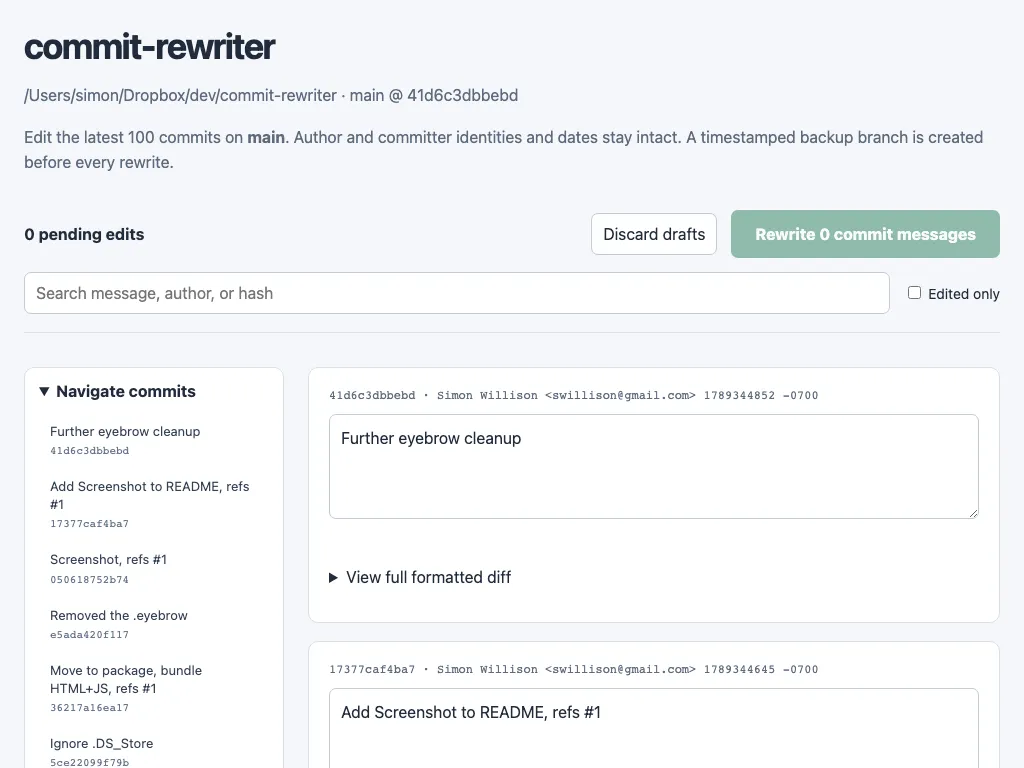
Screenshot of the commit-rewriter web interface. A heading reads commit-rewriter above the repository path and current branch and commit hash, with a short description of the tool. A toolbar shows a pending edits count with Discard drafts and Rewrite commit messages buttons, followed by a search box for message, author, or hash and an Edited only checkbox. A left sidebar titled Navigate commits lists recent commit messages with their short hashes. The main panel shows a card for each commit with its hash, author and timestamp, an editable text area containing the commit message, and a View full formatted diff toggle.

When you submit your edits the tool creates a timestamped branch of your current repo state - to allow you to revert if you need to - and then rewrites every commit from the first one you edited to the most recent.