Keyboard shortcuts

Scrolling

dorCtrl+d
Scroll down
uorCtrl+u
Scroll up
Ctrl+e
One line down
Ctrl+y
One line up
gtheng
Top of article
G
Bottom of article

Articles

j
Older article
k
Newer article
O
Open original
H
Open hackernews
R
Open reddit

Lists

jor↓
Next item
kor↑
Previous item
gtheng
First item
G
Last item
oorEnter
Open selected item

Go to

gthenforgtheni
Feed
gthen1–9
Open feed entry
gthenb
Browse
gthenp
Preferences

Search and help

⌘+kCtrl+kor/
Global search
?
Show this help
Esc
Close this help

Building Managed Agents That Use GitHub Without Exposing Your Token

philschmid.de original

You can run the GitHub CLI (gh) inside a Gemini API Managed Agents without exposing your GitHub Personal Access Token (PAT) to the sandbox.

The Network Configuration egress proxy injects your real token into outbound requests. The agent uses a dummy token locally, so the real token never enters the sandbox.

How it works#

  1. Dummy token: The agent exports GH_TOKEN="dummy" inside the sandbox to satisfy gh's local auth checks.
  2. Interception: The egress proxy intercepts requests to api.github.com or github.com.
  3. Transformation: The proxy replaces the dummy token in the Authorization header with your real token.
  4. Security: The real token remains in the control plane and is never visible inside the sandbox.
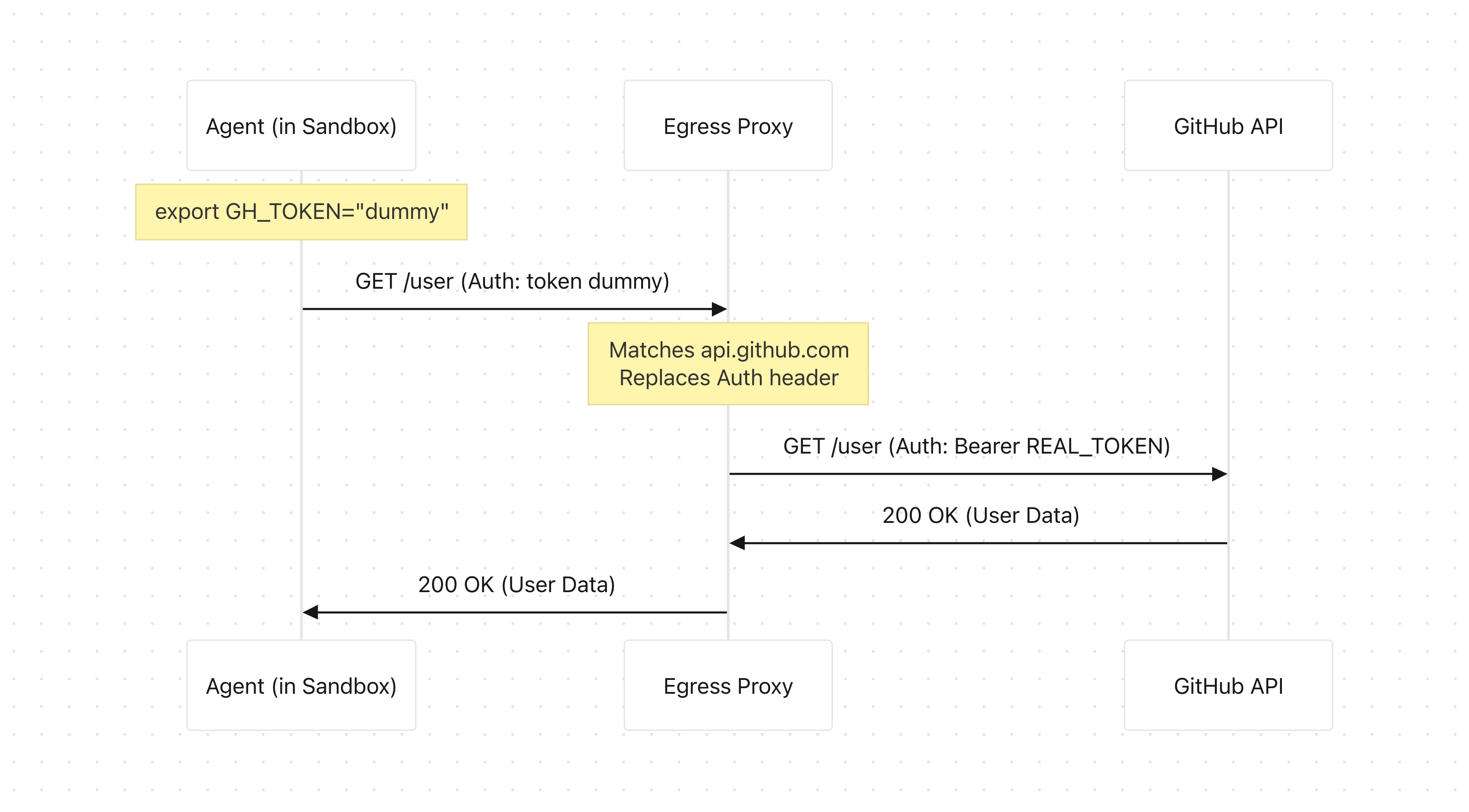
Egress proxy injects GitHub token

Prerequisites#

  • Gemini API Key: Get your key from Google AI Studio.

  • GitHub Personal Access Token (PAT): I recommend a Fine-grained PAT restricted to the specific repositories your agent needs.

    To create one:

    1. Go to GitHub -> Settings -> Developer settings -> Personal access tokens -> Fine-grained tokens or click here.
    2. Click Generate new token.
    3. Under Repository access, select your target repositories.
    4. Under Permissions -> Repository permissions, configure:
      • Contents: Access: Read and write (to clone and push code).
      • Pull requests: Access: Read and write (to open, review, and comment on PRs).
      • Issues: Access: Read and write (to create and comment on issues).
    5. Click Generate token and copy it. It won't be shown again.

Example#

This Python example spins up the agent in an isolated, ephemeral Linux environment, configures the network allowlist with header transformations, and runs gh.

Python

import base64
import os
from google import genai
 
# GitHub PAT from host
GITHUB_PAT = os.environ.get("GITHUB_PAT")
if not GITHUB_PAT:
    raise ValueError("Set GITHUB_PAT environment variable on the host.")
 
# Base64-encode for Git HTTPS auth
git_auth_str = f"x-oauth-basic:{GITHUB_PAT}"
git_auth_base64 = base64.b64encode(git_auth_str.encode("utf-8")).decode("utf-8")
 
client = genai.Client()
 
# Shim: auto-installs gh, injects dummy token, ensures git HTTPS and no prompt
shim_script = """#!/bin/bash
REAL_GH="/workspace/gh_install/bin/gh"
 
if [ ! -f "$REAL_GH" ]; then
    echo "GitHub CLI not found. Installing to /workspace/gh_install..." >&2
    mkdir -p /workspace/gh_install
    curl -sSLo /workspace/gh_install/gh.tar.gz https://github.com/cli/cli/releases/download/v2.40.1/gh_2.40.1_linux_amd64.tar.gz >&2
    tar --no-same-owner -xf /workspace/gh_install/gh.tar.gz -C /workspace/gh_install --strip-components=1 >&2
    rm -f /workspace/gh_install/gh.tar.gz >&2
    echo "GitHub CLI installed." >&2
fi
 
export GH_TOKEN="dummy_token_to_bypass_cli_check"
export GIT_TERMINAL_PROMPT=0
"$REAL_GH" config set git_protocol https >/dev/null 2>&1 || true
exec "$REAL_GH" "$@"
"""
 
agent_prompt = """
Use the GitHub CLI wrapper at `/workspace/bin/gh` to show the logged in user info, and clone the repository 'octocat/Spoon-Knife' to '/workspace/Spoon-Knife'.
"""
 
interaction = client.interactions.create(
    agent="antigravity-preview-05-2026",
    input=agent_prompt,
    environment={
        "type": "remote",
        "sources": [
            {
                "type": "inline",
                "content": shim_script,
                "target": "/workspace/bin/gh"
            }
        ],
        "network": {
            "allowlist": [
                {
                    "domain": "api.github.com", # GitHub API 
                    "transform": [{"Authorization": f"Bearer {GITHUB_PAT}"}]
                },
                {
                    "domain": "github.com", # Git over HTTPS rule
                    "transform": [{"Authorization": f"Basic {git_auth_base64}"}]
                },
                {
                    "domain": "*"
                }
            ]
        }
    }
)
 
print(interaction.output_text)
# Logged in as philschmid; cloned octocat/Spoon-Knife to /workspace/Spoon-Knife

GitHub uses different auth schemes depending on the request. API calls to api.github.com expect a Bearer token, while Git operations against github.com require base64-encoded Basic auth.

The wildcard entry ("domain": "*") lets the sandbox reach everything else, e.g. downloading the gh binary, fetching release assets, etc. You can lock this down to specific domains like objects.githubusercontent.com if you prefer tighter controls.

Persistent "GitHub agent"#

To make the agent autonomous and avoid setup delays, you can create a managed agent that auto-installs the gh CLI. It reuses the environment after the first interaction to keep the installed gh binary across calls.

Python

import base64
import os
from google import genai
 
# GitHub PAT from host
GITHUB_PAT = os.environ.get("GITHUB_PAT", "TOKEN_HERE")
 
git_auth_str = f"x-oauth-basic:{GITHUB_PAT}"
git_auth_base64 = base64.b64encode(git_auth_str.encode("utf-8")).decode("utf-8")
 
client = genai.Client()
 
system_instruction = """
You are a senior code reviewer. You have access to the GitHub CLI via a shim wrapper script at `/workspace/bin/gh`.
First run `chmod +x /workspace/bin/gh` so that the wrapper script is executable. Then always use `/workspace/bin/gh` (or `bash /workspace/bin/gh`) for any GitHub operations.
Do NOT use the standard `gh` command directly, as it will not have the correct authentication token.
"""
 
# Shim: auto-installs gh, injects dummy token, forces HTTPS and disables interactive prompts
shim_script = """#!/bin/bash
REAL_GH="/workspace/gh_install/bin/gh"
 
if [ ! -f "$REAL_GH" ]; then
    echo "GitHub CLI not found. Installing to /workspace/gh_install..." >&2
    mkdir -p /workspace/gh_install
    curl -sSLo /workspace/gh_install/gh.tar.gz https://github.com/cli/cli/releases/download/v2.40.1/gh_2.40.1_linux_amd64.tar.gz >&2
    tar --no-same-owner -xf /workspace/gh_install/gh.tar.gz -C /workspace/gh_install --strip-components=1 >&2
    rm -f /workspace/gh_install/gh.tar.gz >&2
    echo "GitHub CLI installed." >&2
fi
 
export GH_TOKEN="dummy_token_to_bypass_cli_check"
export GIT_TERMINAL_PROMPT=0
"$REAL_GH" config set git_protocol https >/dev/null 2>&1 || true
exec "$REAL_GH" "$@"
"""
 
client.agents.create(
    id="github-reviewer-agent",
    base_agent="antigravity-preview-05-2026",
    base_environment={
        "type": "remote",
        "sources": [
            {
                "type": "inline",
                "content": shim_script,
                "target": "/workspace/bin/gh"
            },
            {
                "type": "inline",
                "content": system_instruction,
                "target": "/AGENTS.md"
            }
        ],
        "network": {
            "allowlist": [
                {
                    "domain": "api.github.com",
                    "transform": [{"Authorization": f"Bearer {GITHUB_PAT}"}]
                },
                {
                    "domain": "github.com",
                    "transform": [{"Authorization": f"Basic {git_auth_base64}"}]
                },
                {"domain": "*"}
            ]
        }
    }
)

The first interaction clones the base environment and triggers gh installation.

Python

interaction_1 = client.interactions.create(
    agent="github-reviewer-agent",
    input="Which GitHub user is logged in?",
    environment="remote",
)
 
print(interaction_1.output_text)
# ... currently logged-in GitHub user is **philschmid**.

For subsequent calls, pass interaction_1.environment_id to reuse the same container, keeping the installed gh binary and inheriting the network transforms. Optionally pass previous_interaction_id=interaction_1.id as well if you want to retain conversation history across turns.

Python

interaction_2 = client.interactions.create(
    agent="github-reviewer-agent",
    input="View the pull request #12 in repository 'octocat/Spoon-Knife' and summarize the changes.",
    environment=interaction_1.environment_id,
    previous_interaction_id=interaction_1.id
)
 
print(interaction_2.output_text)
# Based on the inspection of pull request #12 in the

Conclusion#

You can give Managed Agents access to GitHub without putting secrets in the sandbox. A dummy token satisfies gh locally, and the egress proxy injects the real PAT on the way out.

For more on Managed Agents, environments, and network transforms, see the Managed Agents docs and Network configuration.


Thanks for reading! If you have any questions or feedback, please let me know on Twitter or LinkedIn.