Introducing MCP CLI: A way to call MCP Servers Efficiently
Updated January 2026 for v0.3.0 — New 3-subcommand architecture (
info,grep,call), connection pooling daemon, and tool filtering support.
The Model Context Protocol (MCP) is an open standard for connecting AI agents to external tools, APIs, and data sources. However, as the ecosystem grows with more powerful MCP servers, developers and agent builders are hitting a scaling bottleneck: context window bloat.
mcp-cli is a lightweight CLI that allows dynamic discovery of MCP, reducing token consumption while making tool interactions more efficient for AI coding agents.
Key Features:
- 🪶 Built on Bun,
mcp-clicompiles to a single standalone binary. - 🔌 Works with both stdio (local) and HTTP (remote) MCP servers.
- 🔍 Glob-based search across all servers
mcp-cli grep "*mail*" -d. - 🤖 Designed for AI coding agents (Gemini CLI, Claude Code, etc.).
- ⚡ Connection pooling with lazy-spawn daemon (60s idle timeout).
- 🎛️ Tool filtering via
allowedToolsanddisabledToolsconfig. - � Server instructions support in output.
- �💡 Structured error messages with recovery suggestions.
The Context Problem#
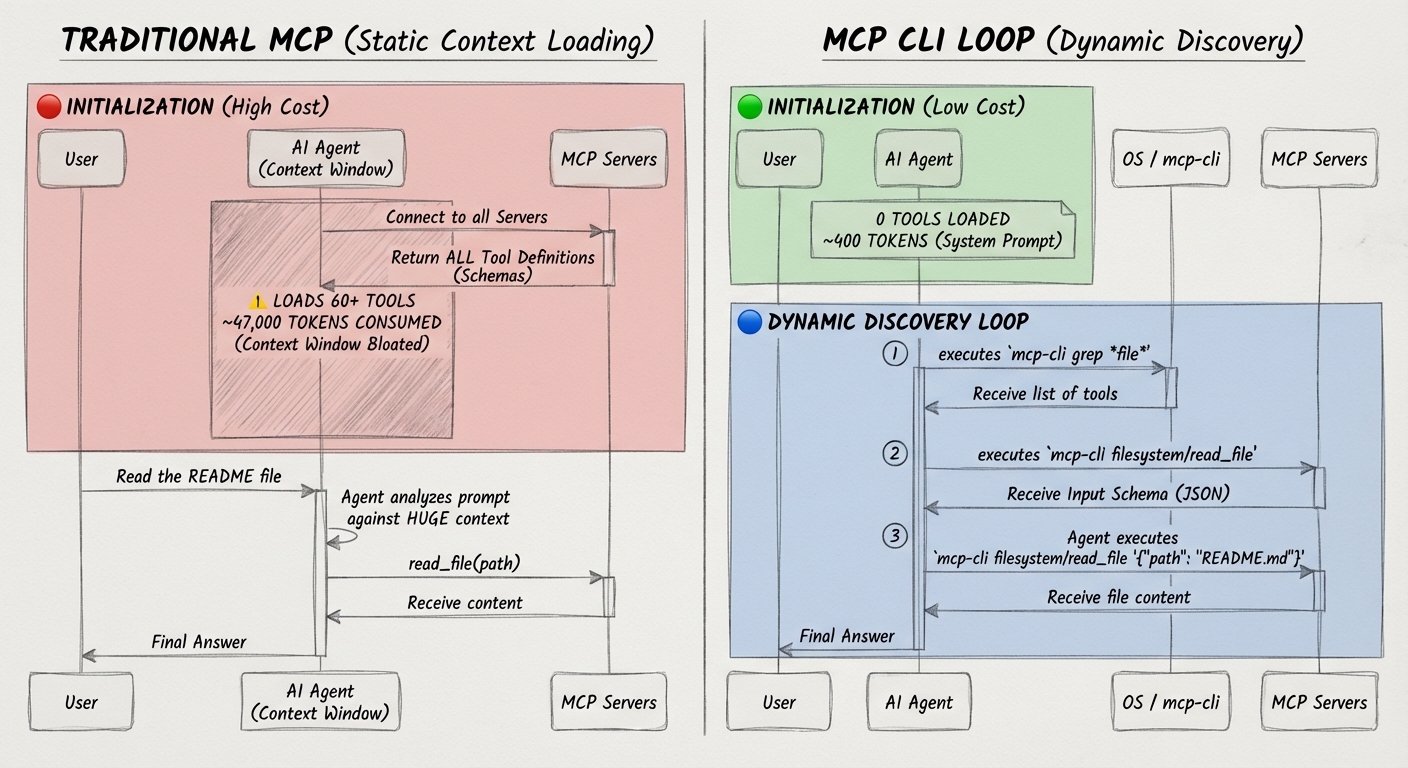
Every MCP server comes with tool definitions schemas describing what each tool does, its parameters, types, and descriptions. Traditional MCP integration loads all of these schemas upfront into the agent's context window.
Here's what that looks like in practice:
| Setup | Tokens Used |
|---|---|
| 6 MCP servers, 60 tools | ~47,000 tokens |
| After dynamic discovery | ~400 tokens |
That is a 99% reduction in MCP-related token usage for this scenario.
When working with multiple MCP servers (GitHub, databases, browser automation—tool), definitions quickly consume a third or more of the effective context. This leads to:
- Reduced effective context length for actual reasoning and code generation.
- More frequent context compactions interrupting flow.
- Hard limits on the number of simultaneous MCP servers you can use.
- Higher API costs due to input token overhead.
Dynamic Context Discovery#
The solution is dynamic context discovery. Instead of loading everything upfront (static context), agents pull in only the information they need, when they need it.
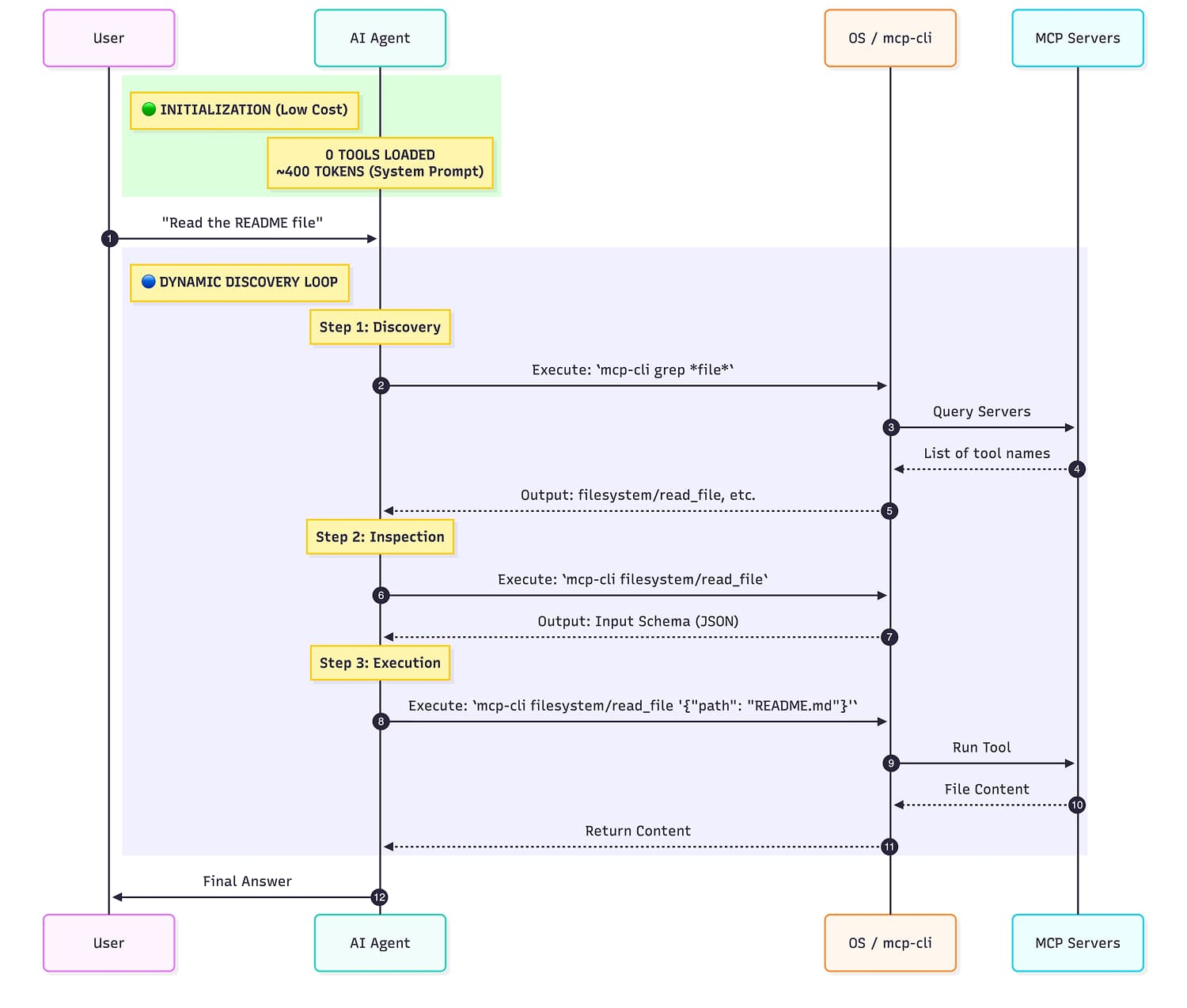
mcp-cli implements this pattern for MCP:
- Step 1: "What servers exist?" →
mcp-cli - Step 2: "What are the params for tool X?" →
mcp-cli info github search_repositories - Step 3: Execute →
mcp-cli call github search_repositories '{"query": "mcp"}'
Most Interactions only use a handful of tools, yet static loading consumes tokens for every tool definition. Dynamic discovery inverts this, you pay only for what you use.
Quick start#
mcp-cli allows dynamic discovery of MCP while making tool interactions more efficient for AI coding agents.
1. Installation#
Bash
# binary install
|
# requires bun install
2. Create a config file#
Create mcp_servers.json in your current directory or ~/.config/mcp/:
JSON
3. Discover available tools#
Bash
# List all servers and tools
# deepwiki
# • read_wiki_structure
# • read_wiki_contents
# • ask_question
#
# filesystem
# • read_file
# • read_text_file
# • read_media_file
# • read_multiple_files
# ...
# With descriptions
# mcp-cli -d
4. Call a tool#
Bash
# View tool schema first
# Tool: read_file
# Server: filesystem
#
# Description:
# Read the complete contents of a file as text.
#
# Input Schema:
# {
# "type": "object",
# "properties": {
# ...
5. Execute the tool#
Bash
# Call the tool
6. Complex commands#
MCP CLI allows the model to generate commands that chain multiple tool calls together.
Bash
# Using a heredoc (no '-' needed with call subcommand)
# From a file
|
# Using jq to build complex JSON
|
# Find all TypeScript files and read the first one
| |
Tool Filtering#
You can restrict which tools are available from a server using allowedTools and disabledTools in your config:
JSON
Rules:
allowedTools: Only tools matching these patterns are available (supports glob:*,?)disabledTools: Tools matching these patterns are excludeddisabledToolstakes precedence overallowedTools- Filtering applies globally to all CLI operations (info, grep, call)
Examples:
Bash
# Only allow read operations
# Allow all except destructive operations
# Combine: allow file operations but disable delete
Connection Pooling#
By default, mcp-cli uses lazy-spawn connection pooling to avoid repeated MCP server startup latency:
- Automatic: No manual start/stop needed
- Per-server: Each MCP server gets its own daemon
- Stale detection: Config changes trigger re-spawn
- 60s idle timeout: Configurable via
MCP_DAEMON_TIMEOUT
Control via environment:
Bash
MCP_NO_DAEMON=1 MCP_DAEMON_TIMEOUT=120 Integrating with AI Agents#
mcp-cli is designed to be used with AI Agents and bash tools. There are two main ways to integrate it:
Option 1: System Instructions Integration#
Add this to your AI agent's system prompt for direct CLI access:
Xml
## MCP Servers
You have access to MCP servers via the `mcp-cli` CLI.
Commands:
```bash
mcp-cli info # List all servers
mcp-cli info # Show server tools
mcp-cli info # Get tool schema
mcp-cli grep "" # Search tools
mcp-cli call # Call tool (stdin auto-detected)
mcp-cli call '{}' # Call with JSON args
```
**Both formats work:** `info ` or `info /`
Workflow:
1. **Discover**: `mcp-cli info` to see available servers
2. **Inspect**: `mcp-cli info ` to get the schema
3. **Execute**: `mcp-cli call '{}'` with arguments
### Examples
```bash
# Call with inline JSON
mcp-cli call github search_repositories '{"query": "mcp server"}'
# Pipe from stdin (no '-' needed)
echo '{"path": "./file"}' | mcp-cli call filesystem read_file
# Heredoc for complex JSON
mcp-cli call server tool <Option 2: Agent Skills#
For AI agents that support Agent Skills an upcoming standard for extending coding agents. mcp-cli ships with a ready-to-use skill definition.
Create mcp-cli/SKILL.md in your agent's skills directory:
Markdown
1. 2.3.4.
- ---Conclusion#
The AI Agent space is moving incredibly fast. mcp-cli tries to solve context tool discovery problem turning it into an iterative, just-in-time process. It allows agents to access a massive ecosystem of shared capabilities without the context bloat of static integration. Whether used within a Skill or as a standalone utility, it ensures your agent spends its tokens on reasoning, not configuration.
The project is open source and designed to fit into existing workflows. Give it a try and contribute at github.com/philschmid/mcp-cli.
Thanks for reading! If you have any questions or feedback, please let me know on Twitter or LinkedIn.