Keyboard shortcuts

Scrolling

dorCtrl+d
Scroll down
uorCtrl+u
Scroll up
Ctrl+e
One line down
Ctrl+y
One line up
gtheng
Top of article
G
Bottom of article

Articles

j
Older article
k
Newer article
O
Open original
H
Open hackernews
R
Open reddit

Lists

jor↓
Next item
kor↑
Previous item
gtheng
First item
G
Last item
oorEnter
Open selected item

Go to

gthenforgtheni
Feed
gthen1–9
Open feed entry
gthenb
Browse
gthenp
Preferences

Search and help

⌘+kCtrl+kor/
Global search
?
Show this help
Esc
Close this help

Qwen3.5-LiveTranslate: From Sound to Sight, From Word to Right
qwen.ai original

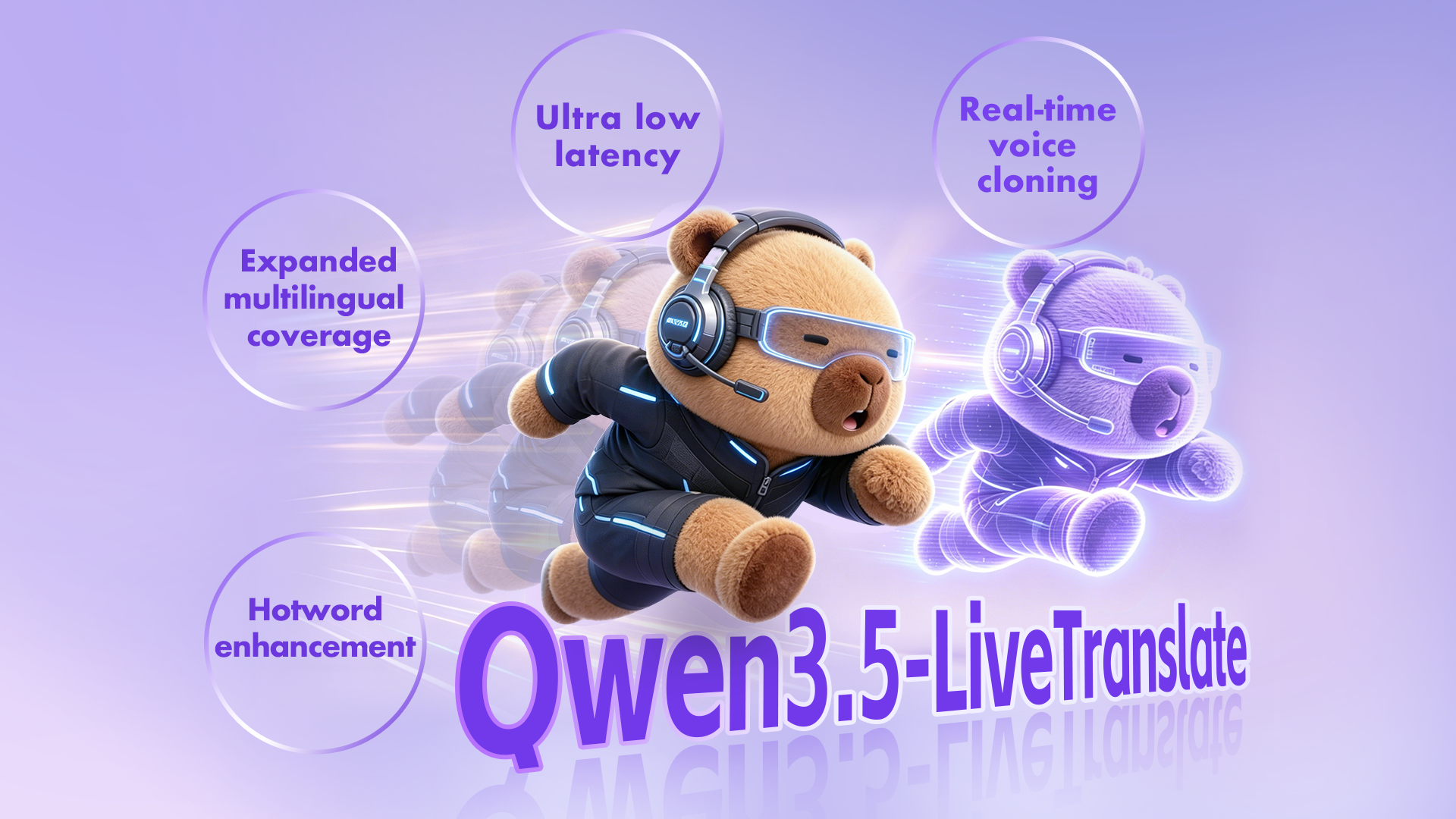
Qwen3.5-LiveTranslate Main Image

DashScope Demo

Qwen3.5-LiveTranslate-Flash is the latest simultaneous interpretation model in the Qwen family, built on top of Qwen3.5-Omni. It delivers real-time, multimodal translation that not only hears and translates speech, but also sees and understands visual context to produce more accurate translations. Compared with its predecessor Qwen3-LiveTranslate, Qwen3.5-LiveTranslate-Flash brings major upgrades across language coverage, latency, voice cloning, and terminology handling, making it well-suited for international meetings, livestream localization, online classrooms, and business negotiations.

Key Highlights#

  • Massively expanded language coverage: understands 18 → 60 languages, speaks 10 → 29 languages. The language support of input audio and output text has grown from 18 to 60, and output audio language support from 10 to 29, covering far more cross-lingual combinations to meet multilingual interpretation needs in international meetings, livestream localization, online classrooms, and business negotiations.

  • Ultra-low latency: powered by Readable Unit technology, faster text and speech output. A novel Readable Unit real-time translation technique achieves more aggressive streaming output while preserving translation readability and semantic consistency. Average speech-to-speech per-token latency is reduced to to 2.8 seconds, ideal for latency-sensitive scenarios such as livestreams, co-hosting, and press conferences.

  • Real-time voice cloning: one sentence to start, instantly “interpret in your voice”. During simultaneous interpretation, the system automatically replicates the speaker’s vocal characteristics, keeping the translated speech sounding like “the same person” across languages, enhancing immersion and identity consistency, especially critical for streamers, guests, and hosts.

  • Hotword enhancement: proper nouns and industry terms “recognized right, written right, translated right”. Built-in Hotword capability prioritizes the recognition and translation of names, places, brand names, product models, and industry terminology. Hotwords can be dynamically configured and updated in real time per scenario, significantly reducing terminology mistranslation risk, well-suited for technical launches, medical/legal/financial meetings, and enterprise training.

Performance#

We evaluate Qwen3.5-LiveTranslate-Flash in both offline and real-time (streaming) settings.

Offline Translation#

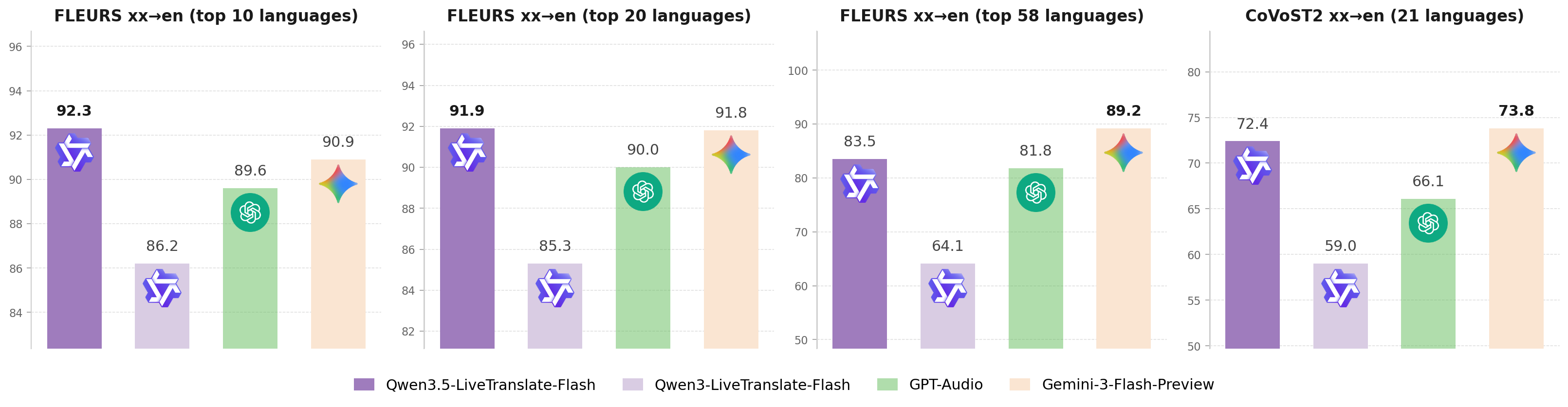
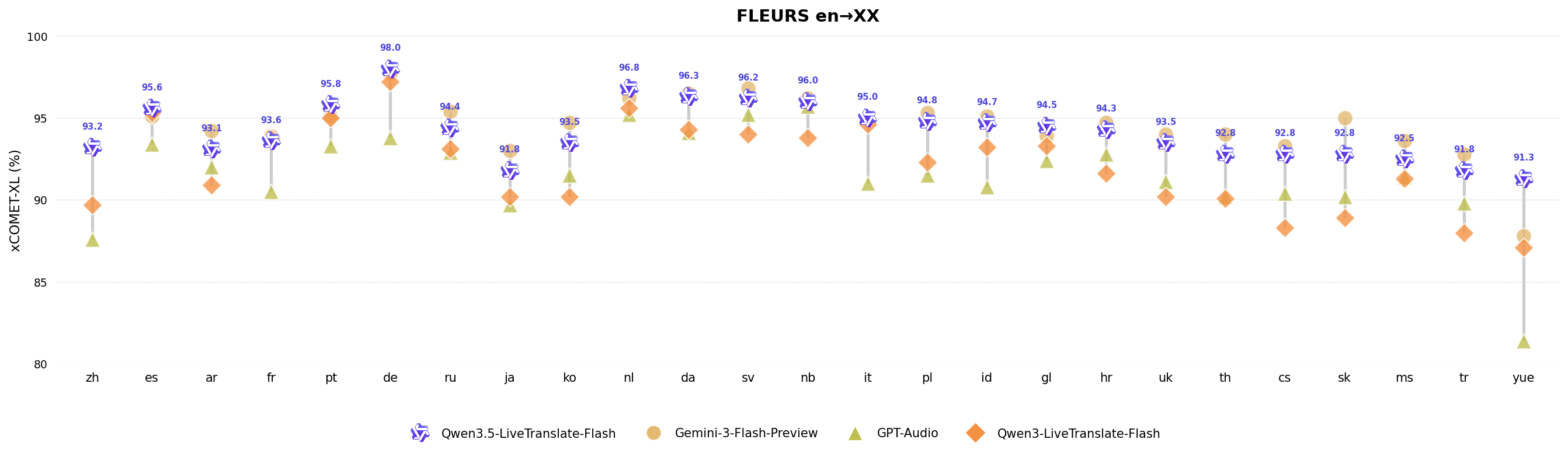
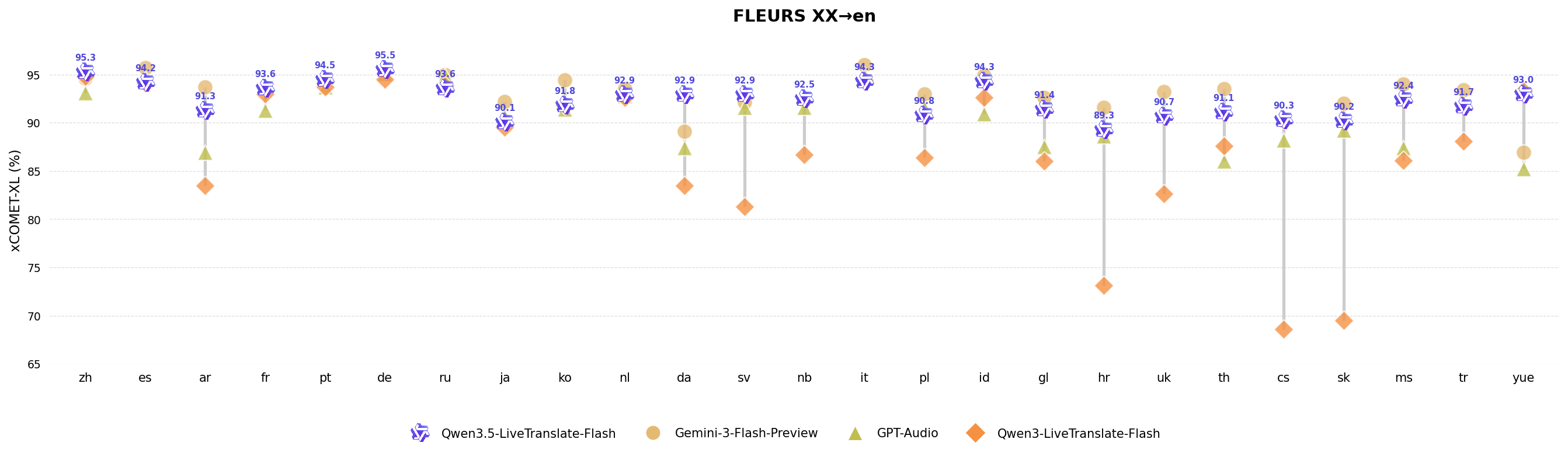
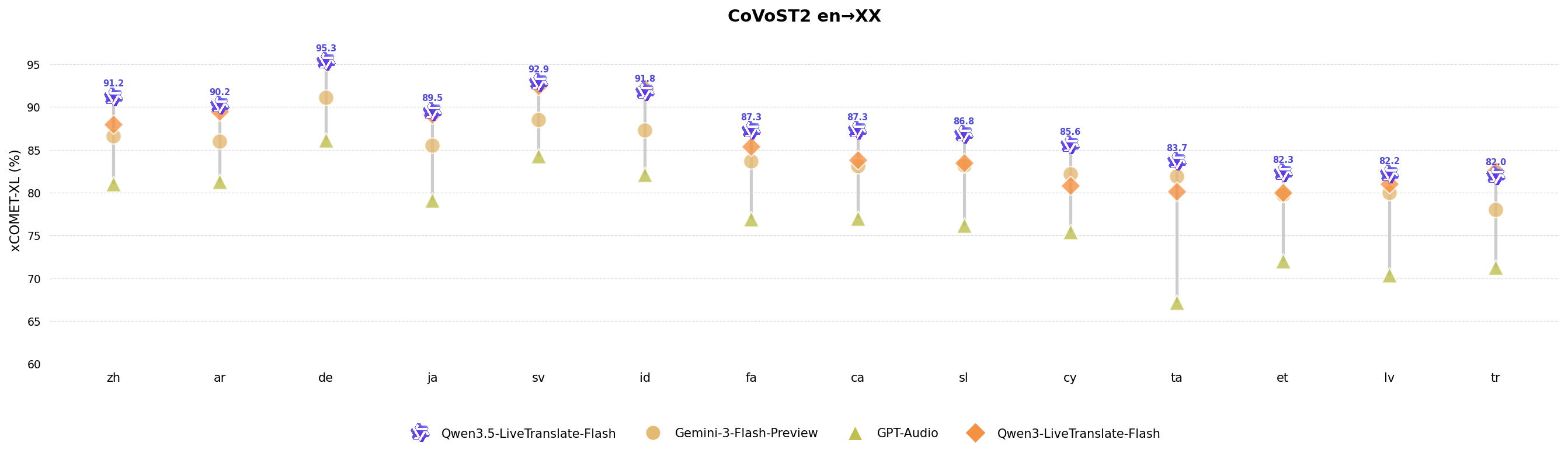
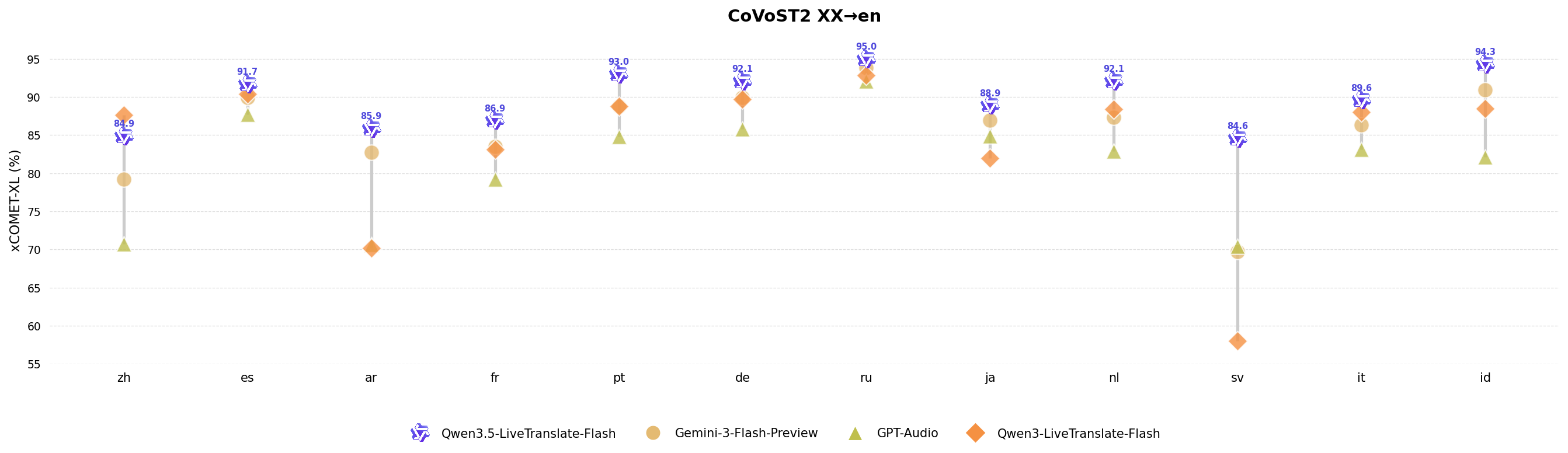
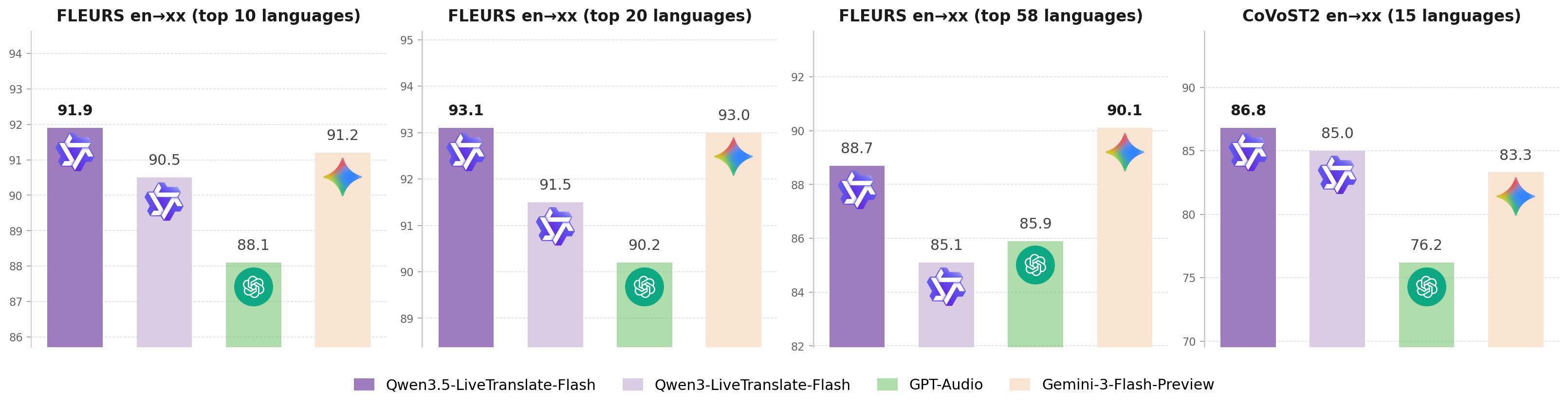
On public multilingual speech translation benchmarks (FLEURS, CoVoST2), Qwen3.5-LiveTranslate-Flash achieves higher translation accuracy than mainstream commerical large speech models, significantly surpasses its predecessor Qwen3-LiveTranslate-Flash, and delivers breakthroughs in both language coverage and translation quality.

Overview English → X Next
image

Overview X → English Next

image

FLEURS English → X Next

image

FLEURS X → English Next

image

CoVoST2 English → X Next

image

CoVoST2 X → English Next

image

Real-Time Translation#

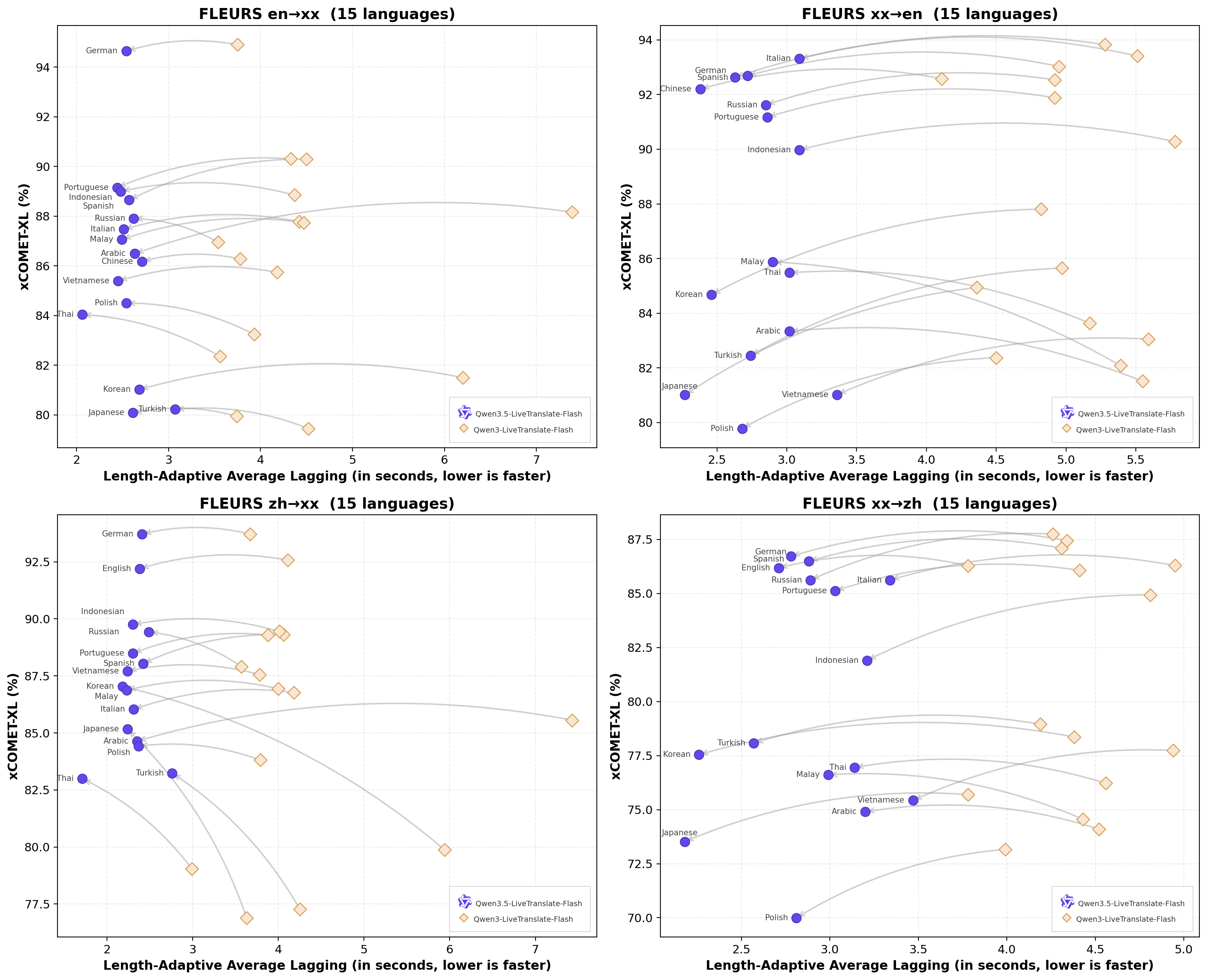
With the Readable Unit streaming strategy, Qwen3.5-LiveTranslate-Flash reduces first-token latency by 3.45 s and per-token latency by 1.88 s compared to Qwen3-LiveTranslate-Flash, achieving an average speech-to-speech per-token latency of 2.8 s, with virtually no loss in translation quality.

Overview Next
image

Model Architecture#

Qwen3.5-LiveTranslate is a translation large model built on the Qwen3.5-Omni Thinker-Talker architecture. The Thinker receives interleaved visual and audio inputs and generates text translations, while the Talker takes the translated text and source audio to produce speech with crosslingual voice cloning. For real-time simultaneous interpretation, we adopt a chunk-wise streaming input mechanism and introduce Readable Unit tags to control speech synthesis granularity, effectively reducing interpretation latency. Meanwhile, dynamic crosslingual voice cloning enables the model to preserve the speaker’s original vocal characteristics during real-time translation.
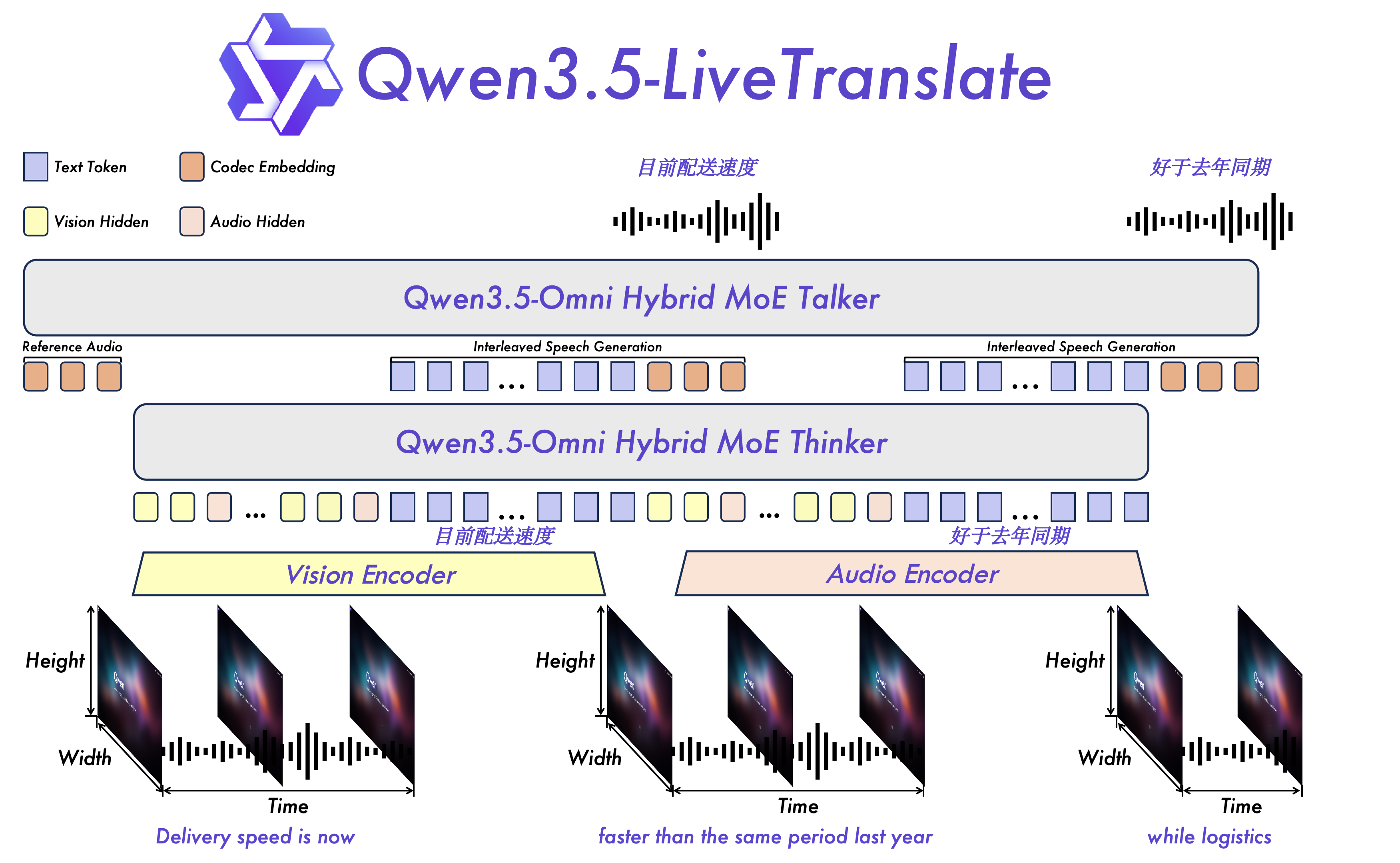
Qwen3.5-LiveTranslate model architecture overview

Qwen3.5-LiveTranslate model architecture overview

More Supported Languages#

Compared to Qwen3-LiveTranslate, Qwen3.5-LiveTranslate significantly expands language coverage. The support of input audio and output text grows from 18 to 60 languages, and output audio support from 10 to 29 languages, enabling a far wider range of cross-lingual translation combinations across global scenarios.

Qwen3-LiveTranslate Qwen3.5-LiveTranslate
Input Modality Audio / Video Audio / Video
Inference Mode Offline / Streaming Offline / Streaming
Voice Cloning ✗ ✓ (3 modes: pre-registered / clone-once / real-time)
Hotwords Up to 1,000 Up to 1,000
Input Audio Languages & Output Text Languages 18 languages Chinese, English, Russian, French, German, Portuguese, Spanish, Italian, Indonesian, Korean, Japanese, Vietnamese, Thai, Arabic, Cantonese, Hindi, Greek, Turkish 60 languages Afrikaans, Arabic, Asturian, Azerbaijani, Basque, Belarusian, Bengali, Bosnian, Bulgarian, Cantonese, Catalan, Cebuano, Chinese, Croatian, Czech, Danish, Dutch, English, Esperanto, Estonian, Filipino, Finnish, French, Galician, Georgian, German, Greek, Hebrew, Hindi, Hungarian, Icelandic, Indonesian, Interlingua, Italian, Japanese, Javanese, Kannada, Kazakh, Korean, Kyrgyz, Lingala, Latvian, Lithuanian, Macedonian, Malay, Malayalam, Maltese, Maori, Marathi, Mongolian, Norwegian Bokmål, Nynorsk, Odia, Persian, Polish, Portuguese, Punjabi, Romanian, Russian, Serbian, Slovak, Slovenian, Spanish, Swahili, Swedish, Tajik, Tamil, Telugu, Thai, Turkish, Ukrainian, Urdu, Uyghur, Vietnamese
Output Audio Languages 10 languages Chinese, English, French, German, Russian, Italian, Spanish, Portuguese, Japanese, Korean 29 languages Chinese, English, German, Italian, Portuguese, Spanish, Japanese, Korean, French, Russian, Thai, Indonesian, Arabic, Vietnamese, Turkish, Finnish, Polish, Hindi, Dutch, Czech, Urdu, Filipino, Swedish, Danish, Hebrew, Icelandic, Malay, Norwegian, Persian

🎬 See It in Action#

International Meeting#

A multilingual business meeting where participants speak in different languages and switch between them mid-sentence. Qwen3.5-LiveTranslate handles code-switching, diverse accents, and domain-specific terminology in real time — delivering fluent, natural translations without missing a beat.

Traveling Abroad#

A real-world travel scenario powered by Qwen AI Glasses: a Chinese tourist orders food at a local restaurant in Thailand. The model performs live Thai-to-Chinese translation on-device, combining visual context from the menu with spoken dialogue to produce accurate, context-aware translations — making cross-language communication effortless on the go.

Livestream Scenarios#

E-commerce livestream translation scenario. Qwen3.5-LiveTranslate accurately translates product specifications and numerical information, ensuring precise cross-language delivery of product parameters.

Classical Chinese Translation#

A scene from Romance of the Three Kingdoms narrated in classical Chinese (文言文). Qwen3.5-LiveTranslate accurately interprets and translates archaic Chinese prose into modern English, demonstrating its ability to handle literary and historical language beyond everyday speech.

Visual Disambiguation#

Qwen3.5-LiveTranslate leverages visual context to resolve translation ambiguities. When a word or phrase has multiple possible meanings, the model uses what it sees — on-screen text, objects, or scene context — to select the correct interpretation, producing translations that are both accurate and contextually grounded.

Using Qwen3.5-LiveTranslate via DashScope API#

import os
import time
import base64
import asyncio
import json
import websockets
import pyaudio
import queue
import threading
import traceback


class LiveTranslateClient:
    """Client for the DashScope live-translation service: captures mic audio, sends it to the server, and plays back the translated speech."""

    def __init__(self, api_key: str, target_language: str = "en", *, audio_enabled: bool = True):
        if not api_key:
            raise ValueError("API key cannot be empty.")

        self.api_key = api_key
        self.target_language = target_language
        self.audio_enabled = audio_enabled
        self.ws = None
        self.api_url = "wss://dashscope.aliyuncs.com/api-ws/v1/realtime?model=qwen3.5-livetranslate-flash-realtime"

        # Audio input parameters (microphone capture)
        self.input_rate = 16000
        self.input_chunk = 1600
        self.input_format = pyaudio.paInt16
        self.input_channels = 1

        # Audio output parameters (local playback)
        self.output_rate = 24000
        self.output_chunk = 2400
        self.output_format = pyaudio.paInt16
        self.output_channels = 1

        # Runtime state and playback resources
        self.is_connected = False
        self.audio_player_thread = None
        self.audio_playback_queue = queue.Queue()
        self.pyaudio_instance = pyaudio.PyAudio()

    async def connect(self):
        """Open a WebSocket connection to the translation service."""
        headers = {"Authorization": f"Bearer {self.api_key}"}
        try:
            self.ws = await websockets.connect(self.api_url, additional_headers=headers)
            self.is_connected = True
            print(f"Successfully connected to server: {self.api_url}")
            await self.configure_session()
        except Exception as e:
            print(f"Connection failed: {e}")
            self.is_connected = False
            raise

    async def configure_session(self):
        """Configure the translation session: target language, audio formats, and optional features."""
        config = {
            "event_id": f"event_{int(time.time() * 1000)}",
            "type": "session.update",
            "session": {
                # `modalities` decides what the server returns:
                #   ["text", "audio"] — both translated text and synthesized speech (recommended)
                #   ["text"]          — translated text only
                "modalities": ["text", "audio"] if self.audio_enabled else ["text"],
                "input_audio_format": "pcm",
                "output_audio_format": "pcm",
                # `input_audio_transcription`: enable source-language ASR.
                # Setting `model` to 'qwen3-asr-flash-realtime' also streams back the source transcript.
                # "input_audio_transcription": {
                #     "model": "qwen3-asr-flash-realtime",
                #     "language": "zh"  # source language; defaults to 'en'
                # },
                "translation": {
                    "language": self.target_language,
                    # `corpus`: register hotwords to boost accuracy on proper nouns and domain-specific terms.
                    # "corpus": {
                    #     "phrases": {
                    #         "人工智能": "Artificial Intelligence",
                    #         "机器学习": "Machine Learning"
                    #     }
                    # }
                }
            }
        }
        print(f"Sending session config: {json.dumps(config, indent=2, ensure_ascii=False)}")
        await self.ws.send(json.dumps(config))

    async def send_audio_chunk(self, audio_data: bytes):
        """Base64-encode an audio chunk and send it to the server."""
        if not self.is_connected:
            return

        event = {
            "event_id": f"event_{int(time.time() * 1000)}",
            "type": "input_audio_buffer.append",
            "audio": base64.b64encode(audio_data).decode()
        }
        await self.ws.send(json.dumps(event))

    async def send_image_frame(self, image_bytes: bytes, *, event_id: str | None = None):
        """Send an image frame to the server as visual context for translation."""
        if not self.is_connected:
            return
        if not image_bytes:
            raise ValueError("image_bytes cannot be empty")

        image_b64 = base64.b64encode(image_bytes).decode()
        event = {
            "event_id": event_id or f"event_{int(time.time() * 1000)}",
            "type": "input_image_buffer.append",
            "image": image_b64,
        }
        await self.ws.send(json.dumps(event))

    def _audio_player_task(self):
        """Background thread task: drain PCM chunks from the playback queue and write them to the speaker output stream."""
        stream = self.pyaudio_instance.open(
            format=self.output_format,
            channels=self.output_channels,
            rate=self.output_rate,
            output=True,
            frames_per_buffer=self.output_chunk,
        )
        try:
            while self.is_connected or not self.audio_playback_queue.empty():
                try:
                    audio_chunk = self.audio_playback_queue.get(timeout=0.1)
                    if audio_chunk is None:  # sentinel: stop the playback loop
                        break
                    stream.write(audio_chunk)
                    self.audio_playback_queue.task_done()
                except queue.Empty:
                    continue
        finally:
            stream.stop_stream()
            stream.close()

    def start_audio_player(self):
        """Spin up the background audio playback thread (no-op when audio output is disabled)."""
        if not self.audio_enabled:
            return
        if self.audio_player_thread is None or not self.audio_player_thread.is_alive():
            self.audio_player_thread = threading.Thread(target=self._audio_player_task, daemon=True)
            self.audio_player_thread.start()

    async def handle_server_messages(self, on_text_received):
        """Continuously receive and dispatch event messages pushed by the server."""
        try:
            async for message in self.ws:
                event = json.loads(message)
                event_type = event.get("type")
                if event_type == "response.audio.delta" and self.audio_enabled:
                    audio_b64 = event.get("delta", "")
                    if audio_b64:
                        audio_data = base64.b64decode(audio_b64)
                        self.audio_playback_queue.put(audio_data)

                elif event_type == "response.done":
                    print("\n[INFO] Response complete.")
                    usage = event.get("response", {}).get("usage", {})
                    if usage:
                        print(f"[INFO] Token usage: {json.dumps(usage, indent=2, ensure_ascii=False)}")
                # Receive source-language ASR results (requires input_audio_transcription.model to be enabled)
                # elif event_type == "conversation.item.input_audio_transcription.text":
                #     stash = event.get("stash", "")  # streaming partial result, not yet finalized
                #     print(f"[Recognizing] {stash}")
                # elif event_type == "conversation.item.input_audio_transcription.completed":
                #     transcript = event.get("transcript", "")  # final transcript for an utterance
                #     print(f"[Source] {transcript}")
                # In voice + text mode, the translation text arrives alongside synthesized audio under the `transcript` field
                elif event_type == "response.audio_transcript.done":
                    print("\n[INFO] Translation complete.")
                    text = event.get("transcript", "")
                    if text:
                        print(f"[INFO] Translation: {text}")
                # In text-only mode, the translation arrives via response.text.done under the `text` field
                elif event_type == "response.text.done":
                    print("\n[INFO] Translation complete.")
                    text = event.get("text", "")
                    if text:
                        print(f"[INFO] Translation: {text}")

        except websockets.exceptions.ConnectionClosed as e:
            print(f"[WARNING] Connection closed: {e}")
            self.is_connected = False
        except Exception as e:
            print(f"[ERROR] Unknown error during message handling: {e}")
            traceback.print_exc()
            self.is_connected = False

    async def start_microphone_streaming(self):
        """Continuously capture microphone audio and stream it to the server in real time."""
        stream = self.pyaudio_instance.open(
            format=self.input_format,
            channels=self.input_channels,
            rate=self.input_rate,
            input=True,
            frames_per_buffer=self.input_chunk
        )
        print("Microphone started, please begin speaking...")
        try:
            while self.is_connected:
                audio_chunk = await asyncio.get_event_loop().run_in_executor(
                    None, stream.read, self.input_chunk
                )
                await self.send_audio_chunk(audio_chunk)
        finally:
            stream.stop_stream()
            stream.close()

    async def close(self):
        """Gracefully close the WebSocket connection and release audio resources."""
        self.is_connected = False
        if self.ws:
            await self.ws.close()
            print("WebSocket connection closed.")

        if self.audio_player_thread:
            self.audio_playback_queue.put(None)  # signal the playback thread to exit
            self.audio_player_thread.join(timeout=1)
            print("Audio playback thread stopped.")

        self.pyaudio_instance.terminate()
        print("PyAudio instance released.")


def print_banner():
    print("=" * 60)
    print("  Powered by Qwen qwen3.5-livetranslate-flash-realtime")
    print("=" * 60 + "\n")


def get_user_config():
    """Collect runtime parameters from the user via CLI: output mode and target language."""
    print("Select mode:")
    print("1. Voice + Text [default] | 2. Text only")
    mode_choice = input("Enter option (press Enter for Voice + Text): ").strip()
    audio_enabled = (mode_choice != "2")

    if audio_enabled:
        lang_map = {
            "1": "en", "2": "zh", "3": "ru", "4": "fr", "5": "de", "6": "pt",
            "7": "es", "8": "it", "9": "ko", "10": "ja", "11": "yue"
        }
        print("Select target translation language (Voice + Text mode):")
        print("1. English | 2. Chinese | 3. Russian | 4. French | 5. German | 6. Portuguese | 7. Spanish | 8. Italian | 9. Korean | 10. Japanese | 11. Cantonese")
    else:
        lang_map = {
            "1": "en", "2": "zh", "3": "ru", "4": "fr", "5": "de", "6": "pt", "7": "es", "8": "it",
            "9": "id", "10": "ko", "11": "ja", "12": "vi", "13": "th", "14": "ar",
            "15": "yue", "16": "hi", "17": "el", "18": "tr"
        }
        print("Select target translation language (Text only mode):")
        print("1. English | 2. Chinese | 3. Russian | 4. French | 5. German | 6. Portuguese | 7. Spanish | 8. Italian | 9. Indonesian | 10. Korean | 11. Japanese | 12. Vietnamese | 13. Thai | 14. Arabic | 15. Cantonese | 16. Hindi | 17. Greek | 18. Turkish")

    choice = input("Enter option (default is the first one): ").strip()
    target_language = lang_map.get(choice, next(iter(lang_map.values())))

    return target_language, audio_enabled


async def main():
    """Program entry point: connect, configure the session, and drive the live-translation loop."""
    print_banner()

    api_key = os.environ.get("DASHSCOPE_API_KEY")
    if not api_key:
        print("[ERROR] Please set the environment variable DASHSCOPE_API_KEY")
        print("  Example: export DASHSCOPE_API_KEY='your_api_key_here'")
        return

    target_language, audio_enabled = get_user_config()
    print("\nConfiguration complete:")
    print(f"  - Target language: {target_language}")
    if not audio_enabled:
        print("  - Output mode: Text only")

    client = LiveTranslateClient(api_key=api_key, target_language=target_language, audio_enabled=audio_enabled)

    # Callback fired as translated text arrives — stream it to stdout, character by character
    def on_translation_text(text):
        print(text, end="", flush=True)

    try:
        print("Connecting to the translation service...")
        await client.connect()

        # Launch the audio playback thread (only does real work when audio output is enabled)
        client.start_audio_player()

        print("\n" + "-" * 60)
        print("Connected! Please speak into the microphone.")
        print("The program will translate your speech in real time and play the results. Press Ctrl+C to exit.")
        print("-" * 60 + "\n")

        # Run two coroutines concurrently: server-message handling + microphone audio upload
        message_handler = asyncio.create_task(client.handle_server_messages(on_translation_text))
        tasks = [message_handler]
        # Microphone capture is the translation input source — required regardless of output mode
        microphone_streamer = asyncio.create_task(client.start_microphone_streaming())
        tasks.append(microphone_streamer)

        await asyncio.gather(*tasks)

    except KeyboardInterrupt:
        print("\n\nUser interrupted, exiting...")
    except Exception as e:
        print(f"\nFatal error occurred: {e}")
    finally:
        print("\nCleaning up resources...")
        await client.close()
        print("Program exited.")


if __name__ == "__main__":
    asyncio.run(main())

Future Directions#

We will continue exploring the capability boundaries of multimodal translation and focus on the following directions:

  • Lower latency: keep reducing end-to-end simultaneous interpretation latency toward real-time experience limits.
  • More languages and dialects: expand input/output coverage for low-resource languages, regional dialects, and cross-regional expressions.
  • Longer context and stronger consistency: maintain terminology, names, and context consistency in long meetings and multi-turn dialogues.
  • Higher-fidelity voice cloning: preserve speaker characteristics while restoring ambient sounds and on-site atmosphere more naturally.
  • Richer interaction modes: support multilingual, mixed-dialect expression, speaker separation, and joint multimodal modeling with gestures, lip movement, and expressions.

Citation#

Feel free to cite the following article if you find Qwen3.5-LiveTranslate helpful:

@misc{qwen35livetranslateblog,
    title = {Qwen3.5-LiveTranslate: From Sound to Sight, From Word to Right},
    url = {https://qwen.ai/blog?id=qwen3.5-livetranslate},
    author = {Qwen Team},
    month = {May},
    year = {2026}
}