Model Context Protocol (MCP) an overview
The Model Context Protocol (MCP) is an open standard introduced by Anthropic with the goal to standardize how AI applications (chatbots, IDE assistants, or custom agents) connect with external tools, data sources, and systems.
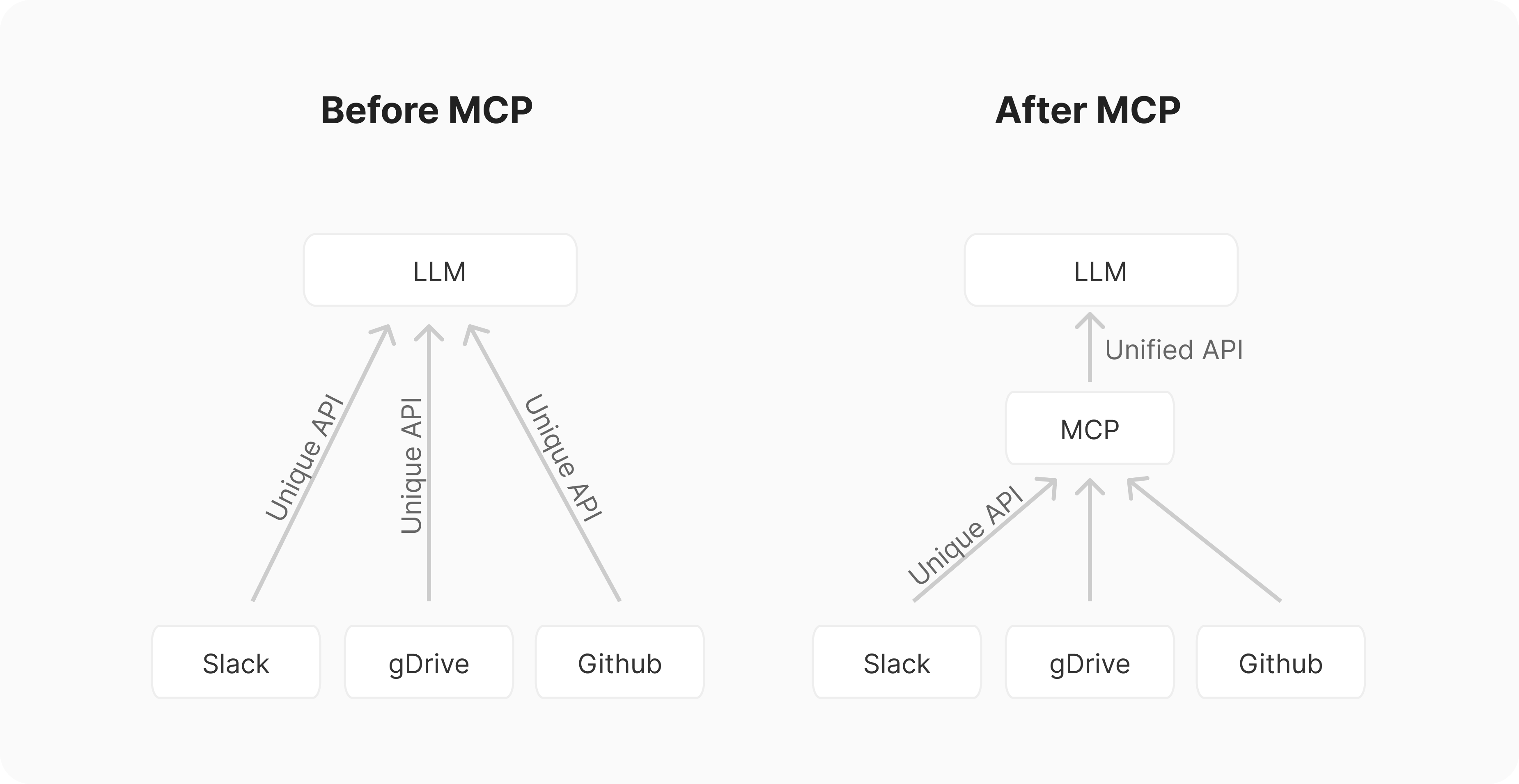
Think of it like USB for AI integrations. Before standards like USB, connecting peripherals required a mess of different ports and custom drivers. Similarly, integrating AI applications with external tools and systems is/was an "M×N problem".
If you have M different AI applications (Chat, RAG 1, custom agents, etc.) and N different tools/systems (GitHub, Slack, Asana, databases, etc.), you might need to build M×N different integrations. This leads to duplicated effort across teams, inconsistent implementations.
MCP aims to simplify this by providing a common API and transforming this into an "M+N problem". Tool creators build N MCP servers (one for each system), while application developers build M MCP clients (one for each AI application). MCP defines a client-server architecture where:
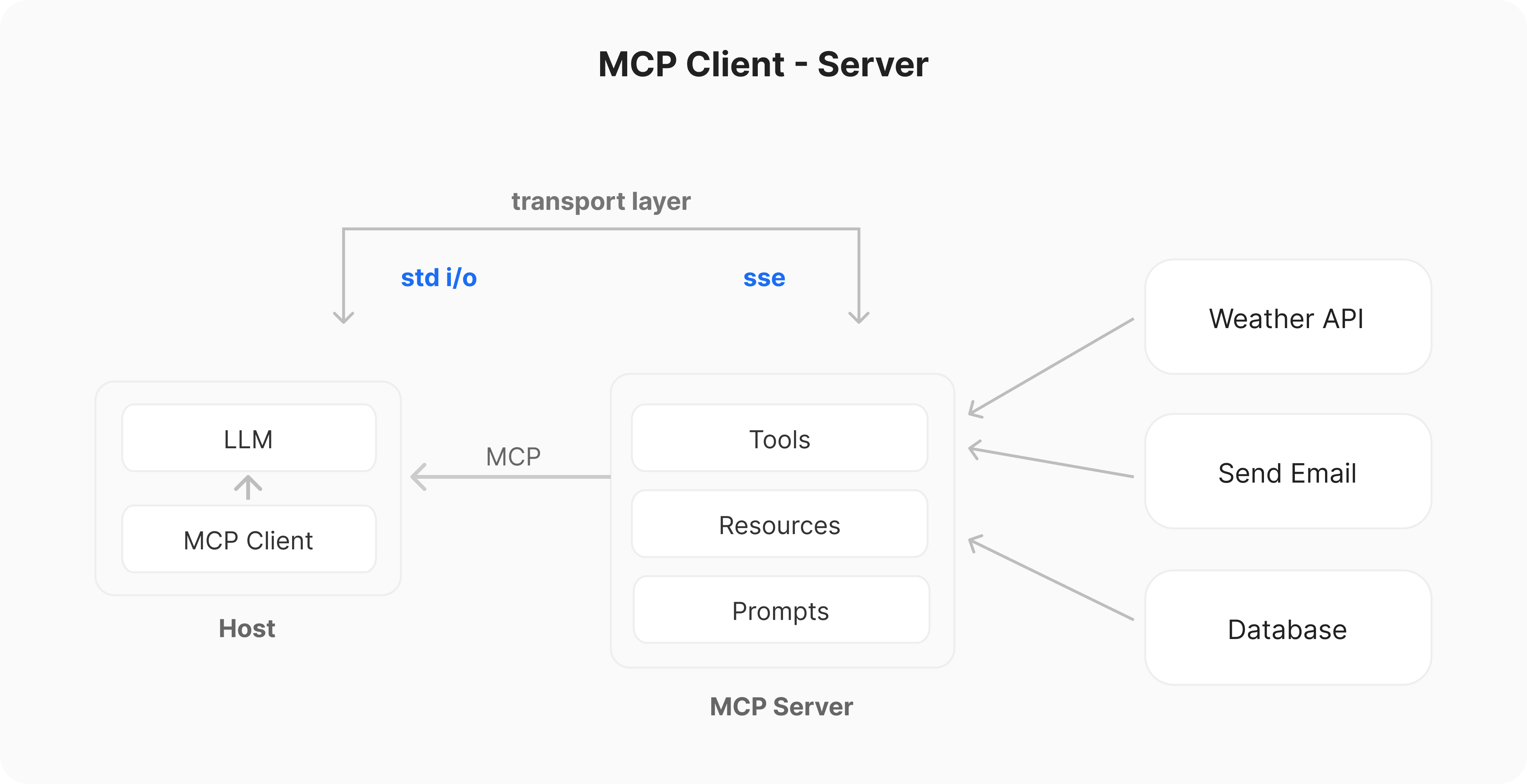
- Hosts: Applications the user interacts with (e.g., Claude Desktop, an IDE like Cursor, a custom agent).
- Clients: Live within the Host application and manage the connection to one specific MCP server. Maintain a 1:1 to connection.
- Servers: External programs that expose Tools, Resources and Prompts via standard API to the AI model via the client.
The current components of MCP servers include:
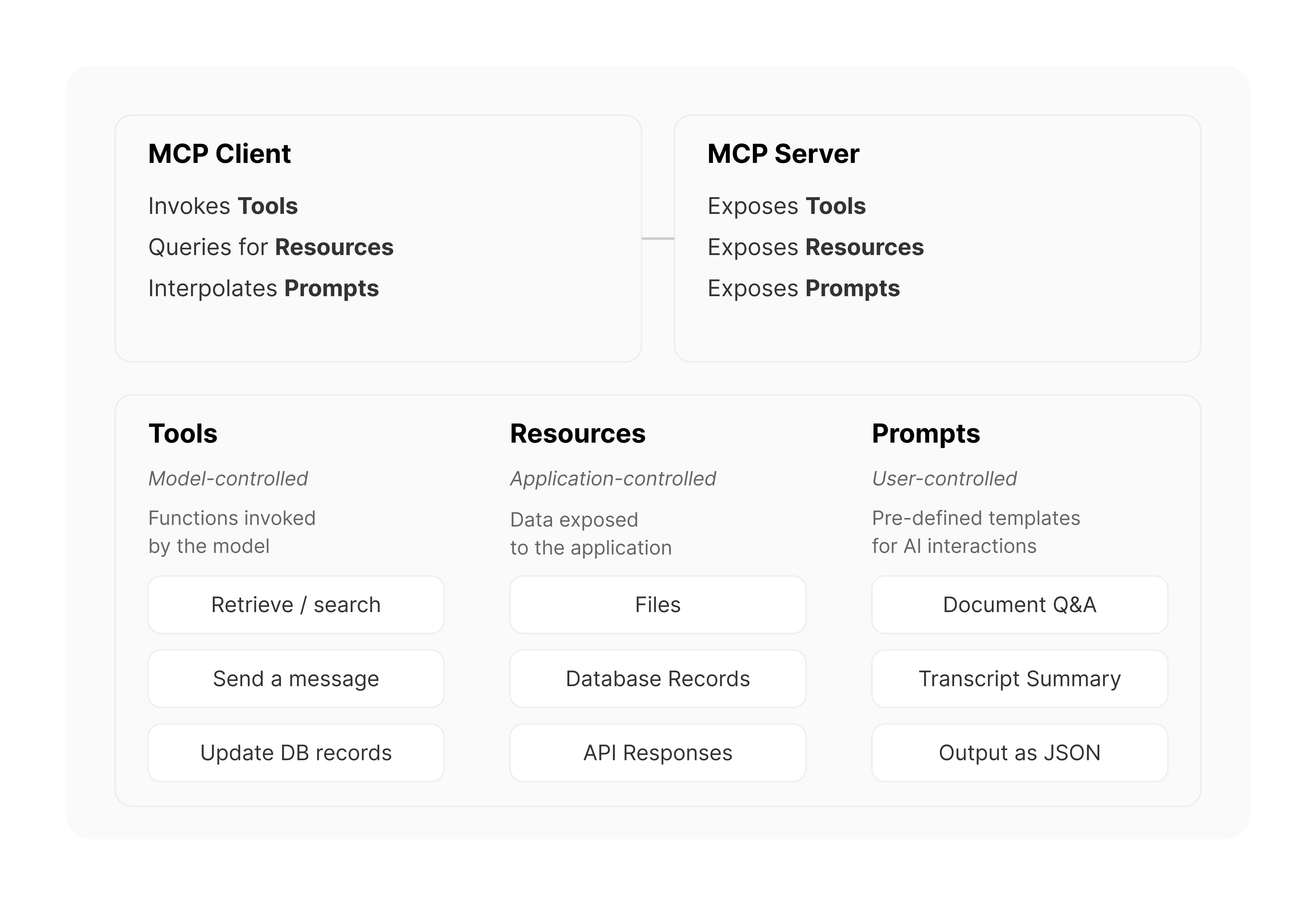
- Tools (Model-controlled): These are functions (tools) that LLMs can call to perform specific actions, e.g. weather API, basically function calling
- Resources (Application-controlled): These are data sources that LLMs can access, similar to GET endpoints in a REST API. Resources provide data without performing significant computation, no side effects. Part of the context/request
- Prompts (User-controlled): These are pre-defined templates to use tools or resources in the most optimal way. Selected before running inference
How does MCP work?#
MCP operates on the client-server model described earlier. Here’s a simplified flow:
- Initialization: When a Host application starts it creates N MCP Clients, which exchange information about capabilities and protocol versions via a handshake.
- Discovery: Clients requests what capabilities (Tools, Resources, Prompts) the server offers. The Server responds with a list and descriptions.
- Context Provision: The Host application can now make resources and prompts available to the user or parses the tools into a LLM compatible format, e.g. JSON Function calling
- Invocation: If the LLM determines it needs to use a Tool (e.g., based on the user's request like "What are the open issues in the 'X' repo?"), the Host directs the Client to send an invocation request to the appropriate Server.
- Execution: The Server receives the request (e.g., fetch_github_issues with repo 'X'), executes the underlying logic (calls the GitHub API), and gets the result.
- Response: The Server sends the result back to the Client.
- Completion: The Client relays the result to the Host, which incorporates it into the LLM's context, allowing the LLM to generate a final response for the user based on the fresh, external information.
MCP servers#
MCP Servers are the bridge/API between the MCP world and the specific functionality of an external system (an API, a database, local files, etc.). They are essentially wrappers that expose these external capabilities according to the MCP specification.
Servers can be built in various languages (Python, TypeScript, Java, Rust, etc.) as long as they can communicate over the supported transports. Servers communicate with clients primarily via two methods:
- stdio (Standard Input/Output): Used when Client and Server run on the same machines. This is simple and effective for local integrations (e.g., accessing local files or running a local script).
- HTTP via SSE (Server-Sent Events): The Client connects to the Server via HTTP. After an initial setup, the Server can push messages (events) to the Client over a persistent connection using the SSE standard.
Example of how to build an MCP server with Python and FastMCP:
Python
# Create an MCP server
=
# Add a tool, will be converted into JSON spec for function calling
"""Add two numbers"""
return +
# Add a data resource, e.g. displayed on new chats
"""Get a personalized greeting"""
return f
# Specific prompt templates for better use
return f
List of pre-build and community build MCP servers:
- https://github.com/punkpeye/awesome-mcp-servers
- https://github.com/modelcontextprotocol/servers
- https://mcp.composio.dev/
MCP Clients#
MCP Clients are part of Host applications (the IDE, chatbot, etc.) that manage the communication with a specific MCP Server.
- Role: Handle connection management, capability discovery, request forwarding, and response handling according to the MCP spec.
- Examples of Hosts/Clients:
- UI Apps: Claude Desktop, Microsoft Copilot Studio, LibreChat, Claude Code
- IDEs: Cursor, Windsurf, Continue, Zed, Cline
- Custom Agents (Python/TypeScript):
- Firebase Genkit
- LangGraph
- OpenAI agents sdk
- ….
Example of how to build an MCP client with Python and mcp.
Python
# Commands for running/connecting to MCP Server
=
# Initialize the connection
await
# List available prompts
= await
# Get a prompt
= await
# List available resources
= await
# List available tools
= await
# Read a resource
, = await
# Call a tool
= await
Why is there so much hype? Did MCP win?#
While Anthropic announced MCP in late 2024, its momentum significantly accelerated in early 2025. This isn't just random hype; several factors converged:
- "AI-Native" while older standards like OpenAPI, GraphQL, or SOAP exist for API interaction, MCP was designed specifically for the needs of modern AI agents. MCP refines patterns seen in agent development:
- Tools (Model-controlled): Actions the AI decides to take.
- Resources (Application-controlled): Context provided to the AI.
- Prompts (User-controlled): Specific user-invoked interactions.
- "Open Standard" with a Big Backer: Any "open standard” should have a spec, and MCP has a VERY good spec. The spec alone defeats a lot of contenders, who do not provide such detailed specs.
- Built on Proven Foundations: Instead of re-inventing everything from scratch, Anthropic adapted from Language Server Protocol (LSP), e.g. JSON-RPC 2.0
- Strong Initial Ecosystem & Dogfooding: MCP didn't launch as just a spec. Anthropic "dogfooded" it extensively and released it with a comprehensive initial set:
- Client: Claude Desktop.
- Servers: Numerous reference implementations (filesystem, git, Slack, etc.).
- Tooling: MCP Inspector for testing, great documentation
- SDKs: Python and TypeScript libraries, now Java, Kotlin C#
- Network Effects: The open nature fostered a community. Tools like Cursor and Windsurf integrated MCP. Companies like Composio provided pre-built servers for hundreds of integrations. OpenAI announced support for MCP. Developers built thousands of community MCP servers (GitHub, Slack, databases, Docker, etc.).
Practical Example with Gemini and Python uSDK#
Python
=
=
# Create server parameters for stdio connection
=
=
# Initialize the connection
await
# --- 1. Get Tools from Session and convert to Gemini Tool objects ---
= await
=
# --- 2. Initial Request with user prompt and function declarations ---
= await
# --- 3. Append initial response to contents ---
# --- 4. Tool Calling Loop ---
= 0
= 5
+= 1
: =
# --- 4.1 Process all function calls in order and return in this turn ---
=
= or # Ensure args is a dict
:
# Call the session's tool executor
= await
=
=
=
# Prepare FunctionResponse Part
# --- 4.2 Add the tool response(s) to history ---
# --- 4.3 Make the next call to the model with updated history ---
= await
# --- 5. Return Final Response ---
return
# Test prompt
=
# Run agent loop
= await
return
= await
What about Security, Updates, Authentication?#
MCP is a living protocol. The specification is actively maintained on GitHub, last update from 03/26 improves security, scalability, and usability.
- Authentication & Security (OAuth 2.1): The protocol now mandates the OAuth 2.1 framework for authenticating remote HTTP servers
- Improved Transport & Efficiency: The previous HTTP+SSE transport will be replaced with a more flexible Streamable HTTP transport and support for JSON-RPC batching.
- Richer Context & Control: New tool annotations provide more metadata about a tool's behavior (e.g., read-only vs. destructive)
Acknowledgements#
This overview was compiled with the help of deep and manual research, drawing inspiration and information from several excellent resources, including:
- What Is MCP, and Why Is Everyone – Suddenly!– Talking About It?
- What is MCP
- I gave Claude root access to my server... Model Context Protocol explained
- Why MCP Won
- Building Agents with Model Context Protocol - Full Workshop with Mahesh Murag of Anthropic
If you have any questions, feedback, or ideas, please dm me on X or LinkedIn. I am excited to hear about how you are experimenting and pushing the boundaries of AI agents.