Function Calling Guide: Google DeepMind Gemini 2.0 Flash
Function calling is the capability to connect LLMs to external tools and to interact with your code and APIs in a structured way. Instead of generating text responses, LLMs understand when to call specific functions and provide the necessary parameters to execute real-world actions.
Throughout this guide, we'll look at a practical weather-based assistant access to a weather API. Yes, not very creative, but there is a free API we can use and it should be enough to demonstrate the concept understand how you can use function calling to build a more complex assistant.
This guide covers:
- How does function calling work?
- When to use function calling?
- Function Calling with Google Gemini 2.0 Flash
- Advanced: Function Calling with LangChain
- Advanced: Function Calling with OpenAI Compatible API
How does function calling work?#
Function calling may imply that the LLM is directly performing some action. This is not the case! When a user prompts an LLM with function calling, the model analyzes the input and determines if and which function would be the most appropriate for the task (can be a single function or multiple functions). Instead of providing a text response, the model generates a structured JSON object that specifies which function to call and the necessary parameters.
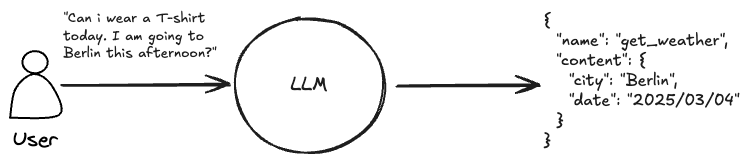
In practice function calling not only describe the process of generating structured output, but also the process of calling a function and how to handle the output. As you don't want to return the raw output of the function to your user, you want the LLM to generate an appropriate response, based on the conversation history.
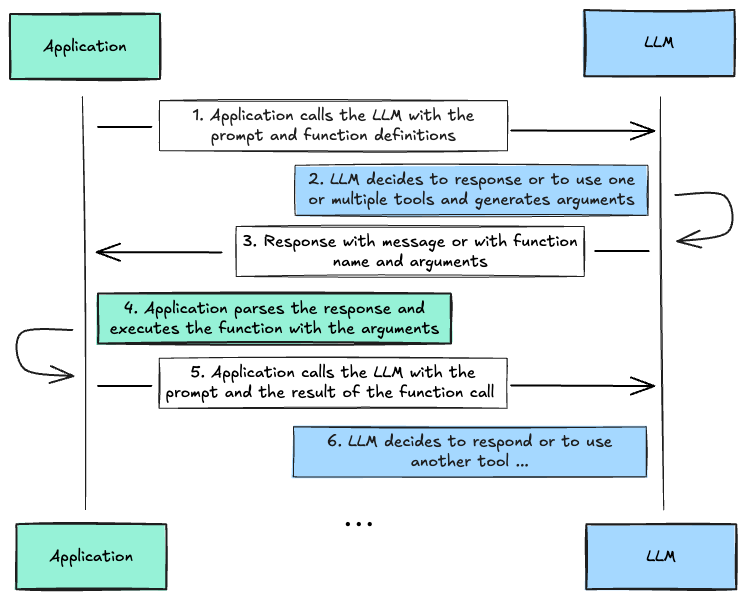
Practical Function Calling follows these steps:
- Your application sends a prompt to the LLM along with function definitions
- The LLM analyzes the prompt and decides whether to respond directly or use defined functions
- If using functions, the LLM generates structured arguments for the function call
- Your application receives the function call details and executes the actual function
- The function results are sent back to the LLM
- The LLM provides a final response incorporating the function results
This cycle can continue as needed, allowing for complex multi-step interactions between the application and the LLM. It is also possible that the LLM decides that it needs to call multiple functions after each other or in parallel before returning a final response to the user.
When to Use Function Calling?#
Function calling has emerged as one of the popular methods for building AI agents. It can help build human-AI interfaces that access and query real-time information from external sources like APIs, databases, and knowledge bases while providing a natural language interface (text or audio) to users.
Function calling enables automation tasks like scheduling appointments, creating invoices, or sending reminders. An example usecase could be a customer service assistant might use function calling to seamlessly handle tasks like checking order status, processing returns, and updating customer information – all while maintaining a natural conversation flow with the user.
You now longer need to build Applications which required complex forms or multiple steps to collect information from the user. Instead, you can build a natural language interface that allows the user to interact with the application in a conversational way. Or have no user interface at all and let the LLM interact with the world on your behalf.
Function Calling with Google Gemini 2.0 Flash#
Google Gemini 2.0 Flash supports function calling through multiple interfaces, OpenAPI compatible JSON Schema and Python functions defintions with docstrings. If you are using JavaScript/Typescript you currently have to use the JSON Schema interface. The Python SDK google-genai can automatically generate the JSON Schema from the Python function definitions and docstrings. We are going to take a look at both interfaces.
Note: Gemini 2.0 Flash currently doesn't support anyOf type in the JSON Schema.
Lets start with the JSON Schema interface, but before that lets install the google-genai library and make sure we have a Gemini API key. If you don't have one yet you can get one from Google AI Studio.
Python
%
Once you have the SDK and API key, you can create a client and define the model you are going to use the new Gemini 2.0 Flash model, which is available via free tier with 1,500 request per day (at 2025-02-06).
Python
# create client
=
=
# Define the model you are going to use
=
Before we begin, lets quickly test if we have access to the model and can generate some text.
Python
=
# Nuremberg is home to the oldest Christmas market in Germany, the Christkindlesmarkt, which dates back to the mid-16th century.
Function Calling with JSON Schema#
For using Function Calling with JSON Schema we need to define our functions as JSON Schema. Let's create a simple weather function as an example. The main parts of the JSON Schema are:
name: name of the function, this need to match the name of your function in your codedescription: description of what the function does. This is important as this information will be used by the LLM to identify when to use the functionparameters: JSON schema object of type definition for the input arguments of your function. Each parameter has a type, e.g.stringand adescriptionwhich are used by the LLM what to add here.required: Whatparametersare required if not all required the LLM might not provide an argument when it thinks its not needed.
Python
=
We can now use this function definition and add it to our LLM call. The LLM will then decide on its own if it should "call" the function or return a normal text response. Lets test this. Function declarations are defined in the config object. We use the Pydantic GenerateContentConfig data structure to define the config.
Python
# Generation Config
=
First lets try without our tool using "Whats the weather in Berlin this today?" prompt.
Python
=
# I can't give you a real-time weather update for Berlin. To get the most accurate and current weather information, I recommend checking a reliable weather source like:
# * **A weather app:** (e.g., WeatherBug, AccuWeather, The Weather Channel)
# * **A weather website:** (e.g., Google Weather, [weather.com](http://weather.com))
# * **A local news source:** (e.g., a Berlin news website or TV station)
# These sources will provide you with up-to-the-minute details on temperature, wind, precipitation, and more.
As expected the output is not helpful, as the LLM does not know how to answer the question. Now lets try with our function.
Note: When the LLM decides to use a tool the .text attribute might be null as the function call is returned in the function_call attribute of each candidate.
Python
=
# iterate over eacht return part and check if it is a function call or a normal response
# id=None args={'date': '2025-03-04', 'location': 'Berlin, DE'} name='get_weather_forecast'
Great, Gemini correctly identified that it needs to call our function and generated the structured response including the function name and arguments. Now, lets put this into a "agentic" method that will call the Gemini then check if the response is a function call and if so call the function with the arguments and finally generate a final response.
Note: The code below uses the available types data structured from the google-genai library to create the conversation history.
Python
# Simple function to get the weather forecast for a given location and date
=
=
=
=
return
return
return
# Function dictionary to map the function name to the function
=
# helper function to call the function
return
# agentic loop to handle the function call
# create the conversation
=
# initial request
=
# add response to the conversation
# check if the response is a function call
=
# Call the tool with arguments
=
# Build the response parts using the function result.
=
# Send follow-up with tool results, but remove the tools from the config
=
# Add the reponse to the conversation
# return the final response
return .
# Tool call detected
# Calling tool: get_weather_forecast with args: {'date': '2025-03-04', 'location': 'Berlin, DE'}
# Calling LLM with tool results
# 'OK. Today in Berlin, the temperature will be between 1.7 and 12.2 degrees Celsius.'
Awesome! We successfully called our function and generated a final response using the function result.
Function Calling using Python functions#
The Python SDK google-genai can automatically generate the JSON Schema from the Python function definitions and docstrings.
Python
=
"""
Retrieves the weather using Open-Meteo API for a given location (city) and a date (yyyy-mm-dd). Returns a list dictionary with the time and temperature for each hour."
Args:
location (str): The city and state, e.g., San Francisco, CA
date (str): The forecasting date for when to get the weather format (yyyy-mm-dd)
Returns:
Dict[str, float]: A dictionary with the time as key and the temperature as value
"""
=
=
=
return
return
return
Similar to the JSON Schema example we add our function to the generation config and we disable the automatic function calling for now, more on that later.
Python
# Generation Config
=
We can now generate a response.
Python
=
# iterate over eacht return part and check if it is a function call or a normal response
# id=None args={'location': 'Berlin, Germany', 'date': '2025-03-04'} name='get_weather_forecast'
Great! Similar to our JSON Schema example Gemini correctly identified that it needs to call our function. The next step would be to implement the same logic to identify the function to call and handle the output, but the Python SDK supports this out of the box.
If we enable the automatic_function_calling the SDK will automatically call the function, and sends another request to Gemini with the function result. We can remove the automatic_function_calling as the default behavior when Python functions are used as tools is to automatically call the function.
Python
# Generation Config
=
=
# OK. Today in Berlin, the temperature will be between 1.7 and 12.2 degrees Celsius.
Great. Now, lets try an example which might be closer to a real usecase, where we provide more context to our Assistant about the user to have a more natural conversation.
Python
# Generation Config
=
# Prompt includes more context about the user and the current date
= f
=
# The temperature in Nuremberg will range from 0.6 degrees Celsius to 13.2 degrees Celsius today. I would recommend bringing a jacket.
Advanced: Function Calling with LangChain#
LangChain is a composable framework that simplifies the development of LLM-powered application. LangChain supports Google Gemini 2.0 Flash and the function calling capabilities. LangGraph is an orchestration framework for controllable agentic workflows, and many companies use LangChain and LangGraph together to build AI Agents.
Python
% --
To use Gemini with LangChain we need to create a ChatGoogleGenerativeAI class, that implements the BaseChatModel interface, which is responsible for the LLM calls and supporting function calling.
Python
# Get API key and define model id
=
=
# Create LLM class
=
# lets try it
=
# I do not have access to real-time information, including live weather updates. To find out the weather in Berlin today, I recommend checking a reliable weather app or website such as:
# * **Google Weather:** Just search "weather in Berlin" on Google.
# * **AccuWeather:** [https://www.accuweather.com/](https://www.accuweather.com/)
# * **The Weather Channel:** [https://weather.com/](https://weather.com/)
# * **Local German weather services:** such as Deutscher Wetterdienst (DWD)
# These sources will provide you with the most up-to-date and accurate weather information for Berlin.
Great! This looks similar to our initial call without tools enabled. Now lets try to add the function calling capabilities. Similar to the SDK LangChain supports automatic python function to tool conversion. If you want to use a function as tool you can add a @tool decorator to the function.
Note: We copy the code from out get_weather_forecast function from the Python SDK example.
Python
=
"""Retrieves the weather using Open-Meteo API for a given location (city) and a date (yyyy-mm-dd). Returns a list dictionary with the time and temperature for each hour."
Args:
location (str): The city and state, e.g., San Francisco, CA
date (str): The forecasting date for when to get the weather format (yyyy-mm-dd)
Returns:
Dict[str, float]: A dictionary with the time as key and the temperature as value
"""
=
=
=
return
return
return
After we have our tool defined we can bind it to the LLM.
Python
=
Now, lets try it out.
Python
=
# Call the LLM with the messages and tools
=
# Check if the LLM returned a function call
# [{'name': 'get_weather_forecast', 'args': {'date': '2025-03-04', 'location': 'Berlin, DE'}, 'id': 'c0043a1b-4430-4f7a-a0d6-35bd4ffc6501', 'type': 'tool_call'}]
Great! It worked. Now, we would need to call our function with the arguments again and add the result to the conversation. Similar to the Python SDK example Langchain supports automatic function calling, through the create_tool_calling_agent and AgentExecutor.
-
create_tool_calling_agent: Creates an agent that can:- Understand when to use available tools based on user input
- Generate structured arguments for tool calls
- Process tool outputs to create natural responses
-
AgentExecutor: Handles the execution flow by:- Managing the conversation between user and agent
- Automatically calling tools when the agent requests them
- Handling any errors during tool execution
- Maintaining conversation context across multiple interactions
Python
# Initialize the prompt template
=
# Create the agent and executor with out llm, tools and prompt
=
=
# Run our query
=
# Entering new AgentExecutor chain...
# Invoking: `get_weather_forecast` with `{'date': '2025-03-04', 'location': 'Berlin, DE'}`
# {'2025-03-04T00:00': 3.5, '2025-03-04T01:00': 3.4, '2025-03-04T02:00': 3.2, '2025-03-04T03:00': 2.4, '2025-03-04T04:00': 2.4, '2025-03-04T05:00': 2.1, '2025-03-04T06:00': 1.7, '2025-03-04T07:00': 1.9, '2025-03-04T08:00': 3.3, '2025-03-04T09:00': 5.2, '2025-03-04T10:00': 6.9, '2025-03-04T11:00': 8.5, '2025-03-04T12:00': 10.5, '2025-03-04T13:00': 11.4, '2025-03-04T14:00': 11.8, '2025-03-04T15:00': 12.2, '2025-03-04T16:00': 11.6, '2025-03-04T17:00': 10.6, '2025-03-04T18:00': 9.6, '2025-03-04T19:00': 8.6, '2025-03-04T20:00': 7.8, '2025-03-04T21:00': 6.9, '2025-03-04T22:00': 6.3, '2025-03-04T23:00': 5.8}
# [1m> Finished chain.
# OK. Today in Berlin, the temperature will be between 1.7 and 12.2 degrees Celsius.
Awesome! It worked.
Advanced: Function Calling with OpenAI Compatible API#
Google Gemini has an OpenAI compatible API, which allows us to use Gemini models with the OpenAI API and SDKs. The API supports function calling out of the box, meaning we can use the OpenAI features to call our function.
Python
%
Python
# Get API key and define model id
=
=
=
Lets try it out.
Python
=
# I do not have real-time access to live weather data. To find out the weather in Berlin today, I recommend checking a reliable weather source such as:
# * **A weather app:** (e.g., WeatherBug, AccuWeather, The Weather Channel)
# * **A weather website:** (e.g., Google Weather, a local news site)
# These sources will give you the most up-to-date and accurate information.
Great! Now lets our JSON Schema example.
Python
=
=
# Function(arguments='{"date":"2025-03-04","location":"Berlin, DE"}', name='get_weather_forecast')
Awesome! We successfully called our function and generated the structured response. If you are using the OpenAI SDK you can now easily test Gemini function calling.
Conclusion#
Function calling with Gemini 2.0 Flash provides a powerful way to build AI applications that can interact with external tools and APIs in a structured way. We explored three different approaches to implement function calling:
- Using JSON Schema - A flexible approach that works across programming languages
- Using Python Functions - A simpler approach with automatic schema generation when working in Python
- Using the OpenAI-compatible API - Allowing you to leverage existing OpenAI-based code
Each approach has its strengths, with the Python SDK offering the most streamlined experience for Python developers, while the JSON Schema and OpenAI-compatible approaches provide more flexibility for other languages and existing codebases.
Function calling enables us to build powerful AI assistants that can access real-time data, perform actions, handle complex interactions, and provide natural language interfaces to APIs and tools, making it an increasingly important capability for practical AI applications that interact with the real world.
Thanks for reading! If you have any questions or feedback, please let me know on Twitter or LinkedIn.