
TL;DR: Convert GitHub repos to markdown with repo2txt, drag into Google AI Studio, and ask questions. Gemini’s massive context window makes it amazing for code comprehension.
\nWhenever I want to understand a new codebase, the absolute best way I found is using agents. Here’s my workflow:
\nStep 1: Go to repo2txt and paste in a GitHub repository URL. It gives you the full tree of the project. Select all the source code files that interest you. For the best result, skip tests, add documentation and sources. Definitely skip images, they’d be pulled in as base64 and will freeze your browser’s JS engine and clutter up the context.
\nStep 2: Go to Google AI Studio, drag in the markdown file, and start asking questions like:
\nBut this workflow isn’t just for understanding existing code, it’s become my secret weapon for creating new projects too.
\nWhenever I start a new project, I’ll paste all my ideas into AI Studio. These days I mostly dictate via Wispr Flow - Gemini is incredibly good to understand and convert my ideas into a Software Design Document. During my research I’ll often find other oss projects that solve similar things, so I drag in the compiled markdown and ask Gemini things like
\n\n\nWhich edge cases are implemented here that I didn’t think of?
\n
Once I am happy with the output, I copy the markdown, paste it into a fresh Gemini context and ask it to take the spec apart with this specific prompt:
\n\n\nTake this SDD apart. Give me 20 points that are underspecified, weird, or inconsistent.
\n
These questions I copy back into the original Gemini context to improve the SDD. I always return to the original context because it has the full history of how we arrived at the spec—context that would be lost in the critique window. We play this back-and-forth game for 3-5 rounds. Often Master-Gemini already has the answers as it has more context from previous discussions, sometimes I have to add new thoughts or pick the edge case option.
\nAs you iterate, you’ll notice the questions become increasingly niche—that’s your signal that the spec is becoming bulletproof. After these rounds, you’ll have a comprehensive SDD, typically around 500 lines, that captures every detail of your vision.
\nOnce your SDD is complete, implementation becomes almost trivial:
\ndocs/spec.md in your repositoryThe beauty of this approach is that Claude Code doesn’t need complex prompting or hand-holding—the spec contains everything it needs. The clear, detailed specification eliminates ambiguity and lets the AI focus on implementation rather than guessing your intent.
\nHere’s an example of the spec I used to build Peekaboo - an MCP to give your agent eyes/screenshots. The best part about Peekaboo? It uses its own agent to prevent cluttering up your context. From spec to working product: just a few hours of letting Claude Code do its thing.
\nWanna see me in action? Here’s a video where I do the whole process from idea to final app. I used Cursor back then, but would use Claude Code now, as it loops much longer without interrupts. Maybe I’ll use Gemini CLI in the future. AI moves so fast!
\nOne challenge you might encounter: as you refine your spec through multiple iterations, AI tools can hit their output token limits and start dropping earlier context. This “context amnesia” means critical requirements from your initial spec might disappear in later versions—a problem my friend Bruno Virlet pointed out when using Gemini for spec refinement.
\nThe solution? Instead of asking for one massive spec revision, break it down:
\nThis block-based approach ensures you maintain control over your spec’s evolution while leveraging AI’s analytical capabilities without losing critical details in the process.
\nHeck, I restarted an old side project of mine by simply giving Gemini the whole unfinished SwiftUI project (500k tokens!) and told it to generate an SDD from that, but use web tech for it + rebuild in TypeScript. The code is the spec. (blacked out some secrets, something for a future blog post…)
\n
An honorable mention: DeepWiki is surprisingly great at understanding a codebase and includes a free agent. For example, here’s VibeTunnel on DeepWiki. VibeTunnel is my current focus, it turns any browser into your terminal to command your agents (like Claude Code or Gemini CLI) on the go.
\nThe downside: you can’t mix and match multiple repositories, Gemini rules for that.
\nHonorable mentions also to Gitingest and Repomix. They have better design, but aren’t as efficient in choosing exactly the files you want. You get better results if you keep Gemini’s context focused.
\nAs to alternatives to Google’s AI Studio, I haven’t found anything that comes close. OpenAI has great models, but they struggle with generating the comprehensive 500-line markdown files that make this workflow sing. Gemini’s massive context window and willingness to produce detailed documentation is unmatched for this use case.
\nThere’s a lot of people on Twitter and Mastodon that ask me about my workflows, so whenever I find a process that works for me, I’ll make a blog post and share it with you. Wanna be the first to hear about it? Follow @steipete and sign up for my newsletter.
\nNow go and build something amazing, or join me & the VibeTunnel Team. We’ll make sure your agents won’t know what hit them!
\n", "content_markdown": "\n\n**TL;DR**: Convert GitHub repos to markdown with [repo2txt](https://repo2txt.simplebasedomain.com/), drag into [Google AI Studio](https://aistudio.google.com/prompts/new_chat), and ask questions. Gemini’s massive context window makes it amazing for code comprehension.\n\n## The Problem\n\nWhenever I want to understand a new codebase, the absolute best way I found is using agents. Here’s my workflow:\n\n**Step 1**: Go to [repo2txt](https://repo2txt.simplebasedomain.com/) and paste in a GitHub repository URL. It gives you the full tree of the project. Select all the source code files that interest you. For the best result, skip tests, add documentation and sources. *Definitely skip images*, they’d be pulled in as base64 and will freeze your browser’s JS engine and clutter up the context.\n\n**Step 2**: Go to [Google AI Studio](https://aistudio.google.com/prompts/new_chat), drag in the markdown file, and start asking questions like:\n\n- “What’s notable about this project?”\n- “How did they solve **this thing you are curious about**?”\n\nBut this workflow isn’t just for understanding existing code, it’s become my secret weapon for creating new projects too.\n\n## From Idea to SDD\n\nWhenever I start a new project, I’ll paste all my ideas into AI Studio. These days I mostly dictate via [Wispr Flow](https://wisprflow.ai/) - Gemini is incredibly good to understand and convert my ideas into a Software Design Document. During my research I’ll often find other oss projects that solve similar things, so I drag in the compiled markdown and ask Gemini things like\n\n> Which edge cases are implemented here that I didn’t think of?\n\n## The Two-Context Technique\n\nOnce I am happy with the output, I copy the markdown, paste it into a fresh Gemini context and ask it to take the spec apart with this specific prompt:\n\n> Take this SDD apart. Give me 20 points that are underspecified, weird, or inconsistent.\n\nThese questions I copy back into the original Gemini context to improve the SDD. I always return to the original context because it has the full history of how we arrived at the spec—context that would be lost in the critique window. We play this back-and-forth game for 3-5 rounds. Often Master-Gemini already has the answers as it has more context from previous discussions, sometimes I have to add new thoughts or pick the edge case option.\n\nAs you iterate, you’ll notice the questions become increasingly niche—that’s your signal that the spec is becoming bulletproof. After these rounds, you’ll have a comprehensive SDD, typically around 500 lines, that captures every detail of your vision.\n\n## From SDD to Implementation\n\nOnce your SDD is complete, implementation becomes almost trivial:\n\n1. Save the final spec as `docs/spec.md` in your repository\n2. Open Claude Code and simply prompt: “Build spec.md”\n3. Let it run for 2-4 hours\n4. Review and iterate on the results\n\nThe beauty of this approach is that Claude Code doesn’t need complex prompting or hand-holding—the spec contains everything it needs. The clear, detailed specification eliminates ambiguity and lets the AI focus on implementation rather than guessing your intent.\n\nHere’s [an example of the spec](https://github.com/steipete/peekaboo/blob/main/docs/spec.md) I used to build [Peekaboo - an MCP to give your agent eyes/screenshots](https://www.peekaboo.boo/). The best part about Peekaboo? It uses its own agent to prevent cluttering up your context. From spec to working product: just a few hours of letting Claude Code do its thing.\n\nWanna see me in action? Here’s [a video where I do the whole process from idea to final app](https://steipete.com/posts/2025/the-future-of-vibe-coding). I used Cursor back then, but would use Claude Code now, as it loops much longer without interrupts. Maybe I’ll use [Gemini CLI](https://blog.google/technology/developers/introducing-gemini-cli-open-source-ai-agent/) in the future. [AI moves so fast!](https://x.com/steipete/status/1937919798740214023)\n\n## Dealing with Context Loss During Refinement\n\nOne challenge you might encounter: as you refine your spec through multiple iterations, AI tools can hit their output token limits and start dropping earlier context. This “context amnesia” means critical requirements from your initial spec might disappear in later versions—a problem my friend Bruno Virlet pointed out when using Gemini for spec refinement.\n\nThe solution? Instead of asking for one massive spec revision, break it down:\n\n1. **Generate in logical blocks**: Request specific sections separately\n - “Generate the architecture overview”\n - “Generate the API specifications”\n - “Generate the data model requirements”\n2. **Maintain a master document**: Manually concatenate outputs, ensuring nothing gets lost\n3. **Create a requirements checklist**: Track key features across iterations\n\nThis block-based approach ensures you maintain control over your spec’s evolution while leveraging AI’s analytical capabilities without losing critical details in the process.\n\n## The Code is the Spec\n\nHeck, I restarted an old side project of mine by simply giving Gemini the whole unfinished SwiftUI project (500k tokens!) and told it to generate an SDD from that, but use web tech for it + rebuild in TypeScript. The code **is** the spec. (blacked out some secrets, something for a future blog post…)\n\n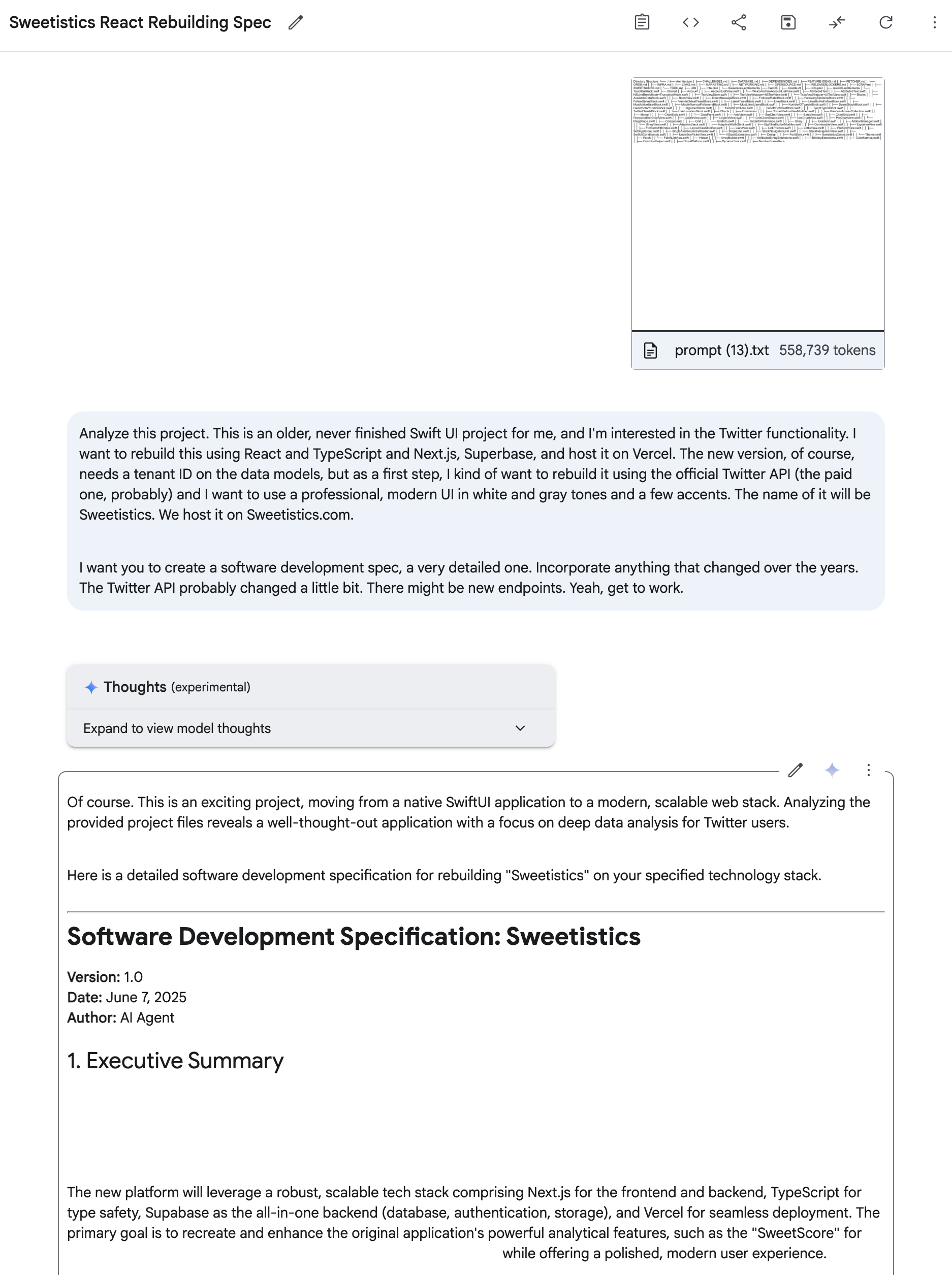\n\n## Alternatives: DeepWiki, RepoMix & Co\n\nAn honorable mention: [DeepWiki](https://deepwiki.com/) is surprisingly great at understanding a codebase and includes a free agent. For example, here’s [VibeTunnel on DeepWiki](https://deepwiki.com/amantus-ai/vibetunnel). [VibeTunnel is my current focus](https://steipete.me/posts/2025/vibetunnel-turn-any-browser-into-your-mac-terminal), it turns any browser into your terminal to command your agents (like Claude Code or Gemini CLI) on the go.\n\nThe downside: you can’t mix and match multiple repositories, Gemini rules for that.\n\nHonorable mentions also to [Gitingest](https://gitingest.com/) and [Repomix](https://repomix.com/). They have better design, but aren’t as efficient in choosing exactly the files you want. You get better results if you keep Gemini’s context focused.\n\nAs to alternatives to Google’s AI Studio, I haven’t found anything that comes close. OpenAI has great models, but they struggle with generating the comprehensive 500-line markdown files that make this workflow sing. Gemini’s massive context window and willingness to produce detailed documentation is unmatched for this use case.\n\n## That’s It!\n\nThere’s a lot of people on Twitter and Mastodon that ask me about my workflows, so whenever I find a process that works for me, I’ll make a blog post and share it with you. Wanna be the first to hear about it? Follow [@steipete](https://twitter.com/steipete) and sign up for my newsletter.\n\n* * *\n\nNow go and build something amazing, or join me & the [VibeTunnel Team](https://steipete.me/posts/2025/vibetunnel-turn-any-browser-into-your-mac-terminal#motivation). We’ll make sure your agents won’t know what hit them!\n", "dateCreated": "2026-09-27T19:29:15.293681927+00:00", "date_created": "2025-06-25T12:00:00+00:00", "date_modified": "2025-06-25T12:00:00+00:00", "date_published": "2025-06-25T12:00:00+00:00", "description": "A quick tip on how I use repo2txt and Google AI Studio to understand new codebases. Gemini's 1M token context window is perfect for asking questions about code.", "external_url": "https://steipete.me/posts/2025/understanding-codebases-with-ai-gemini-workflow/", "git": { "commit": "ebb0941c5c06a2ab2377342d607535262a3e969e", "path": "items/steipete-me/2025/06/2025-06-25-my-ai-workflow-for-understanding-any-codebase.md", "permalink": "https://github.com/aymericbeaumet/aggr-instance/blob/ebb0941c5c06a2ab2377342d607535262a3e969e/items/steipete-me/2025/06/2025-06-25-my-ai-workflow-for-understanding-any-codebase.md" }, "id": "urn:aggr:item:ea4f8653a11fddaedb421936eb78442b35a3210f", "isBasedOn": { "@id": "https://steipete.me/posts/2025/understanding-codebases-with-ai-gemini-workflow/" }, "mainEntity": { "@id": "https://steipete.me/posts/2025/understanding-codebases-with-ai-gemini-workflow/", "@type": "CreativeWork", "archivedAt": { "@id": "https://aggr.aymericbeaumet.com/items/steipete-me/2025-06-25-my-ai-workflow-for-understanding-any-codebase/#webpage" }, "dateModified": "2025-06-25T12:00:00+00:00", "datePublished": "2025-06-25T12:00:00+00:00", "headline": "My AI Workflow for Understanding Any Codebase", "timeRequired": "PT5M", "url": "https://steipete.me/posts/2025/understanding-codebases-with-ai-gemini-workflow/", "wordCount": 1008 }, "name": "Archived snapshot: My AI Workflow for Understanding Any Codebase", "preview": null, "reading_minutes": 5, "replicated_at": null, "source": "steipete-me", "source_name": "Peter Steinberger", "summary": "A quick tip on how I use repo2txt and Google AI Studio to understand new codebases. Gemini's 1M token context window is perfect for asking questions about code.", "tags": [], "temporalCoverage": "2026-09-27T19:29:15.293681927+00:00", "title": "My AI Workflow for Understanding Any Codebase", "url": "https://aggr.aymericbeaumet.com/items/steipete-me/2025-06-25-my-ai-workflow-for-understanding-any-codebase/", "word_count": 1008 }