{
  "@context": "https://schema.org",
  "@id": "https://aggr.aymericbeaumet.com/items/steipete-me/2025-06-07-peekaboo-mcp-lightning-fast-macos-screenshots-for-ai-agents/#webpage",
  "@type": [
    "WebPage",
    "ArchiveComponent"
  ],
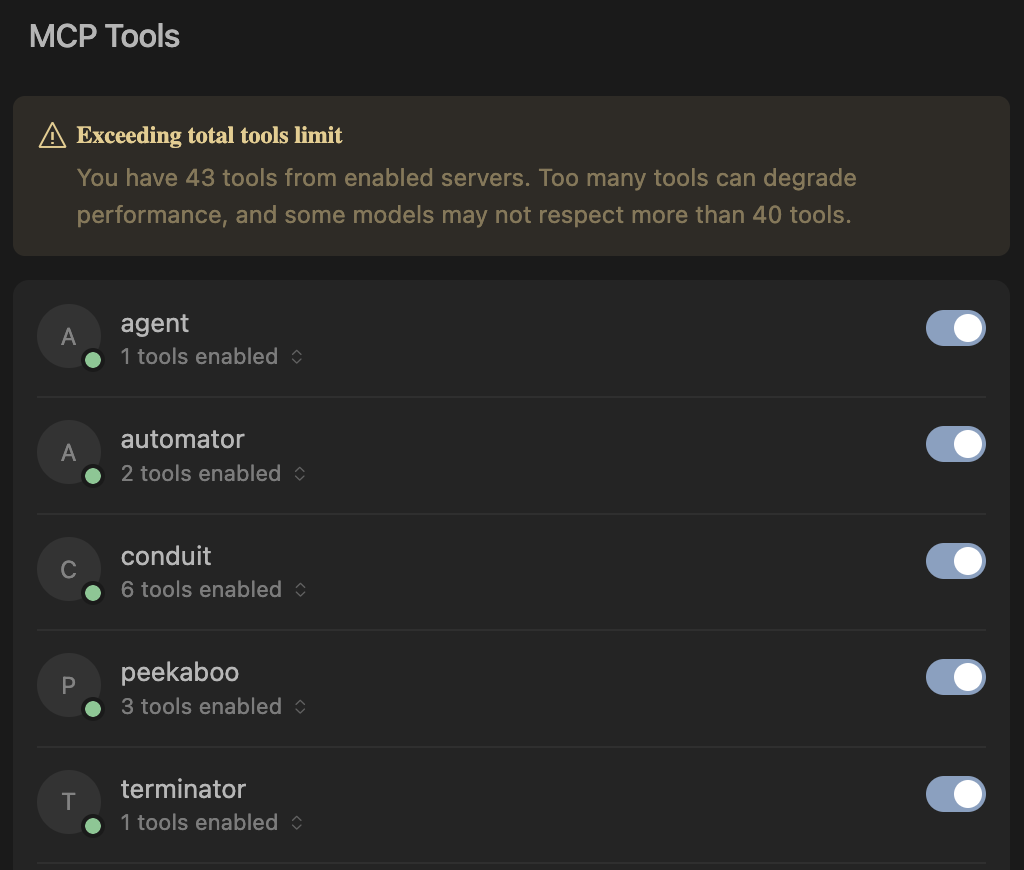
  "articleBody": "![](https://steipete.me/assets/img/2025/peekaboo-mcp-lightning-fast-macos-screenshots-for-ai-agents/banner.png)\n\n**TL;DR**: Peekaboo is a macOS-only MCP server that enables AI agents to capture screenshots of applications, or the entire system, with optional visual question answering through local or remote AI models.\n\n> Without screenshots, agents debug blind—Peekaboo gives them eyes.\n\n## What Peekaboo Can Do\n\nPeekaboo provides three main tools that give AI agents visual capabilities:\n\n- **`image`** - Capture screenshots of screens or specific applications\n- **`analyze`** - Ask AI questions about captured images using vision models\n- **`list`** - Enumerate available screens and windows for targeted captures\n\nEach tool is designed to be powerful and flexible. The most powerful feature is visual question answering - agents can ask questions about screenshots like “What do you see in this window?” or “Is the submit button visible?” and get accurate answers. This saves context space since asking specific questions is much more efficient than returning raw image data.\n\nPeekaboo supports both cloud and local vision models, letting you choose between accuracy and privacy.\n\n ![Install Peekaboo in Cursor IDE](https://cursor.com/deeplink/mcp-install-dark.png) ![Install Peekaboo in Cursor IDE](https://cursor.com/deeplink/mcp-install-light.png)\n\n## Design Philosophy\n\n### Less is More\n\nThe most important rule when building MCPs: **Keep the number of tools small**. Most agents struggle once they encounter more than 40 different tools. My approach is to make every tool very powerful but keep the total count minimal to avoid cluttering the context.\n\n![Cursor showing 40+ tools can become overwhelming](https://steipete.me/assets/img/2025/peekaboo-mcp-lightning-fast-macos-screenshots-for-ai-agents/cursor-40-tools.png)\n\n### Lenient Tool Calling\n\nAnother crucial principle: **tool calling should be lenient**. Agents make mistakes with parameters, so rather than returning errors, Peekaboo tries to understand their intent. Being overly strict just forces unnecessary retry loops - MCPs should be forgiving since agents aren’t infallible.\n\n### Fuzzy Window Matching\n\nPeekaboo implements fuzzy window matching because agents don’t always know exact window titles. If an agent asks for “Chrome” but the window is titled “Google Chrome - Peekaboo MCP”, we still match it. Partial matches work, case doesn’t matter, and common variations are understood.\n\nFor more insights on building robust MCP tools, check out my guide: [MCP Best Practices](https://steipete.me/posts/2025/mcp-best-practices).\n\n## Local vs Cloud Vision Models\n\nPeekaboo supports both local and cloud vision models. While cloud models like GPT-4o offer superior accuracy, local models provide privacy, cost control, and offline operation.\n\nFor local inference, I recommend LLaVA as the default for its balance of accuracy and performance. For resource-constrained systems, Qwen2-VL provides excellent results with lower requirements.\n\nModel specifications and requirements\n\n**[LLaVA](https://ollama.com/library/llava) (Large Language and Vision Assistant)**\n\n- `llava:7b` - ~4.5GB download, ~8GB RAM required\n- `llava:13b` - ~8GB download, ~16GB RAM required\n- `llava:34b` - ~20GB download, ~40GB RAM required\n- Best overall quality for vision tasks\n\n**[Qwen2-VL](https://ollama.com/library/qwen2-vl)**\n\n- `qwen2-vl:7b` - ~4GB download, ~6GB RAM required\n- Excellent performance with lower resource requirements\n- Ideal for less powerful machines\n\n**Installation:**\n\n```bash\n# Install your chosen model\nollama pull llava:latest        # or llava:7b, llava:13b, etc.\nollama pull qwen2-vl:7b        # for resource-constrained systems\n```\n\n## My MCP Ecosystem\n\nPeekaboo is part of a growing collection of MCP servers I’m building:\n\n- **[claude-code-mcp](https://github.com/steipete/claude-code-mcp)** - Integrates Claude Code into Cursor for task offloading\n- **[macos-automator-mcp](https://github.com/steipete/macos-automator-mcp)** - Run AppleScript and JXA on macOS\n- **[Terminator](https://github.com/steipete/Terminator)** - External terminal so agents don’t get stuck on long-running commands\n\nEach serves a specific purpose in building autonomous AI workflows.\n\n## Technical Architecture\n\nPeekaboo combines TypeScript and Swift for the best of both worlds. TypeScript provides excellent [MCP support](https://github.com/modelcontextprotocol/typescript-sdk) and easy distribution via npm, while Swift enables direct access to Apple’s [ScreenCaptureKit](https://developer.apple.com/documentation/screencapturekit) for capturing windows without focus changes.\n\nMy initial [AppleScript prototype](https://github.com/steipete/Peekaboo/blob/main/peekaboo.scpt) had a fatal flaw: it required focus changes to capture windows. The Swift rewrite uses ScreenCaptureKit to access the window manager directly - no focus changes, no user disruption.\n\nThe system uses a Swift CLI that communicates with a Node.js MCP server, supporting both local models and cloud providers with automatic fallback. Built with Swift 6 and the new Swift Testing framework ([now that I have experience with it!](https://steipete.me/posts/migrating-700-tests-to-swift-testing)), Peekaboo delivers fast, non-intrusive screenshot capture with intelligent window matching.\n\nFor detailed testing instructions using the MCP Inspector, see the [Peekaboo README](https://github.com/steipete/Peekaboo#testing--debugging).\n\n## The Vision: Autonomous Agent Debugging\n\nPeekaboo is like one puzzle piece in a larger set of MCPs I’m building to help agents stay in the loop. The goal is simple: if an agent can answer questions by itself, you don’t have to intervene and it can simply continue and debug itself. This is the holy grail for building applications with CI - you want to do everything so the agent can loop and work until what you want is done.\n\nWhen your build fails, when your UI doesn’t look right, when something breaks - instead of stopping and asking you “what do you see?”, the agent can take a screenshot, analyze it, and continue fixing the problem autonomously. That’s the power of giving agents their eyes.\n\n👻 [Peekaboo MCP](https://www.peekaboo.dev/) is available now - ⭐ [the repo](https://github.com/steipete/Peekaboo) if this saves you a debug session!\n",

  "authors": [],
  "captured_at": "2026-09-27T19:29:15.293681927+00:00",
  "category": "programming",
  "content_html": "<p><picture class=\"article-picture article-picture-fallback\" style=\"--image-ratio:16 / 9\"><img src=\"https://steipete.me/assets/img/2025/peekaboo-mcp-lightning-fast-macos-screenshots-for-ai-agents/banner.png\" alt=\"\" loading=\"eager\" decoding=\"async\" fetchpriority=\"high\" referrerpolicy=\"no-referrer\" class=\"progressive-image\"></picture></p>\n<p><strong>TL;DR</strong>: Peekaboo is a macOS-only MCP server that enables AI agents to capture screenshots of applications, or the entire system, with optional visual question answering through local or remote AI models.</p>\n<blockquote>\n<p>Without screenshots, agents debug blind—Peekaboo gives them eyes.</p>\n</blockquote>\n<h2>What Peekaboo Can Do</h2>\n<p>Peekaboo provides three main tools that give AI agents visual capabilities:</p>\n<ul>\n<li><strong><code>image</code></strong> - Capture screenshots of screens or specific applications</li>\n<li><strong><code>analyze</code></strong> - Ask AI questions about captured images using vision models</li>\n<li><strong><code>list</code></strong> - Enumerate available screens and windows for targeted captures</li>\n</ul>\n<p>Each tool is designed to be powerful and flexible. The most powerful feature is visual question answering - agents can ask questions about screenshots like “What do you see in this window?” or “Is the submit button visible?” and get accurate answers. This saves context space since asking specific questions is much more efficient than returning raw image data.</p>\n<p>Peekaboo supports both cloud and local vision models, letting you choose between accuracy and privacy.</p>\n<p><picture class=\"article-picture article-picture-fallback\" style=\"--image-ratio:16 / 9\"><img src=\"https://cursor.com/deeplink/mcp-install-dark.png\" alt=\"Install Peekaboo in Cursor IDE\" loading=\"lazy\" decoding=\"async\" fetchpriority=\"low\" referrerpolicy=\"no-referrer\" class=\"progressive-image\"></picture> <picture class=\"article-picture article-picture-fallback\" style=\"--image-ratio:16 / 9\"><img src=\"https://cursor.com/deeplink/mcp-install-light.png\" alt=\"Install Peekaboo in Cursor IDE\" loading=\"lazy\" decoding=\"async\" fetchpriority=\"low\" referrerpolicy=\"no-referrer\" class=\"progressive-image\"></picture></p>\n<h2>Design Philosophy</h2>\n<h3>Less is More</h3>\n<p>The most important rule when building MCPs: <strong>Keep the number of tools small</strong>. Most agents struggle once they encounter more than 40 different tools. My approach is to make every tool very powerful but keep the total count minimal to avoid cluttering the context.</p>\n<p><picture class=\"article-picture article-picture-fallback\" style=\"--image-ratio:16 / 9\"><img src=\"https://steipete.me/assets/img/2025/peekaboo-mcp-lightning-fast-macos-screenshots-for-ai-agents/cursor-40-tools.png\" alt=\"Cursor showing 40+ tools can become overwhelming\" loading=\"lazy\" decoding=\"async\" fetchpriority=\"low\" referrerpolicy=\"no-referrer\" class=\"progressive-image\"></picture></p>\n<h3>Lenient Tool Calling</h3>\n<p>Another crucial principle: <strong>tool calling should be lenient</strong>. Agents make mistakes with parameters, so rather than returning errors, Peekaboo tries to understand their intent. Being overly strict just forces unnecessary retry loops - MCPs should be forgiving since agents aren’t infallible.</p>\n<h3>Fuzzy Window Matching</h3>\n<p>Peekaboo implements fuzzy window matching because agents don’t always know exact window titles. If an agent asks for “Chrome” but the window is titled “Google Chrome - Peekaboo MCP”, we still match it. Partial matches work, case doesn’t matter, and common variations are understood.</p>\n<p>For more insights on building robust MCP tools, check out my guide: <a target=\"_blank\" rel=\"noopener noreferrer\" href=\"https://steipete.me/posts/2025/mcp-best-practices\">MCP Best Practices</a>.</p>\n<h2>Local vs Cloud Vision Models</h2>\n<p>Peekaboo supports both local and cloud vision models. While cloud models like GPT-4o offer superior accuracy, local models provide privacy, cost control, and offline operation.</p>\n<p>For local inference, I recommend LLaVA as the default for its balance of accuracy and performance. For resource-constrained systems, Qwen2-VL provides excellent results with lower requirements.</p>\n<p>Model specifications and requirements</p>\n<p><strong><a target=\"_blank\" rel=\"noopener noreferrer\" href=\"https://ollama.com/library/llava\">LLaVA</a> (Large Language and Vision Assistant)</strong></p>\n<ul>\n<li><code>llava:7b</code> - ~4.5GB download, ~8GB RAM required</li>\n<li><code>llava:13b</code> - ~8GB download, ~16GB RAM required</li>\n<li><code>llava:34b</code> - ~20GB download, ~40GB RAM required</li>\n<li>Best overall quality for vision tasks</li>\n</ul>\n<p><strong><a target=\"_blank\" rel=\"noopener noreferrer\" href=\"https://ollama.com/library/qwen2-vl\">Qwen2-VL</a></strong></p>\n<ul>\n<li><code>qwen2-vl:7b</code> - ~4GB download, ~6GB RAM required</li>\n<li>Excellent performance with lower resource requirements</li>\n<li>Ideal for less powerful machines</li>\n</ul>\n<p><strong>Installation:</strong></p>\n<pre><code class=\"language-bash\"><span class=\"code-snippet\" data-language=\"Shell\"><span class=\"syntax-source syntax-shell syntax-bash\"><span class=\"syntax-comment syntax-line syntax-number-sign syntax-shell\"><span class=\"syntax-punctuation syntax-definition syntax-comment syntax-begin syntax-shell\">#</span></span><span class=\"syntax-comment syntax-line syntax-number-sign syntax-shell\"> Install your chosen model</span><span class=\"syntax-comment syntax-line syntax-number-sign syntax-shell\">\n</span><span class=\"syntax-meta syntax-function-call syntax-shell\"><span class=\"syntax-variable syntax-function syntax-shell\">ollama</span></span><span class=\"syntax-meta syntax-function-call syntax-arguments syntax-shell\"> pull llava:latest        <span class=\"syntax-comment syntax-line syntax-number-sign syntax-shell\"><span class=\"syntax-punctuation syntax-definition syntax-comment syntax-begin syntax-shell\">#</span></span><span class=\"syntax-comment syntax-line syntax-number-sign syntax-shell\"> or llava:7b, llava:13b, etc.</span><span class=\"syntax-comment syntax-line syntax-number-sign syntax-shell\">\n</span></span><span class=\"syntax-meta syntax-function-call syntax-shell\"><span class=\"syntax-variable syntax-function syntax-shell\">ollama</span></span><span class=\"syntax-meta syntax-function-call syntax-arguments syntax-shell\"> pull qwen2-vl:7b        <span class=\"syntax-comment syntax-line syntax-number-sign syntax-shell\"><span class=\"syntax-punctuation syntax-definition syntax-comment syntax-begin syntax-shell\">#</span></span><span class=\"syntax-comment syntax-line syntax-number-sign syntax-shell\"> for resource-constrained systems</span><span class=\"syntax-comment syntax-line syntax-number-sign syntax-shell\">\n</span></span></span></span></code></pre>\n<h2>My MCP Ecosystem</h2>\n<p>Peekaboo is part of a growing collection of MCP servers I’m building:</p>\n<ul>\n<li><strong><a target=\"_blank\" rel=\"noopener noreferrer\" href=\"https://github.com/steipete/claude-code-mcp\">claude-code-mcp</a></strong> - Integrates Claude Code into Cursor for task offloading</li>\n<li><strong><a target=\"_blank\" rel=\"noopener noreferrer\" href=\"https://github.com/steipete/macos-automator-mcp\">macos-automator-mcp</a></strong> - Run AppleScript and JXA on macOS</li>\n<li><strong><a target=\"_blank\" rel=\"noopener noreferrer\" href=\"https://github.com/steipete/Terminator\">Terminator</a></strong> - External terminal so agents don’t get stuck on long-running commands</li>\n</ul>\n<p>Each serves a specific purpose in building autonomous AI workflows.</p>\n<h2>Technical Architecture</h2>\n<p>Peekaboo combines TypeScript and Swift for the best of both worlds. TypeScript provides excellent <a target=\"_blank\" rel=\"noopener noreferrer\" href=\"https://github.com/modelcontextprotocol/typescript-sdk\">MCP support</a> and easy distribution via npm, while Swift enables direct access to Apple’s <a target=\"_blank\" rel=\"noopener noreferrer\" href=\"https://developer.apple.com/documentation/screencapturekit\">ScreenCaptureKit</a> for capturing windows without focus changes.</p>\n<p>My initial <a target=\"_blank\" rel=\"noopener noreferrer\" href=\"https://github.com/steipete/Peekaboo/blob/main/peekaboo.scpt\">AppleScript prototype</a> had a fatal flaw: it required focus changes to capture windows. The Swift rewrite uses ScreenCaptureKit to access the window manager directly - no focus changes, no user disruption.</p>\n<p>The system uses a Swift CLI that communicates with a Node.js MCP server, supporting both local models and cloud providers with automatic fallback. Built with Swift 6 and the new Swift Testing framework (<a target=\"_blank\" rel=\"noopener noreferrer\" href=\"https://steipete.me/posts/migrating-700-tests-to-swift-testing\">now that I have experience with it!</a>), Peekaboo delivers fast, non-intrusive screenshot capture with intelligent window matching.</p>\n<p>For detailed testing instructions using the MCP Inspector, see the <a target=\"_blank\" rel=\"noopener noreferrer\" href=\"https://github.com/steipete/Peekaboo#testing--debugging\">Peekaboo README</a>.</p>\n<h2>The Vision: Autonomous Agent Debugging</h2>\n<p>Peekaboo is like one puzzle piece in a larger set of MCPs I’m building to help agents stay in the loop. The goal is simple: if an agent can answer questions by itself, you don’t have to intervene and it can simply continue and debug itself. This is the holy grail for building applications with CI - you want to do everything so the agent can loop and work until what you want is done.</p>\n<p>When your build fails, when your UI doesn’t look right, when something breaks - instead of stopping and asking you “what do you see?”, the agent can take a screenshot, analyze it, and continue fixing the problem autonomously. That’s the power of giving agents their eyes.</p>\n<p>👻 <a target=\"_blank\" rel=\"noopener noreferrer\" href=\"https://www.peekaboo.dev/\">Peekaboo MCP</a> is available now - ⭐ <a target=\"_blank\" rel=\"noopener noreferrer\" href=\"https://github.com/steipete/Peekaboo\">the repo</a> if this saves you a debug session!</p>\n",
  "content_markdown": "![](https://steipete.me/assets/img/2025/peekaboo-mcp-lightning-fast-macos-screenshots-for-ai-agents/banner.png)\n\n**TL;DR**: Peekaboo is a macOS-only MCP server that enables AI agents to capture screenshots of applications, or the entire system, with optional visual question answering through local or remote AI models.\n\n> Without screenshots, agents debug blind—Peekaboo gives them eyes.\n\n## What Peekaboo Can Do\n\nPeekaboo provides three main tools that give AI agents visual capabilities:\n\n- **`image`** - Capture screenshots of screens or specific applications\n- **`analyze`** - Ask AI questions about captured images using vision models\n- **`list`** - Enumerate available screens and windows for targeted captures\n\nEach tool is designed to be powerful and flexible. The most powerful feature is visual question answering - agents can ask questions about screenshots like “What do you see in this window?” or “Is the submit button visible?” and get accurate answers. This saves context space since asking specific questions is much more efficient than returning raw image data.\n\nPeekaboo supports both cloud and local vision models, letting you choose between accuracy and privacy.\n\n ![Install Peekaboo in Cursor IDE](https://cursor.com/deeplink/mcp-install-dark.png) ![Install Peekaboo in Cursor IDE](https://cursor.com/deeplink/mcp-install-light.png)\n\n## Design Philosophy\n\n### Less is More\n\nThe most important rule when building MCPs: **Keep the number of tools small**. Most agents struggle once they encounter more than 40 different tools. My approach is to make every tool very powerful but keep the total count minimal to avoid cluttering the context.\n\n![Cursor showing 40+ tools can become overwhelming](https://steipete.me/assets/img/2025/peekaboo-mcp-lightning-fast-macos-screenshots-for-ai-agents/cursor-40-tools.png)\n\n### Lenient Tool Calling\n\nAnother crucial principle: **tool calling should be lenient**. Agents make mistakes with parameters, so rather than returning errors, Peekaboo tries to understand their intent. Being overly strict just forces unnecessary retry loops - MCPs should be forgiving since agents aren’t infallible.\n\n### Fuzzy Window Matching\n\nPeekaboo implements fuzzy window matching because agents don’t always know exact window titles. If an agent asks for “Chrome” but the window is titled “Google Chrome - Peekaboo MCP”, we still match it. Partial matches work, case doesn’t matter, and common variations are understood.\n\nFor more insights on building robust MCP tools, check out my guide: [MCP Best Practices](https://steipete.me/posts/2025/mcp-best-practices).\n\n## Local vs Cloud Vision Models\n\nPeekaboo supports both local and cloud vision models. While cloud models like GPT-4o offer superior accuracy, local models provide privacy, cost control, and offline operation.\n\nFor local inference, I recommend LLaVA as the default for its balance of accuracy and performance. For resource-constrained systems, Qwen2-VL provides excellent results with lower requirements.\n\nModel specifications and requirements\n\n**[LLaVA](https://ollama.com/library/llava) (Large Language and Vision Assistant)**\n\n- `llava:7b` - ~4.5GB download, ~8GB RAM required\n- `llava:13b` - ~8GB download, ~16GB RAM required\n- `llava:34b` - ~20GB download, ~40GB RAM required\n- Best overall quality for vision tasks\n\n**[Qwen2-VL](https://ollama.com/library/qwen2-vl)**\n\n- `qwen2-vl:7b` - ~4GB download, ~6GB RAM required\n- Excellent performance with lower resource requirements\n- Ideal for less powerful machines\n\n**Installation:**\n\n```bash\n# Install your chosen model\nollama pull llava:latest        # or llava:7b, llava:13b, etc.\nollama pull qwen2-vl:7b        # for resource-constrained systems\n```\n\n## My MCP Ecosystem\n\nPeekaboo is part of a growing collection of MCP servers I’m building:\n\n- **[claude-code-mcp](https://github.com/steipete/claude-code-mcp)** - Integrates Claude Code into Cursor for task offloading\n- **[macos-automator-mcp](https://github.com/steipete/macos-automator-mcp)** - Run AppleScript and JXA on macOS\n- **[Terminator](https://github.com/steipete/Terminator)** - External terminal so agents don’t get stuck on long-running commands\n\nEach serves a specific purpose in building autonomous AI workflows.\n\n## Technical Architecture\n\nPeekaboo combines TypeScript and Swift for the best of both worlds. TypeScript provides excellent [MCP support](https://github.com/modelcontextprotocol/typescript-sdk) and easy distribution via npm, while Swift enables direct access to Apple’s [ScreenCaptureKit](https://developer.apple.com/documentation/screencapturekit) for capturing windows without focus changes.\n\nMy initial [AppleScript prototype](https://github.com/steipete/Peekaboo/blob/main/peekaboo.scpt) had a fatal flaw: it required focus changes to capture windows. The Swift rewrite uses ScreenCaptureKit to access the window manager directly - no focus changes, no user disruption.\n\nThe system uses a Swift CLI that communicates with a Node.js MCP server, supporting both local models and cloud providers with automatic fallback. Built with Swift 6 and the new Swift Testing framework ([now that I have experience with it!](https://steipete.me/posts/migrating-700-tests-to-swift-testing)), Peekaboo delivers fast, non-intrusive screenshot capture with intelligent window matching.\n\nFor detailed testing instructions using the MCP Inspector, see the [Peekaboo README](https://github.com/steipete/Peekaboo#testing--debugging).\n\n## The Vision: Autonomous Agent Debugging\n\nPeekaboo is like one puzzle piece in a larger set of MCPs I’m building to help agents stay in the loop. The goal is simple: if an agent can answer questions by itself, you don’t have to intervene and it can simply continue and debug itself. This is the holy grail for building applications with CI - you want to do everything so the agent can loop and work until what you want is done.\n\nWhen your build fails, when your UI doesn’t look right, when something breaks - instead of stopping and asking you “what do you see?”, the agent can take a screenshot, analyze it, and continue fixing the problem autonomously. That’s the power of giving agents their eyes.\n\n👻 [Peekaboo MCP](https://www.peekaboo.dev/) is available now - ⭐ [the repo](https://github.com/steipete/Peekaboo) if this saves you a debug session!\n",

  "dateCreated": "2026-09-27T19:29:15.293681927+00:00",
  "date_created": "2025-06-07T11:00:00+00:00",
  "date_modified": "2025-06-07T11:00:00+00:00",
  "date_published": "2025-06-07T11:00:00+00:00",
  "description": "Turn your blind AI into a visual debugger with instant screenshot capture and analysis",
  "external_url": "https://steipete.me/posts/2025/peekaboo-mcp-lightning-fast-macos-screenshots-for-ai-agents/",
  "git": {
    "commit": "ebb0941c5c06a2ab2377342d607535262a3e969e",
    "path": "items/steipete-me/2025/06/2025-06-07-peekaboo-mcp-lightning-fast-macos-screenshots-for-ai-agents.md",
    "permalink": "https://github.com/aymericbeaumet/aggr-instance/blob/ebb0941c5c06a2ab2377342d607535262a3e969e/items/steipete-me/2025/06/2025-06-07-peekaboo-mcp-lightning-fast-macos-screenshots-for-ai-agents.md"
  },
  "id": "urn:aggr:item:90ff2867051bc650518fbaabb38c5acbe5df5126",
  "isBasedOn": {
    "@id": "https://steipete.me/posts/2025/peekaboo-mcp-lightning-fast-macos-screenshots-for-ai-agents/"
  },
  "mainEntity": {
    "@id": "https://steipete.me/posts/2025/peekaboo-mcp-lightning-fast-macos-screenshots-for-ai-agents/",
    "@type": "CreativeWork",
    "archivedAt": {
      "@id": "https://aggr.aymericbeaumet.com/items/steipete-me/2025-06-07-peekaboo-mcp-lightning-fast-macos-screenshots-for-ai-agents/#webpage"
    },
    "dateModified": "2025-06-07T11:00:00+00:00",
    "datePublished": "2025-06-07T11:00:00+00:00",
    "headline": "Peekaboo MCP – lightning-fast macOS screenshots for AI agents",
    "timeRequired": "PT4M",
    "url": "https://steipete.me/posts/2025/peekaboo-mcp-lightning-fast-macos-screenshots-for-ai-agents/",
    "wordCount": 777
  },
  "name": "Archived snapshot: Peekaboo MCP – lightning-fast macOS screenshots for AI agents",
  "preview": null,
  "reading_minutes": 4,
  "replicated_at": null,
  "source": "steipete-me",
  "source_name": "Peter Steinberger",
  "summary": "Turn your blind AI into a visual debugger with instant screenshot capture and analysis",
  "tags": [],
  "temporalCoverage": "2026-09-27T19:29:15.293681927+00:00",
  "title": "Peekaboo MCP – lightning-fast macOS screenshots for AI agents",
  "url": "https://aggr.aymericbeaumet.com/items/steipete-me/2025-06-07-peekaboo-mcp-lightning-fast-macos-screenshots-for-ai-agents/",
  "word_count": 777
}
