{
  "@context": "https://schema.org",
  "@id": "https://aggr.aymericbeaumet.com/items/mariozechner-at/2025-08-06-patching-claude-code-for-debugging-and-cost-support-for-max/#webpage",
  "@type": [
    "WebPage",
    "ArchiveComponent"
  ],
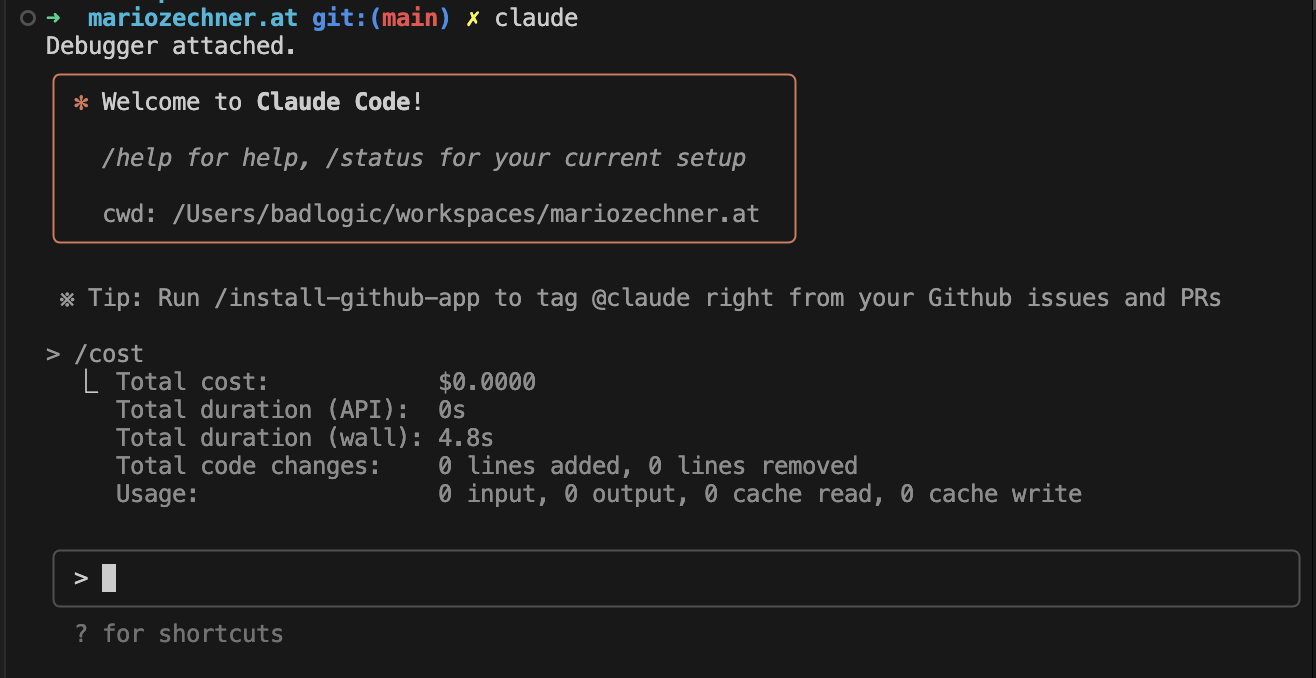
  "articleBody": "![](https://mariozechner.at/posts/2025-08-06-cc-antidebug/media/header.png)\\\ncc-antidebug patches\n\n- [No debugging allowed](https://mariozechner.at/posts/2025-08-06-cc-antidebug#toc_0)\n- [But at what cost?](https://mariozechner.at/posts/2025-08-06-cc-antidebug#toc_1)\n- [Patch all the things](https://mariozechner.at/posts/2025-08-06-cc-antidebug#toc_2)\n- [cc-antidebug](https://mariozechner.at/posts/2025-08-06-cc-antidebug#toc_3)\n  - [CLI Usage](https://mariozechner.at/posts/2025-08-06-cc-antidebug#toc_4)\n  - [Programmatic Usage](https://mariozechner.at/posts/2025-08-06-cc-antidebug#toc_5)\n- [Results](https://mariozechner.at/posts/2025-08-06-cc-antidebug#toc_6)\n- [What else can we do?](https://mariozechner.at/posts/2025-08-06-cc-antidebug#toc_7)\n\nI love Claude Code, it's really good, but it also has some annoyances.\n\n## No debugging allowed\n\nI've recently looked into using the [Claude Code SDK](https://docs.anthropic.com/en/docs/claude-code/sdk). The SDK comes in different flavors. The simplest one is just invoking Claude on the CLI with `--print`. There's also a TypeScript SDK and a Python SDK. Both of these basically spawn Claude Code as a child process and then communicate with it via stdin and stdout.\n\nWhen you debug a Node.js app that uses the Claude Code TypeScript SDK, the SDK call will fail. Claude Code has anti-debugging functionality that detects if a debugger is attached. When I use VS Code's JavaScript Debug Terminal, it sets environment variables that get inherited through the process tree. The spawned Claude Code process sees these debugger environment variables and immediately exits. This is very annoying.\n\n## But at what cost?\n\nIf you type `/cost` into Claude Code logged in through your Pro or Max plan, Claude Code will not show you the token usage and cost of the current session. Instead, you'll be greeted with a little message that tells you, basically, don't worry your little head about it. You have a plan. You don't need to know the numbers. Numbers are bad for you. That too is very annoying.\n\n## Patch all the things\n\nI've already managed to disable the anti-debugging inside of Claude Code, as you've learned by reading my [last amazing blog post in full](https://mariozechner.at/posts/2025-08-03-cchistory/). The way I approach this mirrors how I would approach patching a native executable. It's just way easier with JavaScript.\n\nFirst I formatted the Claude Code executable using Biome. Then I searched for strings that would be used to detect a debugger being attached to the Node.js process, like `--inspect-brk`. Once I found the function that does the anti-debugging check, I just wrote a little function using unholy regex to rip out the checks and replace them with no-ops. The function now tells Claude Code, \"nope, no debugging here. Everything's totally fine.\"\n\nThe same principle can be applied to allowing `/cost` to show us token usage and costs, even if we are logged in with a Max plan. Claude Code will output this string: \"With your Claude Max subscription, no need to monitor cost — your subscription includes Claude Code usage\". So again, I just locate the string in the formatted binary, look at the context surrounding it, and write a bunch more unholy regexes to replace it with a no-op that says: \"No plan here. You can totally go ahead and just show the token usage and cost. Numbers are good now.\"\n\n## cc-antidebug\n\nNow I like tools that just do the thing and I don't have to think about it. And I like to share my tools. Which is why I've built [cc-antidebug](https://github.com/badlogic/cc-antidebug) which is now available on NPM. Here's how you can use it.\n\n### CLI Usage\n\nJust want to patch your global install once? Use this. And you can also restore the original binary. Note that Claude Code will update every now and then. You'll need to reapply the patch.\n\n```bash\n# Apply the patch\nnpx @mariozechner/cc-antidebug patch\n\n# Restore the original binary\nnpx @mariozechner/cc-antidebug restore\n```\n\n### Programmatic Usage\n\nYou can also use it inside your Node.js apps. This is relevant for CI and other similar use cases where you want to just temporarily patch and restore the unpatched version again:\n\n```bash\nnpm install @mariozechner/cc-antidebug\n```\n\n```javascript\nimport { patchClaudeBinary, restoreClaudeBinary } from \"@mariozechner/cc-antidebug\";\n\n// Apply the patch\npatchClaudeBinary();\n\n// Do your debugging work here...\n\n// Restore the original\nrestoreClaudeBinary();\n```\n\n## Results\n\n## What else can we do?\n\nWell, I suppose the sky is the limit. Even though the source code is obfuscated and minified, it's still pretty readable (after formatting with Biome). And if you can't read it or follow the execution flow, just give it to Claude. If you patch your Claude Code installation with cc-antidebug, you can even debug interactive Claude Code sessions. That way you can identify and eliminate other annoyances. Of course, Claude Code changes over time so your patches might not apply until the heat death of the universe. But it's easy enough to update your patches for new Claude Code versions.\n\nThis page respects your privacy by not using cookies or similar technologies and by not collecting any personally identifiable information.\n",
  "authors": [],
  "captured_at": "2026-09-27T19:29:15.293681927+00:00",
  "category": "programming",
  "content_html": "<figure class=\"article-figure\"><picture class=\"article-picture article-picture-fallback\" style=\"--image-ratio:16 / 9\"><img src=\"https://mariozechner.at/posts/2025-08-06-cc-antidebug/media/header.png\" alt=\"\" loading=\"eager\" decoding=\"async\" fetchpriority=\"high\" referrerpolicy=\"no-referrer\" class=\"progressive-image\"></picture><figcaption>cc-antidebug patches</figcaption></figure>\n<ul>\n<li><a target=\"_blank\" rel=\"noopener noreferrer\" href=\"https://mariozechner.at/posts/2025-08-06-cc-antidebug#toc_0\">No debugging allowed</a></li>\n<li><a target=\"_blank\" rel=\"noopener noreferrer\" href=\"https://mariozechner.at/posts/2025-08-06-cc-antidebug#toc_1\">But at what cost?</a></li>\n<li><a target=\"_blank\" rel=\"noopener noreferrer\" href=\"https://mariozechner.at/posts/2025-08-06-cc-antidebug#toc_2\">Patch all the things</a></li>\n<li><a target=\"_blank\" rel=\"noopener noreferrer\" href=\"https://mariozechner.at/posts/2025-08-06-cc-antidebug#toc_3\">cc-antidebug</a>\n<ul>\n<li><a target=\"_blank\" rel=\"noopener noreferrer\" href=\"https://mariozechner.at/posts/2025-08-06-cc-antidebug#toc_4\">CLI Usage</a></li>\n<li><a target=\"_blank\" rel=\"noopener noreferrer\" href=\"https://mariozechner.at/posts/2025-08-06-cc-antidebug#toc_5\">Programmatic Usage</a></li>\n</ul>\n</li>\n<li><a target=\"_blank\" rel=\"noopener noreferrer\" href=\"https://mariozechner.at/posts/2025-08-06-cc-antidebug#toc_6\">Results</a></li>\n<li><a target=\"_blank\" rel=\"noopener noreferrer\" href=\"https://mariozechner.at/posts/2025-08-06-cc-antidebug#toc_7\">What else can we do?</a></li>\n</ul>\n<p>I love Claude Code, it's really good, but it also has some annoyances.</p>\n<h2>No debugging allowed</h2>\n<p>I've recently looked into using the <a target=\"_blank\" rel=\"noopener noreferrer\" href=\"https://docs.anthropic.com/en/docs/claude-code/sdk\">Claude Code SDK</a>. The SDK comes in different flavors. The simplest one is just invoking Claude on the CLI with <code>--print</code>. There's also a TypeScript SDK and a Python SDK. Both of these basically spawn Claude Code as a child process and then communicate with it via stdin and stdout.</p>\n<p>When you debug a Node.js app that uses the Claude Code TypeScript SDK, the SDK call will fail. Claude Code has anti-debugging functionality that detects if a debugger is attached. When I use VS Code's JavaScript Debug Terminal, it sets environment variables that get inherited through the process tree. The spawned Claude Code process sees these debugger environment variables and immediately exits. This is very annoying.</p>\n<h2>But at what cost?</h2>\n<p>If you type <code>/cost</code> into Claude Code logged in through your Pro or Max plan, Claude Code will not show you the token usage and cost of the current session. Instead, you'll be greeted with a little message that tells you, basically, don't worry your little head about it. You have a plan. You don't need to know the numbers. Numbers are bad for you. That too is very annoying.</p>\n<h2>Patch all the things</h2>\n<p>I've already managed to disable the anti-debugging inside of Claude Code, as you've learned by reading my <a target=\"_blank\" rel=\"noopener noreferrer\" href=\"https://mariozechner.at/posts/2025-08-03-cchistory/\">last amazing blog post in full</a>. The way I approach this mirrors how I would approach patching a native executable. It's just way easier with JavaScript.</p>\n<p>First I formatted the Claude Code executable using Biome. Then I searched for strings that would be used to detect a debugger being attached to the Node.js process, like <code>--inspect-brk</code>. Once I found the function that does the anti-debugging check, I just wrote a little function using unholy regex to rip out the checks and replace them with no-ops. The function now tells Claude Code, &quot;nope, no debugging here. Everything's totally fine.&quot;</p>\n<p>The same principle can be applied to allowing <code>/cost</code> to show us token usage and costs, even if we are logged in with a Max plan. Claude Code will output this string: &quot;With your Claude Max subscription, no need to monitor cost — your subscription includes Claude Code usage&quot;. So again, I just locate the string in the formatted binary, look at the context surrounding it, and write a bunch more unholy regexes to replace it with a no-op that says: &quot;No plan here. You can totally go ahead and just show the token usage and cost. Numbers are good now.&quot;</p>\n<h2>cc-antidebug</h2>\n<p>Now I like tools that just do the thing and I don't have to think about it. And I like to share my tools. Which is why I've built <a target=\"_blank\" rel=\"noopener noreferrer\" href=\"https://github.com/badlogic/cc-antidebug\">cc-antidebug</a> which is now available on NPM. Here's how you can use it.</p>\n<h3>CLI Usage</h3>\n<p>Just want to patch your global install once? Use this. And you can also restore the original binary. Note that Claude Code will update every now and then. You'll need to reapply the patch.</p>\n<pre><code class=\"language-bash\"><span class=\"code-snippet\" data-language=\"Shell\"><span class=\"syntax-source syntax-shell syntax-bash\"><span class=\"syntax-comment syntax-line syntax-number-sign syntax-shell\"><span class=\"syntax-punctuation syntax-definition syntax-comment syntax-begin syntax-shell\">#</span></span><span class=\"syntax-comment syntax-line syntax-number-sign syntax-shell\"> Apply the patch</span><span class=\"syntax-comment syntax-line syntax-number-sign syntax-shell\">\n</span><span class=\"syntax-meta syntax-function-call syntax-shell\"><span class=\"syntax-variable syntax-function syntax-shell\">npx</span></span><span class=\"syntax-meta syntax-function-call syntax-arguments syntax-shell\"> @mariozechner/cc-antidebug patch</span>\n\n<span class=\"syntax-comment syntax-line syntax-number-sign syntax-shell\"><span class=\"syntax-punctuation syntax-definition syntax-comment syntax-begin syntax-shell\">#</span></span><span class=\"syntax-comment syntax-line syntax-number-sign syntax-shell\"> Restore the original binary</span><span class=\"syntax-comment syntax-line syntax-number-sign syntax-shell\">\n</span><span class=\"syntax-meta syntax-function-call syntax-shell\"><span class=\"syntax-variable syntax-function syntax-shell\">npx</span></span><span class=\"syntax-meta syntax-function-call syntax-arguments syntax-shell\"> @mariozechner/cc-antidebug restore</span>\n</span></span></code></pre>\n<h3>Programmatic Usage</h3>\n<p>You can also use it inside your Node.js apps. This is relevant for CI and other similar use cases where you want to just temporarily patch and restore the unpatched version again:</p>\n<pre><code class=\"language-bash\"><span class=\"code-snippet\" data-language=\"Shell\"><span class=\"syntax-source syntax-shell syntax-bash\"><span class=\"syntax-meta syntax-function-call syntax-shell\"><span class=\"syntax-variable syntax-function syntax-shell\">npm</span></span><span class=\"syntax-meta syntax-function-call syntax-arguments syntax-shell\"> install @mariozechner/cc-antidebug</span>\n</span></span></code></pre>\n<pre><code class=\"language-javascript\"><span class=\"code-snippet\" data-language=\"JavaScript\"><span class=\"syntax-source syntax-js\"><span class=\"syntax-meta syntax-import syntax-js\"><span class=\"syntax-keyword syntax-control syntax-import-export syntax-js\">import</span> <span class=\"syntax-meta syntax-block syntax-js\"><span class=\"syntax-punctuation syntax-section syntax-block syntax-js\">{</span> <span class=\"syntax-variable syntax-other syntax-readwrite syntax-js\">patchClaudeBinary</span><span class=\"syntax-punctuation syntax-separator syntax-comma syntax-js\">,</span> <span class=\"syntax-variable syntax-other syntax-readwrite syntax-js\">restoreClaudeBinary</span> <span class=\"syntax-punctuation syntax-section syntax-block syntax-js\">}</span></span> <span class=\"syntax-keyword syntax-control syntax-import-export syntax-js\">from</span> <span class=\"syntax-string syntax-quoted syntax-double syntax-js\"><span class=\"syntax-punctuation syntax-definition syntax-string syntax-begin syntax-js\">&quot;</span>@mariozechner/cc-antidebug<span class=\"syntax-punctuation syntax-definition syntax-string syntax-end syntax-js\">&quot;</span></span></span><span class=\"syntax-punctuation syntax-terminator syntax-statement syntax-js\">;</span>\n\n<span class=\"syntax-comment syntax-line syntax-double-slash syntax-js\"><span class=\"syntax-punctuation syntax-definition syntax-comment syntax-js\">//</span> Apply the patch\n</span><span class=\"syntax-meta syntax-function-call syntax-js\"><span class=\"syntax-variable syntax-function syntax-js\">patchClaudeBinary</span><span class=\"syntax-meta syntax-group syntax-js\"><span class=\"syntax-punctuation syntax-section syntax-group syntax-js\">(</span></span><span class=\"syntax-meta syntax-group syntax-js\"><span class=\"syntax-punctuation syntax-section syntax-group syntax-js\">)</span></span></span><span class=\"syntax-punctuation syntax-terminator syntax-statement syntax-js\">;</span>\n\n<span class=\"syntax-comment syntax-line syntax-double-slash syntax-js\"><span class=\"syntax-punctuation syntax-definition syntax-comment syntax-js\">//</span> Do your debugging work here...\n</span>\n<span class=\"syntax-comment syntax-line syntax-double-slash syntax-js\"><span class=\"syntax-punctuation syntax-definition syntax-comment syntax-js\">//</span> Restore the original\n</span><span class=\"syntax-meta syntax-function-call syntax-js\"><span class=\"syntax-variable syntax-function syntax-js\">restoreClaudeBinary</span><span class=\"syntax-meta syntax-group syntax-js\"><span class=\"syntax-punctuation syntax-section syntax-group syntax-js\">(</span></span><span class=\"syntax-meta syntax-group syntax-js\"><span class=\"syntax-punctuation syntax-section syntax-group syntax-js\">)</span></span></span><span class=\"syntax-punctuation syntax-terminator syntax-statement syntax-js\">;</span>\n</span></span></code></pre>\n<h2>Results</h2>\n<h2>What else can we do?</h2>\n<p>Well, I suppose the sky is the limit. Even though the source code is obfuscated and minified, it's still pretty readable (after formatting with Biome). And if you can't read it or follow the execution flow, just give it to Claude. If you patch your Claude Code installation with cc-antidebug, you can even debug interactive Claude Code sessions. That way you can identify and eliminate other annoyances. Of course, Claude Code changes over time so your patches might not apply until the heat death of the universe. But it's easy enough to update your patches for new Claude Code versions.</p>\n<p>This page respects your privacy by not using cookies or similar technologies and by not collecting any personally identifiable information.</p>\n",
  "content_markdown": "![](https://mariozechner.at/posts/2025-08-06-cc-antidebug/media/header.png)\\\ncc-antidebug patches\n\n- [No debugging allowed](https://mariozechner.at/posts/2025-08-06-cc-antidebug#toc_0)\n- [But at what cost?](https://mariozechner.at/posts/2025-08-06-cc-antidebug#toc_1)\n- [Patch all the things](https://mariozechner.at/posts/2025-08-06-cc-antidebug#toc_2)\n- [cc-antidebug](https://mariozechner.at/posts/2025-08-06-cc-antidebug#toc_3)\n  - [CLI Usage](https://mariozechner.at/posts/2025-08-06-cc-antidebug#toc_4)\n  - [Programmatic Usage](https://mariozechner.at/posts/2025-08-06-cc-antidebug#toc_5)\n- [Results](https://mariozechner.at/posts/2025-08-06-cc-antidebug#toc_6)\n- [What else can we do?](https://mariozechner.at/posts/2025-08-06-cc-antidebug#toc_7)\n\nI love Claude Code, it's really good, but it also has some annoyances.\n\n## No debugging allowed\n\nI've recently looked into using the [Claude Code SDK](https://docs.anthropic.com/en/docs/claude-code/sdk). The SDK comes in different flavors. The simplest one is just invoking Claude on the CLI with `--print`. There's also a TypeScript SDK and a Python SDK. Both of these basically spawn Claude Code as a child process and then communicate with it via stdin and stdout.\n\nWhen you debug a Node.js app that uses the Claude Code TypeScript SDK, the SDK call will fail. Claude Code has anti-debugging functionality that detects if a debugger is attached. When I use VS Code's JavaScript Debug Terminal, it sets environment variables that get inherited through the process tree. The spawned Claude Code process sees these debugger environment variables and immediately exits. This is very annoying.\n\n## But at what cost?\n\nIf you type `/cost` into Claude Code logged in through your Pro or Max plan, Claude Code will not show you the token usage and cost of the current session. Instead, you'll be greeted with a little message that tells you, basically, don't worry your little head about it. You have a plan. You don't need to know the numbers. Numbers are bad for you. That too is very annoying.\n\n## Patch all the things\n\nI've already managed to disable the anti-debugging inside of Claude Code, as you've learned by reading my [last amazing blog post in full](https://mariozechner.at/posts/2025-08-03-cchistory/). The way I approach this mirrors how I would approach patching a native executable. It's just way easier with JavaScript.\n\nFirst I formatted the Claude Code executable using Biome. Then I searched for strings that would be used to detect a debugger being attached to the Node.js process, like `--inspect-brk`. Once I found the function that does the anti-debugging check, I just wrote a little function using unholy regex to rip out the checks and replace them with no-ops. The function now tells Claude Code, \"nope, no debugging here. Everything's totally fine.\"\n\nThe same principle can be applied to allowing `/cost` to show us token usage and costs, even if we are logged in with a Max plan. Claude Code will output this string: \"With your Claude Max subscription, no need to monitor cost — your subscription includes Claude Code usage\". So again, I just locate the string in the formatted binary, look at the context surrounding it, and write a bunch more unholy regexes to replace it with a no-op that says: \"No plan here. You can totally go ahead and just show the token usage and cost. Numbers are good now.\"\n\n## cc-antidebug\n\nNow I like tools that just do the thing and I don't have to think about it. And I like to share my tools. Which is why I've built [cc-antidebug](https://github.com/badlogic/cc-antidebug) which is now available on NPM. Here's how you can use it.\n\n### CLI Usage\n\nJust want to patch your global install once? Use this. And you can also restore the original binary. Note that Claude Code will update every now and then. You'll need to reapply the patch.\n\n```bash\n# Apply the patch\nnpx @mariozechner/cc-antidebug patch\n\n# Restore the original binary\nnpx @mariozechner/cc-antidebug restore\n```\n\n### Programmatic Usage\n\nYou can also use it inside your Node.js apps. This is relevant for CI and other similar use cases where you want to just temporarily patch and restore the unpatched version again:\n\n```bash\nnpm install @mariozechner/cc-antidebug\n```\n\n```javascript\nimport { patchClaudeBinary, restoreClaudeBinary } from \"@mariozechner/cc-antidebug\";\n\n// Apply the patch\npatchClaudeBinary();\n\n// Do your debugging work here...\n\n// Restore the original\nrestoreClaudeBinary();\n```\n\n## Results\n\n## What else can we do?\n\nWell, I suppose the sky is the limit. Even though the source code is obfuscated and minified, it's still pretty readable (after formatting with Biome). And if you can't read it or follow the execution flow, just give it to Claude. If you patch your Claude Code installation with cc-antidebug, you can even debug interactive Claude Code sessions. That way you can identify and eliminate other annoyances. Of course, Claude Code changes over time so your patches might not apply until the heat death of the universe. But it's easy enough to update your patches for new Claude Code versions.\n\nThis page respects your privacy by not using cookies or similar technologies and by not collecting any personally identifiable information.\n",
  "dateCreated": "2026-09-27T19:29:15.293681927+00:00",
  "date_created": "2025-08-06T00:00:00+00:00",
  "date_modified": "2025-08-06T00:00:00+00:00",
  "date_published": "2025-08-06T00:00:00+00:00",
  "description": "cc-antidebug patches Claude Code to enable Node.js debugger support for SDK-based apps and restores the /cost command functionality for Max plan users",
  "external_url": "https://mariozechner.at/posts/2025-08-06-cc-antidebug",
  "git": {
    "commit": "ebb0941c5c06a2ab2377342d607535262a3e969e",
    "path": "items/mariozechner-at/2025/08/2025-08-06-patching-claude-code-for-debugging-and-cost-support-for-max.md",
    "permalink": "https://github.com/aymericbeaumet/aggr-instance/blob/ebb0941c5c06a2ab2377342d607535262a3e969e/items/mariozechner-at/2025/08/2025-08-06-patching-claude-code-for-debugging-and-cost-support-for-max.md"
  },
  "id": "urn:aggr:item:0e065cfc6c591d949f0f2e6b3c8fcc19fcdff8f7",
  "isBasedOn": {
    "@id": "https://mariozechner.at/posts/2025-08-06-cc-antidebug"
  },
  "mainEntity": {
    "@id": "https://mariozechner.at/posts/2025-08-06-cc-antidebug",
    "@type": "CreativeWork",
    "archivedAt": {
      "@id": "https://aggr.aymericbeaumet.com/items/mariozechner-at/2025-08-06-patching-claude-code-for-debugging-and-cost-support-for-max/#webpage"
    },
    "dateModified": "2025-08-06T00:00:00+00:00",
    "datePublished": "2025-08-06T00:00:00+00:00",
    "headline": "Patching Claude Code for debugging and /cost support for Max users",
    "timeRequired": "PT4M",
    "url": "https://mariozechner.at/posts/2025-08-06-cc-antidebug",
    "wordCount": 747
  },
  "name": "Archived snapshot: Patching Claude Code for debugging and /cost support for Max users",
  "preview": null,
  "reading_minutes": 4,
  "replicated_at": null,
  "source": "mariozechner-at",
  "source_name": "{ Mario Zechner }",
  "summary": "cc-antidebug patches Claude Code to enable Node.js debugger support for SDK-based apps and restores the /cost command functionality for Max plan users",
  "tags": [],
  "temporalCoverage": "2026-09-27T19:29:15.293681927+00:00",
  "title": "Patching Claude Code for debugging and /cost support for Max users",
  "url": "https://aggr.aymericbeaumet.com/items/mariozechner-at/2025-08-06-patching-claude-code-for-debugging-and-cost-support-for-max/",
  "word_count": 747
}