{
  "@context": "https://schema.org",
  "@id": "https://aggr.aymericbeaumet.com/items/huggingface-co/2026-08-12-introducing-olmoearth-embeddings-custom-embedding-exports/#webpage",
  "@type": [
    "WebPage",
    "ArchiveComponent"
  ],
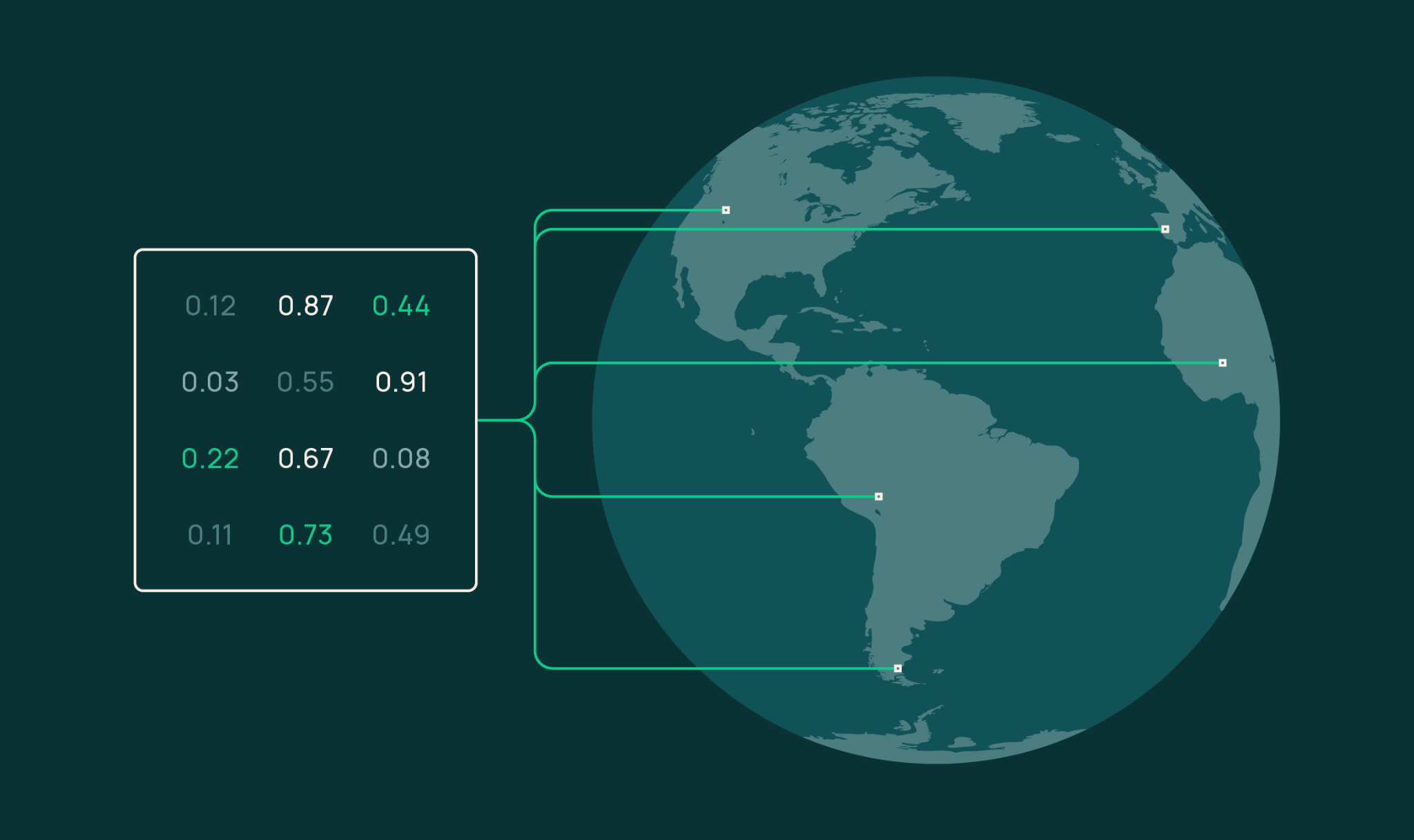
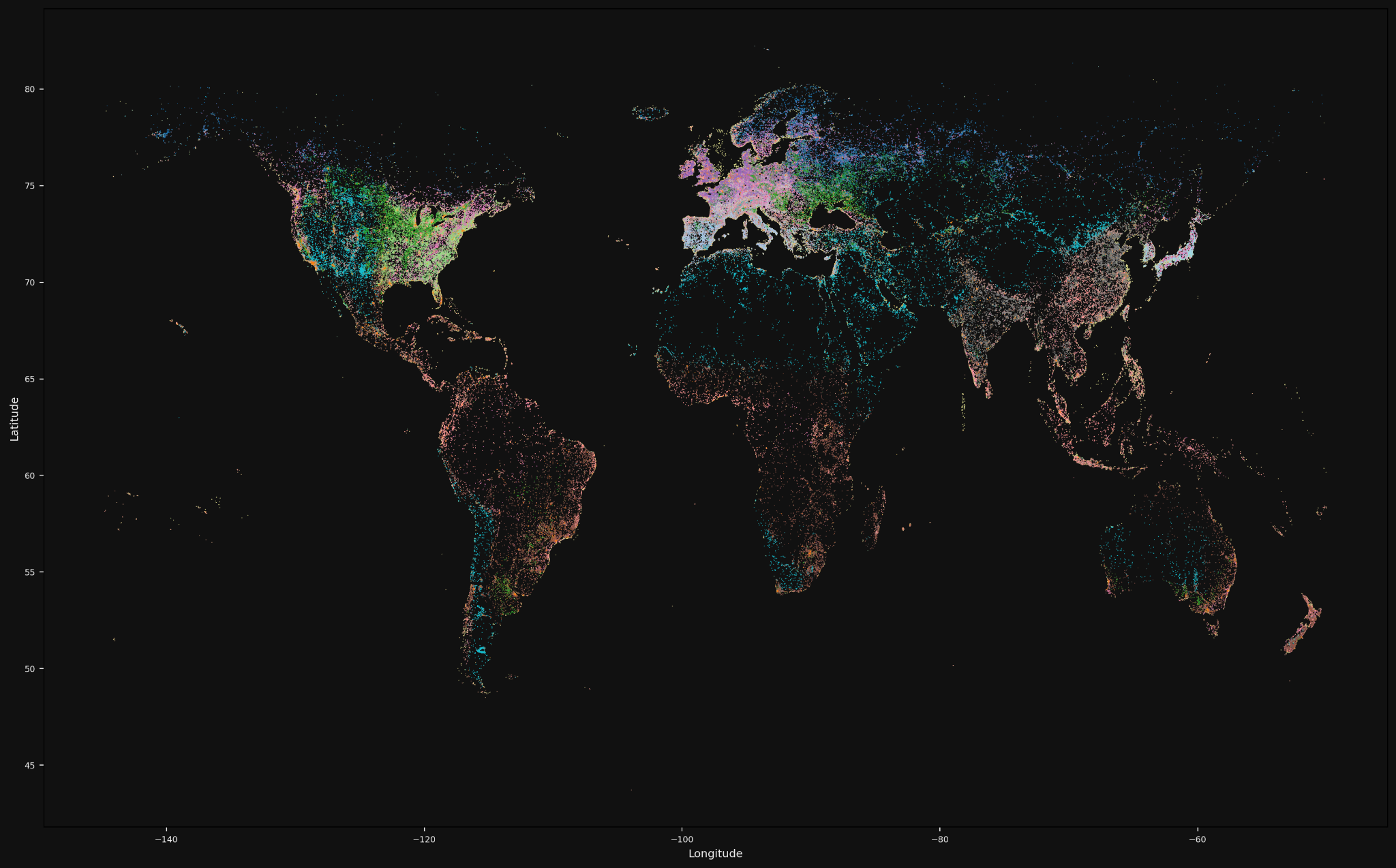
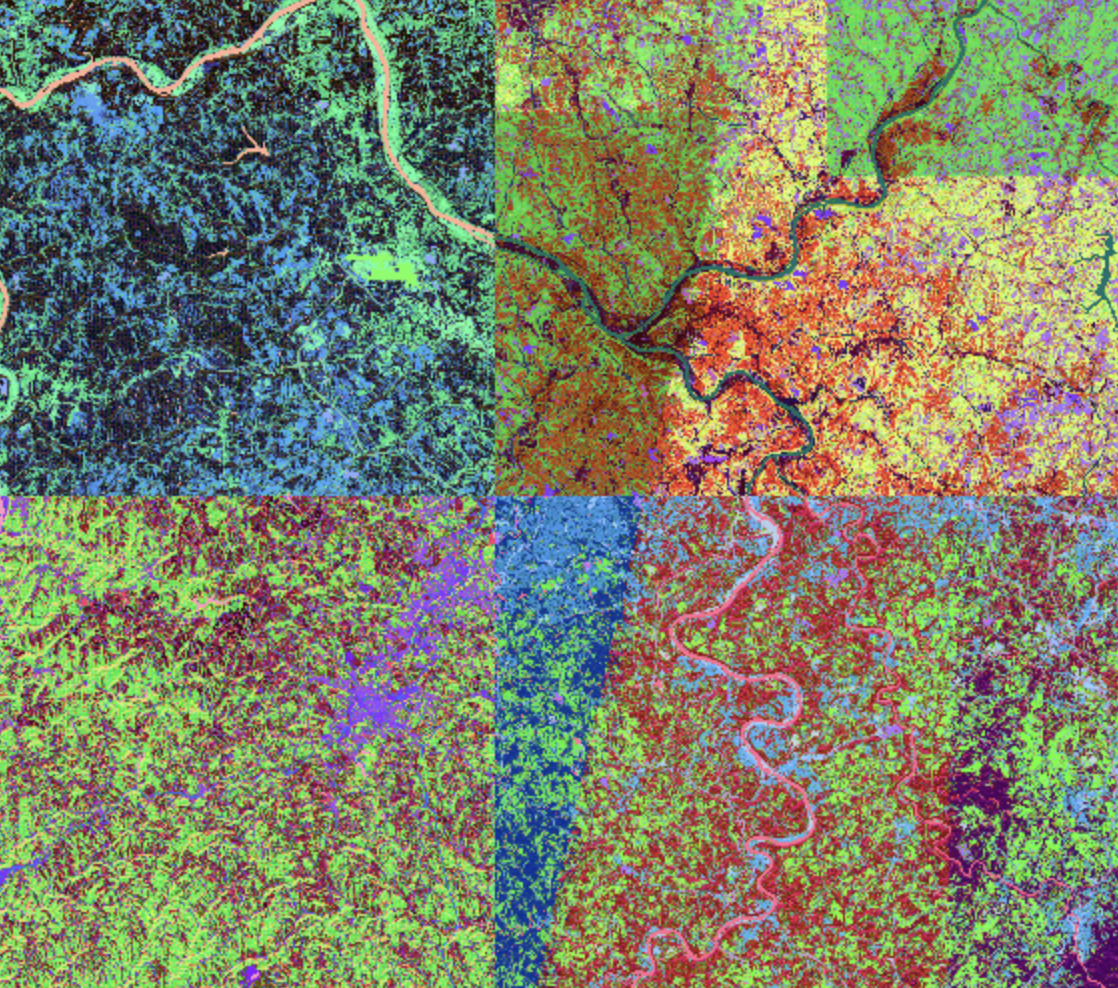
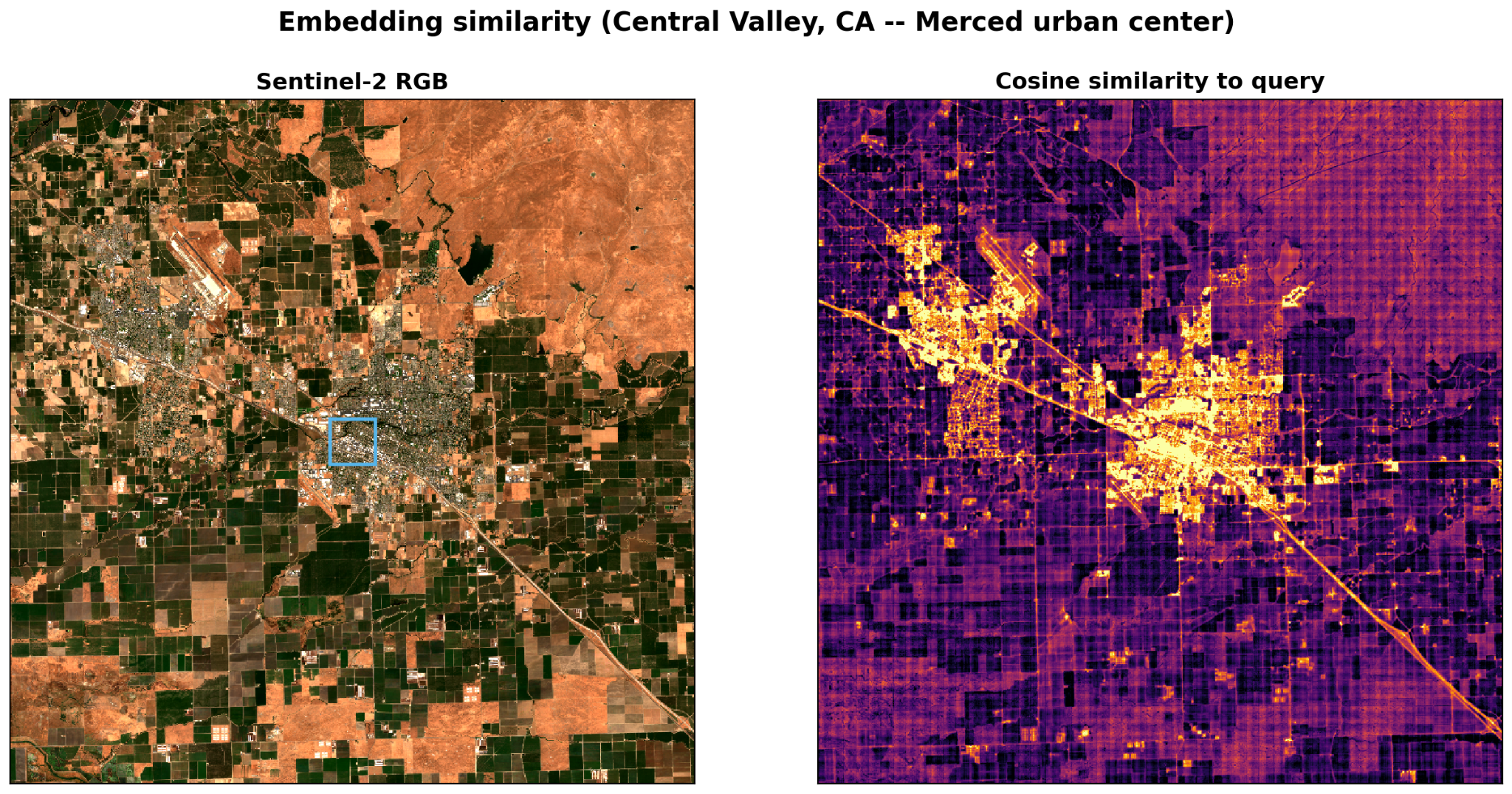
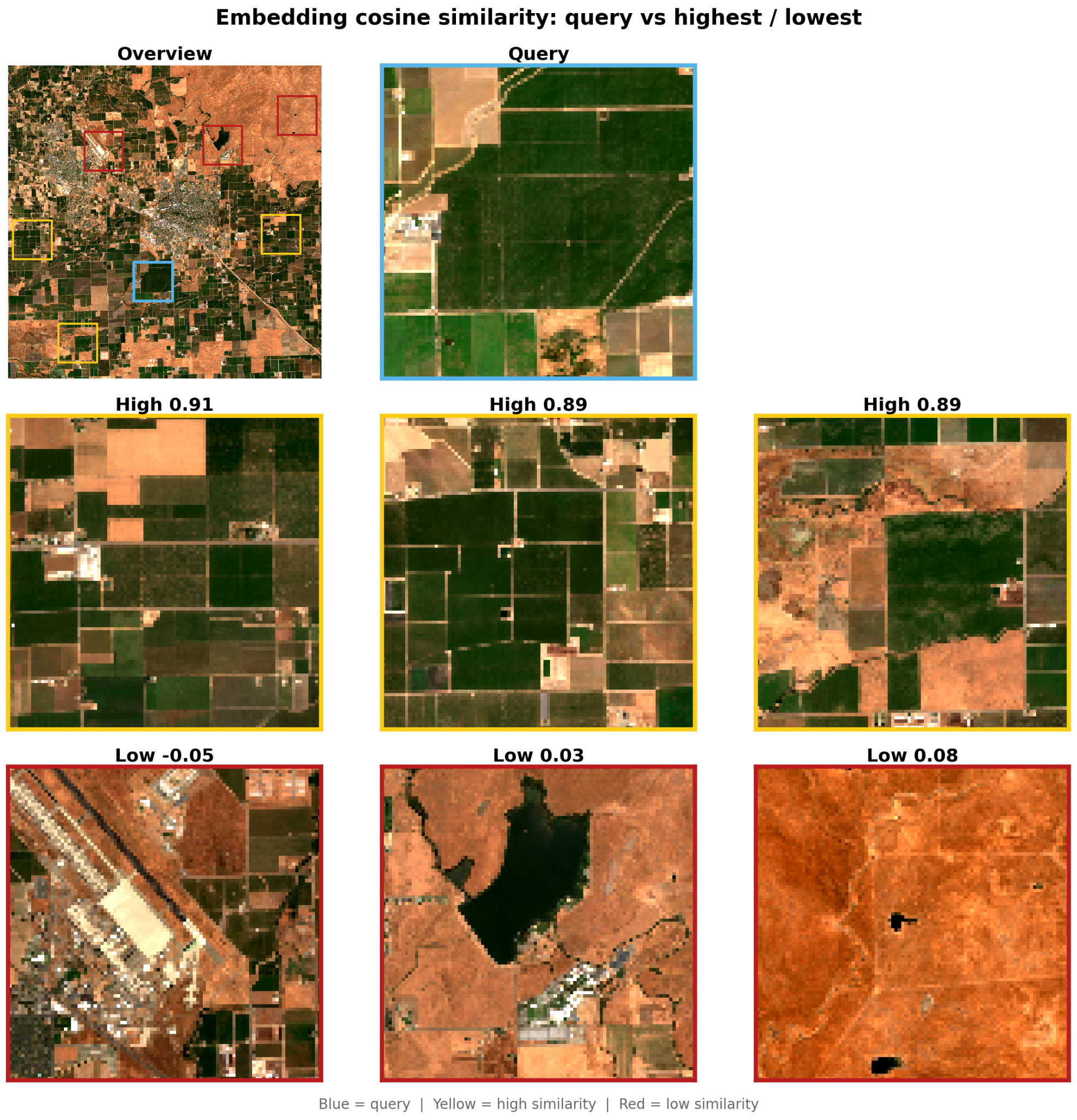
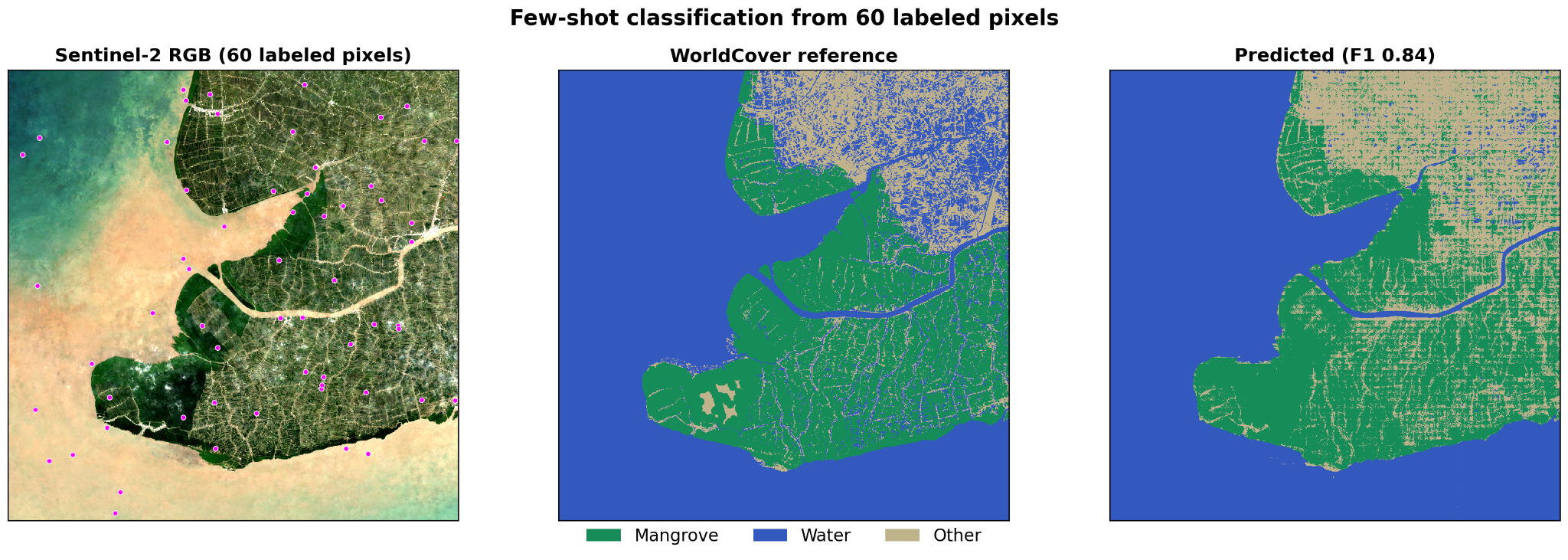
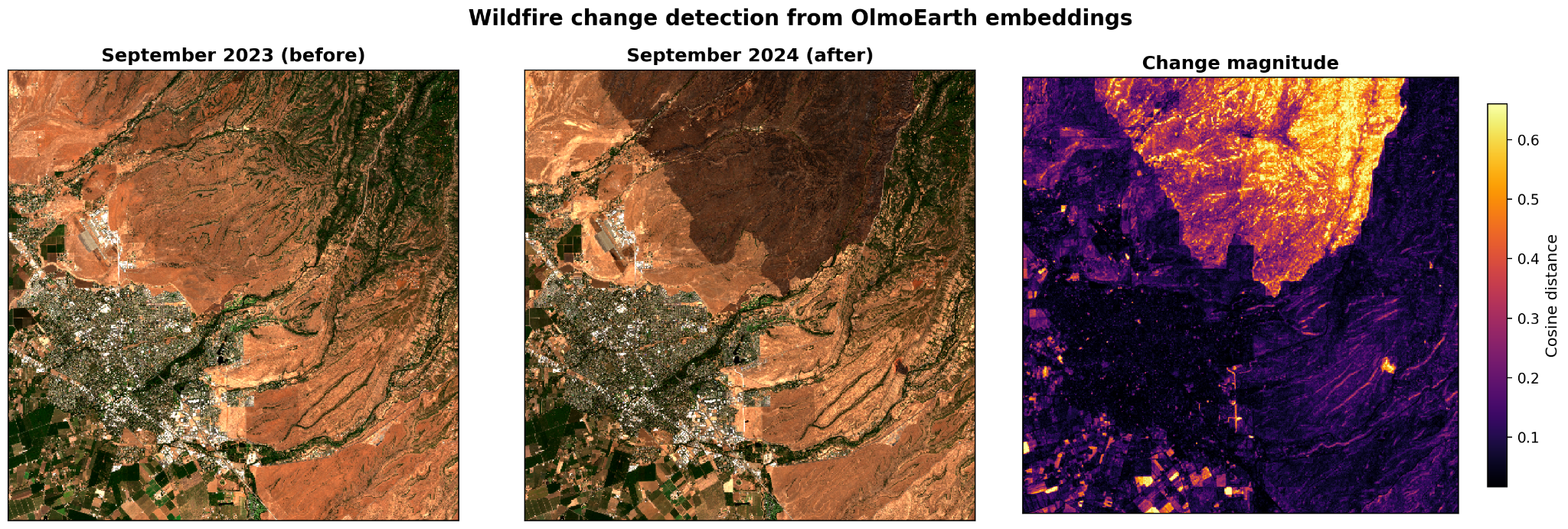
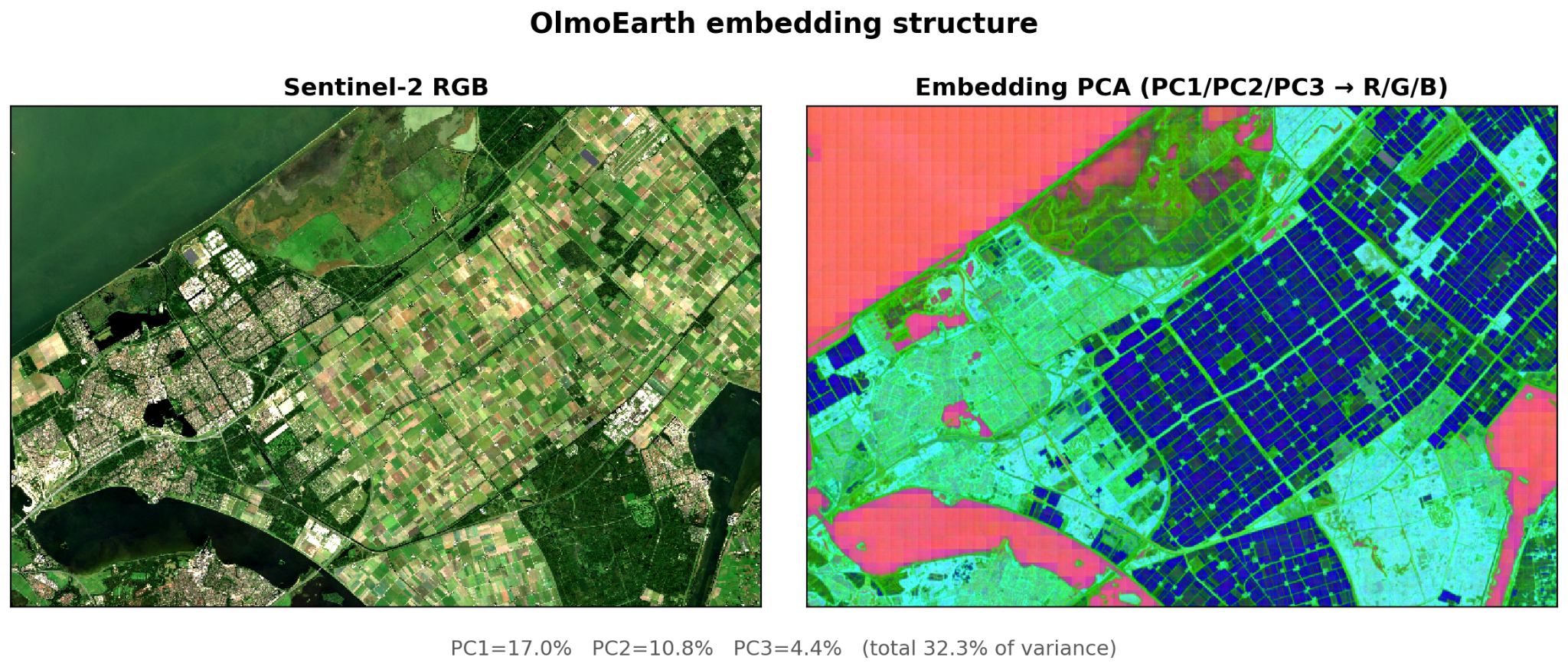
  "articleBody": "📄 Tech Report: [https://allenai.org/papers/olmoearth](https://allenai.org/papers/olmoearth) | 📊 Documentation: [https://docs.olmoearth.allenai.org/embeddings](https://docs.olmoearth.allenai.org/embeddings) | 💻 Learn more about OlmoEarth: [https://allenai.org/olmoearth](https://allenai.org/olmoearth)\n\n[![OlmoEarth embeddings concept illustration: a grid of numeric embedding values connected by lines to points on a globe](https://www.datocms-assets.com/64837/1776965297-olmoearth-embeddings-blog-google-docs-image-1.png)](https://www.datocms-assets.com/64837/1776965297-olmoearth-embeddings-blog-google-docs-image-1.png)\n\n[OlmoEarth Studio](https://olmoearth.allenai.org/), our platform for building Earth observation models, now lets you compute and export **embedding vectors**—compact numerical representations of Earth-observation data produced by our open source OlmoEarth foundation models. The [source code](https://github.com/allenai/olmoearth_pretrain) and [model weights](https://huggingface.co/collections/allenai/olmoearth) are publicly available alongside the [research paper](https://allenai.org/papers/olmoearth), so the community can inspect exactly how these embeddings are generated.\n\nEmbeddings are a fast, cost-effective entry point for leveraging OlmoEarth: they support a wide range of downstream tasks, from similarity search to segmentation to unsupervised exploration. Locations with similar surface characteristics end up with similar vectors; locations that differ land far apart. OlmoEarth embeddings have shown strong performance in our own benchmarking and in [independent evaluations](https://arxiv.org/abs/2603.02080). The exported Cloud-Optimized GeoTIFFs (COGs) are lightweight and easy to share. Choose your area of interest, time range, encoder variant, resolution, and imagery sources via the Studio UI or API, and get back a COG you can use however you like. If your application requires higher performance, Studio also supports [supervised fine-tuning (SFT)](https://docs.olmoearth.allenai.org/model-fine-tuning).\n\nCustom-computed embeddings are now available for users of OlmoEarth Studio. [Reach out](https://allenai.org/olmoearth) if you're interested in gaining access. Instructions for using the publicly available OlmoEarth models to compute your own embeddings are available [here](https://github.com/allenai/rslearn/blob/master/docs/examples/OlmoEarthEmbeddings.md).\n\n## Computing embeddings in Studio\n\n[![World map of OlmoEarth embeddings with each land pixel colored by its k-means cluster, revealing coherent biome and land-cover structure across continents](https://www.datocms-assets.com/64837/1776965912-olmoearth-embeddings-blog-google-docs-image-2-1.png)](https://www.datocms-assets.com/64837/1776965912-olmoearth-embeddings-blog-google-docs-image-2-1.png)\n\n*Global structure in OlmoEarth embeddings from seasonal Sentinel-2 imagery across 1.1M samples. Colors indicate 15 k-means clusters in a PCA-reduced embedding space.*\n\nComputing embeddings follows the same workflow as any other prediction in Studio. First configure a model and run it, and then download the results. Several parameters tailor the output:\n\n- **Area of interest:** Draw or upload any polygon; Studio handles imagery acquisition and tiling.\n- **Time span:** 1-12 monthly periods.\n- **Encoder variant:** Nano (128-dim, 1.4M params), Tiny (192-dim, 6.2M params), or Base (768-dim, 89M params).\n- **Spatial resolution:** 10 meter, 20 meter, 40 meter, or 80 meter per pixel.\n- **Imagery sources:** Sentinel-2 L2A, Sentinel-1 RTC, or both.\n\n[![Four false-color renderings of the same embedding raster side by side, each mapping the embedding bands to color differently](https://www.datocms-assets.com/64837/1776966011-olmoearth-embeddings-blog-google-docs-image-3.png)](https://www.datocms-assets.com/64837/1776966011-olmoearth-embeddings-blog-google-docs-image-3.png)\n\n*Different visualization options applied to the same embedding raster.*\n\nStudio delivers a COG with one band per embedding dimension. Vectors are stored as **signed 8-bit integers** (int8). Values range from -127 to +127, with -128 reserved for nodata. To recover floating-point vectors, see [dequantize\\_embeddings](https://github.com/allenai/olmoearth_pretrain/blob/main/olmoearth_pretrain/evals/embedding_transforms.py) in olmoearth\\_pretrain.\n\nBecause everything is computed on demand rather than pulled from a pre-computed global archive, your embeddings reflect exactly the conditions you care about. You can generate monthly embeddings to capture seasonal dynamics, not just annual snapshots.\n\n## What you can do with OlmoEarth embeddings\n\nThe examples below all use OlmoEarth-v1-Tiny (192-dim) embeddings at 40-meter resolution with Sentinel-2 L2A composites (annual for most examples; monthly for change detection). Tiny is a lightweight encoder but still highly performant; for your own applications, you can swap it for a larger variant at the cost of higher compute and storage.\n\n### Similarity search: Finding \"more like this\"\n\nPick a query pixel, extract its embedding, and compute cosine similarity against every other pixel. The result is a heatmap showing where the landscape looks most and least like your query pixel.\n\n[![Sentinel-2 imagery of farmland around Merced, California with the query pixel boxed in blue, beside the matching cosine-similarity heatmap in which the urban core and road corridors glow yellow against dark cropland](https://www.datocms-assets.com/64837/1776966099-olmoearth-embeddings-blog-google-docs-image-4-2.png)](https://www.datocms-assets.com/64837/1776966099-olmoearth-embeddings-blog-google-docs-image-4-2.png)\n\nThis query sits near the Merced urban center in California. Urban fabric and road corridors light up coherently while agricultural parcels stay dark. The model distinguishes built-up surfaces from cropland without any labels.\n\nSwitching the query to a small agricultural window, we define the query vector as the mean of the embedding vectors over that window, then pull Sentinel-2 imagery at the highest- and lowest-similarity locations to see what the model treats as similar and dissimilar.\n\n[![Embedding cosine similarity, query versus highest and lowest: an overview tile and the blue query patch above three high-similarity agricultural patches at 0.91, 0.89, and 0.89, and three low-similarity patches at -0.05 (airport), 0.03 (reservoir), and 0.08 (arid rangeland)](https://www.datocms-assets.com/64837/1776966200-olmoearth-embeddings-blog-google-docs-image-5-2.png)](https://www.datocms-assets.com/64837/1776966200-olmoearth-embeddings-blog-google-docs-image-5-2.png)\n\nThe most similar patches (0.89 and above) are all agricultural parcels with irrigated fields. The least similar (around zero) are an airport with surrounding bare ground, a reservoir with dry terrain, and arid rangeland. No training data, no labels, just a dot product in embedding space.\n\n### Few-shot segmentation: Labeling the landscape\n\nSimilarity search tells you \"where is it like this?\" but sometimes you need discrete labels across a region. Because the representations are already rich, a simple linear classifier can produce a wall-to-wall land-cover map from very few labeled pixels.\n\nTo test this, we labeled just *60 pixels* (20 per class) over Ca Mau, Vietnam, a coastal mangrove region. Using [ESA WorldCover 2021](https://esa-worldcover.org/en) as the label source for three classes (mangrove, water, other), we randomly sampled 20 pixels per class, trained a logistic regression with per-feature standardization, and predicted every pixel in the region.\n\n[![Few-shot classification from 60 labeled pixels over Ca Mau, Vietnam: Sentinel-2 RGB, the ESA WorldCover reference map, and the predicted mangrove/water/other map at F1 0.84](https://www.datocms-assets.com/64837/1776966290-olmoearth-embeddings-blog-google-docs-image-6-2.png)](https://www.datocms-assets.com/64837/1776966290-olmoearth-embeddings-blog-google-docs-image-6-2.png)\n\nFrom 60 labeled pixels, the classifier produces a coherent map with *weighted F1 = 0.84*. Mangrove stands, tidal channels, and open water are delineated across the entire region. The classifier saturates quickly: increasing from 30 to 300 labels barely changes accuracy, because the embeddings are doing most of the heavy lifting.\n\nThe core of the analysis is a few lines of Python:\n\n```python\nimport rasterio\nimport numpy as np\nfrom sklearn.pipeline import make_pipeline\nfrom sklearn.preprocessing import StandardScaler\nfrom sklearn.linear_model import LogisticRegression\n\n# Load the 192-band embedding COG exported from Studio\nwith rasterio.open(\"embeddings.tif\") as ds:\n    emb = ds.read().astype(np.float32)  # (192, H, W)\n\nC, H, W = emb.shape\nX = emb.reshape(C, -1).T  # (H*W, 192)\n\n# Train on labeled pixels, predict everywhere\nclf = make_pipeline(StandardScaler(), LogisticRegression(max_iter=2000))\nclf.fit(X[train_idx], labels[train_idx])\nprediction = clf.predict(X).reshape(H, W)\n```\n\nThis is a *linear probe*, a standard evaluation for foundation models. The fact that a logistic regression over 192 dimensions recovers land-cover boundaries from so few labels means the Tiny encoder has organized these ecological distinctions during pretraining. Larger variants (Base, 768-dim) encode even richer representations.\n\nIf you have ground-truth polygons, field survey points, or a coarse existing map, you can train a similar classifier and produce a wall-to-wall map for your own region of interest.\n\n### Change detection: Spotting what shifted\n\nBecause Studio can generate embeddings at any temporal resolution (monthly through annual), you can compare two time periods directly to identify where surface conditions have changed. Below, we computed monthly Sentinel-2 embeddings for the same region in September 2023 and September 2024 and measured per-pixel cosine distance. The Park Fire (July-September 2024) burn scar in Butte County, California lights up immediately.\n\n[![Wildfire change detection from OlmoEarth embeddings: Sentinel-2 imagery of Butte County, California in September 2023 and September 2024, beside a cosine-distance map where the Park Fire burn scar glows orange and yellow](https://www.datocms-assets.com/64837/1776966463-olmoearth-embeddings-blog-google-docs-image-7-1.png)](https://www.datocms-assets.com/64837/1776966463-olmoearth-embeddings-blog-google-docs-image-7-1.png)\n\nNo labels or training required—just two embedding COGs and a few lines of Python.\n\n### Unsupervised exploration: Seeing what the model sees\n\nSometimes you have no query location or reference labels. You just want to understand what structure exists in the embeddings. Principal Component Analysis (PCA) is a clean way to do this: reduce to three dimensions, map to R/G/B, and display as a false-color image. Similar embeddings get similar colors automatically.\n\n[![OlmoEarth embedding structure over Flevoland, the Netherlands: Sentinel-2 RGB beside a PCA false-color image mapping PC1, PC2, and PC3 to red, green, and blue, which reproduces the polder parcel grid](https://www.datocms-assets.com/64837/1776966500-olmoearth-embeddings-blog-google-docs-image-8-2.png)](https://www.datocms-assets.com/64837/1776966500-olmoearth-embeddings-blog-google-docs-image-8-2.png)\n\nFlevoland, in the Netherlands, is a reclaimed polder landscape with a regular grid of agricultural parcels. The PCA false-color image reproduces those boundaries with high fidelity. Different crop types, water bodies, and urban areas each get distinct hues. The embedding has internalized landscape structure without ever being told what a parcel or crop is.\n\nThis kind of unsupervised view is a quick way to see what structure the model has picked up across your area of interest.\n\n### From export to insight\n\nSimilarity search, few-shot segmentation, change detection, and PCA exploration are simple operations on standard raster data that run in seconds. The power comes from the embeddings: learned representations that compress earth observation data into vectors capturing rich information about each location from many sensors and millions of training examples.\n\nCustom embedding exports are available now. Create a project, configure an embeddings model, and [compute your embeddings](https://docs.olmoearth.allenai.org/embeddings). The exported GeoTIFF works with any geospatial tool: QGIS, GDAL, rasterio, or your own scripts. For end-to-end code reproducing the examples in this post, see the [embeddings tutorial](https://github.com/allenai/olmoearth_projects/tree/main/tutorials/embeddings), which includes working code for [similarity search](https://github.com/allenai/olmoearth_projects/tree/main/tutorials/embeddings/src/olmoearth_embeddings_tutorial/similarity), [few-shot segmentation](https://github.com/allenai/olmoearth_projects/tree/main/tutorials/embeddings/src/olmoearth_embeddings_tutorial/segmentation), [change detection](https://github.com/allenai/olmoearth_projects/tree/main/tutorials/embeddings/src/olmoearth_embeddings_tutorial/change_detection), and [PCA visualization](https://github.com/allenai/olmoearth_projects/tree/main/tutorials/embeddings/src/olmoearth_embeddings_tutorial/pca). To get hands-on without any local setup, try the [Colab notebook](https://colab.research.google.com/drive/1JnhFn0IfDJEn49S4sKuCS-mv_b4T2tU0?usp=sharing).\n\n## Going further: fine-tuning\n\nThe examples in this post all use frozen embeddings with no task-specific training. Embeddings are a great entry point for leveraging OlmoEarth: they enable fast, cost-effective generation of results, work well in resource-constrained environments, and are easy to share. For applications that require higher performance, OlmoEarth Studio also supports [SFT](https://docs.olmoearth.allenai.org/model-fine-tuning), training a task-specific model head on your own labels, which typically outperforms linear probes on frozen features.\n\n### Limitations\n\nWhile we are always working to improve our pretraining approaches, it's important to check the quality of the embeddings for your use case using some of the techniques described above. Performance also depends on the quality of the input imagery—persistent cloud cover, atmospheric artifacts, or missing observations in the composite period can affect the resulting vectors.\n\n*Sentinel-2 L2A imagery from the European Space Agency, accessed via Microsoft Planetary Computer. ESA WorldCover 2021 v200 for mangrove reference. The global clustering visualization uses OlmoEarth-v1-Base (768-dim) with seasonal Sentinel-2 composites at patch size 8, instance-level embeddings over 1.1M pretraining samples.*\n",
  "authors": [],
  "captured_at": "2026-10-19T01:26:53.998049939+00:00",
  "category": "ai",
  "content_html": "<p>📄 Tech Report: <a target=\"_blank\" rel=\"noopener noreferrer\" href=\"https://allenai.org/papers/olmoearth\">https://allenai.org/papers/olmoearth</a> | 📊 Documentation: <a target=\"_blank\" rel=\"noopener noreferrer\" href=\"https://docs.olmoearth.allenai.org/embeddings\">https://docs.olmoearth.allenai.org/embeddings</a> | 💻 Learn more about OlmoEarth: <a target=\"_blank\" rel=\"noopener noreferrer\" href=\"https://allenai.org/olmoearth\">https://allenai.org/olmoearth</a></p>\n<p><a target=\"_blank\" rel=\"noopener noreferrer\" href=\"https://www.datocms-assets.com/64837/1776965297-olmoearth-embeddings-blog-google-docs-image-1.png\"><picture class=\"article-picture article-picture-fallback\" style=\"--image-ratio:16 / 9\"><img src=\"https://www.datocms-assets.com/64837/1776965297-olmoearth-embeddings-blog-google-docs-image-1.png\" alt=\"OlmoEarth embeddings concept illustration: a grid of numeric embedding values connected by lines to points on a globe\" loading=\"eager\" decoding=\"async\" fetchpriority=\"high\" referrerpolicy=\"no-referrer\" class=\"progressive-image\"></picture></a></p>\n<p><a target=\"_blank\" rel=\"noopener noreferrer\" href=\"https://olmoearth.allenai.org/\">OlmoEarth Studio</a>, our platform for building Earth observation models, now lets you compute and export <strong>embedding vectors</strong>—compact numerical representations of Earth-observation data produced by our open source OlmoEarth foundation models. The <a target=\"_blank\" rel=\"noopener noreferrer\" href=\"https://github.com/allenai/olmoearth_pretrain\">source code</a> and <a target=\"_blank\" rel=\"noopener noreferrer\" href=\"https://huggingface.co/collections/allenai/olmoearth\">model weights</a> are publicly available alongside the <a target=\"_blank\" rel=\"noopener noreferrer\" href=\"https://allenai.org/papers/olmoearth\">research paper</a>, so the community can inspect exactly how these embeddings are generated.</p>\n<p>Embeddings are a fast, cost-effective entry point for leveraging OlmoEarth: they support a wide range of downstream tasks, from similarity search to segmentation to unsupervised exploration. Locations with similar surface characteristics end up with similar vectors; locations that differ land far apart. OlmoEarth embeddings have shown strong performance in our own benchmarking and in <a target=\"_blank\" rel=\"noopener noreferrer\" href=\"https://arxiv.org/abs/2603.02080\">independent evaluations</a>. The exported Cloud-Optimized GeoTIFFs (COGs) are lightweight and easy to share. Choose your area of interest, time range, encoder variant, resolution, and imagery sources via the Studio UI or API, and get back a COG you can use however you like. If your application requires higher performance, Studio also supports <a target=\"_blank\" rel=\"noopener noreferrer\" href=\"https://docs.olmoearth.allenai.org/model-fine-tuning\">supervised fine-tuning (SFT)</a>.</p>\n<p>Custom-computed embeddings are now available for users of OlmoEarth Studio. <a target=\"_blank\" rel=\"noopener noreferrer\" href=\"https://allenai.org/olmoearth\">Reach out</a> if you're interested in gaining access. Instructions for using the publicly available OlmoEarth models to compute your own embeddings are available <a target=\"_blank\" rel=\"noopener noreferrer\" href=\"https://github.com/allenai/rslearn/blob/master/docs/examples/OlmoEarthEmbeddings.md\">here</a>.</p>\n<h2>Computing embeddings in Studio</h2>\n<p><a target=\"_blank\" rel=\"noopener noreferrer\" href=\"https://www.datocms-assets.com/64837/1776965912-olmoearth-embeddings-blog-google-docs-image-2-1.png\"><picture class=\"article-picture article-picture-fallback\" style=\"--image-ratio:16 / 9\"><img src=\"https://www.datocms-assets.com/64837/1776965912-olmoearth-embeddings-blog-google-docs-image-2-1.png\" alt=\"World map of OlmoEarth embeddings with each land pixel colored by its k-means cluster, revealing coherent biome and land-cover structure across continents\" loading=\"lazy\" decoding=\"async\" fetchpriority=\"low\" referrerpolicy=\"no-referrer\" class=\"progressive-image\"></picture></a></p>\n<p><em>Global structure in OlmoEarth embeddings from seasonal Sentinel-2 imagery across 1.1M samples. Colors indicate 15 k-means clusters in a PCA-reduced embedding space.</em></p>\n<p>Computing embeddings follows the same workflow as any other prediction in Studio. First configure a model and run it, and then download the results. Several parameters tailor the output:</p>\n<ul>\n<li><strong>Area of interest:</strong> Draw or upload any polygon; Studio handles imagery acquisition and tiling.</li>\n<li><strong>Time span:</strong> 1-12 monthly periods.</li>\n<li><strong>Encoder variant:</strong> Nano (128-dim, 1.4M params), Tiny (192-dim, 6.2M params), or Base (768-dim, 89M params).</li>\n<li><strong>Spatial resolution:</strong> 10 meter, 20 meter, 40 meter, or 80 meter per pixel.</li>\n<li><strong>Imagery sources:</strong> Sentinel-2 L2A, Sentinel-1 RTC, or both.</li>\n</ul>\n<p><a target=\"_blank\" rel=\"noopener noreferrer\" href=\"https://www.datocms-assets.com/64837/1776966011-olmoearth-embeddings-blog-google-docs-image-3.png\"><picture class=\"article-picture article-picture-fallback\" style=\"--image-ratio:16 / 9\"><img src=\"https://www.datocms-assets.com/64837/1776966011-olmoearth-embeddings-blog-google-docs-image-3.png\" alt=\"Four false-color renderings of the same embedding raster side by side, each mapping the embedding bands to color differently\" loading=\"lazy\" decoding=\"async\" fetchpriority=\"low\" referrerpolicy=\"no-referrer\" class=\"progressive-image\"></picture></a></p>\n<p><em>Different visualization options applied to the same embedding raster.</em></p>\n<p>Studio delivers a COG with one band per embedding dimension. Vectors are stored as <strong>signed 8-bit integers</strong> (int8). Values range from -127 to +127, with -128 reserved for nodata. To recover floating-point vectors, see <a target=\"_blank\" rel=\"noopener noreferrer\" href=\"https://github.com/allenai/olmoearth_pretrain/blob/main/olmoearth_pretrain/evals/embedding_transforms.py\">dequantize_embeddings</a> in olmoearth_pretrain.</p>\n<p>Because everything is computed on demand rather than pulled from a pre-computed global archive, your embeddings reflect exactly the conditions you care about. You can generate monthly embeddings to capture seasonal dynamics, not just annual snapshots.</p>\n<h2>What you can do with OlmoEarth embeddings</h2>\n<p>The examples below all use OlmoEarth-v1-Tiny (192-dim) embeddings at 40-meter resolution with Sentinel-2 L2A composites (annual for most examples; monthly for change detection). Tiny is a lightweight encoder but still highly performant; for your own applications, you can swap it for a larger variant at the cost of higher compute and storage.</p>\n<h3>Similarity search: Finding &quot;more like this&quot;</h3>\n<p>Pick a query pixel, extract its embedding, and compute cosine similarity against every other pixel. The result is a heatmap showing where the landscape looks most and least like your query pixel.</p>\n<p><a target=\"_blank\" rel=\"noopener noreferrer\" href=\"https://www.datocms-assets.com/64837/1776966099-olmoearth-embeddings-blog-google-docs-image-4-2.png\"><picture class=\"article-picture article-picture-fallback\" style=\"--image-ratio:16 / 9\"><img src=\"https://www.datocms-assets.com/64837/1776966099-olmoearth-embeddings-blog-google-docs-image-4-2.png\" alt=\"Sentinel-2 imagery of farmland around Merced, California with the query pixel boxed in blue, beside the matching cosine-similarity heatmap in which the urban core and road corridors glow yellow against dark cropland\" loading=\"lazy\" decoding=\"async\" fetchpriority=\"low\" referrerpolicy=\"no-referrer\" class=\"progressive-image\"></picture></a></p>\n<p>This query sits near the Merced urban center in California. Urban fabric and road corridors light up coherently while agricultural parcels stay dark. The model distinguishes built-up surfaces from cropland without any labels.</p>\n<p>Switching the query to a small agricultural window, we define the query vector as the mean of the embedding vectors over that window, then pull Sentinel-2 imagery at the highest- and lowest-similarity locations to see what the model treats as similar and dissimilar.</p>\n<p><a target=\"_blank\" rel=\"noopener noreferrer\" href=\"https://www.datocms-assets.com/64837/1776966200-olmoearth-embeddings-blog-google-docs-image-5-2.png\"><picture class=\"article-picture article-picture-fallback\" style=\"--image-ratio:16 / 9\"><img src=\"https://www.datocms-assets.com/64837/1776966200-olmoearth-embeddings-blog-google-docs-image-5-2.png\" alt=\"Embedding cosine similarity, query versus highest and lowest: an overview tile and the blue query patch above three high-similarity agricultural patches at 0.91, 0.89, and 0.89, and three low-similarity patches at -0.05 (airport), 0.03 (reservoir), and 0.08 (arid rangeland)\" loading=\"lazy\" decoding=\"async\" fetchpriority=\"low\" referrerpolicy=\"no-referrer\" class=\"progressive-image\"></picture></a></p>\n<p>The most similar patches (0.89 and above) are all agricultural parcels with irrigated fields. The least similar (around zero) are an airport with surrounding bare ground, a reservoir with dry terrain, and arid rangeland. No training data, no labels, just a dot product in embedding space.</p>\n<h3>Few-shot segmentation: Labeling the landscape</h3>\n<p>Similarity search tells you &quot;where is it like this?&quot; but sometimes you need discrete labels across a region. Because the representations are already rich, a simple linear classifier can produce a wall-to-wall land-cover map from very few labeled pixels.</p>\n<p>To test this, we labeled just <em>60 pixels</em> (20 per class) over Ca Mau, Vietnam, a coastal mangrove region. Using <a target=\"_blank\" rel=\"noopener noreferrer\" href=\"https://esa-worldcover.org/en\">ESA WorldCover 2021</a> as the label source for three classes (mangrove, water, other), we randomly sampled 20 pixels per class, trained a logistic regression with per-feature standardization, and predicted every pixel in the region.</p>\n<p><a target=\"_blank\" rel=\"noopener noreferrer\" href=\"https://www.datocms-assets.com/64837/1776966290-olmoearth-embeddings-blog-google-docs-image-6-2.png\"><picture class=\"article-picture article-picture-fallback\" style=\"--image-ratio:16 / 9\"><img src=\"https://www.datocms-assets.com/64837/1776966290-olmoearth-embeddings-blog-google-docs-image-6-2.png\" alt=\"Few-shot classification from 60 labeled pixels over Ca Mau, Vietnam: Sentinel-2 RGB, the ESA WorldCover reference map, and the predicted mangrove/water/other map at F1 0.84\" loading=\"lazy\" decoding=\"async\" fetchpriority=\"low\" referrerpolicy=\"no-referrer\" class=\"progressive-image\"></picture></a></p>\n<p>From 60 labeled pixels, the classifier produces a coherent map with <em>weighted F1 = 0.84</em>. Mangrove stands, tidal channels, and open water are delineated across the entire region. The classifier saturates quickly: increasing from 30 to 300 labels barely changes accuracy, because the embeddings are doing most of the heavy lifting.</p>\n<p>The core of the analysis is a few lines of Python:</p>\n<pre><code class=\"language-python\"><span class=\"code-snippet\" data-language=\"Python\"><span class=\"syntax-source syntax-python\"><span class=\"syntax-meta syntax-statement syntax-import syntax-python\"><span class=\"syntax-keyword syntax-control syntax-import syntax-python\">import</span> <span class=\"syntax-meta syntax-qualified-name syntax-python\"><span class=\"syntax-meta syntax-generic-name syntax-python\">rasterio</span></span></span>\n<span class=\"syntax-meta syntax-statement syntax-import syntax-python\"><span class=\"syntax-keyword syntax-control syntax-import syntax-python\">import</span> <span class=\"syntax-meta syntax-qualified-name syntax-python\"><span class=\"syntax-meta syntax-generic-name syntax-python\">numpy</span></span> <span class=\"syntax-keyword syntax-control syntax-import syntax-as syntax-python\">as</span> <span class=\"syntax-meta syntax-qualified-name syntax-python\"><span class=\"syntax-meta syntax-generic-name syntax-python\">np</span></span></span>\n<span class=\"syntax-meta syntax-statement syntax-import syntax-python\"><span class=\"syntax-keyword syntax-control syntax-import syntax-from syntax-python\">from</span></span><span class=\"syntax-meta syntax-statement syntax-import syntax-python\"><span class=\"syntax-meta syntax-import-source syntax-python\"> <span class=\"syntax-meta syntax-import-path syntax-python\"><span class=\"syntax-meta syntax-import-name syntax-python\">sklearn</span><span class=\"syntax-punctuation syntax-accessor syntax-dot syntax-python\">.</span><span class=\"syntax-meta syntax-import-name syntax-python\">pipeline</span></span> <span class=\"syntax-meta syntax-statement syntax-import syntax-python\"><span class=\"syntax-keyword syntax-control syntax-import syntax-python\">import</span></span></span></span><span class=\"syntax-meta syntax-statement syntax-import syntax-python\"></span><span class=\"syntax-meta syntax-statement syntax-import syntax-python\"> <span class=\"syntax-meta syntax-generic-name syntax-python\">make_pipeline</span></span>\n<span class=\"syntax-meta syntax-statement syntax-import syntax-python\"><span class=\"syntax-keyword syntax-control syntax-import syntax-from syntax-python\">from</span></span><span class=\"syntax-meta syntax-statement syntax-import syntax-python\"><span class=\"syntax-meta syntax-import-source syntax-python\"> <span class=\"syntax-meta syntax-import-path syntax-python\"><span class=\"syntax-meta syntax-import-name syntax-python\">sklearn</span><span class=\"syntax-punctuation syntax-accessor syntax-dot syntax-python\">.</span><span class=\"syntax-meta syntax-import-name syntax-python\">preprocessing</span></span> <span class=\"syntax-meta syntax-statement syntax-import syntax-python\"><span class=\"syntax-keyword syntax-control syntax-import syntax-python\">import</span></span></span></span><span class=\"syntax-meta syntax-statement syntax-import syntax-python\"></span><span class=\"syntax-meta syntax-statement syntax-import syntax-python\"> <span class=\"syntax-meta syntax-generic-name syntax-python\">StandardScaler</span></span>\n<span class=\"syntax-meta syntax-statement syntax-import syntax-python\"><span class=\"syntax-keyword syntax-control syntax-import syntax-from syntax-python\">from</span></span><span class=\"syntax-meta syntax-statement syntax-import syntax-python\"><span class=\"syntax-meta syntax-import-source syntax-python\"> <span class=\"syntax-meta syntax-import-path syntax-python\"><span class=\"syntax-meta syntax-import-name syntax-python\">sklearn</span><span class=\"syntax-punctuation syntax-accessor syntax-dot syntax-python\">.</span><span class=\"syntax-meta syntax-import-name syntax-python\">linear_model</span></span> <span class=\"syntax-meta syntax-statement syntax-import syntax-python\"><span class=\"syntax-keyword syntax-control syntax-import syntax-python\">import</span></span></span></span><span class=\"syntax-meta syntax-statement syntax-import syntax-python\"></span><span class=\"syntax-meta syntax-statement syntax-import syntax-python\"> <span class=\"syntax-meta syntax-generic-name syntax-python\">LogisticRegression</span></span>\n\n<span class=\"syntax-comment syntax-line syntax-number-sign syntax-python\"><span class=\"syntax-punctuation syntax-definition syntax-comment syntax-python\">#</span> Load the 192-band embedding COG exported from Studio\n</span><span class=\"syntax-meta syntax-statement syntax-with syntax-python\"><span class=\"syntax-keyword syntax-control syntax-flow syntax-with syntax-python\">with</span> <span class=\"syntax-meta syntax-function-call syntax-python\"><span class=\"syntax-meta syntax-qualified-name syntax-python\"><span class=\"syntax-meta syntax-generic-name syntax-python\">rasterio</span><span class=\"syntax-punctuation syntax-accessor syntax-dot syntax-python\">.</span></span><span class=\"syntax-meta syntax-qualified-name syntax-python\"><span class=\"syntax-variable syntax-function syntax-python\">open</span></span><span class=\"syntax-punctuation syntax-section syntax-arguments syntax-begin syntax-python\">(</span><span class=\"syntax-meta syntax-function-call syntax-arguments syntax-python\"><span class=\"syntax-meta syntax-string syntax-python\"><span class=\"syntax-string syntax-quoted syntax-double syntax-python\"><span class=\"syntax-punctuation syntax-definition syntax-string syntax-begin syntax-python\">&quot;</span></span></span><span class=\"syntax-meta syntax-string syntax-python\"><span class=\"syntax-string syntax-quoted syntax-double syntax-python\">embeddings.tif<span class=\"syntax-punctuation syntax-definition syntax-string syntax-end syntax-python\">&quot;</span></span></span></span><span class=\"syntax-punctuation syntax-section syntax-arguments syntax-end syntax-python\">)</span></span> <span class=\"syntax-meta syntax-statement syntax-with syntax-python\"><span class=\"syntax-keyword syntax-control syntax-flow syntax-with syntax-as syntax-python\">as</span></span></span><span class=\"syntax-meta syntax-statement syntax-with syntax-python\"> <span class=\"syntax-meta syntax-generic-name syntax-python\">ds</span><span class=\"syntax-punctuation syntax-section syntax-block syntax-with syntax-python\">:</span></span>\n    <span class=\"syntax-meta syntax-qualified-name syntax-python\"><span class=\"syntax-meta syntax-generic-name syntax-python\">emb</span></span> <span class=\"syntax-keyword syntax-operator syntax-assignment syntax-python\">=</span> <span class=\"syntax-meta syntax-function-call syntax-python\"><span class=\"syntax-meta syntax-qualified-name syntax-python\"><span class=\"syntax-meta syntax-generic-name syntax-python\">ds</span><span class=\"syntax-punctuation syntax-accessor syntax-dot syntax-python\">.</span></span><span class=\"syntax-meta syntax-qualified-name syntax-python\"><span class=\"syntax-variable syntax-function syntax-python\">read</span></span><span class=\"syntax-punctuation syntax-section syntax-arguments syntax-begin syntax-python\">(</span><span class=\"syntax-punctuation syntax-section syntax-arguments syntax-end syntax-python\">)</span></span><span class=\"syntax-meta syntax-function-call syntax-python\"><span class=\"syntax-meta syntax-qualified-name syntax-python\"><span class=\"syntax-punctuation syntax-accessor syntax-dot syntax-python\">.</span></span><span class=\"syntax-meta syntax-qualified-name syntax-python\"><span class=\"syntax-variable syntax-function syntax-python\">astype</span></span><span class=\"syntax-punctuation syntax-section syntax-arguments syntax-begin syntax-python\">(</span><span class=\"syntax-meta syntax-function-call syntax-arguments syntax-python\"><span class=\"syntax-meta syntax-qualified-name syntax-python\"><span class=\"syntax-meta syntax-generic-name syntax-python\">np</span><span class=\"syntax-punctuation syntax-accessor syntax-dot syntax-python\">.</span><span class=\"syntax-meta syntax-generic-name syntax-python\">float32</span></span></span><span class=\"syntax-punctuation syntax-section syntax-arguments syntax-end syntax-python\">)</span></span>  <span class=\"syntax-comment syntax-line syntax-number-sign syntax-python\"><span class=\"syntax-punctuation syntax-definition syntax-comment syntax-python\">#</span> (192, H, W)\n</span>\n<span class=\"syntax-meta syntax-qualified-name syntax-python\"><span class=\"syntax-meta syntax-generic-name syntax-python\">C</span></span>, <span class=\"syntax-meta syntax-qualified-name syntax-python\"><span class=\"syntax-meta syntax-generic-name syntax-python\">H</span></span>, <span class=\"syntax-meta syntax-qualified-name syntax-python\"><span class=\"syntax-meta syntax-generic-name syntax-python\">W</span></span> <span class=\"syntax-keyword syntax-operator syntax-assignment syntax-python\">=</span> <span class=\"syntax-meta syntax-qualified-name syntax-python\"><span class=\"syntax-meta syntax-generic-name syntax-python\">emb</span><span class=\"syntax-punctuation syntax-accessor syntax-dot syntax-python\">.</span><span class=\"syntax-meta syntax-generic-name syntax-python\">shape</span></span>\n<span class=\"syntax-meta syntax-qualified-name syntax-python\"><span class=\"syntax-meta syntax-generic-name syntax-python\">X</span></span> <span class=\"syntax-keyword syntax-operator syntax-assignment syntax-python\">=</span> <span class=\"syntax-meta syntax-function-call syntax-python\"><span class=\"syntax-meta syntax-qualified-name syntax-python\"><span class=\"syntax-meta syntax-generic-name syntax-python\">emb</span><span class=\"syntax-punctuation syntax-accessor syntax-dot syntax-python\">.</span></span><span class=\"syntax-meta syntax-qualified-name syntax-python\"><span class=\"syntax-variable syntax-function syntax-python\">reshape</span></span><span class=\"syntax-punctuation syntax-section syntax-arguments syntax-begin syntax-python\">(</span><span class=\"syntax-meta syntax-function-call syntax-arguments syntax-python\"><span class=\"syntax-meta syntax-qualified-name syntax-python\"><span class=\"syntax-meta syntax-generic-name syntax-python\">C</span></span><span class=\"syntax-punctuation syntax-separator syntax-arguments syntax-python\">,</span> <span class=\"syntax-keyword syntax-operator syntax-arithmetic syntax-python\">-</span><span class=\"syntax-constant syntax-numeric syntax-integer syntax-decimal syntax-python\">1</span></span><span class=\"syntax-punctuation syntax-section syntax-arguments syntax-end syntax-python\">)</span></span><span class=\"syntax-punctuation syntax-accessor syntax-dot syntax-python\">.</span><span class=\"syntax-meta syntax-generic-name syntax-python\">T</span>  <span class=\"syntax-comment syntax-line syntax-number-sign syntax-python\"><span class=\"syntax-punctuation syntax-definition syntax-comment syntax-python\">#</span> (H*W, 192)\n</span>\n<span class=\"syntax-comment syntax-line syntax-number-sign syntax-python\"><span class=\"syntax-punctuation syntax-definition syntax-comment syntax-python\">#</span> Train on labeled pixels, predict everywhere\n</span><span class=\"syntax-meta syntax-qualified-name syntax-python\"><span class=\"syntax-meta syntax-generic-name syntax-python\">clf</span></span> <span class=\"syntax-keyword syntax-operator syntax-assignment syntax-python\">=</span> <span class=\"syntax-meta syntax-function-call syntax-python\"><span class=\"syntax-meta syntax-qualified-name syntax-python\"><span class=\"syntax-variable syntax-function syntax-python\">make_pipeline</span></span><span class=\"syntax-punctuation syntax-section syntax-arguments syntax-begin syntax-python\">(</span><span class=\"syntax-meta syntax-function-call syntax-arguments syntax-python\"><span class=\"syntax-meta syntax-function-call syntax-python\"><span class=\"syntax-meta syntax-qualified-name syntax-python\"><span class=\"syntax-variable syntax-function syntax-python\">StandardScaler</span></span><span class=\"syntax-punctuation syntax-section syntax-arguments syntax-begin syntax-python\">(</span><span class=\"syntax-punctuation syntax-section syntax-arguments syntax-end syntax-python\">)</span></span><span class=\"syntax-punctuation syntax-separator syntax-arguments syntax-python\">,</span> <span class=\"syntax-meta syntax-function-call syntax-python\"><span class=\"syntax-meta syntax-qualified-name syntax-python\"><span class=\"syntax-variable syntax-function syntax-python\">LogisticRegression</span></span><span class=\"syntax-punctuation syntax-section syntax-arguments syntax-begin syntax-python\">(</span><span class=\"syntax-meta syntax-function-call syntax-arguments syntax-python\"><span class=\"syntax-variable syntax-parameter syntax-python\">max_iter</span><span class=\"syntax-keyword syntax-operator syntax-assignment syntax-python\">=</span><span class=\"syntax-constant syntax-numeric syntax-integer syntax-decimal syntax-python\">2000</span></span><span class=\"syntax-punctuation syntax-section syntax-arguments syntax-end syntax-python\">)</span></span></span><span class=\"syntax-punctuation syntax-section syntax-arguments syntax-end syntax-python\">)</span></span>\n<span class=\"syntax-meta syntax-function-call syntax-python\"><span class=\"syntax-meta syntax-qualified-name syntax-python\"><span class=\"syntax-meta syntax-generic-name syntax-python\">clf</span><span class=\"syntax-punctuation syntax-accessor syntax-dot syntax-python\">.</span></span><span class=\"syntax-meta syntax-qualified-name syntax-python\"><span class=\"syntax-variable syntax-function syntax-python\">fit</span></span><span class=\"syntax-punctuation syntax-section syntax-arguments syntax-begin syntax-python\">(</span><span class=\"syntax-meta syntax-function-call syntax-arguments syntax-python\"><span class=\"syntax-meta syntax-item-access syntax-python\"><span class=\"syntax-meta syntax-qualified-name syntax-python\"><span class=\"syntax-meta syntax-generic-name syntax-python\">X</span></span></span><span class=\"syntax-meta syntax-item-access syntax-python\"><span class=\"syntax-punctuation syntax-section syntax-brackets syntax-begin syntax-python\">[</span></span><span class=\"syntax-meta syntax-item-access syntax-arguments syntax-python\"><span class=\"syntax-meta syntax-qualified-name syntax-python\"><span class=\"syntax-meta syntax-generic-name syntax-python\">train_idx</span></span></span><span class=\"syntax-meta syntax-item-access syntax-python\"><span class=\"syntax-punctuation syntax-section syntax-brackets syntax-end syntax-python\">]</span></span><span class=\"syntax-punctuation syntax-separator syntax-arguments syntax-python\">,</span> <span class=\"syntax-meta syntax-item-access syntax-python\"><span class=\"syntax-meta syntax-qualified-name syntax-python\"><span class=\"syntax-meta syntax-generic-name syntax-python\">labels</span></span></span><span class=\"syntax-meta syntax-item-access syntax-python\"><span class=\"syntax-punctuation syntax-section syntax-brackets syntax-begin syntax-python\">[</span></span><span class=\"syntax-meta syntax-item-access syntax-arguments syntax-python\"><span class=\"syntax-meta syntax-qualified-name syntax-python\"><span class=\"syntax-meta syntax-generic-name syntax-python\">train_idx</span></span></span><span class=\"syntax-meta syntax-item-access syntax-python\"><span class=\"syntax-punctuation syntax-section syntax-brackets syntax-end syntax-python\">]</span></span></span><span class=\"syntax-punctuation syntax-section syntax-arguments syntax-end syntax-python\">)</span></span>\n<span class=\"syntax-meta syntax-qualified-name syntax-python\"><span class=\"syntax-meta syntax-generic-name syntax-python\">prediction</span></span> <span class=\"syntax-keyword syntax-operator syntax-assignment syntax-python\">=</span> <span class=\"syntax-meta syntax-function-call syntax-python\"><span class=\"syntax-meta syntax-qualified-name syntax-python\"><span class=\"syntax-meta syntax-generic-name syntax-python\">clf</span><span class=\"syntax-punctuation syntax-accessor syntax-dot syntax-python\">.</span></span><span class=\"syntax-meta syntax-qualified-name syntax-python\"><span class=\"syntax-variable syntax-function syntax-python\">predict</span></span><span class=\"syntax-punctuation syntax-section syntax-arguments syntax-begin syntax-python\">(</span><span class=\"syntax-meta syntax-function-call syntax-arguments syntax-python\"><span class=\"syntax-meta syntax-qualified-name syntax-python\"><span class=\"syntax-meta syntax-generic-name syntax-python\">X</span></span></span><span class=\"syntax-punctuation syntax-section syntax-arguments syntax-end syntax-python\">)</span></span><span class=\"syntax-meta syntax-function-call syntax-python\"><span class=\"syntax-meta syntax-qualified-name syntax-python\"><span class=\"syntax-punctuation syntax-accessor syntax-dot syntax-python\">.</span></span><span class=\"syntax-meta syntax-qualified-name syntax-python\"><span class=\"syntax-variable syntax-function syntax-python\">reshape</span></span><span class=\"syntax-punctuation syntax-section syntax-arguments syntax-begin syntax-python\">(</span><span class=\"syntax-meta syntax-function-call syntax-arguments syntax-python\"><span class=\"syntax-meta syntax-qualified-name syntax-python\"><span class=\"syntax-meta syntax-generic-name syntax-python\">H</span></span><span class=\"syntax-punctuation syntax-separator syntax-arguments syntax-python\">,</span> <span class=\"syntax-meta syntax-qualified-name syntax-python\"><span class=\"syntax-meta syntax-generic-name syntax-python\">W</span></span></span><span class=\"syntax-punctuation syntax-section syntax-arguments syntax-end syntax-python\">)</span></span>\n</span></span></code></pre>\n<p>This is a <em>linear probe</em>, a standard evaluation for foundation models. The fact that a logistic regression over 192 dimensions recovers land-cover boundaries from so few labels means the Tiny encoder has organized these ecological distinctions during pretraining. Larger variants (Base, 768-dim) encode even richer representations.</p>\n<p>If you have ground-truth polygons, field survey points, or a coarse existing map, you can train a similar classifier and produce a wall-to-wall map for your own region of interest.</p>\n<h3>Change detection: Spotting what shifted</h3>\n<p>Because Studio can generate embeddings at any temporal resolution (monthly through annual), you can compare two time periods directly to identify where surface conditions have changed. Below, we computed monthly Sentinel-2 embeddings for the same region in September 2023 and September 2024 and measured per-pixel cosine distance. The Park Fire (July-September 2024) burn scar in Butte County, California lights up immediately.</p>\n<p><a target=\"_blank\" rel=\"noopener noreferrer\" href=\"https://www.datocms-assets.com/64837/1776966463-olmoearth-embeddings-blog-google-docs-image-7-1.png\"><picture class=\"article-picture article-picture-fallback\" style=\"--image-ratio:16 / 9\"><img src=\"https://www.datocms-assets.com/64837/1776966463-olmoearth-embeddings-blog-google-docs-image-7-1.png\" alt=\"Wildfire change detection from OlmoEarth embeddings: Sentinel-2 imagery of Butte County, California in September 2023 and September 2024, beside a cosine-distance map where the Park Fire burn scar glows orange and yellow\" loading=\"lazy\" decoding=\"async\" fetchpriority=\"low\" referrerpolicy=\"no-referrer\" class=\"progressive-image\"></picture></a></p>\n<p>No labels or training required—just two embedding COGs and a few lines of Python.</p>\n<h3>Unsupervised exploration: Seeing what the model sees</h3>\n<p>Sometimes you have no query location or reference labels. You just want to understand what structure exists in the embeddings. Principal Component Analysis (PCA) is a clean way to do this: reduce to three dimensions, map to R/G/B, and display as a false-color image. Similar embeddings get similar colors automatically.</p>\n<p><a target=\"_blank\" rel=\"noopener noreferrer\" href=\"https://www.datocms-assets.com/64837/1776966500-olmoearth-embeddings-blog-google-docs-image-8-2.png\"><picture class=\"article-picture article-picture-fallback\" style=\"--image-ratio:16 / 9\"><img src=\"https://www.datocms-assets.com/64837/1776966500-olmoearth-embeddings-blog-google-docs-image-8-2.png\" alt=\"OlmoEarth embedding structure over Flevoland, the Netherlands: Sentinel-2 RGB beside a PCA false-color image mapping PC1, PC2, and PC3 to red, green, and blue, which reproduces the polder parcel grid\" loading=\"lazy\" decoding=\"async\" fetchpriority=\"low\" referrerpolicy=\"no-referrer\" class=\"progressive-image\"></picture></a></p>\n<p>Flevoland, in the Netherlands, is a reclaimed polder landscape with a regular grid of agricultural parcels. The PCA false-color image reproduces those boundaries with high fidelity. Different crop types, water bodies, and urban areas each get distinct hues. The embedding has internalized landscape structure without ever being told what a parcel or crop is.</p>\n<p>This kind of unsupervised view is a quick way to see what structure the model has picked up across your area of interest.</p>\n<h3>From export to insight</h3>\n<p>Similarity search, few-shot segmentation, change detection, and PCA exploration are simple operations on standard raster data that run in seconds. The power comes from the embeddings: learned representations that compress earth observation data into vectors capturing rich information about each location from many sensors and millions of training examples.</p>\n<p>Custom embedding exports are available now. Create a project, configure an embeddings model, and <a target=\"_blank\" rel=\"noopener noreferrer\" href=\"https://docs.olmoearth.allenai.org/embeddings\">compute your embeddings</a>. The exported GeoTIFF works with any geospatial tool: QGIS, GDAL, rasterio, or your own scripts. For end-to-end code reproducing the examples in this post, see the <a target=\"_blank\" rel=\"noopener noreferrer\" href=\"https://github.com/allenai/olmoearth_projects/tree/main/tutorials/embeddings\">embeddings tutorial</a>, which includes working code for <a target=\"_blank\" rel=\"noopener noreferrer\" href=\"https://github.com/allenai/olmoearth_projects/tree/main/tutorials/embeddings/src/olmoearth_embeddings_tutorial/similarity\">similarity search</a>, <a target=\"_blank\" rel=\"noopener noreferrer\" href=\"https://github.com/allenai/olmoearth_projects/tree/main/tutorials/embeddings/src/olmoearth_embeddings_tutorial/segmentation\">few-shot segmentation</a>, <a target=\"_blank\" rel=\"noopener noreferrer\" href=\"https://github.com/allenai/olmoearth_projects/tree/main/tutorials/embeddings/src/olmoearth_embeddings_tutorial/change_detection\">change detection</a>, and <a target=\"_blank\" rel=\"noopener noreferrer\" href=\"https://github.com/allenai/olmoearth_projects/tree/main/tutorials/embeddings/src/olmoearth_embeddings_tutorial/pca\">PCA visualization</a>. To get hands-on without any local setup, try the <a target=\"_blank\" rel=\"noopener noreferrer\" href=\"https://colab.research.google.com/drive/1JnhFn0IfDJEn49S4sKuCS-mv_b4T2tU0?usp=sharing\">Colab notebook</a>.</p>\n<h2>Going further: fine-tuning</h2>\n<p>The examples in this post all use frozen embeddings with no task-specific training. Embeddings are a great entry point for leveraging OlmoEarth: they enable fast, cost-effective generation of results, work well in resource-constrained environments, and are easy to share. For applications that require higher performance, OlmoEarth Studio also supports <a target=\"_blank\" rel=\"noopener noreferrer\" href=\"https://docs.olmoearth.allenai.org/model-fine-tuning\">SFT</a>, training a task-specific model head on your own labels, which typically outperforms linear probes on frozen features.</p>\n<h3>Limitations</h3>\n<p>While we are always working to improve our pretraining approaches, it's important to check the quality of the embeddings for your use case using some of the techniques described above. Performance also depends on the quality of the input imagery—persistent cloud cover, atmospheric artifacts, or missing observations in the composite period can affect the resulting vectors.</p>\n<p><em>Sentinel-2 L2A imagery from the European Space Agency, accessed via Microsoft Planetary Computer. ESA WorldCover 2021 v200 for mangrove reference. The global clustering visualization uses OlmoEarth-v1-Base (768-dim) with seasonal Sentinel-2 composites at patch size 8, instance-level embeddings over 1.1M pretraining samples.</em></p>\n",
  "content_markdown": "📄 Tech Report: [https://allenai.org/papers/olmoearth](https://allenai.org/papers/olmoearth) | 📊 Documentation: [https://docs.olmoearth.allenai.org/embeddings](https://docs.olmoearth.allenai.org/embeddings) | 💻 Learn more about OlmoEarth: [https://allenai.org/olmoearth](https://allenai.org/olmoearth)\n\n[![OlmoEarth embeddings concept illustration: a grid of numeric embedding values connected by lines to points on a globe](https://www.datocms-assets.com/64837/1776965297-olmoearth-embeddings-blog-google-docs-image-1.png)](https://www.datocms-assets.com/64837/1776965297-olmoearth-embeddings-blog-google-docs-image-1.png)\n\n[OlmoEarth Studio](https://olmoearth.allenai.org/), our platform for building Earth observation models, now lets you compute and export **embedding vectors**—compact numerical representations of Earth-observation data produced by our open source OlmoEarth foundation models. The [source code](https://github.com/allenai/olmoearth_pretrain) and [model weights](https://huggingface.co/collections/allenai/olmoearth) are publicly available alongside the [research paper](https://allenai.org/papers/olmoearth), so the community can inspect exactly how these embeddings are generated.\n\nEmbeddings are a fast, cost-effective entry point for leveraging OlmoEarth: they support a wide range of downstream tasks, from similarity search to segmentation to unsupervised exploration. Locations with similar surface characteristics end up with similar vectors; locations that differ land far apart. OlmoEarth embeddings have shown strong performance in our own benchmarking and in [independent evaluations](https://arxiv.org/abs/2603.02080). The exported Cloud-Optimized GeoTIFFs (COGs) are lightweight and easy to share. Choose your area of interest, time range, encoder variant, resolution, and imagery sources via the Studio UI or API, and get back a COG you can use however you like. If your application requires higher performance, Studio also supports [supervised fine-tuning (SFT)](https://docs.olmoearth.allenai.org/model-fine-tuning).\n\nCustom-computed embeddings are now available for users of OlmoEarth Studio. [Reach out](https://allenai.org/olmoearth) if you're interested in gaining access. Instructions for using the publicly available OlmoEarth models to compute your own embeddings are available [here](https://github.com/allenai/rslearn/blob/master/docs/examples/OlmoEarthEmbeddings.md).\n\n## Computing embeddings in Studio\n\n[![World map of OlmoEarth embeddings with each land pixel colored by its k-means cluster, revealing coherent biome and land-cover structure across continents](https://www.datocms-assets.com/64837/1776965912-olmoearth-embeddings-blog-google-docs-image-2-1.png)](https://www.datocms-assets.com/64837/1776965912-olmoearth-embeddings-blog-google-docs-image-2-1.png)\n\n*Global structure in OlmoEarth embeddings from seasonal Sentinel-2 imagery across 1.1M samples. Colors indicate 15 k-means clusters in a PCA-reduced embedding space.*\n\nComputing embeddings follows the same workflow as any other prediction in Studio. First configure a model and run it, and then download the results. Several parameters tailor the output:\n\n- **Area of interest:** Draw or upload any polygon; Studio handles imagery acquisition and tiling.\n- **Time span:** 1-12 monthly periods.\n- **Encoder variant:** Nano (128-dim, 1.4M params), Tiny (192-dim, 6.2M params), or Base (768-dim, 89M params).\n- **Spatial resolution:** 10 meter, 20 meter, 40 meter, or 80 meter per pixel.\n- **Imagery sources:** Sentinel-2 L2A, Sentinel-1 RTC, or both.\n\n[![Four false-color renderings of the same embedding raster side by side, each mapping the embedding bands to color differently](https://www.datocms-assets.com/64837/1776966011-olmoearth-embeddings-blog-google-docs-image-3.png)](https://www.datocms-assets.com/64837/1776966011-olmoearth-embeddings-blog-google-docs-image-3.png)\n\n*Different visualization options applied to the same embedding raster.*\n\nStudio delivers a COG with one band per embedding dimension. Vectors are stored as **signed 8-bit integers** (int8). Values range from -127 to +127, with -128 reserved for nodata. To recover floating-point vectors, see [dequantize\\_embeddings](https://github.com/allenai/olmoearth_pretrain/blob/main/olmoearth_pretrain/evals/embedding_transforms.py) in olmoearth\\_pretrain.\n\nBecause everything is computed on demand rather than pulled from a pre-computed global archive, your embeddings reflect exactly the conditions you care about. You can generate monthly embeddings to capture seasonal dynamics, not just annual snapshots.\n\n## What you can do with OlmoEarth embeddings\n\nThe examples below all use OlmoEarth-v1-Tiny (192-dim) embeddings at 40-meter resolution with Sentinel-2 L2A composites (annual for most examples; monthly for change detection). Tiny is a lightweight encoder but still highly performant; for your own applications, you can swap it for a larger variant at the cost of higher compute and storage.\n\n### Similarity search: Finding \"more like this\"\n\nPick a query pixel, extract its embedding, and compute cosine similarity against every other pixel. The result is a heatmap showing where the landscape looks most and least like your query pixel.\n\n[![Sentinel-2 imagery of farmland around Merced, California with the query pixel boxed in blue, beside the matching cosine-similarity heatmap in which the urban core and road corridors glow yellow against dark cropland](https://www.datocms-assets.com/64837/1776966099-olmoearth-embeddings-blog-google-docs-image-4-2.png)](https://www.datocms-assets.com/64837/1776966099-olmoearth-embeddings-blog-google-docs-image-4-2.png)\n\nThis query sits near the Merced urban center in California. Urban fabric and road corridors light up coherently while agricultural parcels stay dark. The model distinguishes built-up surfaces from cropland without any labels.\n\nSwitching the query to a small agricultural window, we define the query vector as the mean of the embedding vectors over that window, then pull Sentinel-2 imagery at the highest- and lowest-similarity locations to see what the model treats as similar and dissimilar.\n\n[![Embedding cosine similarity, query versus highest and lowest: an overview tile and the blue query patch above three high-similarity agricultural patches at 0.91, 0.89, and 0.89, and three low-similarity patches at -0.05 (airport), 0.03 (reservoir), and 0.08 (arid rangeland)](https://www.datocms-assets.com/64837/1776966200-olmoearth-embeddings-blog-google-docs-image-5-2.png)](https://www.datocms-assets.com/64837/1776966200-olmoearth-embeddings-blog-google-docs-image-5-2.png)\n\nThe most similar patches (0.89 and above) are all agricultural parcels with irrigated fields. The least similar (around zero) are an airport with surrounding bare ground, a reservoir with dry terrain, and arid rangeland. No training data, no labels, just a dot product in embedding space.\n\n### Few-shot segmentation: Labeling the landscape\n\nSimilarity search tells you \"where is it like this?\" but sometimes you need discrete labels across a region. Because the representations are already rich, a simple linear classifier can produce a wall-to-wall land-cover map from very few labeled pixels.\n\nTo test this, we labeled just *60 pixels* (20 per class) over Ca Mau, Vietnam, a coastal mangrove region. Using [ESA WorldCover 2021](https://esa-worldcover.org/en) as the label source for three classes (mangrove, water, other), we randomly sampled 20 pixels per class, trained a logistic regression with per-feature standardization, and predicted every pixel in the region.\n\n[![Few-shot classification from 60 labeled pixels over Ca Mau, Vietnam: Sentinel-2 RGB, the ESA WorldCover reference map, and the predicted mangrove/water/other map at F1 0.84](https://www.datocms-assets.com/64837/1776966290-olmoearth-embeddings-blog-google-docs-image-6-2.png)](https://www.datocms-assets.com/64837/1776966290-olmoearth-embeddings-blog-google-docs-image-6-2.png)\n\nFrom 60 labeled pixels, the classifier produces a coherent map with *weighted F1 = 0.84*. Mangrove stands, tidal channels, and open water are delineated across the entire region. The classifier saturates quickly: increasing from 30 to 300 labels barely changes accuracy, because the embeddings are doing most of the heavy lifting.\n\nThe core of the analysis is a few lines of Python:\n\n```python\nimport rasterio\nimport numpy as np\nfrom sklearn.pipeline import make_pipeline\nfrom sklearn.preprocessing import StandardScaler\nfrom sklearn.linear_model import LogisticRegression\n\n# Load the 192-band embedding COG exported from Studio\nwith rasterio.open(\"embeddings.tif\") as ds:\n    emb = ds.read().astype(np.float32)  # (192, H, W)\n\nC, H, W = emb.shape\nX = emb.reshape(C, -1).T  # (H*W, 192)\n\n# Train on labeled pixels, predict everywhere\nclf = make_pipeline(StandardScaler(), LogisticRegression(max_iter=2000))\nclf.fit(X[train_idx], labels[train_idx])\nprediction = clf.predict(X).reshape(H, W)\n```\n\nThis is a *linear probe*, a standard evaluation for foundation models. The fact that a logistic regression over 192 dimensions recovers land-cover boundaries from so few labels means the Tiny encoder has organized these ecological distinctions during pretraining. Larger variants (Base, 768-dim) encode even richer representations.\n\nIf you have ground-truth polygons, field survey points, or a coarse existing map, you can train a similar classifier and produce a wall-to-wall map for your own region of interest.\n\n### Change detection: Spotting what shifted\n\nBecause Studio can generate embeddings at any temporal resolution (monthly through annual), you can compare two time periods directly to identify where surface conditions have changed. Below, we computed monthly Sentinel-2 embeddings for the same region in September 2023 and September 2024 and measured per-pixel cosine distance. The Park Fire (July-September 2024) burn scar in Butte County, California lights up immediately.\n\n[![Wildfire change detection from OlmoEarth embeddings: Sentinel-2 imagery of Butte County, California in September 2023 and September 2024, beside a cosine-distance map where the Park Fire burn scar glows orange and yellow](https://www.datocms-assets.com/64837/1776966463-olmoearth-embeddings-blog-google-docs-image-7-1.png)](https://www.datocms-assets.com/64837/1776966463-olmoearth-embeddings-blog-google-docs-image-7-1.png)\n\nNo labels or training required—just two embedding COGs and a few lines of Python.\n\n### Unsupervised exploration: Seeing what the model sees\n\nSometimes you have no query location or reference labels. You just want to understand what structure exists in the embeddings. Principal Component Analysis (PCA) is a clean way to do this: reduce to three dimensions, map to R/G/B, and display as a false-color image. Similar embeddings get similar colors automatically.\n\n[![OlmoEarth embedding structure over Flevoland, the Netherlands: Sentinel-2 RGB beside a PCA false-color image mapping PC1, PC2, and PC3 to red, green, and blue, which reproduces the polder parcel grid](https://www.datocms-assets.com/64837/1776966500-olmoearth-embeddings-blog-google-docs-image-8-2.png)](https://www.datocms-assets.com/64837/1776966500-olmoearth-embeddings-blog-google-docs-image-8-2.png)\n\nFlevoland, in the Netherlands, is a reclaimed polder landscape with a regular grid of agricultural parcels. The PCA false-color image reproduces those boundaries with high fidelity. Different crop types, water bodies, and urban areas each get distinct hues. The embedding has internalized landscape structure without ever being told what a parcel or crop is.\n\nThis kind of unsupervised view is a quick way to see what structure the model has picked up across your area of interest.\n\n### From export to insight\n\nSimilarity search, few-shot segmentation, change detection, and PCA exploration are simple operations on standard raster data that run in seconds. The power comes from the embeddings: learned representations that compress earth observation data into vectors capturing rich information about each location from many sensors and millions of training examples.\n\nCustom embedding exports are available now. Create a project, configure an embeddings model, and [compute your embeddings](https://docs.olmoearth.allenai.org/embeddings). The exported GeoTIFF works with any geospatial tool: QGIS, GDAL, rasterio, or your own scripts. For end-to-end code reproducing the examples in this post, see the [embeddings tutorial](https://github.com/allenai/olmoearth_projects/tree/main/tutorials/embeddings), which includes working code for [similarity search](https://github.com/allenai/olmoearth_projects/tree/main/tutorials/embeddings/src/olmoearth_embeddings_tutorial/similarity), [few-shot segmentation](https://github.com/allenai/olmoearth_projects/tree/main/tutorials/embeddings/src/olmoearth_embeddings_tutorial/segmentation), [change detection](https://github.com/allenai/olmoearth_projects/tree/main/tutorials/embeddings/src/olmoearth_embeddings_tutorial/change_detection), and [PCA visualization](https://github.com/allenai/olmoearth_projects/tree/main/tutorials/embeddings/src/olmoearth_embeddings_tutorial/pca). To get hands-on without any local setup, try the [Colab notebook](https://colab.research.google.com/drive/1JnhFn0IfDJEn49S4sKuCS-mv_b4T2tU0?usp=sharing).\n\n## Going further: fine-tuning\n\nThe examples in this post all use frozen embeddings with no task-specific training. Embeddings are a great entry point for leveraging OlmoEarth: they enable fast, cost-effective generation of results, work well in resource-constrained environments, and are easy to share. For applications that require higher performance, OlmoEarth Studio also supports [SFT](https://docs.olmoearth.allenai.org/model-fine-tuning), training a task-specific model head on your own labels, which typically outperforms linear probes on frozen features.\n\n### Limitations\n\nWhile we are always working to improve our pretraining approaches, it's important to check the quality of the embeddings for your use case using some of the techniques described above. Performance also depends on the quality of the input imagery—persistent cloud cover, atmospheric artifacts, or missing observations in the composite period can affect the resulting vectors.\n\n*Sentinel-2 L2A imagery from the European Space Agency, accessed via Microsoft Planetary Computer. ESA WorldCover 2021 v200 for mangrove reference. The global clustering visualization uses OlmoEarth-v1-Base (768-dim) with seasonal Sentinel-2 composites at patch size 8, instance-level embeddings over 1.1M pretraining samples.*\n",
  "dateCreated": "2026-10-19T01:26:53.998049939+00:00",
  "date_created": "2026-08-12T16:14:36+00:00",
  "date_modified": "2026-08-12T16:14:36+00:00",
  "date_published": "2026-08-12T16:14:36+00:00",
  "description": "📄 Tech Report: https://allenai.org/papers/olmoearth | 📊 Documentation: https://docs.olmoearth.allenai.org/embeddings | 💻 Learn more about OlmoEarth: https://allenai.org/olmoearth OlmoEarth Studio, our platform for building Earth…",
  "external_url": "https://huggingface.co/blog/allenai/olmoearth-embeddings",
  "git": {
    "commit": "ebb0941c5c06a2ab2377342d607535262a3e969e",
    "path": "items/huggingface-co/2026/08/2026-08-12-introducing-olmoearth-embeddings-custom-embedding-exports.md",
    "permalink": "https://github.com/aymericbeaumet/aggr-instance/blob/ebb0941c5c06a2ab2377342d607535262a3e969e/items/huggingface-co/2026/08/2026-08-12-introducing-olmoearth-embeddings-custom-embedding-exports.md"
  },
  "id": "urn:aggr:item:6fede0ab8d71c3e28528b3b8795fc6cccc06b9ff",
  "isBasedOn": {
    "@id": "https://huggingface.co/blog/allenai/olmoearth-embeddings"
  },
  "mainEntity": {
    "@id": "https://huggingface.co/blog/allenai/olmoearth-embeddings",
    "@type": "CreativeWork",
    "archivedAt": {
      "@id": "https://aggr.aymericbeaumet.com/items/huggingface-co/2026-08-12-introducing-olmoearth-embeddings-custom-embedding-exports/#webpage"
    },
    "dateModified": "2026-08-12T16:14:36+00:00",
    "datePublished": "2026-08-12T16:14:36+00:00",
    "headline": "Introducing OlmoEarth embeddings: Custom embedding exports from OlmoEarth Studio for downstream analysis",
    "image": {
      "@type": "ImageObject",
      "caption": null,
      "height": 90,
      "url": "https://cdn-uploads.huggingface.co/production/uploads/638e39b249de7ae552d977b5/u9KR_QjSYF7mJIbRE3Ni8.jpeg",
      "width": 160
    },
    "timeRequired": "PT7M",
    "url": "https://huggingface.co/blog/allenai/olmoearth-embeddings",
    "wordCount": 1500
  },
  "name": "Archived snapshot: Introducing OlmoEarth embeddings: Custom embedding exports from OlmoEarth Studio for downstream analysis",
  "preview": {
    "alt": null,
    "color": null,
    "height": 90,
    "placeholder": {
      "data_url": "data:image/png;base64,iVBORw0KGgoAAAANSUhEUgAAAAEAAAABCAQAAAC1HAwCAAAAC0lEQVR42mNk+A8AAQUBAScY42YAAAAASUVORK5CYII=",
      "hash": ""
    },
    "url": "https://cdn-uploads.huggingface.co/production/uploads/638e39b249de7ae552d977b5/u9KR_QjSYF7mJIbRE3Ni8.jpeg",
    "width": 160
  },
  "reading_minutes": 7,
  "replicated_at": null,
  "source": "huggingface-co",
  "source_name": "Hugging Face - Blog",
  "summary": null,
  "tags": [],
  "temporalCoverage": "2026-10-19T01:26:53.998049939+00:00",
  "title": "Introducing OlmoEarth embeddings: Custom embedding exports from OlmoEarth Studio for downstream analysis",
  "url": "https://aggr.aymericbeaumet.com/items/huggingface-co/2026-08-12-introducing-olmoearth-embeddings-custom-embedding-exports/",
  "word_count": 1500
}