{
  "@context": "https://schema.org",
  "@id": "https://aggr.aymericbeaumet.com/items/hnrss-org/2026-10-21-duckdb-2-0-0-lts-cinnamon-teal/#webpage",
  "@type": [
    "WebPage",
    "ArchiveComponent"
  ],
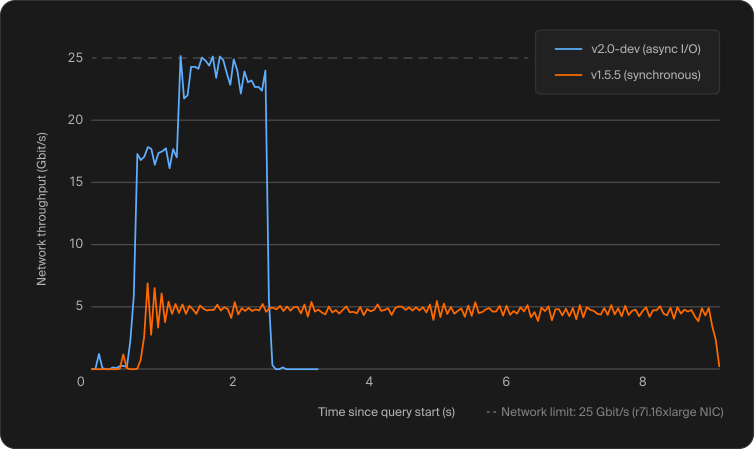
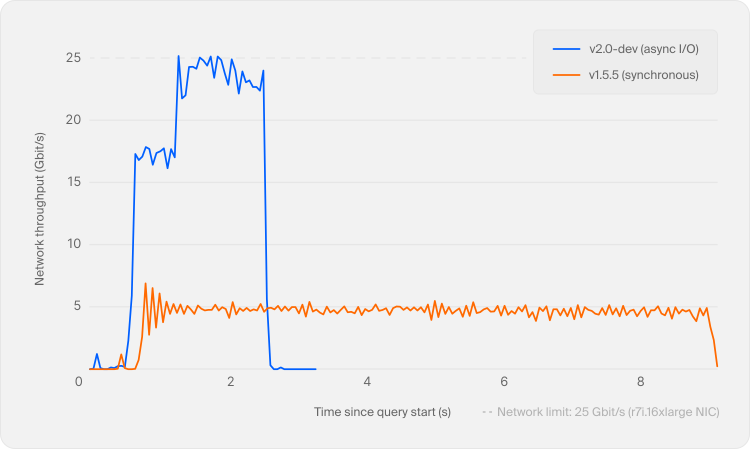
  "articleBody": "*TL;DR: The DuckDB team is happy to announce that today we're releasing DuckDB version 2.0.0 LTS, codenamed “Cinnamon Teal” (Spatula cyanoptera). This is our biggest feature release so far, and it ships a polished version of the Quack protocol, asynchronous I/O, a first-class `VARIANT` type, agent mode, triggers, an extensible SQL parser and much more, built from close to 20,000 commits since DuckDB 1.5.*\n\nWe are proud to release DuckDB 2.0.0, codenamed “Cinnamon Teal” after the [*Spatula cyanoptera*](https://en.wikipedia.org/wiki/Cinnamon_teal), a strikingly reddish-brown duck found in the western Americas.\n\nWhile [DuckDB 1.0](https://duckdb.org/2024/06/03/announcing-duckdb-100.html) was all about stability and backward compatibility, DuckDB 2.0 is above all a feature release. In this blog post, we summarize the highlights and then walk through the breaking changes and how to migrate. We showcased many of the new features in [“A Preview of DuckDB v2.0”](https://duckdb.org/2026/08/17/duckdb-20-highlights.html), which covers each one in more depth. For the complete release notes, see the [release page on GitHub](https://github.com/duckdb/duckdb/releases/tag/v2.0.0).\n\n> Tip To install the new version, please visit the [installation page](https://duckdb.org/install/). Some clients, such as the CLI and Python, are already available. Other client libraries (e.g., Go, R, Java) and some extensions can take a few days to release due to the extra changes and review rounds required.\n\nWith this release, there are currently three DuckDB lines available. DuckDB 2.0 is a long-term support (LTS) release with support until at least October 2027. The previous LTS release, version 1.4, is still supported until late November 2026. To ensure a smooth transition and allow sufficient time for testing, we extended the support period of DuckDB 1.5 until March 2027, effectively also turning it into an LTS release. For details, see the [release calendar](https://duckdb.org/release_calendar.html#lts-releases).\n\nTo find your way around the documentation for all of the new features, we also published a [“What's New in the Docs for 2.0”](https://duckdb.org/docs/2.0/whats_new_in_the_docs.html) page that links each feature below to its documentation.\n\n## [DuckDB as a Server](https://duckdb.org/2026/10/21/announcing-duckdb-200#duckdb-as-a-server)\n\nDuckDB has been an in-process database since day one. In [DuckDB 1.5.3](https://duckdb.org/2026/05/20/announcing-duckdb-153.html), released in May, we introduced the Quack protocol that lets you run DuckDB in a traditional client-server setup, along with the [`quack` extension](https://duckdb.org/docs/2.0/core_extensions/quack.html), which implements DuckDB's native protocol, so any DuckDB process can [serve its databases](https://duckdb.org/docs/2.0/quack/overview.html#server-side-usage).\n\n### [Quack and `CONNECT`](https://duckdb.org/2026/10/21/announcing-duckdb-200#quack-and-connect)\n\nDuckDB 2.0.0 ships a polished version of the Quack protocol with substantial performance and stability improvements. It also introduces the new [`CONNECT` statement](https://duckdb.org/docs/2.0/sql/statements/connect.html) that allows attaching and switching to a remote database in a single command for better ergonomics:\n\n#### [DuckDB server](https://duckdb.org/2026/10/21/announcing-duckdb-200#duckdb-server)\n\n```sql\nCALL quack_serve(\n    token = 'my_token'\n);\n\nCREATE TABLE events\n    (date DATE, name VARCHAR);\n\nINSERT INTO events VALUES\n    ('2027-04-07',\n     'DuckCon #8');\n```\n\nquack:\n\n#### [DuckDB client](https://duckdb.org/2026/10/21/announcing-duckdb-200#duckdb-client)\n\n```sql\nATTACH 'quack:localhost'\n    AS qk (TOKEN 'my_token');\n\nCONNECT qk;\nSELECT * FROM events;\n\n┌────────────┬────────────┐\n│    date    │    name    │\n│    date    │  varchar   │\n├────────────┼────────────┤\n│ 2027-04-07 │ DuckCon #8 │\n└────────────┴────────────┘\n```\n\nFor simplicity, this example runs the server and the client on the same machine. By default, the server only listens on `localhost`. To accept connections from other machines, keep the server on `localhost` and put it behind a [TLS-terminating reverse proxy](https://duckdb.org/docs/2.0/quack/setup/reverse_proxy.html). The [`allow_other_hostname` option](https://duckdb.org/docs/2.0/quack/overview.html#starting-a-server), which exposes the server directly, is only meant for testing.\n\nThe `CONNECT` statement is not limited to Quack: it points your session at [any remote database that supports it](https://duckdb.org/docs/2.0/sql/statements/connect.html#supported-databases), including PostgreSQL and MySQL. For these, the new remote pushdown optimizer ships queries directly to the remote server instead of pulling tables over the wire.\n\n### [Quack in the CLI](https://duckdb.org/2026/10/21/announcing-duckdb-200#quack-in-the-cli)\n\nThe CLI also has shortcuts for setting up a Quack client-server pair: the new [`-serve` and `-connect` arguments](https://duckdb.org/docs/2.0/clients/cli/arguments.html#serving-and-connecting-to-remote-databases) start a Quack server or connect to one directly from the command line:\n\n#### [CLI server](https://duckdb.org/2026/10/21/announcing-duckdb-200#cli-server)\n\n```batch\nduckdb -serve\n```\n\n```plsql\nCREATE TABLE t AS\n      SELECT 42 AS x;\n```\n\nquack:\n\n#### [CLI client](https://duckdb.org/2026/10/21/announcing-duckdb-200#cli-client)\n\n```batch\nduckdb -connect\n```\n\n```plsql\nFROM t;\n\n┌───────┐\n│   x   │\n│ int32 │\n├───────┤\n│    42 │\n└───────┘\n```\n\n## [Performance](https://duckdb.org/2026/10/21/announcing-duckdb-200#performance)\n\n### [Asynchronous I/O](https://duckdb.org/2026/10/21/announcing-duckdb-200#asynchronous-io)\n\nDuckDB 2.0 introduces [asynchronous I/O](https://duckdb.org/docs/2.0/data/io.html) for reading Parquet and CSV files. The I/O layer now scales independently from the query processing layer, issuing reads in the background and keeping multiple requests in flight. This means far more parallelism for remote reads and dramatically faster queries on object storage such as [`s3://`](https://duckdb.org/docs/2.0/core_extensions/httpfs/s3api.html).\n\nWe described the design in detail in a [dedicated blog post](https://duckdb.org/2026/07/31/asynchronous-io.html). In that post, we showed the network throughput over the course of a query with and without asynchronous I/O:\n\n![Network throughput](https://duckdb.org/images/blog/v20-release/sync-vs-async-network-throughput-light.svg) ![Network throughput](https://duckdb.org/images/blog/v20-release/sync-vs-async-network-throughput-dark.svg) *Network throughput. Higher utilization and shorter runtime are better.*\n\n### [The `VARIANT` Type Becomes a First-Class Citizen](https://duckdb.org/2026/10/21/announcing-duckdb-200#the-variant-type-becomes-a-first-class-citizen)\n\nThe [`VARIANT` type](https://duckdb.org/docs/2.0/sql/data_types/variant.html) stores semi-structured, schema-less data such as JSON while keeping the performance of columnar execution. So you can think of it as JSON on steroids: a `VARIANT` column can store differently shaped data in every row, but unlike JSON it is not a text format.\n\n[DuckDB 1.5 already introduced `VARIANT`](https://duckdb.org/2026/03/09/announcing-duckdb-150.html#variant-type), but DuckDB 2.0 fully integrates it. DuckDB 2.0 detects the common structure in your data and “shreds” it, so it compresses well and executes fast. The pipeline works end to end, from shredded execution straight out of storage to shredded `VARIANT` reading and writing for Parquet, backed by a family of [`variant_*` functions](https://duckdb.org/docs/2.0/sql/functions/variant.html). For example:\n\n```sql\nCREATE TABLE events (payload VARIANT);\nINSERT INTO events\nVALUES\n    ('{\"user\": {\"id\": 42, \"tags\": [\"a\", \"b\"]}}'::JSON::VARIANT),\n    ('{\"event\": \"click\", \"x\": 10, \"y\": 20}'::JSON::VARIANT);\n\nSELECT variant_type(payload), variant_keys(payload)\nFROM events;\n```\n\n```text\n┌───────────────────────┬───────────────────────┐\n│ variant_type(payload) │ variant_keys(payload) │\n│        varchar        │       varchar[]       │\n├───────────────────────┼───────────────────────┤\n│ OBJECT                │ [user]                │\n│ OBJECT                │ [event, x, y]         │\n└───────────────────────┴───────────────────────┘\n```\n\n### [Agent Mode in the CLI](https://duckdb.org/2026/10/21/announcing-duckdb-200#agent-mode-in-the-cli)\n\nCoding agents such as Claude Code, Codex and Cursor increasingly drive the DuckDB CLI on their users' behalf. The 2.0 CLI detects when it is being run by an agent and switches to [agent mode](https://duckdb.org/2026/10/09/agent-mode.html): it prints compact Markdown tables instead of padded boxes, says clearly when a result was truncated, stops runaway queries early and reports errors as JSON.\n\nLong-running SQL queries report their expected cost prior to running, so the agent can decide whether to wait. In our experiments on TPC-H, agent mode cut the amount of DuckDB output the model had to read by 59%. You can turn it *on* for manual testing using the [`-agent` flag](https://duckdb.org/docs/2.0/clients/cli/agent_mode.html#activating-agent-mode) or instruct your agent to turn it *off* using the `-no-agent` flag.\n\n## [Extensibility](https://duckdb.org/2026/10/21/announcing-duckdb-200#extensibility)\n\n### [A Brand New SQL Parser](https://duckdb.org/2026/10/21/announcing-duckdb-200#a-brand-new-sql-parser)\n\nDuckDB has always used a parser derived from PostgreSQL's. In 2.0, our own modern, extensible [PEG-based parser](https://duckdb.org/2026/08/20/duckdb-20-peg-parser.html), which debuted as an opt-in feature in [DuckDB 1.5](https://duckdb.org/2026/03/09/announcing-duckdb-150.html#peg-parser), becomes the default. Extensions can now hook into the grammar itself (an idea we first explored in our [research on runtime-extensible parsers](https://duckdb.org/2024/11/22/runtime-extensible-parsers.html)), so expect extensions that expose entirely new SQL syntax. Error messages now come with precise source locations. For details, see the [PEG parser documentation](https://duckdb.org/docs/2.0/sql/peg_parser.html). The new parser is designed to be compatible with the old one, so you should not notice the swap. If you do, please file an issue. In the meantime, you can switch back to the old parser using the [`legacy_parser` extension](https://duckdb.org/docs/2.0/core_extensions/legacy_parser.html) by running `SET enable_legacy_parser = true;`.\n\nThe old parser had served DuckDB since its first commit in 2018. Its grammar was generated with YACC/Bison, which produces an LALR(1) parser, so as DuckSQL grew, even small additions could collide with existing rules and raise `shift/reduce` or `reduce/reduce` conflicts. A PEG grammar avoids this by trying alternatives in the order they are written, so adding syntax no longer risks breaking unrelated rules. Python itself moved to a PEG-based parser in [version 3.9](https://peps.python.org/pep-0617/) for the same flexibility.\n\n### [Write Extensions Once and Host Them Yourself](https://duckdb.org/2026/10/21/announcing-duckdb-200#write-extensions-once-and-host-them-yourself)\n\nDuckDB 2.0 ships a revamped [C API v2](https://duckdb.org/docs/2.0/clients/c/overview.html#c-api-v2), which is considerably more powerful than its predecessor and exposes components such as file systems and table functions to extensions. Before marking it as stable, we would like to test it in the field, so please give it a try and [send us your feedback](https://github.com/duckdb/duckdb/discussions/27525)!\n\nYou can also register and host your own trusted extension repositories, so an organization can host and sign its own extensions and have them install and load just like the built-in ones:\n\n```sql\nSET allow_extension_repositories = 'allowed';\n\nCREATE EXTENSION REPOSITORY my_repo\n    WITH PREFIX 'https://extensions.example.org';\n\nINSTALL AND LOAD my_ext FROM my_repo;\n```\n\nA repository is a name, a URL prefix and one or more RSA public keys that are trusted to sign the extensions served from it. The prefix can point at anything DuckDB can read: a local path, `https`, `s3`, you name it. At `CREATE` time, DuckDB fetches the repository's public keys and pins them into the repository definition, printing each key's SHA-256 fingerprint so you can compare it against one published out of band.\n\nThis feature is still a work in progress and its syntax may change in future releases. For more details, see the [Extension Repositories page](https://duckdb.org/docs/2.0/extensions/extension_repositories.html).\n\n### [Core Extension Updates](https://duckdb.org/2026/10/21/announcing-duckdb-200#core-extension-updates)\n\nDuckDB's [core extensions](https://duckdb.org/docs/2.0/core_extensions/overview.html) are also shipping several new features, fixes and performance optimizations. These are too numerous to all list here, so we only highlight a few of them and will cover them in dedicated blog posts in the coming weeks:\n\n- We released [DuckLake 1.1](https://ducklake.select/2026/10/21/ducklake-11/), including a new specification and [reference implementation](https://duckdb.org/docs/2.0/core_extensions/ducklake.html).\n- The [Iceberg extension](https://duckdb.org/docs/2.0/core_extensions/iceberg/overview.html) strives to become a feature-complete implementation. To this end, it adds REST catalog [`ATTACH` options](https://duckdb.org/docs/2.0/core_extensions/iceberg/iceberg_options.html#attach-options) that derive a table's location from its namespace or load table metadata from the `metadata-location` file returned by the catalog. Further options control the URL prefix and the namespace separator.\n- The [Delta extension](https://duckdb.org/docs/2.0/core_extensions/delta.html) can create Delta tables with `CREATE TABLE` (including partitioning and Delta table properties), supports time travel and improves `VARIANT` support.\n\n## [SQL Features](https://duckdb.org/2026/10/21/announcing-duckdb-200#sql-features)\n\n### [Triggers](https://duckdb.org/2026/10/21/announcing-duckdb-200#triggers)\n\nDuckDB 2.0 delivers triggers: the [`CREATE TRIGGER` statement](https://duckdb.org/docs/2.0/sql/statements/create_trigger.html) with `BEFORE` and `AFTER` triggers, `FOR EACH ROW` and `FOR EACH STATEMENT`, transition tables via `REFERENCING OLD/NEW TABLE`, multiple triggers per event, `RETURNING` on triggered tables and `DROP TRIGGER`. The classic use case is audit tables, where a trigger records what changed in response to a table modification. Some combinations, such as `BEFORE ... FOR EACH ROW` and `UPDATE ... FOR EACH ROW` triggers, are not yet supported; see the [limitations](https://duckdb.org/docs/2.0/sql/statements/create_trigger.html#limitations).\n\n```sql\nCREATE TRIGGER trg_audit\n    AFTER UPDATE ON target\n    REFERENCING\n        OLD TABLE AS o\n        NEW TABLE AS n\n    FOR EACH STATEMENT\n        INSERT INTO audit\n        SELECT n.id, o.val, n.val\n        FROM o JOIN n ON o.id = n.id;\n```\n\nTriggers can also maintain materialized views incrementally! For example, to keep track of the average age of people per nationality in a table `age_statistics`, you can use two triggers – one for insert and another for delete operations – and store the sum and the count alongside the average.\n\nTo see more details, click here.\n\n```sql\nCREATE TABLE people (name VARCHAR, nationality VARCHAR, age INTEGER);\nCREATE TABLE age_statistics (\n    nationality VARCHAR PRIMARY KEY,\n    sum_age INTEGER,\n    num_people INTEGER,\n    average_age DOUBLE\n);\n```\n\nOn insertion, we aggregate the new rows per nationality and merge them into `age_statistics`, adding a row for each new nationality:\n\n```sql\nCREATE TRIGGER people_insert\n    AFTER INSERT ON people\n    REFERENCING NEW TABLE AS n\n    FOR EACH STATEMENT\n        MERGE INTO age_statistics s\n        USING (\n            SELECT nationality, sum(age) AS sum_age, count(*) AS num_people\n            FROM n\n            GROUP BY nationality\n        ) d\n        ON s.nationality = d.nationality\n        WHEN MATCHED THEN UPDATE SET\n            sum_age = s.sum_age + d.sum_age,\n            num_people = s.num_people + d.num_people,\n            average_age = (s.sum_age + d.sum_age) / (s.num_people + d.num_people)\n        WHEN NOT MATCHED THEN INSERT\n            VALUES (d.nationality, d.sum_age, d.num_people, d.sum_age / d.num_people);\n```\n\nOn deletion, we subtract the deleted rows and drop a nationality once its last person has left:\n\n```sql\nCREATE TRIGGER people_delete\n    AFTER DELETE ON people\n    REFERENCING OLD TABLE AS o\n    FOR EACH STATEMENT\n        MERGE INTO age_statistics s\n        USING (\n            SELECT nationality, sum(age) AS sum_age, count(*) AS num_people\n            FROM o\n            GROUP BY nationality\n        ) d\n        ON s.nationality = d.nationality\n        WHEN MATCHED AND s.num_people = d.num_people THEN DELETE\n        WHEN MATCHED THEN UPDATE SET\n            sum_age = s.sum_age - d.sum_age,\n            num_people = s.num_people - d.num_people,\n            average_age = (s.sum_age - d.sum_age) / (s.num_people - d.num_people);\n```\n\nLet's see people come and go:\n\n```sql\nINSERT INTO people VALUES\n    ('Alice', 'US', 34), ('Bram', 'NL', 27), ('Csilla', 'HU', 45),\n    ('Dave', 'US', 58), ('Eva', 'NL', 19), ('Femke', 'NL', 41);\nFROM age_statistics ORDER BY nationality;\n```\n\n```text\n┌─────────────┬─────────┬────────────┬─────────────┐\n│ nationality │ sum_age │ num_people │ average_age │\n│   varchar   │  int32  │   int32    │   double    │\n├─────────────┼─────────┼────────────┼─────────────┤\n│ HU          │      45 │          1 │        45.0 │\n│ NL          │      87 │          3 │        29.0 │\n│ US          │      92 │          2 │        46.0 │\n└─────────────┴─────────┴────────────┴─────────────┘\n```\n\n```sql\nDELETE FROM people WHERE name = 'Alice';\nDELETE FROM people WHERE nationality = 'HU';\nFROM age_statistics ORDER BY nationality;\n```\n\n```text\n┌─────────────┬─────────┬────────────┬─────────────┐\n│ nationality │ sum_age │ num_people │ average_age │\n│   varchar   │  int32  │   int32    │   double    │\n├─────────────┼─────────┼────────────┼─────────────┤\n│ NL          │      87 │          3 │        29.0 │\n│ US          │      58 │          1 │        58.0 │\n└─────────────┴─────────┴────────────┴─────────────┘\n```\n\nTriggers bring us one step closer to materialized views, a long-standing item in the [“future work” section of our roadmap](https://duckdb.org/roadmap.html#future-work).\n\n### [SQL Dialect Additions](https://duckdb.org/2026/10/21/announcing-duckdb-200#sql-dialect-additions)\n\nAs always, DuckDB's [friendly SQL dialect](https://duckdb.org/docs/2.0/sql/dialect/friendly_sql.html) keeps growing. A few favorites from this release cycle:\n\n- The [`$ variable` shorthand](https://duckdb.org/docs/2.0/sql/statements/set_variable.html#the-name-shorthand) lets you write `$x` in most places where an expression is allowed, instead of `getvariable ('x')`.\n- [Data-modifying CTEs](https://duckdb.org/docs/2.0/sql/query_syntax/with.html#data-modifying-ctes) let you use `INSERT`, `UPDATE`, `DELETE` and `COPY` as pipeline steps.\n- [`NEAREST` joins](https://duckdb.org/docs/2.0/sql/query_syntax/from.html#nearest-joins) turn top-k similarity search into a join clause, handy for vector and embedding workloads.\n- [Nested schemas](https://duckdb.org/docs/2.0/sql/statements/create_schema.html#nested-schemas) allow schemas within schemas, e.g., `CREATE SCHEMA finance.reports`.\n- [JSON mutation functions](https://duckdb.org/docs/2.0/data/json/json_functions.html#json-mutation-functions) `json_set`, `json_insert`, `json_replace` and `json_remove` return modified copies of JSON documents (see also our [blog post on JSON patches](https://duckdb.org/2026/08/18/reconciling-json.html)).\n\nThere is more: DuckDB 2.0.0 supports the SQL-standard [`FETCH FIRST`](https://duckdb.org/docs/2.0/sql/query_syntax/limit.html#fetch-first) and allows [`UNNEST` in the `GROUP BY` clause](https://duckdb.org/docs/2.0/sql/query_syntax/groupby.html#grouping-by-unnest). It also ensures well-defined [`MERGE`](https://duckdb.org/docs/2.0/sql/statements/merge_into.html) and [`UPDATE ... FROM`](https://duckdb.org/docs/2.0/sql/statements/update.html) semantics for cases when multiple rows are matched.\n\n## [Migrating to 2.0](https://duckdb.org/2026/10/21/announcing-duckdb-200#migrating-to-20)\n\nDuckDB 2.0 comes with a small set of breaking changes. For most users, upgrading is straightforward, but complex deployments running many DuckDB processes need more care. The storage format is the most likely source of problems: DuckDB versions before 2.0 cannot read database files created by DuckDB 2.0. DuckDB 2.0 can still read and write your existing database files, and these remain readable by older versions. We recommend testing 2.0.0 on a shadow system before switching production over. And, if your workload is mission-critical, you may want to wait for the first patch release, [coming in November](https://duckdb.org/release_calendar.html#upcoming-releases).\n\nFor the full details, see the [migration guide](https://duckdb.org/docs/2.0/operations_manual/migration.html).\n\n## [Internals and Deprecations](https://duckdb.org/2026/10/21/announcing-duckdb-200#internals-and-deprecations)\n\n### [Compiler Requirements](https://duckdb.org/2026/10/21/announcing-duckdb-200#compiler-requirements)\n\nFollowing DuckDB's long stint on C++11, DuckDB 2.0 now [requires a C++17 compiler](https://duckdb.org/docs/2.0/dev/building/overview.html#prerequisites).\n\nWe also switched to Clang as the default compiler for our release builds. On Linux and macOS, both DuckDB and its core extensions are built with Clang. On Windows, the CLI is built with Clang, while most core extensions are still built with MSVC. We may move more Windows builds to Clang in the future, but this requires further changes.\n\n### [Timezones, Calendars and Collations Without ICU](https://duckdb.org/2026/10/21/announcing-duckdb-200#timezones-calendars-and-collations-without-icu)\n\nTimezone-aware timestamps, calendars and collations have always been powered by the ICU library. In 2.0, the ICU library is gone entirely: the [`icu` extension](https://duckdb.org/docs/2.0/core_extensions/icu.html) now implements timezones, calendars and collations itself, with the timezone data built directly from the IANA database and compressed down to around 45 kB.\n\nEverything keeps working exactly as before, and the native implementation is also faster. If you find any issues, please [let us know](https://github.com/duckdb/duckdb/issues)!\n\n### [Deprecations](https://duckdb.org/2026/10/21/announcing-duckdb-200#deprecations)\n\n#### [Lambda Syntax](https://duckdb.org/2026/10/21/announcing-duckdb-200#lambda-syntax)\n\nThe old single-arrow lambda syntax (`x -> x + 1`) is now disabled by default. Use the Python-style syntax instead:\n\n```sql\nSELECT list_transform([1, 2, 3], lambda x: x + 1);\n```\n\nYou can temporarily re-enable the old syntax with `SET lambda_syntax = 'enable_single_arrow';`. Both the flag and the single-arrow syntax will be removed entirely in v2.1.\n\n#### [Amalgamation Builds](https://duckdb.org/2026/10/21/announcing-duckdb-200#amalgamation-builds)\n\nThe [amalgamation build](https://duckdb.org/docs/1.4/dev/building/overview), which bundles DuckDB's entire source code into a single header and a single source file, is now deprecated. The amalgamation has grown too large to be realistically useful in most cases.\n\n#### [Gradual Phase-Out of macOS x86\\_64](https://duckdb.org/2026/10/21/announcing-duckdb-200#gradual-phase-out-of-macos-x86_64)\n\nWe are gradually phasing out `osx_amd64` from the list of fully supported [platforms](https://duckdb.org/docs/2.0/operations_manual/installing_duckdb/requirements.html#supported-platforms). For the time being, DuckDB and [core extensions](https://duckdb.org/docs/2.0/core_extensions/overview.html) are still built and supported, but [community extensions](https://duckdb.org/docs/2.0/extensions/community_extensions.html) are no longer built for this platform. DuckDB 2.1 will stop supporting `osx_amd64`.\n\n## [Summary](https://duckdb.org/2026/10/21/announcing-duckdb-200#summary)\n\nThese were a few highlights, but there are many more features and improvements in this release. There have been almost 20,000 commits by many contributors since DuckDB 1.5, shipping smaller features as well as performance and usability improvements. The full [release notes can be found on GitHub](https://github.com/duckdb/duckdb/releases/tag/v2.0.0).\n\nWe would like to thank our community for the detailed issue reports and feedback that have driven this release, and our special thanks go to our contributors!\n\n![Benchmarking DuckDB v2.0-dev on NVIDIA Vera](https://duckdb.org/images/blog/thumbs/nvidia-vera-benchmark.svg)\n\n### Benchmarking DuckDB v2.0-dev on NVIDIA Vera\n\n![](https://duckdb.org/images/blog/authors/gabor_szarnyas.png)\n\nGábor Szárnyas\n\n![From JSON Strings to Typed Columns](https://duckdb.org/images/blog/thumbs/json.svg)\n\n### From JSON Strings to Typed Columns\n\nThe DuckDB team\n\n![What Is Inside an Iceberg Table?](https://duckdb.org/images/blog/thumbs/iceberg-writes.svg)\n\n### What Is Inside an Iceberg Table?\n\nThe DuckDB team\n",

  "authors": [
    "nnx"
  ],
  "captured_at": "2026-10-21T19:14:42.600331207+00:00",
  "category": "news",
  "content_html": "<p><em>TL;DR: The DuckDB team is happy to announce that today we're releasing DuckDB version 2.0.0 LTS, codenamed “Cinnamon Teal” (Spatula cyanoptera). This is our biggest feature release so far, and it ships a polished version of the Quack protocol, asynchronous I/O, a first-class <code>VARIANT</code> type, agent mode, triggers, an extensible SQL parser and much more, built from close to 20,000 commits since DuckDB 1.5.</em></p>\n<p>We are proud to release DuckDB 2.0.0, codenamed “Cinnamon Teal” after the <a target=\"_blank\" rel=\"noopener noreferrer\" href=\"https://en.wikipedia.org/wiki/Cinnamon_teal\"><em>Spatula cyanoptera</em></a>, a strikingly reddish-brown duck found in the western Americas.</p>\n<p>While <a target=\"_blank\" rel=\"noopener noreferrer\" href=\"https://duckdb.org/2024/06/03/announcing-duckdb-100.html\">DuckDB 1.0</a> was all about stability and backward compatibility, DuckDB 2.0 is above all a feature release. In this blog post, we summarize the highlights and then walk through the breaking changes and how to migrate. We showcased many of the new features in <a target=\"_blank\" rel=\"noopener noreferrer\" href=\"https://duckdb.org/2026/08/17/duckdb-20-highlights.html\">“A Preview of DuckDB v2.0”</a>, which covers each one in more depth. For the complete release notes, see the <a target=\"_blank\" rel=\"noopener noreferrer\" href=\"https://github.com/duckdb/duckdb/releases/tag/v2.0.0\">release page on GitHub</a>.</p>\n<blockquote>\n<p>Tip To install the new version, please visit the <a target=\"_blank\" rel=\"noopener noreferrer\" href=\"https://duckdb.org/install/\">installation page</a>. Some clients, such as the CLI and Python, are already available. Other client libraries (e.g., Go, R, Java) and some extensions can take a few days to release due to the extra changes and review rounds required.</p>\n</blockquote>\n<p>With this release, there are currently three DuckDB lines available. DuckDB 2.0 is a long-term support (LTS) release with support until at least October 2027. The previous LTS release, version 1.4, is still supported until late November 2026. To ensure a smooth transition and allow sufficient time for testing, we extended the support period of DuckDB 1.5 until March 2027, effectively also turning it into an LTS release. For details, see the <a target=\"_blank\" rel=\"noopener noreferrer\" href=\"https://duckdb.org/release_calendar.html#lts-releases\">release calendar</a>.</p>\n<p>To find your way around the documentation for all of the new features, we also published a <a target=\"_blank\" rel=\"noopener noreferrer\" href=\"https://duckdb.org/docs/2.0/whats_new_in_the_docs.html\">“What's New in the Docs for 2.0”</a> page that links each feature below to its documentation.</p>\n<h2><a target=\"_blank\" rel=\"noopener noreferrer\" href=\"https://duckdb.org/2026/10/21/announcing-duckdb-200#duckdb-as-a-server\">DuckDB as a Server</a></h2>\n<p>DuckDB has been an in-process database since day one. In <a target=\"_blank\" rel=\"noopener noreferrer\" href=\"https://duckdb.org/2026/05/20/announcing-duckdb-153.html\">DuckDB 1.5.3</a>, released in May, we introduced the Quack protocol that lets you run DuckDB in a traditional client-server setup, along with the <a target=\"_blank\" rel=\"noopener noreferrer\" href=\"https://duckdb.org/docs/2.0/core_extensions/quack.html\"><code>quack</code> extension</a>, which implements DuckDB's native protocol, so any DuckDB process can <a target=\"_blank\" rel=\"noopener noreferrer\" href=\"https://duckdb.org/docs/2.0/quack/overview.html#server-side-usage\">serve its databases</a>.</p>\n<h3><a target=\"_blank\" rel=\"noopener noreferrer\" href=\"https://duckdb.org/2026/10/21/announcing-duckdb-200#quack-and-connect\">Quack and <code>CONNECT</code></a></h3>\n<p>DuckDB 2.0.0 ships a polished version of the Quack protocol with substantial performance and stability improvements. It also introduces the new <a target=\"_blank\" rel=\"noopener noreferrer\" href=\"https://duckdb.org/docs/2.0/sql/statements/connect.html\"><code>CONNECT</code> statement</a> that allows attaching and switching to a remote database in a single command for better ergonomics:</p>\n<h4><a target=\"_blank\" rel=\"noopener noreferrer\" href=\"https://duckdb.org/2026/10/21/announcing-duckdb-200#duckdb-server\">DuckDB server</a></h4>\n<pre><code class=\"language-sql\"><span class=\"code-snippet\" data-language=\"SQL\"><span class=\"syntax-source syntax-sql\">CALL quack_serve(\n    token <span class=\"syntax-keyword syntax-operator syntax-comparison syntax-sql\">=</span> <span class=\"syntax-string syntax-quoted syntax-single syntax-sql\"><span class=\"syntax-punctuation syntax-definition syntax-string syntax-begin syntax-sql\">&#39;</span>my_token<span class=\"syntax-punctuation syntax-definition syntax-string syntax-end syntax-sql\">&#39;</span></span>\n);\n\n<span class=\"syntax-meta syntax-create syntax-sql\"><span class=\"syntax-keyword syntax-other syntax-create syntax-sql\">CREATE</span> <span class=\"syntax-keyword syntax-other syntax-sql\">TABLE</span> <span class=\"syntax-entity syntax-name syntax-function syntax-sql\">events</span></span>\n    (<span class=\"syntax-storage syntax-type syntax-sql\">date</span> <span class=\"syntax-storage syntax-type syntax-sql\">DATE</span>, name <span class=\"syntax-storage syntax-type syntax-sql\">VARCHAR</span>);\n\n<span class=\"syntax-keyword syntax-other syntax-DML syntax-sql\">INSERT INTO</span> events <span class=\"syntax-keyword syntax-other syntax-DML syntax-II syntax-sql\">VALUES</span>\n    (<span class=\"syntax-string syntax-quoted syntax-single syntax-sql\"><span class=\"syntax-punctuation syntax-definition syntax-string syntax-begin syntax-sql\">&#39;</span>2027-04-07<span class=\"syntax-punctuation syntax-definition syntax-string syntax-end syntax-sql\">&#39;</span></span>,\n     <span class=\"syntax-string syntax-quoted syntax-single syntax-sql\"><span class=\"syntax-punctuation syntax-definition syntax-string syntax-begin syntax-sql\">&#39;</span>DuckCon #8<span class=\"syntax-punctuation syntax-definition syntax-string syntax-end syntax-sql\">&#39;</span></span>);\n</span></span></code></pre>\n<p>quack:</p>\n<h4><a target=\"_blank\" rel=\"noopener noreferrer\" href=\"https://duckdb.org/2026/10/21/announcing-duckdb-200#duckdb-client\">DuckDB client</a></h4>\n<pre><code class=\"language-sql\"><span class=\"code-snippet\" data-language=\"SQL\"><span class=\"syntax-source syntax-sql\">ATTACH <span class=\"syntax-string syntax-quoted syntax-single syntax-sql\"><span class=\"syntax-punctuation syntax-definition syntax-string syntax-begin syntax-sql\">&#39;</span>quack:localhost<span class=\"syntax-punctuation syntax-definition syntax-string syntax-end syntax-sql\">&#39;</span></span>\n    <span class=\"syntax-keyword syntax-other syntax-alias syntax-sql\">AS</span> qk (TOKEN <span class=\"syntax-string syntax-quoted syntax-single syntax-sql\"><span class=\"syntax-punctuation syntax-definition syntax-string syntax-begin syntax-sql\">&#39;</span>my_token<span class=\"syntax-punctuation syntax-definition syntax-string syntax-end syntax-sql\">&#39;</span></span>);\n\nCONNECT qk;\n<span class=\"syntax-keyword syntax-other syntax-DML syntax-sql\">SELECT</span> <span class=\"syntax-keyword syntax-operator syntax-star syntax-sql\">*</span> <span class=\"syntax-keyword syntax-other syntax-DML syntax-sql\">FROM</span> events;\n\n┌────────────┬────────────┐\n│    <span class=\"syntax-storage syntax-type syntax-sql\">date</span>    │    name    │\n│    <span class=\"syntax-storage syntax-type syntax-sql\">date</span>    │  <span class=\"syntax-storage syntax-type syntax-sql\">varchar</span>   │\n├────────────┼────────────┤\n│ <span class=\"syntax-constant syntax-numeric syntax-sql\">2027</span><span class=\"syntax-keyword syntax-operator syntax-math syntax-sql\">-</span><span class=\"syntax-constant syntax-numeric syntax-sql\">04</span><span class=\"syntax-keyword syntax-operator syntax-math syntax-sql\">-</span><span class=\"syntax-constant syntax-numeric syntax-sql\">07</span> │ DuckCon <span class=\"syntax-comment syntax-line syntax-number-sign syntax-sql\"><span class=\"syntax-punctuation syntax-definition syntax-comment syntax-sql\">#</span>8 │\n</span>└────────────┴────────────┘\n</span></span></code></pre>\n<p>For simplicity, this example runs the server and the client on the same machine. By default, the server only listens on <code>localhost</code>. To accept connections from other machines, keep the server on <code>localhost</code> and put it behind a <a target=\"_blank\" rel=\"noopener noreferrer\" href=\"https://duckdb.org/docs/2.0/quack/setup/reverse_proxy.html\">TLS-terminating reverse proxy</a>. The <a target=\"_blank\" rel=\"noopener noreferrer\" href=\"https://duckdb.org/docs/2.0/quack/overview.html#starting-a-server\"><code>allow_other_hostname</code> option</a>, which exposes the server directly, is only meant for testing.</p>\n<p>The <code>CONNECT</code> statement is not limited to Quack: it points your session at <a target=\"_blank\" rel=\"noopener noreferrer\" href=\"https://duckdb.org/docs/2.0/sql/statements/connect.html#supported-databases\">any remote database that supports it</a>, including PostgreSQL and MySQL. For these, the new remote pushdown optimizer ships queries directly to the remote server instead of pulling tables over the wire.</p>\n<h3><a target=\"_blank\" rel=\"noopener noreferrer\" href=\"https://duckdb.org/2026/10/21/announcing-duckdb-200#quack-in-the-cli\">Quack in the CLI</a></h3>\n<p>The CLI also has shortcuts for setting up a Quack client-server pair: the new <a target=\"_blank\" rel=\"noopener noreferrer\" href=\"https://duckdb.org/docs/2.0/clients/cli/arguments.html#serving-and-connecting-to-remote-databases\"><code>-serve</code> and <code>-connect</code> arguments</a> start a Quack server or connect to one directly from the command line:</p>\n<h4><a target=\"_blank\" rel=\"noopener noreferrer\" href=\"https://duckdb.org/2026/10/21/announcing-duckdb-200#cli-server\">CLI server</a></h4>\n<pre><code class=\"language-batch\"><span class=\"code-snippet\" data-language=\"Batch\">duckdb -serve\n</span></code></pre>\n<pre><code class=\"language-plsql\"><span class=\"code-snippet\" data-language=\"Plsql\">CREATE TABLE t AS\n      SELECT 42 AS x;\n</span></code></pre>\n<p>quack:</p>\n<h4><a target=\"_blank\" rel=\"noopener noreferrer\" href=\"https://duckdb.org/2026/10/21/announcing-duckdb-200#cli-client\">CLI client</a></h4>\n<pre><code class=\"language-batch\"><span class=\"code-snippet\" data-language=\"Batch\">duckdb -connect\n</span></code></pre>\n<pre><code class=\"language-plsql\"><span class=\"code-snippet\" data-language=\"Plsql\">FROM t;\n\n┌───────┐\n│   x   │\n│ int32 │\n├───────┤\n│    42 │\n└───────┘\n</span></code></pre>\n<h2><a target=\"_blank\" rel=\"noopener noreferrer\" href=\"https://duckdb.org/2026/10/21/announcing-duckdb-200#performance\">Performance</a></h2>\n<h3><a target=\"_blank\" rel=\"noopener noreferrer\" href=\"https://duckdb.org/2026/10/21/announcing-duckdb-200#asynchronous-io\">Asynchronous I/O</a></h3>\n<p>DuckDB 2.0 introduces <a target=\"_blank\" rel=\"noopener noreferrer\" href=\"https://duckdb.org/docs/2.0/data/io.html\">asynchronous I/O</a> for reading Parquet and CSV files. The I/O layer now scales independently from the query processing layer, issuing reads in the background and keeping multiple requests in flight. This means far more parallelism for remote reads and dramatically faster queries on object storage such as <a target=\"_blank\" rel=\"noopener noreferrer\" href=\"https://duckdb.org/docs/2.0/core_extensions/httpfs/s3api.html\"><code>s3://</code></a>.</p>\n<p>We described the design in detail in a <a target=\"_blank\" rel=\"noopener noreferrer\" href=\"https://duckdb.org/2026/07/31/asynchronous-io.html\">dedicated blog post</a>. In that post, we showed the network throughput over the course of a query with and without asynchronous I/O:</p>\n<p><picture class=\"article-picture article-picture-fallback\" style=\"--image-ratio:16 / 9\"><img src=\"https://duckdb.org/images/blog/v20-release/sync-vs-async-network-throughput-light.svg\" alt=\"Network throughput\" loading=\"eager\" decoding=\"async\" fetchpriority=\"high\" referrerpolicy=\"no-referrer\" class=\"progressive-image\"></picture> <picture class=\"article-picture article-picture-fallback\" style=\"--image-ratio:16 / 9\"><img src=\"https://duckdb.org/images/blog/v20-release/sync-vs-async-network-throughput-dark.svg\" alt=\"Network throughput\" loading=\"lazy\" decoding=\"async\" fetchpriority=\"low\" referrerpolicy=\"no-referrer\" class=\"progressive-image\"></picture> <em>Network throughput. Higher utilization and shorter runtime are better.</em></p>\n<h3><a target=\"_blank\" rel=\"noopener noreferrer\" href=\"https://duckdb.org/2026/10/21/announcing-duckdb-200#the-variant-type-becomes-a-first-class-citizen\">The <code>VARIANT</code> Type Becomes a First-Class Citizen</a></h3>\n<p>The <a target=\"_blank\" rel=\"noopener noreferrer\" href=\"https://duckdb.org/docs/2.0/sql/data_types/variant.html\"><code>VARIANT</code> type</a> stores semi-structured, schema-less data such as JSON while keeping the performance of columnar execution. So you can think of it as JSON on steroids: a <code>VARIANT</code> column can store differently shaped data in every row, but unlike JSON it is not a text format.</p>\n<p><a target=\"_blank\" rel=\"noopener noreferrer\" href=\"https://duckdb.org/2026/03/09/announcing-duckdb-150.html#variant-type\">DuckDB 1.5 already introduced <code>VARIANT</code></a>, but DuckDB 2.0 fully integrates it. DuckDB 2.0 detects the common structure in your data and “shreds” it, so it compresses well and executes fast. The pipeline works end to end, from shredded execution straight out of storage to shredded <code>VARIANT</code> reading and writing for Parquet, backed by a family of <a target=\"_blank\" rel=\"noopener noreferrer\" href=\"https://duckdb.org/docs/2.0/sql/functions/variant.html\"><code>variant_*</code> functions</a>. For example:</p>\n<pre><code class=\"language-sql\"><span class=\"code-snippet\" data-language=\"SQL\"><span class=\"syntax-source syntax-sql\"><span class=\"syntax-meta syntax-create syntax-sql\"><span class=\"syntax-keyword syntax-other syntax-create syntax-sql\">CREATE</span> <span class=\"syntax-keyword syntax-other syntax-sql\">TABLE</span> <span class=\"syntax-entity syntax-name syntax-function syntax-sql\">events</span></span> (payload VARIANT);\n<span class=\"syntax-keyword syntax-other syntax-DML syntax-sql\">INSERT INTO</span> events\n<span class=\"syntax-keyword syntax-other syntax-DML syntax-II syntax-sql\">VALUES</span>\n    (<span class=\"syntax-string syntax-quoted syntax-single syntax-sql\"><span class=\"syntax-punctuation syntax-definition syntax-string syntax-begin syntax-sql\">&#39;</span>{&quot;user&quot;: {&quot;id&quot;: 42, &quot;tags&quot;: [&quot;a&quot;, &quot;b&quot;]}}<span class=\"syntax-punctuation syntax-definition syntax-string syntax-end syntax-sql\">&#39;</span></span>::JSON::VARIANT),\n    (<span class=\"syntax-string syntax-quoted syntax-single syntax-sql\"><span class=\"syntax-punctuation syntax-definition syntax-string syntax-begin syntax-sql\">&#39;</span>{&quot;event&quot;: &quot;click&quot;, &quot;x&quot;: 10, &quot;y&quot;: 20}<span class=\"syntax-punctuation syntax-definition syntax-string syntax-end syntax-sql\">&#39;</span></span>::JSON::VARIANT);\n\n<span class=\"syntax-keyword syntax-other syntax-DML syntax-sql\">SELECT</span> variant_type(payload), variant_keys(payload)\n<span class=\"syntax-keyword syntax-other syntax-DML syntax-sql\">FROM</span> events;\n</span></span></code></pre>\n<pre><code class=\"language-text\"><span class=\"code-snippet\">┌───────────────────────┬───────────────────────┐\n│ variant_type(payload) │ variant_keys(payload) │\n│        varchar        │       varchar[]       │\n├───────────────────────┼───────────────────────┤\n│ OBJECT                │ [user]                │\n│ OBJECT                │ [event, x, y]         │\n└───────────────────────┴───────────────────────┘\n</span></code></pre>\n<h3><a target=\"_blank\" rel=\"noopener noreferrer\" href=\"https://duckdb.org/2026/10/21/announcing-duckdb-200#agent-mode-in-the-cli\">Agent Mode in the CLI</a></h3>\n<p>Coding agents such as Claude Code, Codex and Cursor increasingly drive the DuckDB CLI on their users' behalf. The 2.0 CLI detects when it is being run by an agent and switches to <a target=\"_blank\" rel=\"noopener noreferrer\" href=\"https://duckdb.org/2026/10/09/agent-mode.html\">agent mode</a>: it prints compact Markdown tables instead of padded boxes, says clearly when a result was truncated, stops runaway queries early and reports errors as JSON.</p>\n<p>Long-running SQL queries report their expected cost prior to running, so the agent can decide whether to wait. In our experiments on TPC-H, agent mode cut the amount of DuckDB output the model had to read by 59%. You can turn it <em>on</em> for manual testing using the <a target=\"_blank\" rel=\"noopener noreferrer\" href=\"https://duckdb.org/docs/2.0/clients/cli/agent_mode.html#activating-agent-mode\"><code>-agent</code> flag</a> or instruct your agent to turn it <em>off</em> using the <code>-no-agent</code> flag.</p>\n<h2><a target=\"_blank\" rel=\"noopener noreferrer\" href=\"https://duckdb.org/2026/10/21/announcing-duckdb-200#extensibility\">Extensibility</a></h2>\n<h3><a target=\"_blank\" rel=\"noopener noreferrer\" href=\"https://duckdb.org/2026/10/21/announcing-duckdb-200#a-brand-new-sql-parser\">A Brand New SQL Parser</a></h3>\n<p>DuckDB has always used a parser derived from PostgreSQL's. In 2.0, our own modern, extensible <a target=\"_blank\" rel=\"noopener noreferrer\" href=\"https://duckdb.org/2026/08/20/duckdb-20-peg-parser.html\">PEG-based parser</a>, which debuted as an opt-in feature in <a target=\"_blank\" rel=\"noopener noreferrer\" href=\"https://duckdb.org/2026/03/09/announcing-duckdb-150.html#peg-parser\">DuckDB 1.5</a>, becomes the default. Extensions can now hook into the grammar itself (an idea we first explored in our <a target=\"_blank\" rel=\"noopener noreferrer\" href=\"https://duckdb.org/2024/11/22/runtime-extensible-parsers.html\">research on runtime-extensible parsers</a>), so expect extensions that expose entirely new SQL syntax. Error messages now come with precise source locations. For details, see the <a target=\"_blank\" rel=\"noopener noreferrer\" href=\"https://duckdb.org/docs/2.0/sql/peg_parser.html\">PEG parser documentation</a>. The new parser is designed to be compatible with the old one, so you should not notice the swap. If you do, please file an issue. In the meantime, you can switch back to the old parser using the <a target=\"_blank\" rel=\"noopener noreferrer\" href=\"https://duckdb.org/docs/2.0/core_extensions/legacy_parser.html\"><code>legacy_parser</code> extension</a> by running <code>SET enable_legacy_parser = true;</code>.</p>\n<p>The old parser had served DuckDB since its first commit in 2018. Its grammar was generated with YACC/Bison, which produces an LALR(1) parser, so as DuckSQL grew, even small additions could collide with existing rules and raise <code>shift/reduce</code> or <code>reduce/reduce</code> conflicts. A PEG grammar avoids this by trying alternatives in the order they are written, so adding syntax no longer risks breaking unrelated rules. Python itself moved to a PEG-based parser in <a target=\"_blank\" rel=\"noopener noreferrer\" href=\"https://peps.python.org/pep-0617/\">version 3.9</a> for the same flexibility.</p>\n<h3><a target=\"_blank\" rel=\"noopener noreferrer\" href=\"https://duckdb.org/2026/10/21/announcing-duckdb-200#write-extensions-once-and-host-them-yourself\">Write Extensions Once and Host Them Yourself</a></h3>\n<p>DuckDB 2.0 ships a revamped <a target=\"_blank\" rel=\"noopener noreferrer\" href=\"https://duckdb.org/docs/2.0/clients/c/overview.html#c-api-v2\">C API v2</a>, which is considerably more powerful than its predecessor and exposes components such as file systems and table functions to extensions. Before marking it as stable, we would like to test it in the field, so please give it a try and <a target=\"_blank\" rel=\"noopener noreferrer\" href=\"https://github.com/duckdb/duckdb/discussions/27525\">send us your feedback</a>!</p>\n<p>You can also register and host your own trusted extension repositories, so an organization can host and sign its own extensions and have them install and load just like the built-in ones:</p>\n<pre><code class=\"language-sql\"><span class=\"code-snippet\" data-language=\"SQL\"><span class=\"syntax-source syntax-sql\"><span class=\"syntax-keyword syntax-other syntax-DML syntax-sql\">SET</span> allow_extension_repositories <span class=\"syntax-keyword syntax-operator syntax-comparison syntax-sql\">=</span> <span class=\"syntax-string syntax-quoted syntax-single syntax-sql\"><span class=\"syntax-punctuation syntax-definition syntax-string syntax-begin syntax-sql\">&#39;</span>allowed<span class=\"syntax-punctuation syntax-definition syntax-string syntax-end syntax-sql\">&#39;</span></span>;\n\nCREATE EXTENSION REPOSITORY my_repo\n    <span class=\"syntax-keyword syntax-other syntax-DML syntax-sql\">WITH</span> PREFIX <span class=\"syntax-string syntax-quoted syntax-single syntax-sql\"><span class=\"syntax-punctuation syntax-definition syntax-string syntax-begin syntax-sql\">&#39;</span>https://extensions.example.org<span class=\"syntax-punctuation syntax-definition syntax-string syntax-end syntax-sql\">&#39;</span></span>;\n\nINSTALL <span class=\"syntax-keyword syntax-other syntax-DML syntax-sql\">AND</span> LOAD my_ext <span class=\"syntax-keyword syntax-other syntax-DML syntax-sql\">FROM</span> my_repo;\n</span></span></code></pre>\n<p>A repository is a name, a URL prefix and one or more RSA public keys that are trusted to sign the extensions served from it. The prefix can point at anything DuckDB can read: a local path, <code>https</code>, <code>s3</code>, you name it. At <code>CREATE</code> time, DuckDB fetches the repository's public keys and pins them into the repository definition, printing each key's SHA-256 fingerprint so you can compare it against one published out of band.</p>\n<p>This feature is still a work in progress and its syntax may change in future releases. For more details, see the <a target=\"_blank\" rel=\"noopener noreferrer\" href=\"https://duckdb.org/docs/2.0/extensions/extension_repositories.html\">Extension Repositories page</a>.</p>\n<h3><a target=\"_blank\" rel=\"noopener noreferrer\" href=\"https://duckdb.org/2026/10/21/announcing-duckdb-200#core-extension-updates\">Core Extension Updates</a></h3>\n<p>DuckDB's <a target=\"_blank\" rel=\"noopener noreferrer\" href=\"https://duckdb.org/docs/2.0/core_extensions/overview.html\">core extensions</a> are also shipping several new features, fixes and performance optimizations. These are too numerous to all list here, so we only highlight a few of them and will cover them in dedicated blog posts in the coming weeks:</p>\n<ul>\n<li>We released <a target=\"_blank\" rel=\"noopener noreferrer\" href=\"https://ducklake.select/2026/10/21/ducklake-11/\">DuckLake 1.1</a>, including a new specification and <a target=\"_blank\" rel=\"noopener noreferrer\" href=\"https://duckdb.org/docs/2.0/core_extensions/ducklake.html\">reference implementation</a>.</li>\n<li>The <a target=\"_blank\" rel=\"noopener noreferrer\" href=\"https://duckdb.org/docs/2.0/core_extensions/iceberg/overview.html\">Iceberg extension</a> strives to become a feature-complete implementation. To this end, it adds REST catalog <a target=\"_blank\" rel=\"noopener noreferrer\" href=\"https://duckdb.org/docs/2.0/core_extensions/iceberg/iceberg_options.html#attach-options\"><code>ATTACH</code> options</a> that derive a table's location from its namespace or load table metadata from the <code>metadata-location</code> file returned by the catalog. Further options control the URL prefix and the namespace separator.</li>\n<li>The <a target=\"_blank\" rel=\"noopener noreferrer\" href=\"https://duckdb.org/docs/2.0/core_extensions/delta.html\">Delta extension</a> can create Delta tables with <code>CREATE TABLE</code> (including partitioning and Delta table properties), supports time travel and improves <code>VARIANT</code> support.</li>\n</ul>\n<h2><a target=\"_blank\" rel=\"noopener noreferrer\" href=\"https://duckdb.org/2026/10/21/announcing-duckdb-200#sql-features\">SQL Features</a></h2>\n<h3><a target=\"_blank\" rel=\"noopener noreferrer\" href=\"https://duckdb.org/2026/10/21/announcing-duckdb-200#triggers\">Triggers</a></h3>\n<p>DuckDB 2.0 delivers triggers: the <a target=\"_blank\" rel=\"noopener noreferrer\" href=\"https://duckdb.org/docs/2.0/sql/statements/create_trigger.html\"><code>CREATE TRIGGER</code> statement</a> with <code>BEFORE</code> and <code>AFTER</code> triggers, <code>FOR EACH ROW</code> and <code>FOR EACH STATEMENT</code>, transition tables via <code>REFERENCING OLD/NEW TABLE</code>, multiple triggers per event, <code>RETURNING</code> on triggered tables and <code>DROP TRIGGER</code>. The classic use case is audit tables, where a trigger records what changed in response to a table modification. Some combinations, such as <code>BEFORE ... FOR EACH ROW</code> and <code>UPDATE ... FOR EACH ROW</code> triggers, are not yet supported; see the <a target=\"_blank\" rel=\"noopener noreferrer\" href=\"https://duckdb.org/docs/2.0/sql/statements/create_trigger.html#limitations\">limitations</a>.</p>\n<pre><code class=\"language-sql\"><span class=\"code-snippet\" data-language=\"SQL\"><span class=\"syntax-source syntax-sql\"><span class=\"syntax-meta syntax-create syntax-sql\"><span class=\"syntax-keyword syntax-other syntax-create syntax-sql\">CREATE</span> <span class=\"syntax-keyword syntax-other syntax-sql\">TRIGGER</span> <span class=\"syntax-entity syntax-name syntax-function syntax-sql\">trg_audit</span></span>\n    AFTER <span class=\"syntax-keyword syntax-other syntax-DML syntax-sql\">UPDATE</span> <span class=\"syntax-keyword syntax-other syntax-DDL syntax-create syntax-II syntax-sql\">ON</span> target\n    REFERENCING\n        OLD TABLE <span class=\"syntax-keyword syntax-other syntax-alias syntax-sql\">AS</span> o\n        NEW TABLE <span class=\"syntax-keyword syntax-other syntax-alias syntax-sql\">AS</span> n\n    FOR EACH STATEMENT\n        <span class=\"syntax-keyword syntax-other syntax-DML syntax-sql\">INSERT INTO</span> audit\n        <span class=\"syntax-keyword syntax-other syntax-DML syntax-sql\">SELECT</span> <span class=\"syntax-constant syntax-other syntax-database-name syntax-sql\">n</span>.<span class=\"syntax-constant syntax-other syntax-table-name syntax-sql\">id</span>, <span class=\"syntax-constant syntax-other syntax-database-name syntax-sql\">o</span>.<span class=\"syntax-constant syntax-other syntax-table-name syntax-sql\">val</span>, <span class=\"syntax-constant syntax-other syntax-database-name syntax-sql\">n</span>.<span class=\"syntax-constant syntax-other syntax-table-name syntax-sql\">val</span>\n        <span class=\"syntax-keyword syntax-other syntax-DML syntax-sql\">FROM</span> o <span class=\"syntax-keyword syntax-other syntax-DML syntax-sql\">JOIN</span> n <span class=\"syntax-keyword syntax-other syntax-DDL syntax-create syntax-II syntax-sql\">ON</span> <span class=\"syntax-constant syntax-other syntax-database-name syntax-sql\">o</span>.<span class=\"syntax-constant syntax-other syntax-table-name syntax-sql\">id</span> <span class=\"syntax-keyword syntax-operator syntax-comparison syntax-sql\">=</span> <span class=\"syntax-constant syntax-other syntax-database-name syntax-sql\">n</span>.<span class=\"syntax-constant syntax-other syntax-table-name syntax-sql\">id</span>;\n</span></span></code></pre>\n<p>Triggers can also maintain materialized views incrementally! For example, to keep track of the average age of people per nationality in a table <code>age_statistics</code>, you can use two triggers – one for insert and another for delete operations – and store the sum and the count alongside the average.</p>\n<p>To see more details, click here.</p>\n<pre><code class=\"language-sql\"><span class=\"code-snippet\" data-language=\"SQL\"><span class=\"syntax-source syntax-sql\"><span class=\"syntax-meta syntax-create syntax-sql\"><span class=\"syntax-keyword syntax-other syntax-create syntax-sql\">CREATE</span> <span class=\"syntax-keyword syntax-other syntax-sql\">TABLE</span> <span class=\"syntax-entity syntax-name syntax-function syntax-sql\">people</span></span> (name <span class=\"syntax-storage syntax-type syntax-sql\">VARCHAR</span>, nationality <span class=\"syntax-storage syntax-type syntax-sql\">VARCHAR</span>, age <span class=\"syntax-storage syntax-type syntax-sql\">INTEGER</span>);\n<span class=\"syntax-meta syntax-create syntax-sql\"><span class=\"syntax-keyword syntax-other syntax-create syntax-sql\">CREATE</span> <span class=\"syntax-keyword syntax-other syntax-sql\">TABLE</span> <span class=\"syntax-entity syntax-name syntax-function syntax-sql\">age_statistics</span></span> (\n    nationality <span class=\"syntax-storage syntax-type syntax-sql\">VARCHAR</span> <span class=\"syntax-storage syntax-modifier syntax-sql\">PRIMARY KEY</span>,\n    sum_age <span class=\"syntax-storage syntax-type syntax-sql\">INTEGER</span>,\n    num_people <span class=\"syntax-storage syntax-type syntax-sql\">INTEGER</span>,\n    average_age DOUBLE\n);\n</span></span></code></pre>\n<p>On insertion, we aggregate the new rows per nationality and merge them into <code>age_statistics</code>, adding a row for each new nationality:</p>\n<pre><code class=\"language-sql\"><span class=\"code-snippet\" data-language=\"SQL\"><span class=\"syntax-source syntax-sql\"><span class=\"syntax-meta syntax-create syntax-sql\"><span class=\"syntax-keyword syntax-other syntax-create syntax-sql\">CREATE</span> <span class=\"syntax-keyword syntax-other syntax-sql\">TRIGGER</span> <span class=\"syntax-entity syntax-name syntax-function syntax-sql\">people_insert</span></span>\n    AFTER <span class=\"syntax-keyword syntax-other syntax-DML syntax-sql\">INSERT</span> <span class=\"syntax-keyword syntax-other syntax-DDL syntax-create syntax-II syntax-sql\">ON</span> people\n    REFERENCING NEW TABLE <span class=\"syntax-keyword syntax-other syntax-alias syntax-sql\">AS</span> n\n    FOR EACH STATEMENT\n        MERGE INTO age_statistics s\n        USING (\n            <span class=\"syntax-keyword syntax-other syntax-DML syntax-sql\">SELECT</span> nationality, <span class=\"syntax-support syntax-function syntax-aggregate syntax-sql\">sum</span>(age) <span class=\"syntax-keyword syntax-other syntax-alias syntax-sql\">AS</span> sum_age, <span class=\"syntax-support syntax-function syntax-aggregate syntax-sql\">count</span>(<span class=\"syntax-keyword syntax-operator syntax-star syntax-sql\">*</span>) <span class=\"syntax-keyword syntax-other syntax-alias syntax-sql\">AS</span> num_people\n            <span class=\"syntax-keyword syntax-other syntax-DML syntax-sql\">FROM</span> n\n            <span class=\"syntax-keyword syntax-other syntax-DML syntax-sql\">GROUP BY</span> nationality\n        ) d\n        <span class=\"syntax-keyword syntax-other syntax-DDL syntax-create syntax-II syntax-sql\">ON</span> <span class=\"syntax-constant syntax-other syntax-database-name syntax-sql\">s</span>.<span class=\"syntax-constant syntax-other syntax-table-name syntax-sql\">nationality</span> <span class=\"syntax-keyword syntax-operator syntax-comparison syntax-sql\">=</span> <span class=\"syntax-constant syntax-other syntax-database-name syntax-sql\">d</span>.<span class=\"syntax-constant syntax-other syntax-table-name syntax-sql\">nationality</span>\n        <span class=\"syntax-keyword syntax-other syntax-DML syntax-sql\">WHEN</span> MATCHED <span class=\"syntax-keyword syntax-other syntax-DML syntax-sql\">THEN</span> <span class=\"syntax-keyword syntax-other syntax-DML syntax-sql\">UPDATE</span> <span class=\"syntax-keyword syntax-other syntax-DML syntax-sql\">SET</span>\n            sum_age <span class=\"syntax-keyword syntax-operator syntax-comparison syntax-sql\">=</span> <span class=\"syntax-constant syntax-other syntax-database-name syntax-sql\">s</span>.<span class=\"syntax-constant syntax-other syntax-table-name syntax-sql\">sum_age</span> <span class=\"syntax-keyword syntax-operator syntax-math syntax-sql\">+</span> <span class=\"syntax-constant syntax-other syntax-database-name syntax-sql\">d</span>.<span class=\"syntax-constant syntax-other syntax-table-name syntax-sql\">sum_age</span>,\n            num_people <span class=\"syntax-keyword syntax-operator syntax-comparison syntax-sql\">=</span> <span class=\"syntax-constant syntax-other syntax-database-name syntax-sql\">s</span>.<span class=\"syntax-constant syntax-other syntax-table-name syntax-sql\">num_people</span> <span class=\"syntax-keyword syntax-operator syntax-math syntax-sql\">+</span> <span class=\"syntax-constant syntax-other syntax-database-name syntax-sql\">d</span>.<span class=\"syntax-constant syntax-other syntax-table-name syntax-sql\">num_people</span>,\n            average_age <span class=\"syntax-keyword syntax-operator syntax-comparison syntax-sql\">=</span> (<span class=\"syntax-constant syntax-other syntax-database-name syntax-sql\">s</span>.<span class=\"syntax-constant syntax-other syntax-table-name syntax-sql\">sum_age</span> <span class=\"syntax-keyword syntax-operator syntax-math syntax-sql\">+</span> <span class=\"syntax-constant syntax-other syntax-database-name syntax-sql\">d</span>.<span class=\"syntax-constant syntax-other syntax-table-name syntax-sql\">sum_age</span>) <span class=\"syntax-keyword syntax-operator syntax-math syntax-sql\">/</span> (<span class=\"syntax-constant syntax-other syntax-database-name syntax-sql\">s</span>.<span class=\"syntax-constant syntax-other syntax-table-name syntax-sql\">num_people</span> <span class=\"syntax-keyword syntax-operator syntax-math syntax-sql\">+</span> <span class=\"syntax-constant syntax-other syntax-database-name syntax-sql\">d</span>.<span class=\"syntax-constant syntax-other syntax-table-name syntax-sql\">num_people</span>)\n        <span class=\"syntax-keyword syntax-other syntax-DML syntax-sql\">WHEN</span> NOT MATCHED <span class=\"syntax-keyword syntax-other syntax-DML syntax-sql\">THEN</span> <span class=\"syntax-keyword syntax-other syntax-DML syntax-sql\">INSERT</span>\n            <span class=\"syntax-keyword syntax-other syntax-DML syntax-II syntax-sql\">VALUES</span> (<span class=\"syntax-constant syntax-other syntax-database-name syntax-sql\">d</span>.<span class=\"syntax-constant syntax-other syntax-table-name syntax-sql\">nationality</span>, <span class=\"syntax-constant syntax-other syntax-database-name syntax-sql\">d</span>.<span class=\"syntax-constant syntax-other syntax-table-name syntax-sql\">sum_age</span>, <span class=\"syntax-constant syntax-other syntax-database-name syntax-sql\">d</span>.<span class=\"syntax-constant syntax-other syntax-table-name syntax-sql\">num_people</span>, <span class=\"syntax-constant syntax-other syntax-database-name syntax-sql\">d</span>.<span class=\"syntax-constant syntax-other syntax-table-name syntax-sql\">sum_age</span> <span class=\"syntax-keyword syntax-operator syntax-math syntax-sql\">/</span> <span class=\"syntax-constant syntax-other syntax-database-name syntax-sql\">d</span>.<span class=\"syntax-constant syntax-other syntax-table-name syntax-sql\">num_people</span>);\n</span></span></code></pre>\n<p>On deletion, we subtract the deleted rows and drop a nationality once its last person has left:</p>\n<pre><code class=\"language-sql\"><span class=\"code-snippet\" data-language=\"SQL\"><span class=\"syntax-source syntax-sql\"><span class=\"syntax-meta syntax-create syntax-sql\"><span class=\"syntax-keyword syntax-other syntax-create syntax-sql\">CREATE</span> <span class=\"syntax-keyword syntax-other syntax-sql\">TRIGGER</span> <span class=\"syntax-entity syntax-name syntax-function syntax-sql\">people_delete</span></span>\n    AFTER <span class=\"syntax-keyword syntax-other syntax-DML syntax-sql\">DELETE</span> <span class=\"syntax-keyword syntax-other syntax-DDL syntax-create syntax-II syntax-sql\">ON</span> people\n    REFERENCING OLD TABLE <span class=\"syntax-keyword syntax-other syntax-alias syntax-sql\">AS</span> o\n    FOR EACH STATEMENT\n        MERGE INTO age_statistics s\n        USING (\n            <span class=\"syntax-keyword syntax-other syntax-DML syntax-sql\">SELECT</span> nationality, <span class=\"syntax-support syntax-function syntax-aggregate syntax-sql\">sum</span>(age) <span class=\"syntax-keyword syntax-other syntax-alias syntax-sql\">AS</span> sum_age, <span class=\"syntax-support syntax-function syntax-aggregate syntax-sql\">count</span>(<span class=\"syntax-keyword syntax-operator syntax-star syntax-sql\">*</span>) <span class=\"syntax-keyword syntax-other syntax-alias syntax-sql\">AS</span> num_people\n            <span class=\"syntax-keyword syntax-other syntax-DML syntax-sql\">FROM</span> o\n            <span class=\"syntax-keyword syntax-other syntax-DML syntax-sql\">GROUP BY</span> nationality\n        ) d\n        <span class=\"syntax-keyword syntax-other syntax-DDL syntax-create syntax-II syntax-sql\">ON</span> <span class=\"syntax-constant syntax-other syntax-database-name syntax-sql\">s</span>.<span class=\"syntax-constant syntax-other syntax-table-name syntax-sql\">nationality</span> <span class=\"syntax-keyword syntax-operator syntax-comparison syntax-sql\">=</span> <span class=\"syntax-constant syntax-other syntax-database-name syntax-sql\">d</span>.<span class=\"syntax-constant syntax-other syntax-table-name syntax-sql\">nationality</span>\n        <span class=\"syntax-keyword syntax-other syntax-DML syntax-sql\">WHEN</span> MATCHED <span class=\"syntax-keyword syntax-other syntax-DML syntax-sql\">AND</span> <span class=\"syntax-constant syntax-other syntax-database-name syntax-sql\">s</span>.<span class=\"syntax-constant syntax-other syntax-table-name syntax-sql\">num_people</span> <span class=\"syntax-keyword syntax-operator syntax-comparison syntax-sql\">=</span> <span class=\"syntax-constant syntax-other syntax-database-name syntax-sql\">d</span>.<span class=\"syntax-constant syntax-other syntax-table-name syntax-sql\">num_people</span> <span class=\"syntax-keyword syntax-other syntax-DML syntax-sql\">THEN</span> <span class=\"syntax-keyword syntax-other syntax-DML syntax-sql\">DELETE</span>\n        <span class=\"syntax-keyword syntax-other syntax-DML syntax-sql\">WHEN</span> MATCHED <span class=\"syntax-keyword syntax-other syntax-DML syntax-sql\">THEN</span> <span class=\"syntax-keyword syntax-other syntax-DML syntax-sql\">UPDATE</span> <span class=\"syntax-keyword syntax-other syntax-DML syntax-sql\">SET</span>\n            sum_age <span class=\"syntax-keyword syntax-operator syntax-comparison syntax-sql\">=</span> <span class=\"syntax-constant syntax-other syntax-database-name syntax-sql\">s</span>.<span class=\"syntax-constant syntax-other syntax-table-name syntax-sql\">sum_age</span> <span class=\"syntax-keyword syntax-operator syntax-math syntax-sql\">-</span> <span class=\"syntax-constant syntax-other syntax-database-name syntax-sql\">d</span>.<span class=\"syntax-constant syntax-other syntax-table-name syntax-sql\">sum_age</span>,\n            num_people <span class=\"syntax-keyword syntax-operator syntax-comparison syntax-sql\">=</span> <span class=\"syntax-constant syntax-other syntax-database-name syntax-sql\">s</span>.<span class=\"syntax-constant syntax-other syntax-table-name syntax-sql\">num_people</span> <span class=\"syntax-keyword syntax-operator syntax-math syntax-sql\">-</span> <span class=\"syntax-constant syntax-other syntax-database-name syntax-sql\">d</span>.<span class=\"syntax-constant syntax-other syntax-table-name syntax-sql\">num_people</span>,\n            average_age <span class=\"syntax-keyword syntax-operator syntax-comparison syntax-sql\">=</span> (<span class=\"syntax-constant syntax-other syntax-database-name syntax-sql\">s</span>.<span class=\"syntax-constant syntax-other syntax-table-name syntax-sql\">sum_age</span> <span class=\"syntax-keyword syntax-operator syntax-math syntax-sql\">-</span> <span class=\"syntax-constant syntax-other syntax-database-name syntax-sql\">d</span>.<span class=\"syntax-constant syntax-other syntax-table-name syntax-sql\">sum_age</span>) <span class=\"syntax-keyword syntax-operator syntax-math syntax-sql\">/</span> (<span class=\"syntax-constant syntax-other syntax-database-name syntax-sql\">s</span>.<span class=\"syntax-constant syntax-other syntax-table-name syntax-sql\">num_people</span> <span class=\"syntax-keyword syntax-operator syntax-math syntax-sql\">-</span> <span class=\"syntax-constant syntax-other syntax-database-name syntax-sql\">d</span>.<span class=\"syntax-constant syntax-other syntax-table-name syntax-sql\">num_people</span>);\n</span></span></code></pre>\n<p>Let's see people come and go:</p>\n<pre><code class=\"language-sql\"><span class=\"code-snippet\" data-language=\"SQL\"><span class=\"syntax-source syntax-sql\"><span class=\"syntax-keyword syntax-other syntax-DML syntax-sql\">INSERT INTO</span> people <span class=\"syntax-keyword syntax-other syntax-DML syntax-II syntax-sql\">VALUES</span>\n    (<span class=\"syntax-string syntax-quoted syntax-single syntax-sql\"><span class=\"syntax-punctuation syntax-definition syntax-string syntax-begin syntax-sql\">&#39;</span>Alice<span class=\"syntax-punctuation syntax-definition syntax-string syntax-end syntax-sql\">&#39;</span></span>, <span class=\"syntax-string syntax-quoted syntax-single syntax-sql\"><span class=\"syntax-punctuation syntax-definition syntax-string syntax-begin syntax-sql\">&#39;</span>US<span class=\"syntax-punctuation syntax-definition syntax-string syntax-end syntax-sql\">&#39;</span></span>, <span class=\"syntax-constant syntax-numeric syntax-sql\">34</span>), (<span class=\"syntax-string syntax-quoted syntax-single syntax-sql\"><span class=\"syntax-punctuation syntax-definition syntax-string syntax-begin syntax-sql\">&#39;</span>Bram<span class=\"syntax-punctuation syntax-definition syntax-string syntax-end syntax-sql\">&#39;</span></span>, <span class=\"syntax-string syntax-quoted syntax-single syntax-sql\"><span class=\"syntax-punctuation syntax-definition syntax-string syntax-begin syntax-sql\">&#39;</span>NL<span class=\"syntax-punctuation syntax-definition syntax-string syntax-end syntax-sql\">&#39;</span></span>, <span class=\"syntax-constant syntax-numeric syntax-sql\">27</span>), (<span class=\"syntax-string syntax-quoted syntax-single syntax-sql\"><span class=\"syntax-punctuation syntax-definition syntax-string syntax-begin syntax-sql\">&#39;</span>Csilla<span class=\"syntax-punctuation syntax-definition syntax-string syntax-end syntax-sql\">&#39;</span></span>, <span class=\"syntax-string syntax-quoted syntax-single syntax-sql\"><span class=\"syntax-punctuation syntax-definition syntax-string syntax-begin syntax-sql\">&#39;</span>HU<span class=\"syntax-punctuation syntax-definition syntax-string syntax-end syntax-sql\">&#39;</span></span>, <span class=\"syntax-constant syntax-numeric syntax-sql\">45</span>),\n    (<span class=\"syntax-string syntax-quoted syntax-single syntax-sql\"><span class=\"syntax-punctuation syntax-definition syntax-string syntax-begin syntax-sql\">&#39;</span>Dave<span class=\"syntax-punctuation syntax-definition syntax-string syntax-end syntax-sql\">&#39;</span></span>, <span class=\"syntax-string syntax-quoted syntax-single syntax-sql\"><span class=\"syntax-punctuation syntax-definition syntax-string syntax-begin syntax-sql\">&#39;</span>US<span class=\"syntax-punctuation syntax-definition syntax-string syntax-end syntax-sql\">&#39;</span></span>, <span class=\"syntax-constant syntax-numeric syntax-sql\">58</span>), (<span class=\"syntax-string syntax-quoted syntax-single syntax-sql\"><span class=\"syntax-punctuation syntax-definition syntax-string syntax-begin syntax-sql\">&#39;</span>Eva<span class=\"syntax-punctuation syntax-definition syntax-string syntax-end syntax-sql\">&#39;</span></span>, <span class=\"syntax-string syntax-quoted syntax-single syntax-sql\"><span class=\"syntax-punctuation syntax-definition syntax-string syntax-begin syntax-sql\">&#39;</span>NL<span class=\"syntax-punctuation syntax-definition syntax-string syntax-end syntax-sql\">&#39;</span></span>, <span class=\"syntax-constant syntax-numeric syntax-sql\">19</span>), (<span class=\"syntax-string syntax-quoted syntax-single syntax-sql\"><span class=\"syntax-punctuation syntax-definition syntax-string syntax-begin syntax-sql\">&#39;</span>Femke<span class=\"syntax-punctuation syntax-definition syntax-string syntax-end syntax-sql\">&#39;</span></span>, <span class=\"syntax-string syntax-quoted syntax-single syntax-sql\"><span class=\"syntax-punctuation syntax-definition syntax-string syntax-begin syntax-sql\">&#39;</span>NL<span class=\"syntax-punctuation syntax-definition syntax-string syntax-end syntax-sql\">&#39;</span></span>, <span class=\"syntax-constant syntax-numeric syntax-sql\">41</span>);\n<span class=\"syntax-keyword syntax-other syntax-DML syntax-sql\">FROM</span> age_statistics <span class=\"syntax-keyword syntax-other syntax-DML syntax-sql\">ORDER BY</span> nationality;\n</span></span></code></pre>\n<pre><code class=\"language-text\"><span class=\"code-snippet\">┌─────────────┬─────────┬────────────┬─────────────┐\n│ nationality │ sum_age │ num_people │ average_age │\n│   varchar   │  int32  │   int32    │   double    │\n├─────────────┼─────────┼────────────┼─────────────┤\n│ HU          │      45 │          1 │        45.0 │\n│ NL          │      87 │          3 │        29.0 │\n│ US          │      92 │          2 │        46.0 │\n└─────────────┴─────────┴────────────┴─────────────┘\n</span></code></pre>\n<pre><code class=\"language-sql\"><span class=\"code-snippet\" data-language=\"SQL\"><span class=\"syntax-source syntax-sql\"><span class=\"syntax-keyword syntax-other syntax-DML syntax-sql\">DELETE</span> <span class=\"syntax-keyword syntax-other syntax-DML syntax-sql\">FROM</span> people <span class=\"syntax-keyword syntax-other syntax-DML syntax-sql\">WHERE</span> name <span class=\"syntax-keyword syntax-operator syntax-comparison syntax-sql\">=</span> <span class=\"syntax-string syntax-quoted syntax-single syntax-sql\"><span class=\"syntax-punctuation syntax-definition syntax-string syntax-begin syntax-sql\">&#39;</span>Alice<span class=\"syntax-punctuation syntax-definition syntax-string syntax-end syntax-sql\">&#39;</span></span>;\n<span class=\"syntax-keyword syntax-other syntax-DML syntax-sql\">DELETE</span> <span class=\"syntax-keyword syntax-other syntax-DML syntax-sql\">FROM</span> people <span class=\"syntax-keyword syntax-other syntax-DML syntax-sql\">WHERE</span> nationality <span class=\"syntax-keyword syntax-operator syntax-comparison syntax-sql\">=</span> <span class=\"syntax-string syntax-quoted syntax-single syntax-sql\"><span class=\"syntax-punctuation syntax-definition syntax-string syntax-begin syntax-sql\">&#39;</span>HU<span class=\"syntax-punctuation syntax-definition syntax-string syntax-end syntax-sql\">&#39;</span></span>;\n<span class=\"syntax-keyword syntax-other syntax-DML syntax-sql\">FROM</span> age_statistics <span class=\"syntax-keyword syntax-other syntax-DML syntax-sql\">ORDER BY</span> nationality;\n</span></span></code></pre>\n<pre><code class=\"language-text\"><span class=\"code-snippet\">┌─────────────┬─────────┬────────────┬─────────────┐\n│ nationality │ sum_age │ num_people │ average_age │\n│   varchar   │  int32  │   int32    │   double    │\n├─────────────┼─────────┼────────────┼─────────────┤\n│ NL          │      87 │          3 │        29.0 │\n│ US          │      58 │          1 │        58.0 │\n└─────────────┴─────────┴────────────┴─────────────┘\n</span></code></pre>\n<p>Triggers bring us one step closer to materialized views, a long-standing item in the <a target=\"_blank\" rel=\"noopener noreferrer\" href=\"https://duckdb.org/roadmap.html#future-work\">“future work” section of our roadmap</a>.</p>\n<h3><a target=\"_blank\" rel=\"noopener noreferrer\" href=\"https://duckdb.org/2026/10/21/announcing-duckdb-200#sql-dialect-additions\">SQL Dialect Additions</a></h3>\n<p>As always, DuckDB's <a target=\"_blank\" rel=\"noopener noreferrer\" href=\"https://duckdb.org/docs/2.0/sql/dialect/friendly_sql.html\">friendly SQL dialect</a> keeps growing. A few favorites from this release cycle:</p>\n<ul>\n<li>The <a target=\"_blank\" rel=\"noopener noreferrer\" href=\"https://duckdb.org/docs/2.0/sql/statements/set_variable.html#the-name-shorthand\"><code>$ variable</code> shorthand</a> lets you write <code>$x</code> in most places where an expression is allowed, instead of <code>getvariable ('x')</code>.</li>\n<li><a target=\"_blank\" rel=\"noopener noreferrer\" href=\"https://duckdb.org/docs/2.0/sql/query_syntax/with.html#data-modifying-ctes\">Data-modifying CTEs</a> let you use <code>INSERT</code>, <code>UPDATE</code>, <code>DELETE</code> and <code>COPY</code> as pipeline steps.</li>\n<li><a target=\"_blank\" rel=\"noopener noreferrer\" href=\"https://duckdb.org/docs/2.0/sql/query_syntax/from.html#nearest-joins\"><code>NEAREST</code> joins</a> turn top-k similarity search into a join clause, handy for vector and embedding workloads.</li>\n<li><a target=\"_blank\" rel=\"noopener noreferrer\" href=\"https://duckdb.org/docs/2.0/sql/statements/create_schema.html#nested-schemas\">Nested schemas</a> allow schemas within schemas, e.g., <code>CREATE SCHEMA finance.reports</code>.</li>\n<li><a target=\"_blank\" rel=\"noopener noreferrer\" href=\"https://duckdb.org/docs/2.0/data/json/json_functions.html#json-mutation-functions\">JSON mutation functions</a> <code>json_set</code>, <code>json_insert</code>, <code>json_replace</code> and <code>json_remove</code> return modified copies of JSON documents (see also our <a target=\"_blank\" rel=\"noopener noreferrer\" href=\"https://duckdb.org/2026/08/18/reconciling-json.html\">blog post on JSON patches</a>).</li>\n</ul>\n<p>There is more: DuckDB 2.0.0 supports the SQL-standard <a target=\"_blank\" rel=\"noopener noreferrer\" href=\"https://duckdb.org/docs/2.0/sql/query_syntax/limit.html#fetch-first\"><code>FETCH FIRST</code></a> and allows <a target=\"_blank\" rel=\"noopener noreferrer\" href=\"https://duckdb.org/docs/2.0/sql/query_syntax/groupby.html#grouping-by-unnest\"><code>UNNEST</code> in the <code>GROUP BY</code> clause</a>. It also ensures well-defined <a target=\"_blank\" rel=\"noopener noreferrer\" href=\"https://duckdb.org/docs/2.0/sql/statements/merge_into.html\"><code>MERGE</code></a> and <a target=\"_blank\" rel=\"noopener noreferrer\" href=\"https://duckdb.org/docs/2.0/sql/statements/update.html\"><code>UPDATE ... FROM</code></a> semantics for cases when multiple rows are matched.</p>\n<h2><a target=\"_blank\" rel=\"noopener noreferrer\" href=\"https://duckdb.org/2026/10/21/announcing-duckdb-200#migrating-to-20\">Migrating to 2.0</a></h2>\n<p>DuckDB 2.0 comes with a small set of breaking changes. For most users, upgrading is straightforward, but complex deployments running many DuckDB processes need more care. The storage format is the most likely source of problems: DuckDB versions before 2.0 cannot read database files created by DuckDB 2.0. DuckDB 2.0 can still read and write your existing database files, and these remain readable by older versions. We recommend testing 2.0.0 on a shadow system before switching production over. And, if your workload is mission-critical, you may want to wait for the first patch release, <a target=\"_blank\" rel=\"noopener noreferrer\" href=\"https://duckdb.org/release_calendar.html#upcoming-releases\">coming in November</a>.</p>\n<p>For the full details, see the <a target=\"_blank\" rel=\"noopener noreferrer\" href=\"https://duckdb.org/docs/2.0/operations_manual/migration.html\">migration guide</a>.</p>\n<h2><a target=\"_blank\" rel=\"noopener noreferrer\" href=\"https://duckdb.org/2026/10/21/announcing-duckdb-200#internals-and-deprecations\">Internals and Deprecations</a></h2>\n<h3><a target=\"_blank\" rel=\"noopener noreferrer\" href=\"https://duckdb.org/2026/10/21/announcing-duckdb-200#compiler-requirements\">Compiler Requirements</a></h3>\n<p>Following DuckDB's long stint on C++11, DuckDB 2.0 now <a target=\"_blank\" rel=\"noopener noreferrer\" href=\"https://duckdb.org/docs/2.0/dev/building/overview.html#prerequisites\">requires a C++17 compiler</a>.</p>\n<p>We also switched to Clang as the default compiler for our release builds. On Linux and macOS, both DuckDB and its core extensions are built with Clang. On Windows, the CLI is built with Clang, while most core extensions are still built with MSVC. We may move more Windows builds to Clang in the future, but this requires further changes.</p>\n<h3><a target=\"_blank\" rel=\"noopener noreferrer\" href=\"https://duckdb.org/2026/10/21/announcing-duckdb-200#timezones-calendars-and-collations-without-icu\">Timezones, Calendars and Collations Without ICU</a></h3>\n<p>Timezone-aware timestamps, calendars and collations have always been powered by the ICU library. In 2.0, the ICU library is gone entirely: the <a target=\"_blank\" rel=\"noopener noreferrer\" href=\"https://duckdb.org/docs/2.0/core_extensions/icu.html\"><code>icu</code> extension</a> now implements timezones, calendars and collations itself, with the timezone data built directly from the IANA database and compressed down to around 45 kB.</p>\n<p>Everything keeps working exactly as before, and the native implementation is also faster. If you find any issues, please <a target=\"_blank\" rel=\"noopener noreferrer\" href=\"https://github.com/duckdb/duckdb/issues\">let us know</a>!</p>\n<h3><a target=\"_blank\" rel=\"noopener noreferrer\" href=\"https://duckdb.org/2026/10/21/announcing-duckdb-200#deprecations\">Deprecations</a></h3>\n<h4><a target=\"_blank\" rel=\"noopener noreferrer\" href=\"https://duckdb.org/2026/10/21/announcing-duckdb-200#lambda-syntax\">Lambda Syntax</a></h4>\n<p>The old single-arrow lambda syntax (<code>x -&gt; x + 1</code>) is now disabled by default. Use the Python-style syntax instead:</p>\n<pre><code class=\"language-sql\"><span class=\"code-snippet\" data-language=\"SQL\"><span class=\"syntax-source syntax-sql\"><span class=\"syntax-keyword syntax-other syntax-DML syntax-sql\">SELECT</span> list_transform([<span class=\"syntax-constant syntax-numeric syntax-sql\">1</span>, <span class=\"syntax-constant syntax-numeric syntax-sql\">2</span>, <span class=\"syntax-constant syntax-numeric syntax-sql\">3</span>], lambda x: x <span class=\"syntax-keyword syntax-operator syntax-math syntax-sql\">+</span> <span class=\"syntax-constant syntax-numeric syntax-sql\">1</span>);\n</span></span></code></pre>\n<p>You can temporarily re-enable the old syntax with <code>SET lambda_syntax = 'enable_single_arrow';</code>. Both the flag and the single-arrow syntax will be removed entirely in v2.1.</p>\n<h4><a target=\"_blank\" rel=\"noopener noreferrer\" href=\"https://duckdb.org/2026/10/21/announcing-duckdb-200#amalgamation-builds\">Amalgamation Builds</a></h4>\n<p>The <a target=\"_blank\" rel=\"noopener noreferrer\" href=\"https://duckdb.org/docs/1.4/dev/building/overview\">amalgamation build</a>, which bundles DuckDB's entire source code into a single header and a single source file, is now deprecated. The amalgamation has grown too large to be realistically useful in most cases.</p>\n<h4><a target=\"_blank\" rel=\"noopener noreferrer\" href=\"https://duckdb.org/2026/10/21/announcing-duckdb-200#gradual-phase-out-of-macos-x86_64\">Gradual Phase-Out of macOS x86_64</a></h4>\n<p>We are gradually phasing out <code>osx_amd64</code> from the list of fully supported <a target=\"_blank\" rel=\"noopener noreferrer\" href=\"https://duckdb.org/docs/2.0/operations_manual/installing_duckdb/requirements.html#supported-platforms\">platforms</a>. For the time being, DuckDB and <a target=\"_blank\" rel=\"noopener noreferrer\" href=\"https://duckdb.org/docs/2.0/core_extensions/overview.html\">core extensions</a> are still built and supported, but <a target=\"_blank\" rel=\"noopener noreferrer\" href=\"https://duckdb.org/docs/2.0/extensions/community_extensions.html\">community extensions</a> are no longer built for this platform. DuckDB 2.1 will stop supporting <code>osx_amd64</code>.</p>\n<h2><a target=\"_blank\" rel=\"noopener noreferrer\" href=\"https://duckdb.org/2026/10/21/announcing-duckdb-200#summary\">Summary</a></h2>\n<p>These were a few highlights, but there are many more features and improvements in this release. There have been almost 20,000 commits by many contributors since DuckDB 1.5, shipping smaller features as well as performance and usability improvements. The full <a target=\"_blank\" rel=\"noopener noreferrer\" href=\"https://github.com/duckdb/duckdb/releases/tag/v2.0.0\">release notes can be found on GitHub</a>.</p>\n<p>We would like to thank our community for the detailed issue reports and feedback that have driven this release, and our special thanks go to our contributors!</p>\n<p><picture class=\"article-picture article-picture-fallback\" style=\"--image-ratio:16 / 9\"><img src=\"https://duckdb.org/images/blog/thumbs/nvidia-vera-benchmark.svg\" alt=\"Benchmarking DuckDB v2.0-dev on NVIDIA Vera\" loading=\"lazy\" decoding=\"async\" fetchpriority=\"low\" referrerpolicy=\"no-referrer\" class=\"progressive-image\"></picture></p>\n<h3>Benchmarking DuckDB v2.0-dev on NVIDIA Vera</h3>\n<p><picture class=\"article-picture article-picture-fallback\" style=\"--image-ratio:16 / 9\"><img src=\"https://duckdb.org/images/blog/authors/gabor_szarnyas.png\" alt=\"\" loading=\"lazy\" decoding=\"async\" fetchpriority=\"low\" referrerpolicy=\"no-referrer\" class=\"progressive-image\"></picture></p>\n<p>Gábor Szárnyas</p>\n<p><picture class=\"article-picture article-picture-fallback\" style=\"--image-ratio:16 / 9\"><img src=\"https://duckdb.org/images/blog/thumbs/json.svg\" alt=\"From JSON Strings to Typed Columns\" loading=\"lazy\" decoding=\"async\" fetchpriority=\"low\" referrerpolicy=\"no-referrer\" class=\"progressive-image\"></picture></p>\n<h3>From JSON Strings to Typed Columns</h3>\n<p>The DuckDB team</p>\n<p><picture class=\"article-picture article-picture-fallback\" style=\"--image-ratio:16 / 9\"><img src=\"https://duckdb.org/images/blog/thumbs/iceberg-writes.svg\" alt=\"What Is Inside an Iceberg Table?\" loading=\"lazy\" decoding=\"async\" fetchpriority=\"low\" referrerpolicy=\"no-referrer\" class=\"progressive-image\"></picture></p>\n<h3>What Is Inside an Iceberg Table?</h3>\n<p>The DuckDB team</p>\n",
  "content_markdown": "*TL;DR: The DuckDB team is happy to announce that today we're releasing DuckDB version 2.0.0 LTS, codenamed “Cinnamon Teal” (Spatula cyanoptera). This is our biggest feature release so far, and it ships a polished version of the Quack protocol, asynchronous I/O, a first-class `VARIANT` type, agent mode, triggers, an extensible SQL parser and much more, built from close to 20,000 commits since DuckDB 1.5.*\n\nWe are proud to release DuckDB 2.0.0, codenamed “Cinnamon Teal” after the [*Spatula cyanoptera*](https://en.wikipedia.org/wiki/Cinnamon_teal), a strikingly reddish-brown duck found in the western Americas.\n\nWhile [DuckDB 1.0](https://duckdb.org/2024/06/03/announcing-duckdb-100.html) was all about stability and backward compatibility, DuckDB 2.0 is above all a feature release. In this blog post, we summarize the highlights and then walk through the breaking changes and how to migrate. We showcased many of the new features in [“A Preview of DuckDB v2.0”](https://duckdb.org/2026/08/17/duckdb-20-highlights.html), which covers each one in more depth. For the complete release notes, see the [release page on GitHub](https://github.com/duckdb/duckdb/releases/tag/v2.0.0).\n\n> Tip To install the new version, please visit the [installation page](https://duckdb.org/install/). Some clients, such as the CLI and Python, are already available. Other client libraries (e.g., Go, R, Java) and some extensions can take a few days to release due to the extra changes and review rounds required.\n\nWith this release, there are currently three DuckDB lines available. DuckDB 2.0 is a long-term support (LTS) release with support until at least October 2027. The previous LTS release, version 1.4, is still supported until late November 2026. To ensure a smooth transition and allow sufficient time for testing, we extended the support period of DuckDB 1.5 until March 2027, effectively also turning it into an LTS release. For details, see the [release calendar](https://duckdb.org/release_calendar.html#lts-releases).\n\nTo find your way around the documentation for all of the new features, we also published a [“What's New in the Docs for 2.0”](https://duckdb.org/docs/2.0/whats_new_in_the_docs.html) page that links each feature below to its documentation.\n\n## [DuckDB as a Server](https://duckdb.org/2026/10/21/announcing-duckdb-200#duckdb-as-a-server)\n\nDuckDB has been an in-process database since day one. In [DuckDB 1.5.3](https://duckdb.org/2026/05/20/announcing-duckdb-153.html), released in May, we introduced the Quack protocol that lets you run DuckDB in a traditional client-server setup, along with the [`quack` extension](https://duckdb.org/docs/2.0/core_extensions/quack.html), which implements DuckDB's native protocol, so any DuckDB process can [serve its databases](https://duckdb.org/docs/2.0/quack/overview.html#server-side-usage).\n\n### [Quack and `CONNECT`](https://duckdb.org/2026/10/21/announcing-duckdb-200#quack-and-connect)\n\nDuckDB 2.0.0 ships a polished version of the Quack protocol with substantial performance and stability improvements. It also introduces the new [`CONNECT` statement](https://duckdb.org/docs/2.0/sql/statements/connect.html) that allows attaching and switching to a remote database in a single command for better ergonomics:\n\n#### [DuckDB server](https://duckdb.org/2026/10/21/announcing-duckdb-200#duckdb-server)\n\n```sql\nCALL quack_serve(\n    token = 'my_token'\n);\n\nCREATE TABLE events\n    (date DATE, name VARCHAR);\n\nINSERT INTO events VALUES\n    ('2027-04-07',\n     'DuckCon #8');\n```\n\nquack:\n\n#### [DuckDB client](https://duckdb.org/2026/10/21/announcing-duckdb-200#duckdb-client)\n\n```sql\nATTACH 'quack:localhost'\n    AS qk (TOKEN 'my_token');\n\nCONNECT qk;\nSELECT * FROM events;\n\n┌────────────┬────────────┐\n│    date    │    name    │\n│    date    │  varchar   │\n├────────────┼────────────┤\n│ 2027-04-07 │ DuckCon #8 │\n└────────────┴────────────┘\n```\n\nFor simplicity, this example runs the server and the client on the same machine. By default, the server only listens on `localhost`. To accept connections from other machines, keep the server on `localhost` and put it behind a [TLS-terminating reverse proxy](https://duckdb.org/docs/2.0/quack/setup/reverse_proxy.html). The [`allow_other_hostname` option](https://duckdb.org/docs/2.0/quack/overview.html#starting-a-server), which exposes the server directly, is only meant for testing.\n\nThe `CONNECT` statement is not limited to Quack: it points your session at [any remote database that supports it](https://duckdb.org/docs/2.0/sql/statements/connect.html#supported-databases), including PostgreSQL and MySQL. For these, the new remote pushdown optimizer ships queries directly to the remote server instead of pulling tables over the wire.\n\n### [Quack in the CLI](https://duckdb.org/2026/10/21/announcing-duckdb-200#quack-in-the-cli)\n\nThe CLI also has shortcuts for setting up a Quack client-server pair: the new [`-serve` and `-connect` arguments](https://duckdb.org/docs/2.0/clients/cli/arguments.html#serving-and-connecting-to-remote-databases) start a Quack server or connect to one directly from the command line:\n\n#### [CLI server](https://duckdb.org/2026/10/21/announcing-duckdb-200#cli-server)\n\n```batch\nduckdb -serve\n```\n\n```plsql\nCREATE TABLE t AS\n      SELECT 42 AS x;\n```\n\nquack:\n\n#### [CLI client](https://duckdb.org/2026/10/21/announcing-duckdb-200#cli-client)\n\n```batch\nduckdb -connect\n```\n\n```plsql\nFROM t;\n\n┌───────┐\n│   x   │\n│ int32 │\n├───────┤\n│    42 │\n└───────┘\n```\n\n## [Performance](https://duckdb.org/2026/10/21/announcing-duckdb-200#performance)\n\n### [Asynchronous I/O](https://duckdb.org/2026/10/21/announcing-duckdb-200#asynchronous-io)\n\nDuckDB 2.0 introduces [asynchronous I/O](https://duckdb.org/docs/2.0/data/io.html) for reading Parquet and CSV files. The I/O layer now scales independently from the query processing layer, issuing reads in the background and keeping multiple requests in flight. This means far more parallelism for remote reads and dramatically faster queries on object storage such as [`s3://`](https://duckdb.org/docs/2.0/core_extensions/httpfs/s3api.html).\n\nWe described the design in detail in a [dedicated blog post](https://duckdb.org/2026/07/31/asynchronous-io.html). In that post, we showed the network throughput over the course of a query with and without asynchronous I/O:\n\n![Network throughput](https://duckdb.org/images/blog/v20-release/sync-vs-async-network-throughput-light.svg) ![Network throughput](https://duckdb.org/images/blog/v20-release/sync-vs-async-network-throughput-dark.svg) *Network throughput. Higher utilization and shorter runtime are better.*\n\n### [The `VARIANT` Type Becomes a First-Class Citizen](https://duckdb.org/2026/10/21/announcing-duckdb-200#the-variant-type-becomes-a-first-class-citizen)\n\nThe [`VARIANT` type](https://duckdb.org/docs/2.0/sql/data_types/variant.html) stores semi-structured, schema-less data such as JSON while keeping the performance of columnar execution. So you can think of it as JSON on steroids: a `VARIANT` column can store differently shaped data in every row, but unlike JSON it is not a text format.\n\n[DuckDB 1.5 already introduced `VARIANT`](https://duckdb.org/2026/03/09/announcing-duckdb-150.html#variant-type), but DuckDB 2.0 fully integrates it. DuckDB 2.0 detects the common structure in your data and “shreds” it, so it compresses well and executes fast. The pipeline works end to end, from shredded execution straight out of storage to shredded `VARIANT` reading and writing for Parquet, backed by a family of [`variant_*` functions](https://duckdb.org/docs/2.0/sql/functions/variant.html). For example:\n\n```sql\nCREATE TABLE events (payload VARIANT);\nINSERT INTO events\nVALUES\n    ('{\"user\": {\"id\": 42, \"tags\": [\"a\", \"b\"]}}'::JSON::VARIANT),\n    ('{\"event\": \"click\", \"x\": 10, \"y\": 20}'::JSON::VARIANT);\n\nSELECT variant_type(payload), variant_keys(payload)\nFROM events;\n```\n\n```text\n┌───────────────────────┬───────────────────────┐\n│ variant_type(payload) │ variant_keys(payload) │\n│        varchar        │       varchar[]       │\n├───────────────────────┼───────────────────────┤\n│ OBJECT                │ [user]                │\n│ OBJECT                │ [event, x, y]         │\n└───────────────────────┴───────────────────────┘\n```\n\n### [Agent Mode in the CLI](https://duckdb.org/2026/10/21/announcing-duckdb-200#agent-mode-in-the-cli)\n\nCoding agents such as Claude Code, Codex and Cursor increasingly drive the DuckDB CLI on their users' behalf. The 2.0 CLI detects when it is being run by an agent and switches to [agent mode](https://duckdb.org/2026/10/09/agent-mode.html): it prints compact Markdown tables instead of padded boxes, says clearly when a result was truncated, stops runaway queries early and reports errors as JSON.\n\nLong-running SQL queries report their expected cost prior to running, so the agent can decide whether to wait. In our experiments on TPC-H, agent mode cut the amount of DuckDB output the model had to read by 59%. You can turn it *on* for manual testing using the [`-agent` flag](https://duckdb.org/docs/2.0/clients/cli/agent_mode.html#activating-agent-mode) or instruct your agent to turn it *off* using the `-no-agent` flag.\n\n## [Extensibility](https://duckdb.org/2026/10/21/announcing-duckdb-200#extensibility)\n\n### [A Brand New SQL Parser](https://duckdb.org/2026/10/21/announcing-duckdb-200#a-brand-new-sql-parser)\n\nDuckDB has always used a parser derived from PostgreSQL's. In 2.0, our own modern, extensible [PEG-based parser](https://duckdb.org/2026/08/20/duckdb-20-peg-parser.html), which debuted as an opt-in feature in [DuckDB 1.5](https://duckdb.org/2026/03/09/announcing-duckdb-150.html#peg-parser), becomes the default. Extensions can now hook into the grammar itself (an idea we first explored in our [research on runtime-extensible parsers](https://duckdb.org/2024/11/22/runtime-extensible-parsers.html)), so expect extensions that expose entirely new SQL syntax. Error messages now come with precise source locations. For details, see the [PEG parser documentation](https://duckdb.org/docs/2.0/sql/peg_parser.html). The new parser is designed to be compatible with the old one, so you should not notice the swap. If you do, please file an issue. In the meantime, you can switch back to the old parser using the [`legacy_parser` extension](https://duckdb.org/docs/2.0/core_extensions/legacy_parser.html) by running `SET enable_legacy_parser = true;`.\n\nThe old parser had served DuckDB since its first commit in 2018. Its grammar was generated with YACC/Bison, which produces an LALR(1) parser, so as DuckSQL grew, even small additions could collide with existing rules and raise `shift/reduce` or `reduce/reduce` conflicts. A PEG grammar avoids this by trying alternatives in the order they are written, so adding syntax no longer risks breaking unrelated rules. Python itself moved to a PEG-based parser in [version 3.9](https://peps.python.org/pep-0617/) for the same flexibility.\n\n### [Write Extensions Once and Host Them Yourself](https://duckdb.org/2026/10/21/announcing-duckdb-200#write-extensions-once-and-host-them-yourself)\n\nDuckDB 2.0 ships a revamped [C API v2](https://duckdb.org/docs/2.0/clients/c/overview.html#c-api-v2), which is considerably more powerful than its predecessor and exposes components such as file systems and table functions to extensions. Before marking it as stable, we would like to test it in the field, so please give it a try and [send us your feedback](https://github.com/duckdb/duckdb/discussions/27525)!\n\nYou can also register and host your own trusted extension repositories, so an organization can host and sign its own extensions and have them install and load just like the built-in ones:\n\n```sql\nSET allow_extension_repositories = 'allowed';\n\nCREATE EXTENSION REPOSITORY my_repo\n    WITH PREFIX 'https://extensions.example.org';\n\nINSTALL AND LOAD my_ext FROM my_repo;\n```\n\nA repository is a name, a URL prefix and one or more RSA public keys that are trusted to sign the extensions served from it. The prefix can point at anything DuckDB can read: a local path, `https`, `s3`, you name it. At `CREATE` time, DuckDB fetches the repository's public keys and pins them into the repository definition, printing each key's SHA-256 fingerprint so you can compare it against one published out of band.\n\nThis feature is still a work in progress and its syntax may change in future releases. For more details, see the [Extension Repositories page](https://duckdb.org/docs/2.0/extensions/extension_repositories.html).\n\n### [Core Extension Updates](https://duckdb.org/2026/10/21/announcing-duckdb-200#core-extension-updates)\n\nDuckDB's [core extensions](https://duckdb.org/docs/2.0/core_extensions/overview.html) are also shipping several new features, fixes and performance optimizations. These are too numerous to all list here, so we only highlight a few of them and will cover them in dedicated blog posts in the coming weeks:\n\n- We released [DuckLake 1.1](https://ducklake.select/2026/10/21/ducklake-11/), including a new specification and [reference implementation](https://duckdb.org/docs/2.0/core_extensions/ducklake.html).\n- The [Iceberg extension](https://duckdb.org/docs/2.0/core_extensions/iceberg/overview.html) strives to become a feature-complete implementation. To this end, it adds REST catalog [`ATTACH` options](https://duckdb.org/docs/2.0/core_extensions/iceberg/iceberg_options.html#attach-options) that derive a table's location from its namespace or load table metadata from the `metadata-location` file returned by the catalog. Further options control the URL prefix and the namespace separator.\n- The [Delta extension](https://duckdb.org/docs/2.0/core_extensions/delta.html) can create Delta tables with `CREATE TABLE` (including partitioning and Delta table properties), supports time travel and improves `VARIANT` support.\n\n## [SQL Features](https://duckdb.org/2026/10/21/announcing-duckdb-200#sql-features)\n\n### [Triggers](https://duckdb.org/2026/10/21/announcing-duckdb-200#triggers)\n\nDuckDB 2.0 delivers triggers: the [`CREATE TRIGGER` statement](https://duckdb.org/docs/2.0/sql/statements/create_trigger.html) with `BEFORE` and `AFTER` triggers, `FOR EACH ROW` and `FOR EACH STATEMENT`, transition tables via `REFERENCING OLD/NEW TABLE`, multiple triggers per event, `RETURNING` on triggered tables and `DROP TRIGGER`. The classic use case is audit tables, where a trigger records what changed in response to a table modification. Some combinations, such as `BEFORE ... FOR EACH ROW` and `UPDATE ... FOR EACH ROW` triggers, are not yet supported; see the [limitations](https://duckdb.org/docs/2.0/sql/statements/create_trigger.html#limitations).\n\n```sql\nCREATE TRIGGER trg_audit\n    AFTER UPDATE ON target\n    REFERENCING\n        OLD TABLE AS o\n        NEW TABLE AS n\n    FOR EACH STATEMENT\n        INSERT INTO audit\n        SELECT n.id, o.val, n.val\n        FROM o JOIN n ON o.id = n.id;\n```\n\nTriggers can also maintain materialized views incrementally! For example, to keep track of the average age of people per nationality in a table `age_statistics`, you can use two triggers – one for insert and another for delete operations – and store the sum and the count alongside the average.\n\nTo see more details, click here.\n\n```sql\nCREATE TABLE people (name VARCHAR, nationality VARCHAR, age INTEGER);\nCREATE TABLE age_statistics (\n    nationality VARCHAR PRIMARY KEY,\n    sum_age INTEGER,\n    num_people INTEGER,\n    average_age DOUBLE\n);\n```\n\nOn insertion, we aggregate the new rows per nationality and merge them into `age_statistics`, adding a row for each new nationality:\n\n```sql\nCREATE TRIGGER people_insert\n    AFTER INSERT ON people\n    REFERENCING NEW TABLE AS n\n    FOR EACH STATEMENT\n        MERGE INTO age_statistics s\n        USING (\n            SELECT nationality, sum(age) AS sum_age, count(*) AS num_people\n            FROM n\n            GROUP BY nationality\n        ) d\n        ON s.nationality = d.nationality\n        WHEN MATCHED THEN UPDATE SET\n            sum_age = s.sum_age + d.sum_age,\n            num_people = s.num_people + d.num_people,\n            average_age = (s.sum_age + d.sum_age) / (s.num_people + d.num_people)\n        WHEN NOT MATCHED THEN INSERT\n            VALUES (d.nationality, d.sum_age, d.num_people, d.sum_age / d.num_people);\n```\n\nOn deletion, we subtract the deleted rows and drop a nationality once its last person has left:\n\n```sql\nCREATE TRIGGER people_delete\n    AFTER DELETE ON people\n    REFERENCING OLD TABLE AS o\n    FOR EACH STATEMENT\n        MERGE INTO age_statistics s\n        USING (\n            SELECT nationality, sum(age) AS sum_age, count(*) AS num_people\n            FROM o\n            GROUP BY nationality\n        ) d\n        ON s.nationality = d.nationality\n        WHEN MATCHED AND s.num_people = d.num_people THEN DELETE\n        WHEN MATCHED THEN UPDATE SET\n            sum_age = s.sum_age - d.sum_age,\n            num_people = s.num_people - d.num_people,\n            average_age = (s.sum_age - d.sum_age) / (s.num_people - d.num_people);\n```\n\nLet's see people come and go:\n\n```sql\nINSERT INTO people VALUES\n    ('Alice', 'US', 34), ('Bram', 'NL', 27), ('Csilla', 'HU', 45),\n    ('Dave', 'US', 58), ('Eva', 'NL', 19), ('Femke', 'NL', 41);\nFROM age_statistics ORDER BY nationality;\n```\n\n```text\n┌─────────────┬─────────┬────────────┬─────────────┐\n│ nationality │ sum_age │ num_people │ average_age │\n│   varchar   │  int32  │   int32    │   double    │\n├─────────────┼─────────┼────────────┼─────────────┤\n│ HU          │      45 │          1 │        45.0 │\n│ NL          │      87 │          3 │        29.0 │\n│ US          │      92 │          2 │        46.0 │\n└─────────────┴─────────┴────────────┴─────────────┘\n```\n\n```sql\nDELETE FROM people WHERE name = 'Alice';\nDELETE FROM people WHERE nationality = 'HU';\nFROM age_statistics ORDER BY nationality;\n```\n\n```text\n┌─────────────┬─────────┬────────────┬─────────────┐\n│ nationality │ sum_age │ num_people │ average_age │\n│   varchar   │  int32  │   int32    │   double    │\n├─────────────┼─────────┼────────────┼─────────────┤\n│ NL          │      87 │          3 │        29.0 │\n│ US          │      58 │          1 │        58.0 │\n└─────────────┴─────────┴────────────┴─────────────┘\n```\n\nTriggers bring us one step closer to materialized views, a long-standing item in the [“future work” section of our roadmap](https://duckdb.org/roadmap.html#future-work).\n\n### [SQL Dialect Additions](https://duckdb.org/2026/10/21/announcing-duckdb-200#sql-dialect-additions)\n\nAs always, DuckDB's [friendly SQL dialect](https://duckdb.org/docs/2.0/sql/dialect/friendly_sql.html) keeps growing. A few favorites from this release cycle:\n\n- The [`$ variable` shorthand](https://duckdb.org/docs/2.0/sql/statements/set_variable.html#the-name-shorthand) lets you write `$x` in most places where an expression is allowed, instead of `getvariable ('x')`.\n- [Data-modifying CTEs](https://duckdb.org/docs/2.0/sql/query_syntax/with.html#data-modifying-ctes) let you use `INSERT`, `UPDATE`, `DELETE` and `COPY` as pipeline steps.\n- [`NEAREST` joins](https://duckdb.org/docs/2.0/sql/query_syntax/from.html#nearest-joins) turn top-k similarity search into a join clause, handy for vector and embedding workloads.\n- [Nested schemas](https://duckdb.org/docs/2.0/sql/statements/create_schema.html#nested-schemas) allow schemas within schemas, e.g., `CREATE SCHEMA finance.reports`.\n- [JSON mutation functions](https://duckdb.org/docs/2.0/data/json/json_functions.html#json-mutation-functions) `json_set`, `json_insert`, `json_replace` and `json_remove` return modified copies of JSON documents (see also our [blog post on JSON patches](https://duckdb.org/2026/08/18/reconciling-json.html)).\n\nThere is more: DuckDB 2.0.0 supports the SQL-standard [`FETCH FIRST`](https://duckdb.org/docs/2.0/sql/query_syntax/limit.html#fetch-first) and allows [`UNNEST` in the `GROUP BY` clause](https://duckdb.org/docs/2.0/sql/query_syntax/groupby.html#grouping-by-unnest). It also ensures well-defined [`MERGE`](https://duckdb.org/docs/2.0/sql/statements/merge_into.html) and [`UPDATE ... FROM`](https://duckdb.org/docs/2.0/sql/statements/update.html) semantics for cases when multiple rows are matched.\n\n## [Migrating to 2.0](https://duckdb.org/2026/10/21/announcing-duckdb-200#migrating-to-20)\n\nDuckDB 2.0 comes with a small set of breaking changes. For most users, upgrading is straightforward, but complex deployments running many DuckDB processes need more care. The storage format is the most likely source of problems: DuckDB versions before 2.0 cannot read database files created by DuckDB 2.0. DuckDB 2.0 can still read and write your existing database files, and these remain readable by older versions. We recommend testing 2.0.0 on a shadow system before switching production over. And, if your workload is mission-critical, you may want to wait for the first patch release, [coming in November](https://duckdb.org/release_calendar.html#upcoming-releases).\n\nFor the full details, see the [migration guide](https://duckdb.org/docs/2.0/operations_manual/migration.html).\n\n## [Internals and Deprecations](https://duckdb.org/2026/10/21/announcing-duckdb-200#internals-and-deprecations)\n\n### [Compiler Requirements](https://duckdb.org/2026/10/21/announcing-duckdb-200#compiler-requirements)\n\nFollowing DuckDB's long stint on C++11, DuckDB 2.0 now [requires a C++17 compiler](https://duckdb.org/docs/2.0/dev/building/overview.html#prerequisites).\n\nWe also switched to Clang as the default compiler for our release builds. On Linux and macOS, both DuckDB and its core extensions are built with Clang. On Windows, the CLI is built with Clang, while most core extensions are still built with MSVC. We may move more Windows builds to Clang in the future, but this requires further changes.\n\n### [Timezones, Calendars and Collations Without ICU](https://duckdb.org/2026/10/21/announcing-duckdb-200#timezones-calendars-and-collations-without-icu)\n\nTimezone-aware timestamps, calendars and collations have always been powered by the ICU library. In 2.0, the ICU library is gone entirely: the [`icu` extension](https://duckdb.org/docs/2.0/core_extensions/icu.html) now implements timezones, calendars and collations itself, with the timezone data built directly from the IANA database and compressed down to around 45 kB.\n\nEverything keeps working exactly as before, and the native implementation is also faster. If you find any issues, please [let us know](https://github.com/duckdb/duckdb/issues)!\n\n### [Deprecations](https://duckdb.org/2026/10/21/announcing-duckdb-200#deprecations)\n\n#### [Lambda Syntax](https://duckdb.org/2026/10/21/announcing-duckdb-200#lambda-syntax)\n\nThe old single-arrow lambda syntax (`x -> x + 1`) is now disabled by default. Use the Python-style syntax instead:\n\n```sql\nSELECT list_transform([1, 2, 3], lambda x: x + 1);\n```\n\nYou can temporarily re-enable the old syntax with `SET lambda_syntax = 'enable_single_arrow';`. Both the flag and the single-arrow syntax will be removed entirely in v2.1.\n\n#### [Amalgamation Builds](https://duckdb.org/2026/10/21/announcing-duckdb-200#amalgamation-builds)\n\nThe [amalgamation build](https://duckdb.org/docs/1.4/dev/building/overview), which bundles DuckDB's entire source code into a single header and a single source file, is now deprecated. The amalgamation has grown too large to be realistically useful in most cases.\n\n#### [Gradual Phase-Out of macOS x86\\_64](https://duckdb.org/2026/10/21/announcing-duckdb-200#gradual-phase-out-of-macos-x86_64)\n\nWe are gradually phasing out `osx_amd64` from the list of fully supported [platforms](https://duckdb.org/docs/2.0/operations_manual/installing_duckdb/requirements.html#supported-platforms). For the time being, DuckDB and [core extensions](https://duckdb.org/docs/2.0/core_extensions/overview.html) are still built and supported, but [community extensions](https://duckdb.org/docs/2.0/extensions/community_extensions.html) are no longer built for this platform. DuckDB 2.1 will stop supporting `osx_amd64`.\n\n## [Summary](https://duckdb.org/2026/10/21/announcing-duckdb-200#summary)\n\nThese were a few highlights, but there are many more features and improvements in this release. There have been almost 20,000 commits by many contributors since DuckDB 1.5, shipping smaller features as well as performance and usability improvements. The full [release notes can be found on GitHub](https://github.com/duckdb/duckdb/releases/tag/v2.0.0).\n\nWe would like to thank our community for the detailed issue reports and feedback that have driven this release, and our special thanks go to our contributors!\n\n![Benchmarking DuckDB v2.0-dev on NVIDIA Vera](https://duckdb.org/images/blog/thumbs/nvidia-vera-benchmark.svg)\n\n### Benchmarking DuckDB v2.0-dev on NVIDIA Vera\n\n![](https://duckdb.org/images/blog/authors/gabor_szarnyas.png)\n\nGábor Szárnyas\n\n![From JSON Strings to Typed Columns](https://duckdb.org/images/blog/thumbs/json.svg)\n\n### From JSON Strings to Typed Columns\n\nThe DuckDB team\n\n![What Is Inside an Iceberg Table?](https://duckdb.org/images/blog/thumbs/iceberg-writes.svg)\n\n### What Is Inside an Iceberg Table?\n\nThe DuckDB team\n",
  "dateCreated": "2026-10-21T19:14:42.600331207+00:00",
  "date_created": "2026-10-21T14:01:22+00:00",
  "date_modified": "2026-10-21T14:01:22+00:00",
  "date_published": "2026-10-21T14:01:22+00:00",
  "description": "TL;DR: The DuckDB team is happy to announce that today we're releasing DuckDB version 2.0.0 LTS, codenamed “Cinnamon Teal” (Spatula cyanoptera). This is our biggest feature release so far, and it ships a polished version of the Quack…",
  "external_url": "https://duckdb.org/2026/10/21/announcing-duckdb-200",
  "git": {
    "commit": "33e7967b937ef6329f2d9194d87eba92105b7ced",
    "path": "items/hnrss-org/2026/10/2026-10-21-duckdb-2-0-0-lts-cinnamon-teal.md",
    "permalink": "https://github.com/aymericbeaumet/aggr-instance/blob/33e7967b937ef6329f2d9194d87eba92105b7ced/items/hnrss-org/2026/10/2026-10-21-duckdb-2-0-0-lts-cinnamon-teal.md"
  },
  "id": "urn:aggr:item:aed0492ff8ea39d1099af5abcaefa2de3b9a988c",
  "isBasedOn": {
    "@id": "https://duckdb.org/2026/10/21/announcing-duckdb-200"
  },
  "mainEntity": {
    "@id": "https://duckdb.org/2026/10/21/announcing-duckdb-200",
    "@type": "CreativeWork",
    "archivedAt": {
      "@id": "https://aggr.aymericbeaumet.com/items/hnrss-org/2026-10-21-duckdb-2-0-0-lts-cinnamon-teal/#webpage"
    },
    "author": [
      {
        "@type": "Person",
        "name": "nnx"
      }
    ],
    "dateModified": "2026-10-21T14:01:22+00:00",
    "datePublished": "2026-10-21T14:01:22+00:00",
    "headline": "DuckDB 2.0.0 LTS “Cinnamon Teal”",
    "image": {
      "@type": "ImageObject",
      "caption": null,
      "height": 90,
      "url": "https://duckdb.org/images/blog/thumbs/duckdb-release-2-0-0.png",
      "width": 160
    },
    "timeRequired": "PT12M",
    "url": "https://duckdb.org/2026/10/21/announcing-duckdb-200",
    "wordCount": 2654
  },
  "name": "Archived snapshot: DuckDB 2.0.0 LTS “Cinnamon Teal”",
  "preview": {
    "alt": null,
    "color": null,
    "height": 90,
    "placeholder": {
      "data_url": "data:image/png;base64,iVBORw0KGgoAAAANSUhEUgAAAAEAAAABCAQAAAC1HAwCAAAAC0lEQVR42mNk+A8AAQUBAScY42YAAAAASUVORK5CYII=",
      "hash": ""
    },
    "url": "https://duckdb.org/images/blog/thumbs/duckdb-release-2-0-0.png",
    "width": 160
  },
  "reading_minutes": 12,
  "replicated_at": null,
  "source": "hnrss-org",
  "source_name": "Hacker News: Front Page",
  "summary": null,
  "tags": [],
  "temporalCoverage": "2026-10-21T19:14:42.600331207+00:00",
  "title": "DuckDB 2.0.0 LTS “Cinnamon Teal”",
  "url": "https://aggr.aymericbeaumet.com/items/hnrss-org/2026-10-21-duckdb-2-0-0-lts-cinnamon-teal/",
  "word_count": 2654
}