
Claude Desktop Extensions now use the .mcpb (MCP Bundle) file extension instead of .dxt. Existing .dxt extensions will continue to work, but we recommend developers use .mcpb for new extensions going forward. All functionality remains the same - this is purely a naming convention update.
\nWhen we released the Model Context Protocol (MCP) last year, we saw developers build amazing local servers that gave Claude access to everything from file systems to databases. But we kept hearing the same feedback: installation was too complex. Users needed developer tools, had to manually edit configuration files, and often got stuck on dependency issues.
\nToday, we're introducing Desktop Extensions—a new packaging format that makes installing MCP servers as simple as clicking a button.
\nLocal MCP servers unlock powerful capabilities for Claude Desktop users. They can interact with local applications, access private data, and integrate with development tools—all while keeping data on the user's machine. However, the current installation process creates significant barriers:
\nThese friction points meant that MCP servers, despite their power, remained largely inaccessible to non-technical users.
\nDesktop Extensions (.mcpb files) solve these problems by bundling an entire MCP server—including all dependencies—into a single installable package. Here's what changes for users:
Before:
\nAfter:
\n.mcpb fileThat's it. No terminal, no configuration files, no dependency conflicts.
\nA Desktop Extension is a zip archive containing the local MCP server as well as a manifest.json, which describes everything Claude Desktop and other apps supporting desktop extensions need to know.
The only required file in a Desktop Extension is a manifest.json. Claude Desktop handles all the complexity:
\nThe manifest contains human-readable information (like the name, description, or author), a declaration of features (tools, prompts), user configuration, and runtime requirements. Most fields are optional, so the minimal version is quite short, although in practice, we expect all three supported extension types (Node.js, Python, and classic binaries/executables) to include files:
\nThere are a number of convenience options available in the manifest spec that aim to make the installation and configuration of local MCP servers easier. The server configuration object can be defined in a way that makes room both for user-defined configuration in the form of template literals as well as platform-specific overrides. Extension developers can define, in detail, what kind of configuration they want to collect from users.
\nLet’s take a look at a concrete example of how the manifest aids with configuration. In the manifest below, the developer declares that the user needs to supply an api_key. Claude will not enable the extension until the user has supplied that value, keep it automatically in the operating system’s secret vault, and transparently replace the ${user_config.api_key} with the user-supplied value when launching the server. Similarly, ${__dirname} will be replaced with the full path to the extension’s unpacked directory.
A full manifest.json with most of the optional fields might look like this:
To see an extension and manifest, please refer to the examples in the MCPB repository.
\nThe full specification for all required and optional fields in the manifest.json can be found as part of our open-source toolchain.
Let's walk through packaging an existing MCP server as a Desktop Extension. We'll use a simple file system server as an example.
\nFirst, initialize a manifest for your server:
\nThis interactive tool asks about your server and generates a complete manifest.json. If you want to speed-run your way to the most basic manifest.json, you can run the command with a --yes parameter.
\nIf your server needs user input (like API keys or allowed directories), declare it in the manifest:
\nClaude Desktop will:
\nIn the example below, we’re passing the user configuration as an environment variable, but it could also be an argument.
\nBundle everything into a .mcpb file:
This command:
\n.mcpb archiveDrag your .mcpb file into Claude Desktop's Settings window. You'll see:
Extensions can adapt to different operating systems:
\nUse template literals for runtime values:
\n${__dirname}: Extension's installation directory${user_config.key}: User-provided configuration${HOME}, ${TEMP}: System environment variablesHelp users understand capabilities upfront:
\nWe're launching with a curated directory of extensions built into Claude Desktop. Users can browse, search, and install with one click—no searching GitHub or vetting code.
\nWhile we expect both the Desktop Extension specification and the implementation in Claude for macOS and Windows to evolve over time, we look forward to seeing the many ways in which extensions can be used to expand the capabilities of Claude in creative ways.
\nTo submit your extension:
\nWe are committed to the open ecosystem around MCP servers and believe that its ability to be universally adopted by multiple applications and services has benefitted the community. In line with this commitment, we’re open-sourcing the Desktop Extension specification, toolchain, and the schemas and key functions used by Claude for macOS and Windows to implement its own support of Desktop Extensions. It is our hope that the MCPB format doesn’t just make local MCP servers more portable for Claude, but other AI desktop applications, too.
\nWe're open-sourcing:
\nThis means:
\nThe specification and toolchain is on purpose versioned as 0.1, as we are looking forward to working with the greater community on evolving and changing the format. We look forward to hearing from you.
\nWe understand that extensions introduce new security considerations, particularly for enterprises. We've built in several safeguards with the preview release of Desktop Extensions:
\nFor more information about how to manage extensions within your organization, see our documentation.
\nReady to build your own extension? Here's how to start:
\nFor MCP server developers: Review our developer documentation – or dive right in by running the following commands in your local MCP servers’ directory:
\nFor Claude Desktop users: Update to the latest version and look for the Extensions section in Settings
\nFor enterprises: Review our enterprise documentation for deployment options
\nInternally at Anthropic, we have found that Claude is great at building extensions with minimal intervention. If you too want to use Claude Code, we recommend that you briefly explain what you want your extension to do and then add the following context to the prompt:
\nDesktop Extensions represent a fundamental shift in how users interact with local AI tools. By removing installation friction, we're making powerful MCP servers accessible to everyone—not just developers.
\nInternally, we’re using desktop extensions to share highly experimental MCP servers - some fun, some useful.. One team experimented to see how far our models could make it when directly connected to a GameBoy, similar to our “Claude plays Pokémon” research. We used Desktop Extensions to package a single extension that opens up the popular PyBoy GameBoy emulator and lets Claude take control. We believe that countless opportunities exist to connect the model’s capabilities to the tools, data, and applications users already have on their local machines.
\n
We can't wait to see what you build. The same creativity that brought us thousands of MCP servers can now reach millions of users with just one click. Ready to share your MCP server? Submit your extension for review.
\n", "content_markdown": "### File extension update\n\n Claude Desktop Extensions now use the .mcpb (MCP Bundle) file extension instead of .dxt. Existing .dxt extensions will continue to work, but we recommend developers use .mcpb for new extensions going forward. All functionality remains the same - this is purely a naming convention update.\n\n* * *\n\nWhen we released the Model Context Protocol (MCP) last year, we saw developers build amazing local servers that gave Claude access to everything from file systems to databases. But we kept hearing the same feedback: installation was too complex. Users needed developer tools, had to manually edit configuration files, and often got stuck on dependency issues.\n\nToday, we're introducing Desktop Extensions—a new packaging format that makes installing MCP servers as simple as clicking a button.\n\n## Addressing the MCP installation problem\n\nLocal MCP servers unlock powerful capabilities for Claude Desktop users. They can interact with local applications, access private data, and integrate with development tools—all while keeping data on the user's machine. However, the current installation process creates significant barriers:\n\n- **Developer tools required**: Users need Node.js, Python, or other runtimes installed\n- **Manual configuration**: Each server requires editing JSON configuration files\n- **Dependency management**: Users must resolve package conflicts and version mismatches\n- **No discovery mechanism**: Finding useful MCP servers requires searching GitHub\n- **Update complexity**: Keeping servers current means manual reinstallation\n\nThese friction points meant that MCP servers, despite their power, remained largely inaccessible to non-technical users.\n\n## Introducing Desktop Extensions\n\nDesktop Extensions (`.mcpb` files) solve these problems by bundling an entire MCP server—including all dependencies—into a single installable package. Here's what changes for users:\n\n**Before:**\n\n**After:**\n\n1. Download a `.mcpb` file\n2. Double-click to open with Claude Desktop\n3. Click \"Install\"\n\nThat's it. No terminal, no configuration files, no dependency conflicts.\n\n## Architecture overview\n\nA Desktop Extension is a zip archive containing the local MCP server as well as a `manifest.json`, which describes everything Claude Desktop and other apps supporting desktop extensions need to know.\n\nThe only required file in a Desktop Extension is a manifest.json. Claude Desktop handles all the complexity:\n\n- **Built-in runtime**: We ship Node.js with Claude Desktop, eliminating external dependencies\n- **Automatic updates**: Extensions update automatically when new versions are available\n- **Secure secrets**: Sensitive configuration like API keys are stored in the OS keychain\n\nThe manifest contains human-readable information (like the name, description, or author), a declaration of features (tools, prompts), user configuration, and runtime requirements. Most fields are optional, so the minimal version is quite short, although in practice, we expect all three supported extension types (Node.js, Python, and classic binaries/executables) to include files:\n\nThere are a number of convenience options [available in the manifest spec](https://github.com/anthropics/dxt/blob/main/MANIFEST.md) that aim to make the installation and configuration of local MCP servers easier. The server configuration object can be defined in a way that makes room both for user-defined configuration in the form of template literals as well as platform-specific overrides. Extension developers can define, in detail, what kind of configuration they want to collect from users.\n\nLet’s take a look at a concrete example of how the manifest aids with configuration. In the manifest below, the developer declares that the user needs to supply an `api_key`. Claude will not enable the extension until the user has supplied that value, keep it automatically in the operating system’s secret vault, and transparently replace the `${user_config.api_key}` with the user-supplied value when launching the server. Similarly, `${__dirname}` will be replaced with the full path to the extension’s unpacked directory.\n\nA full `manifest.json` with most of the optional fields might look like this:\n\nTo see an extension and manifest, please refer [to the examples in the MCPB repository](https://github.com/anthropics/dxt/tree/main/examples).\n\nThe full specification for all required and optional fields in the `manifest.json` can be found as part of our [open-source toolchain](https://github.com/anthropics/dxt/blob/main/MANIFEST.md).\n\n## Building your first extension\n\nLet's walk through packaging an existing MCP server as a Desktop Extension. We'll use a simple file system server as an example.\n\n### Step 1: Create the manifest\n\nFirst, initialize a manifest for your server:\n\nThis interactive tool asks about your server and generates a complete manifest.json. If you want to speed-run your way to the most basic manifest.json, you can run the command with a --yes parameter.\n\n### Step 2: Handle user configuration\n\nIf your server needs user input (like API keys or allowed directories), declare it in the manifest:\n\nClaude Desktop will:\n\n- Display a user-friendly configuration UI\n- Validate inputs before enabling the extension\n- Securely store sensitive values\n- Pass configuration to your server either as arguments or environment variables, depending on developer configuration\n\nIn the example below, we’re passing the user configuration as an environment variable, but it could also be an argument.\n\n### Step 3: Package the extension\n\nBundle everything into a `.mcpb` file:\n\nThis command:\n\n1. Validates your manifest\n2. Generates the `.mcpb` archive\n\n### Step 4: Test locally\n\nDrag your `.mcpb` file into Claude Desktop's Settings window. You'll see:\n\n- Human-readable information about your extension\n- Required permissions and configuration\n- A simple \"Install\" button\n\n## Advanced features\n\n### Cross-platform support\n\nExtensions can adapt to different operating systems:\n\n### Dynamic configuration\n\nUse template literals for runtime values:\n\n- `${__dirname}`: Extension's installation directory\n- `${user_config.key}`: User-provided configuration\n- `${HOME}, ${TEMP}`: System environment variables\n\n### Feature declaration\n\nHelp users understand capabilities upfront:\n\n## The extension directory\n\nWe're launching with a curated directory of extensions built into Claude Desktop. Users can browse, search, and install with one click—no searching GitHub or vetting code.\n\nWhile we expect both the Desktop Extension specification and the implementation in Claude for macOS and Windows to evolve over time, we look forward to seeing the many ways in which extensions can be used to expand the capabilities of Claude in creative ways.\n\nTo submit your extension:\n\n1. Ensure it follows the guidelines found in the submission form\n2. Test across Windows and macOS\n3. [Submit your extension](https://docs.google.com/forms/d/14_Dmcig4z8NeRMB_e7TOyrKzuZ88-BLYdLvS6LPhiZU/edit)\n4. Our team reviews for quality and security\n\n## Building an open ecosystem\n\nWe are committed to the open ecosystem around MCP servers and believe that its ability to be universally adopted by multiple applications and services has benefitted the community. In line with this commitment, we’re open-sourcing the Desktop Extension specification, toolchain, and the schemas and key functions used by Claude for macOS and Windows to implement its own support of Desktop Extensions. It is our hope that the MCPB format doesn’t just make local MCP servers more portable for Claude, but other AI desktop applications, too.\n\nWe're open-sourcing:\n\n- The complete MCPB specification\n- Packaging and validation tools\n- Reference implementation code\n- TypeScript types and schemas\n\nThis means:\n\n- **For MCP server developers**: Package once, run anywhere that supports MCPB\n- **For app developers**: Add extension support without building from scratch\n- **For users**: Consistent experience across all MCP-enabled applications\n\nThe specification and toolchain is on purpose versioned as 0.1, as we are looking forward to working with the greater community on evolving and changing the format. We look forward to hearing from you.\n\n## Security and enterprise considerations\n\nWe understand that extensions introduce new security considerations, particularly for enterprises. We've built in several safeguards with the preview release of Desktop Extensions:\n\n### For users\n\n- Sensitive data stays in the OS keychain\n- Automatic updates\n- Ability to audit what extensions are installed\n\n### For enterprises\n\n- Group Policy (Windows) and MDM (macOS) support\n- Ability to pre-install approved extensions\n- Blocklist specific extensions or publishers\n- Disable the extension directory entirely\n- Deploy private extension directories\n\nFor more information about how to manage extensions within your organization, see our [documentation](https://support.anthropic.com/en/articles/10949351-getting-started-with-model-context-protocol-mcp-on-claude-for-desktop).\n\n## Getting started\n\nReady to build your own extension? Here's how to start:\n\n**For MCP server developers**: Review our [developer documentation](https://github.com/anthropics/dxt) – or dive right in by running the following commands in your local MCP servers’ directory:\n\n**For Claude Desktop users**: Update to the latest version and look for the Extensions section in Settings\n\n**For enterprises**: Review our enterprise documentation for deployment options\n\n## Building with Claude Code\n\nInternally at Anthropic, we have found that Claude is great at building extensions with minimal intervention. If you too want to use Claude Code, we recommend that you briefly explain what you want your extension to do and then add the following context to the prompt:\n\n## Conclusion\n\nDesktop Extensions represent a fundamental shift in how users interact with local AI tools. By removing installation friction, we're making powerful MCP servers accessible to everyone—not just developers.\n\nInternally, we’re using desktop extensions to share highly experimental MCP servers - some fun, some useful.. One team experimented to see how far our models could make it when directly connected to a GameBoy, similar to our [“Claude plays Pokémon” research](https://www.anthropic.com/news/visible-extended-thinking). We used Desktop Extensions to package a single extension that opens up the popular [PyBoy](https://github.com/Baekalfen/PyBoy) GameBoy emulator and lets Claude take control. We believe that countless opportunities exist to connect the model’s capabilities to the tools, data, and applications users already have on their local machines.\n\n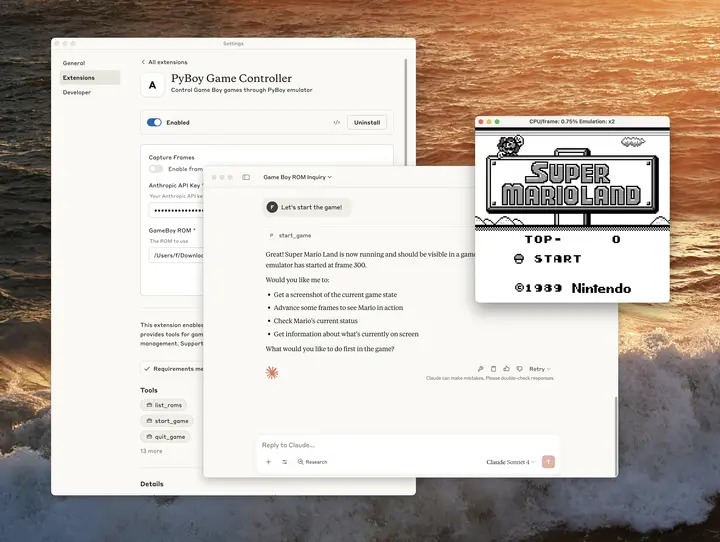\n\nWe can't wait to see what you build. The same creativity that brought us thousands of MCP servers can now reach millions of users with just one click. Ready to share your MCP server? [Submit your extension for review](https://forms.gle/tyiAZvch1kDADKoP9).\n", "dateCreated": "2026-10-20T17:55:58.869157456+00:00", "date_created": "2025-06-26T00:00:00+00:00", "date_modified": null, "date_published": "2025-06-26T00:00:00+00:00", "description": "File extension update Claude Desktop Extensions now use the .mcpb (MCP Bundle) file extension instead of .dxt. Existing .dxt extensions will continue to work, but we recommend developers use .mcpb for new extensions going forward. All…", "external_url": "https://www.anthropic.com/research/desktop-extensions", "git": { "commit": "ebb0941c5c06a2ab2377342d607535262a3e969e", "path": "items/anthropic-com/2025/06/2025-06-26-desktop-extensions-one-click-mcp-server-installation-for.md", "permalink": "https://github.com/aymericbeaumet/aggr-instance/blob/ebb0941c5c06a2ab2377342d607535262a3e969e/items/anthropic-com/2025/06/2025-06-26-desktop-extensions-one-click-mcp-server-installation-for.md" }, "id": "urn:aggr:item:3a21d67df849e72d327f199de141939e3ce836e1", "isBasedOn": { "@id": "https://www.anthropic.com/research/desktop-extensions" }, "mainEntity": { "@id": "https://www.anthropic.com/research/desktop-extensions", "@type": "CreativeWork", "archivedAt": { "@id": "https://aggr.aymericbeaumet.com/items/anthropic-com/2025-06-26-desktop-extensions-one-click-mcp-server-installation-for/#webpage" }, "datePublished": "2025-06-26T00:00:00+00:00", "headline": "Desktop Extensions: One-click MCP server installation for Claude Desktop", "image": { "@type": "ImageObject", "caption": null, "height": 90, "url": "https://www.anthropic.com/_next/image?url=https%3A%2F%2Fwww-cdn.anthropic.com%2Fimages%2F4zrzovbb%2Fwebsite%2F45edbf55189e62f68351df3f6dcd1c0829448dbd-800x800.png&w=1920&q=75", "width": 160 }, "timeRequired": "PT7M", "url": "https://www.anthropic.com/research/desktop-extensions", "wordCount": 1494 }, "name": "Archived snapshot: Desktop Extensions: One-click MCP server installation for Claude Desktop", "preview": { "alt": null, "color": null, "height": 90, "placeholder": { "data_url": "data:image/png;base64,iVBORw0KGgoAAAANSUhEUgAAAAEAAAABCAQAAAC1HAwCAAAAC0lEQVR42mNk+A8AAQUBAScY42YAAAAASUVORK5CYII=", "hash": "" }, "url": "https://www.anthropic.com/_next/image?url=https%3A%2F%2Fwww-cdn.anthropic.com%2Fimages%2F4zrzovbb%2Fwebsite%2F45edbf55189e62f68351df3f6dcd1c0829448dbd-800x800.png&w=1920&q=75", "width": 160 }, "reading_minutes": 7, "replicated_at": null, "source": "anthropic-com", "source_name": "Engineering \\ Anthropic", "summary": null, "tags": [], "temporalCoverage": "2026-10-20T17:55:58.869157456+00:00", "title": "Desktop Extensions: One-click MCP server installation for Claude Desktop", "url": "https://aggr.aymericbeaumet.com/items/anthropic-com/2025-06-26-desktop-extensions-one-click-mcp-server-installation-for/", "word_count": 1494 }