{
  "@context": "https://schema.org",
  "@id": "https://aggr.aymericbeaumet.com/items/ampcode-com/2026-05-06-amp-rebuilt/#webpage",
  "@type": [
    "WebPage",
    "ArchiveComponent"
  ],
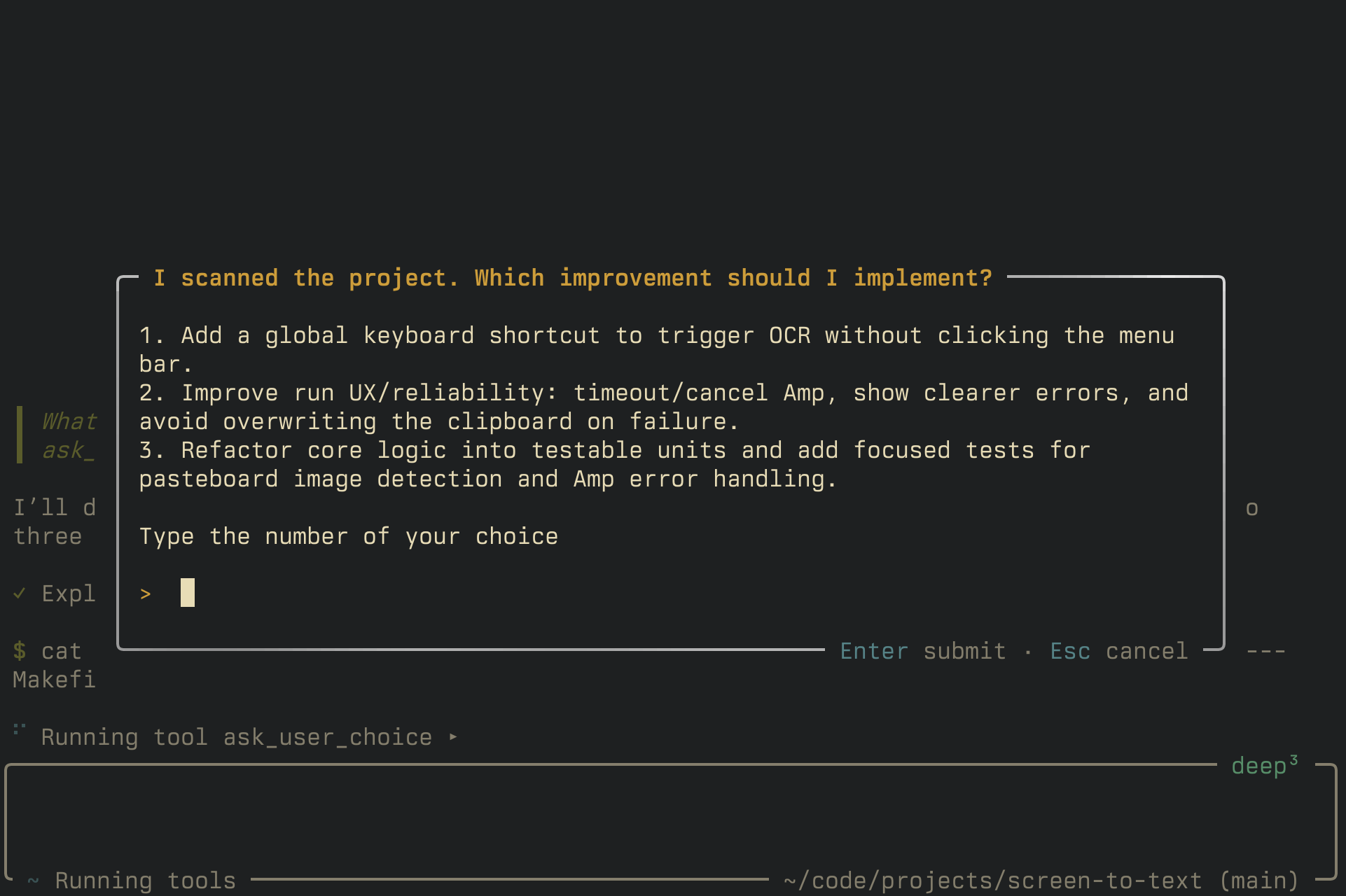
  "articleBody": "Today we're starting to roll out the new Amp.\n\nNot all of it, not yet. But the first piece: a rebuilt Amp CLI. Codename: Neo.\n\nIn [The Coding Agent is Dead](https://ampcode.com/news/the-coding-agent-is-dead) we wrote about where this is going: agents with longer leashes, less handholding, and many more places to run. Not just one agent in one terminal. Agents prompted from anywhere, running everywhere.\n\nThat's the new Amp we're building.\n\nBut the terminal still matters and will matter. There will be moments where you want the agent right next to you.\n\nSo we rebuilt the CLI first. It *is* still Amp in your terminal. But it's running on a completely new architecture: remote-controllable, compaction-first, plugin-powered, and much faster. Built for what's coming.\n\nLet's walk through it.\n\n## Remote Control\n\nWhen you start a thread in the new Amp CLI, you can now remote control it from [ampcode.com](https://ampcode.com).\n\nYou'll not only get live updates but you can also send messages, queue and dequeue them, or cancel what the agent is currently doing:\n\nThe architecture that enables this is the reason we rewrote Amp. And remote control is just the start.\n\nUpdate (2026-2026-05-27): You can now [require passkey authentication](https://ampcode.com/news/proof-of-human) to use remote control.\n\n## No More Manual Context Management\n\nA core principle behind the rebuild: build for what the frontier models can do now, in 2026, and what they will be able to do in the future. Do not build for what once was.\n\nToday's leading frontier models are great at handling compaction.\n\nSo Amp now manages context for you.\n\nYou don't have to watch context percentages anymore, or decide when to [handoff](https://ampcode.com/news/handoff), or extract information from a thread in a panic.\n\nWhen the context window fills up, Amp now compacts the thread: it summarizes the current context, starts a fresh window with that summary, and keeps going.\n\nCompaction now runs automatically when the context window is 90% full.\n\nIt was also the first thing we added to the new architecture. During one migration, we had to shut it off for a day and everyone complained. One beta-user reported: \"I love having auto-compaction. NOT missing handoff...\"\n\nSo [handoff](https://ampcode.com/news/handoff) is out. Compaction is in.\n\n## Plugins\n\nWith this release we're officially releasing the [Amp Plugin API](https://ampcode.com/manual/plugin-api).\n\nAmp plugins can:\n\n- **Handle events** — `amp.on(...)` for tool calls, tool results, and agent lifecycle events\n- **Add tools** — `amp.registerTool(...)` for custom tools the agent can call\n- **Add commands** — `amp.registerCommand(...)` for command palette actions\n- **Show UI elements** — `ctx.ui.notify(...)`, `ctx.ui.confirm(...)`, `ctx.ui.input(...)`, and `ctx.ui.select(...)`\n- **Ask AI questions** — `amp.ai.ask(...)` for yes/no classification with confidence and reasoning\n\nHere, for example, is a plugin that registers a tool called `ask_user_choice`. The agent can use it to present the user with options:\n\n> **Update (September 2026):** `ask_user_choice` is now a built-in Amp tool available to everyone, so you no longer need this plugin. If you added one like it, tell Amp: \"Remove the ask-user-choice plugin; Amp now has a built-in `ask_user_choice` tool.\" The example below still shows how plugin tools and UI work.\n\n```typescript\n// .amp/plugins/ask-user-choice.ts\n\nimport type { PluginAPI } from '@ampcode/plugin'\n\nexport default function (amp: PluginAPI) {\n\tamp.registerTool({\n\t\tname: 'ask_user_choice',\n\t\tdescription:\n\t\t\t'Present the user with a multiple choice question when there are several possible approaches and you need them to pick one. Use when you have 2-5 concrete options to choose from.',\n\t\tinputSchema: {\n\t\t\ttype: 'object',\n\t\t\tproperties: {\n\t\t\t\tquestion: { type: 'string', description: 'The question to ask the user' },\n\t\t\t\toptions: {\n\t\t\t\t\ttype: 'array',\n\t\t\t\t\titems: { type: 'string' },\n\t\t\t\t\tdescription: 'The options to choose from (2-5 items)',\n\t\t\t\t},\n\t\t\t},\n\t\t\trequired: ['question', 'options'],\n\t\t},\n\t\tasync execute(input, ctx) {\n\t\t\tconst question = input.question as string\n\t\t\tconst options = input.options as string[]\n\t\t\tconst optionsList = options.map((opt, i) => `${i + 1}. ${opt}`).join('\\n')\n\n\t\t\tconst answer = await ctx.ui.input({\n\t\t\t\ttitle: question,\n\t\t\t\thelpText: `${optionsList}\\n\\nType the number of your choice`,\n\t\t\t\tsubmitButtonText: 'Select',\n\t\t\t})\n\n\t\t\tif (!answer) return 'User dismissed the question without choosing.'\n\n\t\t\tconst index = parseInt(answer.trim(), 10) - 1\n\t\t\tif (index >= 0 && index < options.length) {\n\t\t\t\treturn `User selected option ${index + 1}: ${options[index]}`\n\t\t\t}\n\t\t\treturn `User responded with: ${answer}`\n\t\t},\n\t})\n}\n```\n\nThat's it: a single file in `.amp/plugins` and Amp gets a new tool. It looks like this:\n\n![The ask_user_choice tool in action](https://static.ampcode.com/news/neo-ask-user-choice.png)\n\nThe [Amp Plugin API](https://ampcode.com/manual/plugin-api) documentation has more examples, including a full permissions plugin.\n\n## Queuing & Steering\n\nQueuing messages is now the default. When you send a message while the agent is busy, it'll get added to the queue instead of stopping and interrupting the agent.\n\nThis, too, we think fits the models of today and tomorrow better. They work for longer and need fewer mid-flight yanks.\n\nIf you want to fast-track a queued message, you can *steer*.\n\nSteering lets you send a queued message as soon as possible, not just when the agent becomes idle. The next time a tool result is sent up to the agent, for example.\n\nUse ↑ to select a queued message, then steer it with ⏎:\n\nYou can also hit Esc Esc to interrupt the agent and send immediately.\n\n## Permissions\n\nAmp will no longer ask for permission before running tools.\n\nWhat was once the `--dangerously-allow-all` flag is now the default behavior for users who have not configured permissions.\n\nThe old permissions system still exists. It's now a built-in plugin. If your existing Amp settings already opt into permissions — through `amp.permissions`, `amp.dangerouslyAllowAll: false`, or `amp.guardedFiles.allowlist` — Amp loads that plugin and works as before. (When the plugin is active, it applies in both `amp` and `amp --execute`.)\n\nWhy change the default?\n\nA year ago tool calls were simpler to check: inspect the name, inspect the arguments, do string-based matching, allow or deny. Now, frontier models write throwaway scripts to get stuff done. They chain shell commands.\n\nIt's near-impossible to determine statically whether a tool invocation will be destructive or not.\n\nWhen a model writes five 20-line Python scripts in parallel to do something, checking whether a tool call contains `rm -rf` gives you a false sense of security.\n\nOn top of that, there are now custom skills and scripts, specifically built for agents. And different organizations have different policies around which model is allowed to call which tool.\n\nSo permissions now live in the Plugin API.\n\nIf you need a policy, build the one that matches your setup. Point Amp at the [Amp Plugin API](https://ampcode.com/manual/plugin-api) and ask it to help you.\n\n## Performance & Efficiency\n\nThe old Amp CLI got slow with huge threads. Neo doesn't. Here's a comparison, using a thread with around 5000 messages:\n\n| Metric           | Old          | New          | Improvement     |\n| ---------------- | ------------ | ------------ | --------------- |\n| CPU% (mean ± sd) | 84.1% ± 1.6% | 17.4% ± 8.8% | 79% less CPU    |\n| CPU% (peak)      | 86.3%        | 25.8%        | —               |\n| Memory (idle)    | 1814 MB      | 540 MB       | 70% less memory |\n\nRendering performance has improved, too.\n\nBefore:\n\nAfter:\n\n## What's Gone\n\nWe also removed features. Of course we did, otherwise it wouldn't be an Amp release, would it?\n\nOur goal is to keep you on the frontier. Amp should not make you work like it's still 2025.\n\nSome features made sense when models needed more babysitting, more manual context management, more careful steering. They don't anymore. When a feature starts tying you to the old way to use agents, it goes.\n\n**Handoff** is gone. As described above, compaction made it obsolete. There are some valid use cases for Handoff even when there's enough space left in the context, but we don't think it warrants the complexity introduced by many small, connected threads.\n\nYou can also still reference other threads and Amp will read them and extract the relevant information.\n\nFor example, you can use Ctrl+O and `thread: new` to create a new thread, then hit Enter to quickly insert a reference to the previous thread. Amp will use that reference along with the rest of your prompt to read the previous thread.\n\n**Amp no longer rolls back file changes when you edit or restore a message.** We've found ourselves using this less and less as models advanced. The models are now good enough to undo changes for you, with more finesse than a rollback. And, the truth is, the rollback feature was always best-effort: if the agent wrote and ran code that generated files, we didn't keep track of that without elaborate snapshotting.\n\n**Skill management**: Amp still supports [Agent Skills](https://agentskills.io/home) but we no longer offer commands or subcommands to add, remove, or update skills. That's better done by separate tools, such as [`skills`](https://github.com/vercel-labs/skills).\n\n**User-invokable skills**: We also removed support for user-invokable skills. The latest generation of models now invokes skills reliably.\n\n**Themes**: Custom themes made it harder to keep the CLI legible, polished, and recognizably Amp. We’d rather ship one good interface than support many broken-looking ones.\n\n**Manual bash invocation**: in the old Amp CLI you could invoke bash commands by using `$` and `$$` in the prompt editor. An interesting idea a year ago, but now with models being ever more capable at running commands on their own and without blowing up their context window (and that context window being unlimited, practically) it's no longer useful.\n\n## Rollout\n\nWe’re rolling Neo out over the next several days. If you want to skip the line, send us an email. We'll flip the switch for you. (Update 2026-05-12: We've briefly paused adding more people to the Neo beta as we fix some bugs.)\n\nThis is the first piece of the new Amp.\n\nMore soon.\n",
  "authors": [],
  "captured_at": "2026-10-03T23:09:50.514863041+00:00",
  "category": "programming",
  "content_html": "<p>Today we're starting to roll out the new Amp.</p>\n<p>Not all of it, not yet. But the first piece: a rebuilt Amp CLI. Codename: Neo.</p>\n<p>In <a target=\"_blank\" rel=\"noopener noreferrer\" href=\"https://ampcode.com/news/the-coding-agent-is-dead\">The Coding Agent is Dead</a> we wrote about where this is going: agents with longer leashes, less handholding, and many more places to run. Not just one agent in one terminal. Agents prompted from anywhere, running everywhere.</p>\n<p>That's the new Amp we're building.</p>\n<p>But the terminal still matters and will matter. There will be moments where you want the agent right next to you.</p>\n<p>So we rebuilt the CLI first. It <em>is</em> still Amp in your terminal. But it's running on a completely new architecture: remote-controllable, compaction-first, plugin-powered, and much faster. Built for what's coming.</p>\n<p>Let's walk through it.</p>\n<h2>Remote Control</h2>\n<p>When you start a thread in the new Amp CLI, you can now remote control it from <a target=\"_blank\" rel=\"noopener noreferrer\" href=\"https://ampcode.com\">ampcode.com</a>.</p>\n<p>You'll not only get live updates but you can also send messages, queue and dequeue them, or cancel what the agent is currently doing:</p>\n<p>The architecture that enables this is the reason we rewrote Amp. And remote control is just the start.</p>\n<p>Update (2026-2026-05-27): You can now <a target=\"_blank\" rel=\"noopener noreferrer\" href=\"https://ampcode.com/news/proof-of-human\">require passkey authentication</a> to use remote control.</p>\n<h2>No More Manual Context Management</h2>\n<p>A core principle behind the rebuild: build for what the frontier models can do now, in 2026, and what they will be able to do in the future. Do not build for what once was.</p>\n<p>Today's leading frontier models are great at handling compaction.</p>\n<p>So Amp now manages context for you.</p>\n<p>You don't have to watch context percentages anymore, or decide when to <a target=\"_blank\" rel=\"noopener noreferrer\" href=\"https://ampcode.com/news/handoff\">handoff</a>, or extract information from a thread in a panic.</p>\n<p>When the context window fills up, Amp now compacts the thread: it summarizes the current context, starts a fresh window with that summary, and keeps going.</p>\n<p>Compaction now runs automatically when the context window is 90% full.</p>\n<p>It was also the first thing we added to the new architecture. During one migration, we had to shut it off for a day and everyone complained. One beta-user reported: &quot;I love having auto-compaction. NOT missing handoff...&quot;</p>\n<p>So <a target=\"_blank\" rel=\"noopener noreferrer\" href=\"https://ampcode.com/news/handoff\">handoff</a> is out. Compaction is in.</p>\n<h2>Plugins</h2>\n<p>With this release we're officially releasing the <a target=\"_blank\" rel=\"noopener noreferrer\" href=\"https://ampcode.com/manual/plugin-api\">Amp Plugin API</a>.</p>\n<p>Amp plugins can:</p>\n<ul>\n<li><strong>Handle events</strong> — <code>amp.on(...)</code> for tool calls, tool results, and agent lifecycle events</li>\n<li><strong>Add tools</strong> — <code>amp.registerTool(...)</code> for custom tools the agent can call</li>\n<li><strong>Add commands</strong> — <code>amp.registerCommand(...)</code> for command palette actions</li>\n<li><strong>Show UI elements</strong> — <code>ctx.ui.notify(...)</code>, <code>ctx.ui.confirm(...)</code>, <code>ctx.ui.input(...)</code>, and <code>ctx.ui.select(...)</code></li>\n<li><strong>Ask AI questions</strong> — <code>amp.ai.ask(...)</code> for yes/no classification with confidence and reasoning</li>\n</ul>\n<p>Here, for example, is a plugin that registers a tool called <code>ask_user_choice</code>. The agent can use it to present the user with options:</p>\n<blockquote>\n<p><strong>Update (September 2026):</strong> <code>ask_user_choice</code> is now a built-in Amp tool available to everyone, so you no longer need this plugin. If you added one like it, tell Amp: &quot;Remove the ask-user-choice plugin; Amp now has a built-in <code>ask_user_choice</code> tool.&quot; The example below still shows how plugin tools and UI work.</p>\n</blockquote>\n<pre><code class=\"language-typescript\"><span class=\"code-snippet\" data-language=\"TypeScript\"><span class=\"syntax-source syntax-js\"><span class=\"syntax-comment syntax-line syntax-double-slash syntax-js\"><span class=\"syntax-punctuation syntax-definition syntax-comment syntax-js\">//</span> .amp/plugins/ask-user-choice.ts\n</span>\n<span class=\"syntax-meta syntax-import syntax-js\"><span class=\"syntax-keyword syntax-control syntax-import-export syntax-js\">import</span> <span class=\"syntax-variable syntax-other syntax-readwrite syntax-js\">type</span> </span><span class=\"syntax-meta syntax-block syntax-js\"><span class=\"syntax-punctuation syntax-section syntax-block syntax-js\">{</span> <span class=\"syntax-variable syntax-other syntax-readwrite syntax-js\">PluginAPI</span> <span class=\"syntax-punctuation syntax-section syntax-block syntax-js\">}</span></span> <span class=\"syntax-keyword syntax-control syntax-import-export syntax-js\">from</span> <span class=\"syntax-string syntax-quoted syntax-single syntax-js\"><span class=\"syntax-punctuation syntax-definition syntax-string syntax-begin syntax-js\">&#39;</span>@ampcode/plugin<span class=\"syntax-punctuation syntax-definition syntax-string syntax-end syntax-js\">&#39;</span></span>\n\n<span class=\"syntax-meta syntax-export syntax-js\"><span class=\"syntax-keyword syntax-control syntax-import-export syntax-js\">export</span> <span class=\"syntax-keyword syntax-control syntax-import-export syntax-js\">default</span> <span class=\"syntax-meta syntax-function syntax-declaration syntax-js\"><span class=\"syntax-storage syntax-type syntax-function syntax-js\">function</span> <span class=\"syntax-punctuation syntax-section syntax-group syntax-begin syntax-js\">(</span><span class=\"syntax-variable syntax-parameter syntax-function syntax-js\">amp</span>: <span class=\"syntax-variable syntax-parameter syntax-function syntax-js\">PluginAPI</span><span class=\"syntax-punctuation syntax-section syntax-group syntax-end syntax-js\">)</span><span class=\"syntax-meta syntax-function syntax-declaration syntax-js\"> </span></span><span class=\"syntax-meta syntax-block syntax-js\"><span class=\"syntax-punctuation syntax-section syntax-block syntax-js\">{</span>\n\t<span class=\"syntax-variable syntax-other syntax-object syntax-js\">amp</span><span class=\"syntax-punctuation syntax-accessor syntax-js\">.</span><span class=\"syntax-meta syntax-function-call syntax-method syntax-js\"><span class=\"syntax-variable syntax-function syntax-js\">registerTool</span><span class=\"syntax-meta syntax-group syntax-js\"><span class=\"syntax-punctuation syntax-section syntax-group syntax-js\">(</span><span class=\"syntax-meta syntax-object-literal syntax-js\"><span class=\"syntax-punctuation syntax-section syntax-block syntax-js\">{</span>\n\t\t<span class=\"syntax-meta syntax-object-literal syntax-key syntax-js\">name</span><span class=\"syntax-punctuation syntax-separator syntax-key-value syntax-js\">:</span> <span class=\"syntax-string syntax-quoted syntax-single syntax-js\"><span class=\"syntax-punctuation syntax-definition syntax-string syntax-begin syntax-js\">&#39;</span>ask_user_choice<span class=\"syntax-punctuation syntax-definition syntax-string syntax-end syntax-js\">&#39;</span></span><span class=\"syntax-punctuation syntax-separator syntax-comma syntax-js\">,</span>\n\t\t<span class=\"syntax-meta syntax-object-literal syntax-key syntax-js\">description</span><span class=\"syntax-punctuation syntax-separator syntax-key-value syntax-js\">:</span>\n\t\t\t<span class=\"syntax-string syntax-quoted syntax-single syntax-js\"><span class=\"syntax-punctuation syntax-definition syntax-string syntax-begin syntax-js\">&#39;</span>Present the user with a multiple choice question when there are several possible approaches and you need them to pick one. Use when you have 2-5 concrete options to choose from.<span class=\"syntax-punctuation syntax-definition syntax-string syntax-end syntax-js\">&#39;</span></span><span class=\"syntax-punctuation syntax-separator syntax-comma syntax-js\">,</span>\n\t\t<span class=\"syntax-meta syntax-object-literal syntax-key syntax-js\">inputSchema</span><span class=\"syntax-punctuation syntax-separator syntax-key-value syntax-js\">:</span> <span class=\"syntax-meta syntax-object-literal syntax-js\"><span class=\"syntax-punctuation syntax-section syntax-block syntax-js\">{</span>\n\t\t\t<span class=\"syntax-meta syntax-object-literal syntax-key syntax-js\">type</span><span class=\"syntax-punctuation syntax-separator syntax-key-value syntax-js\">:</span> <span class=\"syntax-string syntax-quoted syntax-single syntax-js\"><span class=\"syntax-punctuation syntax-definition syntax-string syntax-begin syntax-js\">&#39;</span>object<span class=\"syntax-punctuation syntax-definition syntax-string syntax-end syntax-js\">&#39;</span></span><span class=\"syntax-punctuation syntax-separator syntax-comma syntax-js\">,</span>\n\t\t\t<span class=\"syntax-meta syntax-object-literal syntax-key syntax-js\">properties</span><span class=\"syntax-punctuation syntax-separator syntax-key-value syntax-js\">:</span> <span class=\"syntax-meta syntax-object-literal syntax-js\"><span class=\"syntax-punctuation syntax-section syntax-block syntax-js\">{</span>\n\t\t\t\t<span class=\"syntax-meta syntax-object-literal syntax-key syntax-js\">question</span><span class=\"syntax-punctuation syntax-separator syntax-key-value syntax-js\">:</span> <span class=\"syntax-meta syntax-object-literal syntax-js\"><span class=\"syntax-punctuation syntax-section syntax-block syntax-js\">{</span> <span class=\"syntax-meta syntax-object-literal syntax-key syntax-js\">type</span><span class=\"syntax-punctuation syntax-separator syntax-key-value syntax-js\">:</span> <span class=\"syntax-string syntax-quoted syntax-single syntax-js\"><span class=\"syntax-punctuation syntax-definition syntax-string syntax-begin syntax-js\">&#39;</span>string<span class=\"syntax-punctuation syntax-definition syntax-string syntax-end syntax-js\">&#39;</span></span><span class=\"syntax-punctuation syntax-separator syntax-comma syntax-js\">,</span> <span class=\"syntax-meta syntax-object-literal syntax-key syntax-js\">description</span><span class=\"syntax-punctuation syntax-separator syntax-key-value syntax-js\">:</span> <span class=\"syntax-string syntax-quoted syntax-single syntax-js\"><span class=\"syntax-punctuation syntax-definition syntax-string syntax-begin syntax-js\">&#39;</span>The question to ask the user<span class=\"syntax-punctuation syntax-definition syntax-string syntax-end syntax-js\">&#39;</span></span> <span class=\"syntax-punctuation syntax-section syntax-block syntax-js\">}</span></span><span class=\"syntax-punctuation syntax-separator syntax-comma syntax-js\">,</span>\n\t\t\t\t<span class=\"syntax-meta syntax-object-literal syntax-key syntax-js\">options</span><span class=\"syntax-punctuation syntax-separator syntax-key-value syntax-js\">:</span> <span class=\"syntax-meta syntax-object-literal syntax-js\"><span class=\"syntax-punctuation syntax-section syntax-block syntax-js\">{</span>\n\t\t\t\t\t<span class=\"syntax-meta syntax-object-literal syntax-key syntax-js\">type</span><span class=\"syntax-punctuation syntax-separator syntax-key-value syntax-js\">:</span> <span class=\"syntax-string syntax-quoted syntax-single syntax-js\"><span class=\"syntax-punctuation syntax-definition syntax-string syntax-begin syntax-js\">&#39;</span>array<span class=\"syntax-punctuation syntax-definition syntax-string syntax-end syntax-js\">&#39;</span></span><span class=\"syntax-punctuation syntax-separator syntax-comma syntax-js\">,</span>\n\t\t\t\t\t<span class=\"syntax-meta syntax-object-literal syntax-key syntax-js\">items</span><span class=\"syntax-punctuation syntax-separator syntax-key-value syntax-js\">:</span> <span class=\"syntax-meta syntax-object-literal syntax-js\"><span class=\"syntax-punctuation syntax-section syntax-block syntax-js\">{</span> <span class=\"syntax-meta syntax-object-literal syntax-key syntax-js\">type</span><span class=\"syntax-punctuation syntax-separator syntax-key-value syntax-js\">:</span> <span class=\"syntax-string syntax-quoted syntax-single syntax-js\"><span class=\"syntax-punctuation syntax-definition syntax-string syntax-begin syntax-js\">&#39;</span>string<span class=\"syntax-punctuation syntax-definition syntax-string syntax-end syntax-js\">&#39;</span></span> <span class=\"syntax-punctuation syntax-section syntax-block syntax-js\">}</span></span><span class=\"syntax-punctuation syntax-separator syntax-comma syntax-js\">,</span>\n\t\t\t\t\t<span class=\"syntax-meta syntax-object-literal syntax-key syntax-js\">description</span><span class=\"syntax-punctuation syntax-separator syntax-key-value syntax-js\">:</span> <span class=\"syntax-string syntax-quoted syntax-single syntax-js\"><span class=\"syntax-punctuation syntax-definition syntax-string syntax-begin syntax-js\">&#39;</span>The options to choose from (2-5 items)<span class=\"syntax-punctuation syntax-definition syntax-string syntax-end syntax-js\">&#39;</span></span><span class=\"syntax-punctuation syntax-separator syntax-comma syntax-js\">,</span>\n\t\t\t\t<span class=\"syntax-punctuation syntax-section syntax-block syntax-js\">}</span></span><span class=\"syntax-punctuation syntax-separator syntax-comma syntax-js\">,</span>\n\t\t\t<span class=\"syntax-punctuation syntax-section syntax-block syntax-js\">}</span></span><span class=\"syntax-punctuation syntax-separator syntax-comma syntax-js\">,</span>\n\t\t\t<span class=\"syntax-meta syntax-object-literal syntax-key syntax-js\">required</span><span class=\"syntax-punctuation syntax-separator syntax-key-value syntax-js\">:</span> <span class=\"syntax-meta syntax-sequence syntax-js\"><span class=\"syntax-punctuation syntax-section syntax-brackets syntax-js\">[</span><span class=\"syntax-string syntax-quoted syntax-single syntax-js\"><span class=\"syntax-punctuation syntax-definition syntax-string syntax-begin syntax-js\">&#39;</span>question<span class=\"syntax-punctuation syntax-definition syntax-string syntax-end syntax-js\">&#39;</span></span><span class=\"syntax-punctuation syntax-separator syntax-comma syntax-js\">,</span> <span class=\"syntax-string syntax-quoted syntax-single syntax-js\"><span class=\"syntax-punctuation syntax-definition syntax-string syntax-begin syntax-js\">&#39;</span>options<span class=\"syntax-punctuation syntax-definition syntax-string syntax-end syntax-js\">&#39;</span></span><span class=\"syntax-punctuation syntax-section syntax-brackets syntax-js\">]</span></span><span class=\"syntax-punctuation syntax-separator syntax-comma syntax-js\">,</span>\n\t\t<span class=\"syntax-punctuation syntax-section syntax-block syntax-js\">}</span></span><span class=\"syntax-punctuation syntax-separator syntax-comma syntax-js\">,</span>\n\t\t<span class=\"syntax-meta syntax-function syntax-declaration syntax-js\"><span class=\"syntax-entity syntax-name syntax-function syntax-js\">async</span><span class=\"syntax-meta syntax-function syntax-declaration syntax-js\"> </span></span><span class=\"syntax-meta syntax-function syntax-declaration syntax-js\"><span class=\"syntax-entity syntax-name syntax-function syntax-js\">execute</span><span class=\"syntax-punctuation syntax-section syntax-group syntax-begin syntax-js\">(</span><span class=\"syntax-variable syntax-parameter syntax-function syntax-js\">input</span><span class=\"syntax-punctuation syntax-separator syntax-parameter syntax-function syntax-js\">,</span> <span class=\"syntax-variable syntax-parameter syntax-function syntax-js\">ctx</span><span class=\"syntax-punctuation syntax-section syntax-group syntax-end syntax-js\">)</span><span class=\"syntax-meta syntax-function syntax-declaration syntax-js\"> </span></span><span class=\"syntax-meta syntax-block syntax-js\"><span class=\"syntax-punctuation syntax-section syntax-block syntax-js\">{</span>\n\t\t\t<span class=\"syntax-storage syntax-type syntax-js\">const</span> <span class=\"syntax-variable syntax-other syntax-readwrite syntax-js\">question</span> <span class=\"syntax-keyword syntax-operator syntax-assignment syntax-js\">=</span> <span class=\"syntax-variable syntax-other syntax-object syntax-js\">input</span><span class=\"syntax-punctuation syntax-accessor syntax-js\">.</span><span class=\"syntax-meta syntax-property syntax-object syntax-js\">question</span> <span class=\"syntax-variable syntax-other syntax-readwrite syntax-js\">as</span> <span class=\"syntax-variable syntax-other syntax-readwrite syntax-js\">string</span>\n\t\t\t<span class=\"syntax-storage syntax-type syntax-js\">const</span> <span class=\"syntax-variable syntax-other syntax-readwrite syntax-js\">options</span> <span class=\"syntax-keyword syntax-operator syntax-assignment syntax-js\">=</span> <span class=\"syntax-variable syntax-other syntax-object syntax-js\">input</span><span class=\"syntax-punctuation syntax-accessor syntax-js\">.</span><span class=\"syntax-meta syntax-property syntax-object syntax-js\">options</span> <span class=\"syntax-variable syntax-other syntax-readwrite syntax-js\">as</span> <span class=\"syntax-variable syntax-other syntax-object syntax-js\">string</span><span class=\"syntax-meta syntax-brackets syntax-js\"><span class=\"syntax-punctuation syntax-section syntax-brackets syntax-js\">[</span><span class=\"syntax-punctuation syntax-section syntax-brackets syntax-js\">]</span></span>\n\t\t\t<span class=\"syntax-storage syntax-type syntax-js\">const</span> <span class=\"syntax-variable syntax-other syntax-readwrite syntax-js\">optionsList</span> <span class=\"syntax-keyword syntax-operator syntax-assignment syntax-js\">=</span> <span class=\"syntax-variable syntax-other syntax-object syntax-js\">options</span><span class=\"syntax-punctuation syntax-accessor syntax-js\">.</span><span class=\"syntax-meta syntax-function-call syntax-method syntax-js\"><span class=\"syntax-variable syntax-function syntax-js\">map</span><span class=\"syntax-meta syntax-group syntax-js\"><span class=\"syntax-punctuation syntax-section syntax-group syntax-js\">(</span><span class=\"syntax-meta syntax-function syntax-declaration syntax-js\"><span class=\"syntax-punctuation syntax-section syntax-group syntax-begin syntax-js\">(</span><span class=\"syntax-variable syntax-parameter syntax-function syntax-js\">opt</span><span class=\"syntax-punctuation syntax-separator syntax-parameter syntax-function syntax-js\">,</span> <span class=\"syntax-variable syntax-parameter syntax-function syntax-js\">i</span><span class=\"syntax-punctuation syntax-section syntax-group syntax-end syntax-js\">)</span><span class=\"syntax-meta syntax-function syntax-declaration syntax-js\"> </span><span class=\"syntax-storage syntax-type syntax-function syntax-arrow syntax-js\">=&gt;</span></span> <span class=\"syntax-meta syntax-block syntax-js\"><span class=\"syntax-string syntax-template syntax-js\"><span class=\"syntax-punctuation syntax-definition syntax-string syntax-template syntax-begin syntax-js\">`</span></span><span class=\"syntax-meta syntax-template syntax-expression syntax-js\"><span class=\"syntax-punctuation syntax-definition syntax-template-expression syntax-begin syntax-js\">${</span></span><span class=\"syntax-meta syntax-template syntax-expression syntax-js\"><span class=\"syntax-source syntax-js syntax-embedded syntax-expression\"><span class=\"syntax-variable syntax-other syntax-readwrite syntax-js\">i</span> <span class=\"syntax-keyword syntax-operator syntax-arithmetic syntax-js\">+</span> <span class=\"syntax-constant syntax-numeric syntax-js\">1</span></span><span class=\"syntax-punctuation syntax-definition syntax-template-expression syntax-end syntax-js\">}</span></span><span class=\"syntax-string syntax-template syntax-js\">. </span><span class=\"syntax-meta syntax-template syntax-expression syntax-js\"><span class=\"syntax-punctuation syntax-definition syntax-template-expression syntax-begin syntax-js\">${</span></span><span class=\"syntax-meta syntax-template syntax-expression syntax-js\"><span class=\"syntax-source syntax-js syntax-embedded syntax-expression\"><span class=\"syntax-variable syntax-other syntax-readwrite syntax-js\">opt</span></span><span class=\"syntax-punctuation syntax-definition syntax-template-expression syntax-end syntax-js\">}</span></span><span class=\"syntax-string syntax-template syntax-js\"><span class=\"syntax-punctuation syntax-definition syntax-string syntax-template syntax-end syntax-js\">`</span></span></span></span><span class=\"syntax-meta syntax-group syntax-js\"><span class=\"syntax-punctuation syntax-section syntax-group syntax-js\">)</span></span></span><span class=\"syntax-punctuation syntax-accessor syntax-js\">.</span><span class=\"syntax-meta syntax-function-call syntax-method syntax-js\"><span class=\"syntax-variable syntax-function syntax-js\">join</span><span class=\"syntax-meta syntax-group syntax-js\"><span class=\"syntax-punctuation syntax-section syntax-group syntax-js\">(</span><span class=\"syntax-string syntax-quoted syntax-single syntax-js\"><span class=\"syntax-punctuation syntax-definition syntax-string syntax-begin syntax-js\">&#39;</span><span class=\"syntax-constant syntax-character syntax-escape syntax-js\">\\n</span><span class=\"syntax-punctuation syntax-definition syntax-string syntax-end syntax-js\">&#39;</span></span></span><span class=\"syntax-meta syntax-group syntax-js\"><span class=\"syntax-punctuation syntax-section syntax-group syntax-js\">)</span></span></span>\n\n\t\t\t<span class=\"syntax-storage syntax-type syntax-js\">const</span> <span class=\"syntax-variable syntax-other syntax-readwrite syntax-js\">answer</span> <span class=\"syntax-keyword syntax-operator syntax-assignment syntax-js\">=</span> <span class=\"syntax-variable syntax-other syntax-readwrite syntax-js\">await</span> <span class=\"syntax-variable syntax-other syntax-object syntax-js\">ctx</span><span class=\"syntax-punctuation syntax-accessor syntax-js\">.</span><span class=\"syntax-meta syntax-property syntax-object syntax-js\">ui</span><span class=\"syntax-punctuation syntax-accessor syntax-js\">.</span><span class=\"syntax-meta syntax-function-call syntax-method syntax-js\"><span class=\"syntax-variable syntax-function syntax-js\">input</span><span class=\"syntax-meta syntax-group syntax-js\"><span class=\"syntax-punctuation syntax-section syntax-group syntax-js\">(</span><span class=\"syntax-meta syntax-object-literal syntax-js\"><span class=\"syntax-punctuation syntax-section syntax-block syntax-js\">{</span>\n\t\t\t\t<span class=\"syntax-meta syntax-object-literal syntax-key syntax-js\">title</span><span class=\"syntax-punctuation syntax-separator syntax-key-value syntax-js\">:</span> <span class=\"syntax-variable syntax-other syntax-readwrite syntax-js\">question</span><span class=\"syntax-punctuation syntax-separator syntax-comma syntax-js\">,</span>\n\t\t\t\t<span class=\"syntax-meta syntax-object-literal syntax-key syntax-js\">helpText</span><span class=\"syntax-punctuation syntax-separator syntax-key-value syntax-js\">:</span> <span class=\"syntax-string syntax-template syntax-js\"><span class=\"syntax-punctuation syntax-definition syntax-string syntax-template syntax-begin syntax-js\">`</span></span><span class=\"syntax-meta syntax-template syntax-expression syntax-js\"><span class=\"syntax-punctuation syntax-definition syntax-template-expression syntax-begin syntax-js\">${</span></span><span class=\"syntax-meta syntax-template syntax-expression syntax-js\"><span class=\"syntax-source syntax-js syntax-embedded syntax-expression\"><span class=\"syntax-variable syntax-other syntax-readwrite syntax-js\">optionsList</span></span><span class=\"syntax-punctuation syntax-definition syntax-template-expression syntax-end syntax-js\">}</span></span><span class=\"syntax-string syntax-template syntax-js\"><span class=\"syntax-constant syntax-character syntax-escape syntax-js\">\\n</span><span class=\"syntax-constant syntax-character syntax-escape syntax-js\">\\n</span>Type the number of your choice<span class=\"syntax-punctuation syntax-definition syntax-string syntax-template syntax-end syntax-js\">`</span></span><span class=\"syntax-punctuation syntax-separator syntax-comma syntax-js\">,</span>\n\t\t\t\t<span class=\"syntax-meta syntax-object-literal syntax-key syntax-js\">submitButtonText</span><span class=\"syntax-punctuation syntax-separator syntax-key-value syntax-js\">:</span> <span class=\"syntax-string syntax-quoted syntax-single syntax-js\"><span class=\"syntax-punctuation syntax-definition syntax-string syntax-begin syntax-js\">&#39;</span>Select<span class=\"syntax-punctuation syntax-definition syntax-string syntax-end syntax-js\">&#39;</span></span><span class=\"syntax-punctuation syntax-separator syntax-comma syntax-js\">,</span>\n\t\t\t<span class=\"syntax-punctuation syntax-section syntax-block syntax-js\">}</span></span></span><span class=\"syntax-meta syntax-group syntax-js\"><span class=\"syntax-punctuation syntax-section syntax-group syntax-js\">)</span></span></span>\n\n\t\t\t<span class=\"syntax-meta syntax-conditional syntax-js\"><span class=\"syntax-keyword syntax-control syntax-conditional syntax-js\">if</span> <span class=\"syntax-meta syntax-group syntax-js\"><span class=\"syntax-punctuation syntax-section syntax-group syntax-js\">(</span><span class=\"syntax-keyword syntax-operator syntax-logical syntax-js\">!</span><span class=\"syntax-variable syntax-other syntax-readwrite syntax-js\">answer</span><span class=\"syntax-punctuation syntax-section syntax-group syntax-js\">)</span></span> </span><span class=\"syntax-keyword syntax-control syntax-flow syntax-js\">return</span> <span class=\"syntax-string syntax-quoted syntax-single syntax-js\"><span class=\"syntax-punctuation syntax-definition syntax-string syntax-begin syntax-js\">&#39;</span>User dismissed the question without choosing.<span class=\"syntax-punctuation syntax-definition syntax-string syntax-end syntax-js\">&#39;</span></span>\n\n\t\t\t<span class=\"syntax-storage syntax-type syntax-js\">const</span> <span class=\"syntax-variable syntax-other syntax-readwrite syntax-js\">index</span> <span class=\"syntax-keyword syntax-operator syntax-assignment syntax-js\">=</span> <span class=\"syntax-meta syntax-function-call syntax-js\"><span class=\"syntax-support syntax-function syntax-js\">parseInt</span><span class=\"syntax-meta syntax-group syntax-js\"><span class=\"syntax-punctuation syntax-section syntax-group syntax-js\">(</span><span class=\"syntax-variable syntax-other syntax-object syntax-js\">answer</span><span class=\"syntax-punctuation syntax-accessor syntax-js\">.</span><span class=\"syntax-meta syntax-function-call syntax-method syntax-js\"><span class=\"syntax-variable syntax-function syntax-js\">trim</span><span class=\"syntax-meta syntax-group syntax-js\"><span class=\"syntax-punctuation syntax-section syntax-group syntax-js\">(</span></span><span class=\"syntax-meta syntax-group syntax-js\"><span class=\"syntax-punctuation syntax-section syntax-group syntax-js\">)</span></span></span><span class=\"syntax-punctuation syntax-separator syntax-comma syntax-js\">,</span> <span class=\"syntax-constant syntax-numeric syntax-js\">10</span></span><span class=\"syntax-meta syntax-group syntax-js\"><span class=\"syntax-punctuation syntax-section syntax-group syntax-js\">)</span></span></span> <span class=\"syntax-keyword syntax-operator syntax-arithmetic syntax-js\">-</span> <span class=\"syntax-constant syntax-numeric syntax-js\">1</span>\n\t\t\t<span class=\"syntax-meta syntax-conditional syntax-js\"><span class=\"syntax-keyword syntax-control syntax-conditional syntax-js\">if</span> <span class=\"syntax-meta syntax-group syntax-js\"><span class=\"syntax-punctuation syntax-section syntax-group syntax-js\">(</span><span class=\"syntax-variable syntax-other syntax-readwrite syntax-js\">index</span> <span class=\"syntax-keyword syntax-operator syntax-relational syntax-js\">&gt;=</span> <span class=\"syntax-constant syntax-numeric syntax-js\">0</span> <span class=\"syntax-keyword syntax-operator syntax-logical syntax-js\">&amp;&amp;</span> <span class=\"syntax-variable syntax-other syntax-readwrite syntax-js\">index</span> <span class=\"syntax-keyword syntax-operator syntax-relational syntax-js\">&lt;</span> <span class=\"syntax-variable syntax-other syntax-object syntax-js\">options</span><span class=\"syntax-punctuation syntax-accessor syntax-js\">.</span><span class=\"syntax-meta syntax-property syntax-object syntax-js\">length</span><span class=\"syntax-punctuation syntax-section syntax-group syntax-js\">)</span></span> <span class=\"syntax-meta syntax-block syntax-js\"><span class=\"syntax-punctuation syntax-section syntax-block syntax-js\">{</span>\n\t\t\t\t<span class=\"syntax-keyword syntax-control syntax-flow syntax-js\">return</span> <span class=\"syntax-string syntax-template syntax-js\"><span class=\"syntax-punctuation syntax-definition syntax-string syntax-template syntax-begin syntax-js\">`</span>User selected option </span><span class=\"syntax-meta syntax-template syntax-expression syntax-js\"><span class=\"syntax-punctuation syntax-definition syntax-template-expression syntax-begin syntax-js\">${</span></span><span class=\"syntax-meta syntax-template syntax-expression syntax-js\"><span class=\"syntax-source syntax-js syntax-embedded syntax-expression\"><span class=\"syntax-variable syntax-other syntax-readwrite syntax-js\">index</span> <span class=\"syntax-keyword syntax-operator syntax-arithmetic syntax-js\">+</span> <span class=\"syntax-constant syntax-numeric syntax-js\">1</span></span><span class=\"syntax-punctuation syntax-definition syntax-template-expression syntax-end syntax-js\">}</span></span><span class=\"syntax-string syntax-template syntax-js\">: </span><span class=\"syntax-meta syntax-template syntax-expression syntax-js\"><span class=\"syntax-punctuation syntax-definition syntax-template-expression syntax-begin syntax-js\">${</span></span><span class=\"syntax-meta syntax-template syntax-expression syntax-js\"><span class=\"syntax-source syntax-js syntax-embedded syntax-expression\"><span class=\"syntax-variable syntax-other syntax-object syntax-js\">options</span><span class=\"syntax-meta syntax-brackets syntax-js\"><span class=\"syntax-punctuation syntax-section syntax-brackets syntax-js\">[</span><span class=\"syntax-variable syntax-other syntax-readwrite syntax-js\">index</span><span class=\"syntax-punctuation syntax-section syntax-brackets syntax-js\">]</span></span></span><span class=\"syntax-punctuation syntax-definition syntax-template-expression syntax-end syntax-js\">}</span></span><span class=\"syntax-string syntax-template syntax-js\"><span class=\"syntax-punctuation syntax-definition syntax-string syntax-template syntax-end syntax-js\">`</span></span>\n\t\t\t</span><span class=\"syntax-meta syntax-block syntax-js\"><span class=\"syntax-punctuation syntax-section syntax-block syntax-js\">}</span></span></span>\n\t\t\t<span class=\"syntax-keyword syntax-control syntax-flow syntax-js\">return</span> <span class=\"syntax-string syntax-template syntax-js\"><span class=\"syntax-punctuation syntax-definition syntax-string syntax-template syntax-begin syntax-js\">`</span>User responded with: </span><span class=\"syntax-meta syntax-template syntax-expression syntax-js\"><span class=\"syntax-punctuation syntax-definition syntax-template-expression syntax-begin syntax-js\">${</span></span><span class=\"syntax-meta syntax-template syntax-expression syntax-js\"><span class=\"syntax-source syntax-js syntax-embedded syntax-expression\"><span class=\"syntax-variable syntax-other syntax-readwrite syntax-js\">answer</span></span><span class=\"syntax-punctuation syntax-definition syntax-template-expression syntax-end syntax-js\">}</span></span><span class=\"syntax-string syntax-template syntax-js\"><span class=\"syntax-punctuation syntax-definition syntax-string syntax-template syntax-end syntax-js\">`</span></span>\n\t\t<span class=\"syntax-punctuation syntax-section syntax-block syntax-js\">}</span></span><span class=\"syntax-punctuation syntax-separator syntax-comma syntax-js\">,</span>\n\t<span class=\"syntax-punctuation syntax-section syntax-block syntax-js\">}</span></span></span><span class=\"syntax-meta syntax-group syntax-js\"><span class=\"syntax-punctuation syntax-section syntax-group syntax-js\">)</span></span></span>\n<span class=\"syntax-punctuation syntax-section syntax-block syntax-js\">}</span></span></span>\n</span></span></code></pre>\n<p>That's it: a single file in <code>.amp/plugins</code> and Amp gets a new tool. It looks like this:</p>\n<p><picture class=\"article-picture article-picture-fallback\" style=\"--image-ratio:16 / 9\"><img src=\"https://static.ampcode.com/news/neo-ask-user-choice.png\" alt=\"The ask_user_choice tool in action\" loading=\"eager\" decoding=\"async\" fetchpriority=\"high\" referrerpolicy=\"no-referrer\" class=\"progressive-image\"></picture></p>\n<p>The <a target=\"_blank\" rel=\"noopener noreferrer\" href=\"https://ampcode.com/manual/plugin-api\">Amp Plugin API</a> documentation has more examples, including a full permissions plugin.</p>\n<h2>Queuing &amp; Steering</h2>\n<p>Queuing messages is now the default. When you send a message while the agent is busy, it'll get added to the queue instead of stopping and interrupting the agent.</p>\n<p>This, too, we think fits the models of today and tomorrow better. They work for longer and need fewer mid-flight yanks.</p>\n<p>If you want to fast-track a queued message, you can <em>steer</em>.</p>\n<p>Steering lets you send a queued message as soon as possible, not just when the agent becomes idle. The next time a tool result is sent up to the agent, for example.</p>\n<p>Use ↑ to select a queued message, then steer it with ⏎:</p>\n<p>You can also hit Esc Esc to interrupt the agent and send immediately.</p>\n<h2>Permissions</h2>\n<p>Amp will no longer ask for permission before running tools.</p>\n<p>What was once the <code>--dangerously-allow-all</code> flag is now the default behavior for users who have not configured permissions.</p>\n<p>The old permissions system still exists. It's now a built-in plugin. If your existing Amp settings already opt into permissions — through <code>amp.permissions</code>, <code>amp.dangerouslyAllowAll: false</code>, or <code>amp.guardedFiles.allowlist</code> — Amp loads that plugin and works as before. (When the plugin is active, it applies in both <code>amp</code> and <code>amp --execute</code>.)</p>\n<p>Why change the default?</p>\n<p>A year ago tool calls were simpler to check: inspect the name, inspect the arguments, do string-based matching, allow or deny. Now, frontier models write throwaway scripts to get stuff done. They chain shell commands.</p>\n<p>It's near-impossible to determine statically whether a tool invocation will be destructive or not.</p>\n<p>When a model writes five 20-line Python scripts in parallel to do something, checking whether a tool call contains <code>rm -rf</code> gives you a false sense of security.</p>\n<p>On top of that, there are now custom skills and scripts, specifically built for agents. And different organizations have different policies around which model is allowed to call which tool.</p>\n<p>So permissions now live in the Plugin API.</p>\n<p>If you need a policy, build the one that matches your setup. Point Amp at the <a target=\"_blank\" rel=\"noopener noreferrer\" href=\"https://ampcode.com/manual/plugin-api\">Amp Plugin API</a> and ask it to help you.</p>\n<h2>Performance &amp; Efficiency</h2>\n<p>The old Amp CLI got slow with huge threads. Neo doesn't. Here's a comparison, using a thread with around 5000 messages:</p>\n<table>\n<thead>\n<tr>\n<th>Metric</th>\n<th>Old</th>\n<th>New</th>\n<th>Improvement</th>\n</tr>\n</thead>\n<tbody>\n<tr>\n<td>CPU% (mean ± sd)</td>\n<td>84.1% ± 1.6%</td>\n<td>17.4% ± 8.8%</td>\n<td>79% less CPU</td>\n</tr>\n<tr>\n<td>CPU% (peak)</td>\n<td>86.3%</td>\n<td>25.8%</td>\n<td>—</td>\n</tr>\n<tr>\n<td>Memory (idle)</td>\n<td>1814 MB</td>\n<td>540 MB</td>\n<td>70% less memory</td>\n</tr>\n</tbody>\n</table>\n<p>Rendering performance has improved, too.</p>\n<p>Before:</p>\n<p>After:</p>\n<h2>What's Gone</h2>\n<p>We also removed features. Of course we did, otherwise it wouldn't be an Amp release, would it?</p>\n<p>Our goal is to keep you on the frontier. Amp should not make you work like it's still 2025.</p>\n<p>Some features made sense when models needed more babysitting, more manual context management, more careful steering. They don't anymore. When a feature starts tying you to the old way to use agents, it goes.</p>\n<p><strong>Handoff</strong> is gone. As described above, compaction made it obsolete. There are some valid use cases for Handoff even when there's enough space left in the context, but we don't think it warrants the complexity introduced by many small, connected threads.</p>\n<p>You can also still reference other threads and Amp will read them and extract the relevant information.</p>\n<p>For example, you can use Ctrl+O and <code>thread: new</code> to create a new thread, then hit Enter to quickly insert a reference to the previous thread. Amp will use that reference along with the rest of your prompt to read the previous thread.</p>\n<p><strong>Amp no longer rolls back file changes when you edit or restore a message.</strong> We've found ourselves using this less and less as models advanced. The models are now good enough to undo changes for you, with more finesse than a rollback. And, the truth is, the rollback feature was always best-effort: if the agent wrote and ran code that generated files, we didn't keep track of that without elaborate snapshotting.</p>\n<p><strong>Skill management</strong>: Amp still supports <a target=\"_blank\" rel=\"noopener noreferrer\" href=\"https://agentskills.io/home\">Agent Skills</a> but we no longer offer commands or subcommands to add, remove, or update skills. That's better done by separate tools, such as <a target=\"_blank\" rel=\"noopener noreferrer\" href=\"https://github.com/vercel-labs/skills\"><code>skills</code></a>.</p>\n<p><strong>User-invokable skills</strong>: We also removed support for user-invokable skills. The latest generation of models now invokes skills reliably.</p>\n<p><strong>Themes</strong>: Custom themes made it harder to keep the CLI legible, polished, and recognizably Amp. We’d rather ship one good interface than support many broken-looking ones.</p>\n<p><strong>Manual bash invocation</strong>: in the old Amp CLI you could invoke bash commands by using <code>$</code> and <code>$$</code> in the prompt editor. An interesting idea a year ago, but now with models being ever more capable at running commands on their own and without blowing up their context window (and that context window being unlimited, practically) it's no longer useful.</p>\n<h2>Rollout</h2>\n<p>We’re rolling Neo out over the next several days. If you want to skip the line, send us an email. We'll flip the switch for you. (Update 2026-05-12: We've briefly paused adding more people to the Neo beta as we fix some bugs.)</p>\n<p>This is the first piece of the new Amp.</p>\n<p>More soon.</p>\n",
  "content_markdown": "Today we're starting to roll out the new Amp.\n\nNot all of it, not yet. But the first piece: a rebuilt Amp CLI. Codename: Neo.\n\nIn [The Coding Agent is Dead](https://ampcode.com/news/the-coding-agent-is-dead) we wrote about where this is going: agents with longer leashes, less handholding, and many more places to run. Not just one agent in one terminal. Agents prompted from anywhere, running everywhere.\n\nThat's the new Amp we're building.\n\nBut the terminal still matters and will matter. There will be moments where you want the agent right next to you.\n\nSo we rebuilt the CLI first. It *is* still Amp in your terminal. But it's running on a completely new architecture: remote-controllable, compaction-first, plugin-powered, and much faster. Built for what's coming.\n\nLet's walk through it.\n\n## Remote Control\n\nWhen you start a thread in the new Amp CLI, you can now remote control it from [ampcode.com](https://ampcode.com).\n\nYou'll not only get live updates but you can also send messages, queue and dequeue them, or cancel what the agent is currently doing:\n\nThe architecture that enables this is the reason we rewrote Amp. And remote control is just the start.\n\nUpdate (2026-2026-05-27): You can now [require passkey authentication](https://ampcode.com/news/proof-of-human) to use remote control.\n\n## No More Manual Context Management\n\nA core principle behind the rebuild: build for what the frontier models can do now, in 2026, and what they will be able to do in the future. Do not build for what once was.\n\nToday's leading frontier models are great at handling compaction.\n\nSo Amp now manages context for you.\n\nYou don't have to watch context percentages anymore, or decide when to [handoff](https://ampcode.com/news/handoff), or extract information from a thread in a panic.\n\nWhen the context window fills up, Amp now compacts the thread: it summarizes the current context, starts a fresh window with that summary, and keeps going.\n\nCompaction now runs automatically when the context window is 90% full.\n\nIt was also the first thing we added to the new architecture. During one migration, we had to shut it off for a day and everyone complained. One beta-user reported: \"I love having auto-compaction. NOT missing handoff...\"\n\nSo [handoff](https://ampcode.com/news/handoff) is out. Compaction is in.\n\n## Plugins\n\nWith this release we're officially releasing the [Amp Plugin API](https://ampcode.com/manual/plugin-api).\n\nAmp plugins can:\n\n- **Handle events** — `amp.on(...)` for tool calls, tool results, and agent lifecycle events\n- **Add tools** — `amp.registerTool(...)` for custom tools the agent can call\n- **Add commands** — `amp.registerCommand(...)` for command palette actions\n- **Show UI elements** — `ctx.ui.notify(...)`, `ctx.ui.confirm(...)`, `ctx.ui.input(...)`, and `ctx.ui.select(...)`\n- **Ask AI questions** — `amp.ai.ask(...)` for yes/no classification with confidence and reasoning\n\nHere, for example, is a plugin that registers a tool called `ask_user_choice`. The agent can use it to present the user with options:\n\n> **Update (September 2026):** `ask_user_choice` is now a built-in Amp tool available to everyone, so you no longer need this plugin. If you added one like it, tell Amp: \"Remove the ask-user-choice plugin; Amp now has a built-in `ask_user_choice` tool.\" The example below still shows how plugin tools and UI work.\n\n```typescript\n// .amp/plugins/ask-user-choice.ts\n\nimport type { PluginAPI } from '@ampcode/plugin'\n\nexport default function (amp: PluginAPI) {\n\tamp.registerTool({\n\t\tname: 'ask_user_choice',\n\t\tdescription:\n\t\t\t'Present the user with a multiple choice question when there are several possible approaches and you need them to pick one. Use when you have 2-5 concrete options to choose from.',\n\t\tinputSchema: {\n\t\t\ttype: 'object',\n\t\t\tproperties: {\n\t\t\t\tquestion: { type: 'string', description: 'The question to ask the user' },\n\t\t\t\toptions: {\n\t\t\t\t\ttype: 'array',\n\t\t\t\t\titems: { type: 'string' },\n\t\t\t\t\tdescription: 'The options to choose from (2-5 items)',\n\t\t\t\t},\n\t\t\t},\n\t\t\trequired: ['question', 'options'],\n\t\t},\n\t\tasync execute(input, ctx) {\n\t\t\tconst question = input.question as string\n\t\t\tconst options = input.options as string[]\n\t\t\tconst optionsList = options.map((opt, i) => `${i + 1}. ${opt}`).join('\\n')\n\n\t\t\tconst answer = await ctx.ui.input({\n\t\t\t\ttitle: question,\n\t\t\t\thelpText: `${optionsList}\\n\\nType the number of your choice`,\n\t\t\t\tsubmitButtonText: 'Select',\n\t\t\t})\n\n\t\t\tif (!answer) return 'User dismissed the question without choosing.'\n\n\t\t\tconst index = parseInt(answer.trim(), 10) - 1\n\t\t\tif (index >= 0 && index < options.length) {\n\t\t\t\treturn `User selected option ${index + 1}: ${options[index]}`\n\t\t\t}\n\t\t\treturn `User responded with: ${answer}`\n\t\t},\n\t})\n}\n```\n\nThat's it: a single file in `.amp/plugins` and Amp gets a new tool. It looks like this:\n\n![The ask_user_choice tool in action](https://static.ampcode.com/news/neo-ask-user-choice.png)\n\nThe [Amp Plugin API](https://ampcode.com/manual/plugin-api) documentation has more examples, including a full permissions plugin.\n\n## Queuing & Steering\n\nQueuing messages is now the default. When you send a message while the agent is busy, it'll get added to the queue instead of stopping and interrupting the agent.\n\nThis, too, we think fits the models of today and tomorrow better. They work for longer and need fewer mid-flight yanks.\n\nIf you want to fast-track a queued message, you can *steer*.\n\nSteering lets you send a queued message as soon as possible, not just when the agent becomes idle. The next time a tool result is sent up to the agent, for example.\n\nUse ↑ to select a queued message, then steer it with ⏎:\n\nYou can also hit Esc Esc to interrupt the agent and send immediately.\n\n## Permissions\n\nAmp will no longer ask for permission before running tools.\n\nWhat was once the `--dangerously-allow-all` flag is now the default behavior for users who have not configured permissions.\n\nThe old permissions system still exists. It's now a built-in plugin. If your existing Amp settings already opt into permissions — through `amp.permissions`, `amp.dangerouslyAllowAll: false`, or `amp.guardedFiles.allowlist` — Amp loads that plugin and works as before. (When the plugin is active, it applies in both `amp` and `amp --execute`.)\n\nWhy change the default?\n\nA year ago tool calls were simpler to check: inspect the name, inspect the arguments, do string-based matching, allow or deny. Now, frontier models write throwaway scripts to get stuff done. They chain shell commands.\n\nIt's near-impossible to determine statically whether a tool invocation will be destructive or not.\n\nWhen a model writes five 20-line Python scripts in parallel to do something, checking whether a tool call contains `rm -rf` gives you a false sense of security.\n\nOn top of that, there are now custom skills and scripts, specifically built for agents. And different organizations have different policies around which model is allowed to call which tool.\n\nSo permissions now live in the Plugin API.\n\nIf you need a policy, build the one that matches your setup. Point Amp at the [Amp Plugin API](https://ampcode.com/manual/plugin-api) and ask it to help you.\n\n## Performance & Efficiency\n\nThe old Amp CLI got slow with huge threads. Neo doesn't. Here's a comparison, using a thread with around 5000 messages:\n\n| Metric           | Old          | New          | Improvement     |\n| ---------------- | ------------ | ------------ | --------------- |\n| CPU% (mean ± sd) | 84.1% ± 1.6% | 17.4% ± 8.8% | 79% less CPU    |\n| CPU% (peak)      | 86.3%        | 25.8%        | —               |\n| Memory (idle)    | 1814 MB      | 540 MB       | 70% less memory |\n\nRendering performance has improved, too.\n\nBefore:\n\nAfter:\n\n## What's Gone\n\nWe also removed features. Of course we did, otherwise it wouldn't be an Amp release, would it?\n\nOur goal is to keep you on the frontier. Amp should not make you work like it's still 2025.\n\nSome features made sense when models needed more babysitting, more manual context management, more careful steering. They don't anymore. When a feature starts tying you to the old way to use agents, it goes.\n\n**Handoff** is gone. As described above, compaction made it obsolete. There are some valid use cases for Handoff even when there's enough space left in the context, but we don't think it warrants the complexity introduced by many small, connected threads.\n\nYou can also still reference other threads and Amp will read them and extract the relevant information.\n\nFor example, you can use Ctrl+O and `thread: new` to create a new thread, then hit Enter to quickly insert a reference to the previous thread. Amp will use that reference along with the rest of your prompt to read the previous thread.\n\n**Amp no longer rolls back file changes when you edit or restore a message.** We've found ourselves using this less and less as models advanced. The models are now good enough to undo changes for you, with more finesse than a rollback. And, the truth is, the rollback feature was always best-effort: if the agent wrote and ran code that generated files, we didn't keep track of that without elaborate snapshotting.\n\n**Skill management**: Amp still supports [Agent Skills](https://agentskills.io/home) but we no longer offer commands or subcommands to add, remove, or update skills. That's better done by separate tools, such as [`skills`](https://github.com/vercel-labs/skills).\n\n**User-invokable skills**: We also removed support for user-invokable skills. The latest generation of models now invokes skills reliably.\n\n**Themes**: Custom themes made it harder to keep the CLI legible, polished, and recognizably Amp. We’d rather ship one good interface than support many broken-looking ones.\n\n**Manual bash invocation**: in the old Amp CLI you could invoke bash commands by using `$` and `$$` in the prompt editor. An interesting idea a year ago, but now with models being ever more capable at running commands on their own and without blowing up their context window (and that context window being unlimited, practically) it's no longer useful.\n\n## Rollout\n\nWe’re rolling Neo out over the next several days. If you want to skip the line, send us an email. We'll flip the switch for you. (Update 2026-05-12: We've briefly paused adding more people to the Neo beta as we fix some bugs.)\n\nThis is the first piece of the new Amp.\n\nMore soon.\n",
  "dateCreated": "2026-10-03T23:09:50.514863041+00:00",
  "date_created": "2026-05-06T00:00:00+00:00",
  "date_modified": "2026-05-06T00:00:00+00:00",
  "date_published": "2026-05-06T00:00:00+00:00",
  "description": "Today we're starting to roll out the new Amp. Not all of it, not yet. But the first piece: a rebuilt Amp CLI. Codename: Neo. In The Coding Agent is Dead we wrote about where this is going: agents with longer leashes, less handholding, and…",
  "external_url": "https://ampcode.com/news/neo",
  "git": {
    "commit": "ebb0941c5c06a2ab2377342d607535262a3e969e",
    "path": "items/ampcode-com/2026/05/2026-05-06-amp-rebuilt.md",
    "permalink": "https://github.com/aymericbeaumet/aggr-instance/blob/ebb0941c5c06a2ab2377342d607535262a3e969e/items/ampcode-com/2026/05/2026-05-06-amp-rebuilt.md"
  },
  "id": "urn:aggr:item:68907a17d3aca9402bcd18ce02e0fe269ab3334e",
  "isBasedOn": {
    "@id": "https://ampcode.com/news/neo"
  },
  "mainEntity": {
    "@id": "https://ampcode.com/news/neo",
    "@type": "CreativeWork",
    "archivedAt": {
      "@id": "https://aggr.aymericbeaumet.com/items/ampcode-com/2026-05-06-amp-rebuilt/#webpage"
    },
    "dateModified": "2026-05-06T00:00:00+00:00",
    "datePublished": "2026-05-06T00:00:00+00:00",
    "headline": "Amp, Rebuilt",
    "timeRequired": "PT7M",
    "url": "https://ampcode.com/news/neo",
    "wordCount": 1536
  },
  "name": "Archived snapshot: Amp, Rebuilt",
  "preview": null,
  "reading_minutes": 7,
  "replicated_at": null,
  "source": "ampcode-com",
  "source_name": "Amp News",
  "summary": "Today we're starting to roll out the new Amp. Not all of it, not yet. But the first piece: a rebuilt Amp CLI. Codename: Neo. In The Coding Agent is Dead we wrote about where this is going: agents with longer leashes, less handholding, and many more places to run. Not just one agent in one terminal. Agents prompted from anywhere, running everywhere. That's the new Amp we're building. But the terminal still matters and will matter. There will be moments where you want the agent right next to you. So we rebuilt the CLI first. It is still Amp in your terminal. But it's running on a completely new architecture: remote-controllable, compaction-first, plugin-powered, and much faster. Built for what's coming. Let's walk through it. Remote Control When you start a thread in the new Amp CLI, you can now remote control it from ampcode.com. You'll not only get live updates but you can also send messages, queue and dequeue them, or cancel what the agent is currently doing: The architecture that enables this is the reason we rewrote Amp. And remote control is just the start. Update (2026-2026-05-27): You can now require passkey authentication to use remote control. No More Manual Context Management A core principle behind the rebuild: build for what the frontier models can do now, in 2026, and what they will be able to do in the future. Do not build for what once was. Today's leading frontier models are great at handling compaction. So Amp now manages context for you. You don't have to watch context percentages anymore, or decide when to handoff, or extract information from a thread in a panic. When the context window fills up, Amp now compacts the thread: it summarizes the current context, starts a fresh window with that summary, and keeps going. Compaction now runs automatically when the context window is 90% full. It was also the first thing we added to the new architecture. During one migration, we had to shut it off for a day and everyone complained. One beta-user reported: \"I love having auto-compaction. NOT missing handoff...\" So handoff is out. Compaction is in. Plugins With this release we're officially releasing the Amp Plugin API. Amp plugins can: Handle events — amp.on(...) for tool calls, tool results, and agent lifecycle events Add tools — amp.registerTool(...) for custom tools the agent can call Add commands — amp.registerCommand(...) for command palette actions Show UI elements — ctx.ui.notify(...), ctx.ui.confirm(...), ctx.ui.input(...), and ctx.ui.select(...) Ask AI questions — amp.ai.ask(...) for yes/no classification with confidence and reasoning Here, for example, is a plugin that registers a tool called ask_user_choice. The agent can use it to present the user with options: Update (September 2026): ask_user_choice is now a built-in Amp tool available to everyone, so you no longer need this plugin. If you added one like it, tell Amp: \"Remove the ask-user-choice plugin; Amp now has a built-in ask_user_choice tool.\" The example below still shows how plugin tools and UI work. // .amp/plugins/ask-user-choice.ts import type { PluginAPI } from '@ampcode/plugin' export default function (amp: PluginAPI) { amp.registerTool({ name: 'ask_user_choice', description: 'Present the user with a multiple choice question when there are several possible approaches and you need them to pick one. Use when you have 2-5 concrete options to choose from.', inputSchema: { type: 'object', properties: { question: { type: 'string', description: 'The question to ask the user' }, options: { type: 'array', items: { type: 'string' }, description: 'The options to choose from (2-5 items)', }, }, required: ['question', 'options'], }, async execute(input, ctx) { const question = input.question as string const options = input.options as string[] const optionsList = options.map((opt, i) => `${i + 1}. ${opt}`).join('\\n') const answer = await ctx.ui.input({ title: question, helpText: `${optionsList}\\n\\nType the number of your choice`, submitButtonText: 'Select', }) if (!answer) return 'User dismissed the question without choosing.' const index = parseInt(answer.trim(), 10) - 1 if (index >= 0 && index < options.length) { return `User selected option ${index + 1}: ${options[index]}` } return `User responded with: ${answer}` }, }) } That's it: a single file in .amp/plugins and Amp gets a new tool. It looks like this: The Amp Plugin API documentation has more examples, including a full permissions plugin. Queuing & Steering Queuing messages is now the default. When you send a message while the agent is busy, it'll get added to the queue instead of stopping and interrupting the agent. This, too, we think fits the models of today and tomorrow better. They work for longer and need fewer mid-flight yanks. If you want to fast-track a queued message, you can steer. Steering lets you send a queued message as soon as possible, not just when the agent becomes idle. The next time a tool result is sent up to the agent, for example. Use ↑ to select a queued message, then steer it with ⏎: You can also hit Esc Esc to interrupt the agent and send immediately. Permissions Amp will no longer ask for permission before running tools. What was once the --dangerously-allow-all flag is now the default behavior for users who have not configured permissions. The old permissions system still exists. It's now a built-in plugin. If your existing Amp settings already opt into permissions — through amp.permissions, amp.dangerouslyAllowAll: false, or amp.guardedFiles.allowlist — Amp loads that plugin and works as before. (When the plugin is active, it applies in both amp and amp --execute.) Why change the default? A year ago tool calls were simpler to check: inspect the name, inspect the arguments, do string-based matching, allow or deny. Now, frontier models write throwaway scripts to get stuff done. They chain shell commands. It's near-impossible to determine statically whether a tool invocation will be destructive or not. When a model writes five 20-line Python scripts in parallel to do something, checking whether a tool call contains rm -rf gives you a false sense of security. On top of that, there are now custom skills and scripts, specifically built for agents. And different organizations have different policies around which model is allowed to call which tool. So permissions now live in the Plugin API. If you need a policy, build the one that matches your setup. Point Amp at the Amp Plugin API and ask it to help you. Performance & Efficiency The old Amp CLI got slow with huge threads. Neo doesn't. Here's a comparison, using a thread with around 5000 messages: Metric Old New Improvement CPU% (mean ± sd) 84.1% ± 1.6% 17.4% ± 8.8% 79% less CPU CPU% (peak) 86.3% 25.8% — Memory (idle) 1814 MB 540 MB 70% less memory Rendering performance has improved, too. Before: After: What's Gone We also removed features. Of course we did, otherwise it wouldn't be an Amp release, would it? Our goal is to keep you on the frontier. Amp should not make you work like it's still 2025. Some features made sense when models needed more babysitting, more manual context management, more careful steering. They don't anymore. When a feature starts tying you to the old way to use agents, it goes. Handoff is gone. As described above, compaction made it obsolete. There are some valid use cases for Handoff even when there's enough space left in the context, but we don't think it warrants the complexity introduced by many small, connected threads. You can also still reference other threads and Amp will read them and extract the relevant information. For example, you can use Ctrl+O and thread: new to create a new thread, then hit Enter to quickly insert a reference to the previous thread. Amp will use that reference along with the rest of your prompt to read the previous thread. Amp no longer rolls back file changes when you edit or restore a message. We've found ourselves using this less and less as models advanced. The models are now good enough to undo changes for you, with more finesse than a rollback. And, the truth is, the rollback feature was always best-effort: if the agent wrote and ran code that generated files, we didn't keep track of that without elaborate snapshotting. Skill management: Amp still supports Agent Skills but we no longer offer commands or subcommands to add, remove, or update skills. That's better done by separate tools, such as skills. User-invokable skills: We also removed support for user-invokable skills. The latest generation of models now invokes skills reliably. Themes: Custom themes made it harder to keep the CLI legible, polished, and recognizably Amp. We’d rather ship one good interface than support many broken-looking ones. Manual bash invocation: in the old Amp CLI you could invoke bash commands by using $ and $$ in the prompt editor. An interesting idea a year ago, but now with models being ever more capable at running commands on their own and without blowing up their context window (and that context window being unlimited, practically) it's no longer useful. Rollout We’re rolling Neo out over the next several days. If you want to skip the line, send us an email. We'll flip the switch for you. (Update 2026-05-12: We've briefly paused adding more people to the Neo beta as we fix some bugs.) This is the first piece of the new Amp. More soon.",
  "tags": [],
  "temporalCoverage": "2026-10-03T23:09:50.514863041+00:00",
  "title": "Amp, Rebuilt",
  "url": "https://aggr.aymericbeaumet.com/items/ampcode-com/2026-05-06-amp-rebuilt/",
  "word_count": 1536
}