
The Amp editor extension now has a new panel to view and manage all active agent threads.
\nYou can use the keyboard to navigate between threads:
\nj/k or arrow keys to move between threadsSpace to expand a thread panel to show the last message or tool resultEnter to open a threade to archive or unarchive a threadEsc to toggle focus between the thread list and the input, which starts new threadsWe recommend archiving old threads so the displayed threads represent your working set.
\nAs coding agents improve and require less direct human oversight, more time will be spent by humans in managing and orchestrating work across multiple agent threads. We'll have more to share soon.
\nTo get started, click the button on the left end of the navbar or use Cmd-Opt-I (macOS) or Ctrl-Alt-I (Windows/Linux).
\n", "content_markdown": "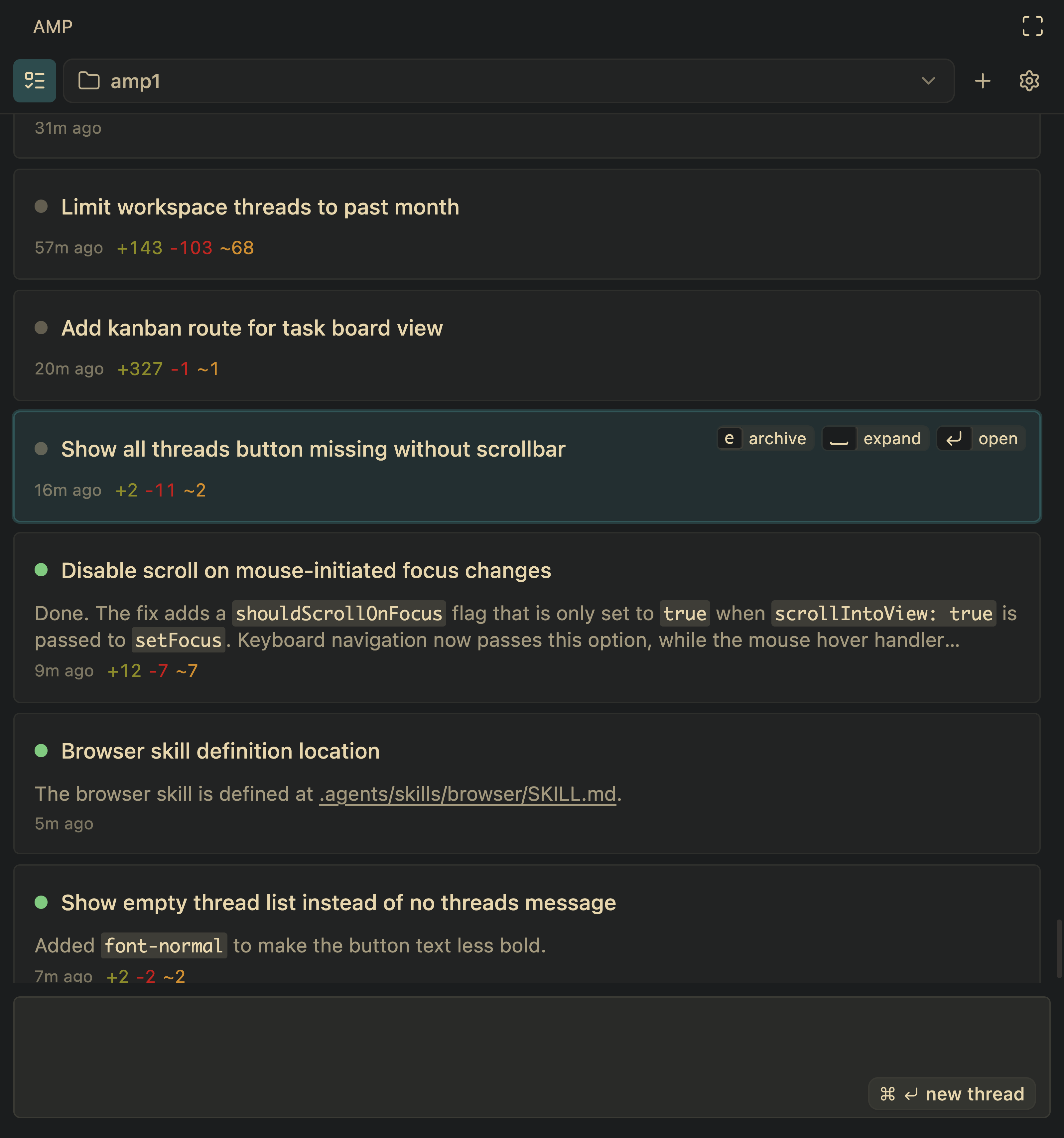\n\nThe Amp editor extension now has a new panel to view and manage all active agent threads.\n\nYou can use the keyboard to navigate between threads:\n\n- `j`/`k` or arrow keys to move between threads\n- `Space` to expand a thread panel to show the last message or tool result\n- `Enter` to open a thread\n- `e` to archive or unarchive a thread\n- `Esc` to toggle focus between the thread list and the input, which starts new threads\n\nWe recommend archiving old threads so the displayed threads represent your working set.\n\nAs coding agents improve and require less direct human oversight, more time will be spent by humans in managing and orchestrating work across multiple agent threads. We'll have more to share soon.\n\nTo get started, click the button on the left end of the navbar or use Cmd-Opt-I (macOS) or Ctrl-Alt-I (Windows/Linux).\n", "dateCreated": "2026-10-03T23:09:50.514863041+00:00", "date_created": "2026-01-09T00:00:00+00:00", "date_modified": "2026-01-09T00:00:00+00:00", "date_published": "2026-01-09T00:00:00+00:00", "description": "The Amp editor extension now has a new panel to view and manage all active agent threads. You can use the keyboard to navigate between threads: j/k or arrow keys to move between threads Space to expand a thread panel to show the last…", "external_url": "https://ampcode.com/news/agents-panel", "git": { "commit": "ebb0941c5c06a2ab2377342d607535262a3e969e", "path": "items/ampcode-com/2026/01/2026-01-09-agents-panel.md", "permalink": "https://github.com/aymericbeaumet/aggr-instance/blob/ebb0941c5c06a2ab2377342d607535262a3e969e/items/ampcode-com/2026/01/2026-01-09-agents-panel.md" }, "id": "urn:aggr:item:a182573971ce6b744243f94149881a2bc5a1b674", "isBasedOn": { "@id": "https://ampcode.com/news/agents-panel" }, "mainEntity": { "@id": "https://ampcode.com/news/agents-panel", "@type": "CreativeWork", "archivedAt": { "@id": "https://aggr.aymericbeaumet.com/items/ampcode-com/2026-01-09-agents-panel/#webpage" }, "dateModified": "2026-01-09T00:00:00+00:00", "datePublished": "2026-01-09T00:00:00+00:00", "headline": "Agents Panel", "timeRequired": "PT1M", "url": "https://ampcode.com/news/agents-panel", "wordCount": 146 }, "name": "Archived snapshot: Agents Panel", "preview": null, "reading_minutes": 1, "replicated_at": null, "source": "ampcode-com", "source_name": "Amp News", "summary": "The Amp editor extension now has a new panel to view and manage all active agent threads. You can use the keyboard to navigate between threads: j/k or arrow keys to move between threads Space to expand a thread panel to show the last message or tool result Enter to open a thread e to archive or unarchive a thread Esc to toggle focus between the thread list and the input, which starts new threads We recommend archiving old threads so the displayed threads represent your working set. As coding agents improve and require less direct human oversight, more time will be spent by humans in managing and orchestrating work across multiple agent threads. We'll have more to share soon. To get started, click the button on the left end of the navbar or use Cmd-Opt-I (macOS) or Ctrl-Alt-I (Windows/Linux).", "tags": [], "temporalCoverage": "2026-10-03T23:09:50.514863041+00:00", "title": "Agents Panel", "url": "https://aggr.aymericbeaumet.com/items/ampcode-com/2026-01-09-agents-panel/", "word_count": 146 }