
Thorsten Ball//May 15, 2025
\nHere is how I use it.
\nAs of today, Amp, the frontier agent, is available to everyone. The waitlist is gone — go, go and sign up and use it!
\nFor the past 10 weeks, Amp has been the main tool with which I develop software and — putting yet another exclamation mark behind the fact that the tools we use end up changing us — it has fundamentally changed how I develop software.
\nSo I thought I’d use the occasion to write up how I personally use Amp.
\nYou can use Amp in Visual Studio Code as an extension or as a CLI. I mainly use it in VS Code, constantly open on the right sidebar, constantly mashing ⌘I and ⌘L.
\nIf you’d told me four months ago that I would use VS Code as my main editor, I wouldn’t have believed you. But here we are. The only explanation I have is this: which text editor I use just doesn’t feel that important to me anymore. I don’t have exact numbers, but my guess is that Amp now writes 70-80% of the code I commit.
\nThat’s right — I barely write code by hand anymore. If I type code, it counts.
\nI think of coding with agents as paint-by-numbers programming: I put in the numbers and the lines and the agent then goes and puts in the colors.
\nThe agent doesn’t make architectural decisions for me, it doesn’t write critical code without close supervision, it doesn’t introduce a completely new structure to the codebase. That’s what I do. But once I know what that should look like, I put everything I know — architecture, possible edge cases, constraints, which tests to add and extend and run — into a prompt and send the agent on its way.
\nIn general — and I’ll give you some exceptions soon — I’ll try to keep the threads, the conversations I have with the model, small.
\nRight now, the model we use under the hood is Claude Sonnet 4. With Claude 3.7 Sonnet (which we used previously), and I expect for Claude Sonnet 4 as well, after the context window reaches 100k tokens, things start to feel blurry, imprecise. When the context window gets too large, Claude starts to forget instructions from the first prompt, or it goes into what the scientists call a “doom loop” — that’s when it tries to fix and fix and fix the same test over and over again, without much success.
\nSometimes I only ask it to remove debug statements from staged code. Other times I want it to implement a small-ish feature that I know won’t touch more than a handful of files, such as adding an RSS feed to this website. Or I want it to simplify the design of a single UI component.
\nAgain, generally speaking, I think a lot of the problems that people who are new to working with agents run into can be traced back to them not starting new threads often enough.
\nThat’s probably the classic use case: ask the agent to implement a new feature, or change an existing one.
\nI’ve been asked the following multiple times in the past few weeks: now, with agents, do you think we won’t have to learn anything about software anymore?
\nAnd I say, no, no, when I write a prompt for the agent, everything I know about developing software comes together: what I think about the architecture, where I suspect the traps are, where I know the relevant code to be, how I think the refactoring should go, what a good test would be, what a necessary trade-off is, how to present it to the user.
\nI don’t write prompts like this:
\nBuild a batch tool into the agent\nBut instead something like this:
\nI need your help implementing this: https://raw.githubusercontent.com/anthropics/anthropic-cookbook/refs/heads/main/tool_use/parallel_tools_claude_3_7_sonnet.ipynb\n\nWe have tools defined in core/src/tools/tools.ts (and the other files) and now I want to implement this batch tool. I imagine that it'll be a bit tricky to figure out the types, so I want you to deeply think about that and find a practical solution that doesn't lead to a lot of complicated types. We should start really simple and then evolve what we have.\nOr something like this:
\nA user ran into this bug that you see in the screenshot. The problem seems to be in core/src/threads/thread-worker.ts and core/src/inference/backends/anthropic.ts\n\nIt looks like we need to make sure that we don't send thinking blocks along when we error.\n\nI know that we already have some logic for thinking blocks, but I want you to analyze how we handle thinking blocks so far.\nAnd then I follow up with:
\nWhat's our current logic for removing thinking blocks? Don't we remove them somewhere in core/src/threads/thread-worker.ts or core/src/threads/thread-delta.ts ?\nAnd then, finally, I say:
\nOkay, make that change!\nThis is, by far, one of my favorite things when working with an agent: giving them visual feedback about their work. And, guess what, they can make screenshots all on their own, when you just give them a URL to open.
\nIn our Amp codebase, we have a storybook for UI components. I always have it running at https://localhost:7002/storybook and when I open that URL I can see most of our components neatly lined up, presented in the different states they can be in.
So if I want the agent to change one of the UI components, I tell it to go look at the storybook — which it can once you add the Playwright MCP server in the settings — and check its work by taking screenshots.
\nLet me give you an example. A few days ago I wanted the agent to update an existing story in our storybook. This was my prompt:
\n
After submitting, the agent went off and changed the storybook to include the changes. Here’s how it confirmed that the changes it made worked:
\n
“The file changes are now showing up correctly!” it exclaims after taking a screenshot — what a time to be alive, right?
\nBut it gets better. I think the screenshots-as-feedback work especially well when the changes the agent made did not work. Because on the screenshot, or in the browser’s console, it then sees errors and tries again until it works. Try it, it’s magical.
\nSometimes my prompt is as simple as this:
\nRun the build and fix all the errors\nSince what “the build” is, is documented in the AGENTS.md, the agent will just run the command and then fix the errors.
Very often I ask the agent to do the following:
\nRun `git diff` to see the code someone else wrote. Review it thoroughly and give me a report\nOf course that “someone else” is no other than — drumroll — the agent itself! But it doesn’t know that, does it? So it goes and runs git diff and says that the code looks good, or clean, or that it has some bugs. If so, I ask it to fix one of the bugs after considering whether the analysis is correct.
Say I had the agent write hundreds of lines of code and in the middle of it I asked it to add some debug statements so that we can figure out why it doesn’t quite work the way we want it to.
\nI often don’t know where it added those debug statements and I don’t have any of the files open. So once I know the feature works and I’m ready to commit, I open a new thread and ask another incantation of the agent to remove the debug statements:
\nRun `git diff` to see what has been changed then remove the debug statements\nI do love screenshots, and so does Amp:
\n
That’s right: you can paste screenshots using ⌘-v/ctrl-v and the agent will then “read” them.
\nI use this constantly and have pasted screenshots of Slack messages in which someone reported a bug, error messages that I can’t neatly copy & paste (or that I’m too lazy to copy), bugs in the UI.
\nIt works best with text, because these models are really good at “reading” text in screenshots, but I’ve also previously asked the agent to “flip the two buttons that are marked in this screenshot” and it figured it out.
\nIn any case: it’s a lot of fun.
\nAmp can sketch diagrams in replies. That’s very handy when you want to figure out how some code works.
\nI mean, come on, look at this:
\n
All it took was this prompt:
\nWalk me through the code in this branch (compared to `main`) and explain to me how the autocompletions are hooked up into vscode and basically walk me through the lifecycle of an autocompletion via the code\nNot the most elegant phrasing, is it? And I didn’t even say it should create a diagram, but in this case it magically did. (In other cases I specifically tell it to use a diagram when I know that’s what I want.)
\nA single git commit contains an incredible amount of meta information: who made the change, how they described the change, what files were changed together, paths of the files, partly what’s in the files.
\nFred Brooks wrote in The Mythical Man Month:
\n\n\nShow me your flowchart and conceal your tables, and I shall continue to be mystified. Show me your tables, and I won’t usually need your flowchart; it’ll be obvious.
\n
Now I’ll say this: show me a commit and I shall know enough to build something similar.
\nI often use the fact that raw commits contain so much information to inject relevant context into a prompt by simply asking the agent to look at a specific commit before doing anything.
\nHere’s an example:
\nThis test server/src/lib/components/diffs/diff-file-tree.test.ts has recently been broken by this commit: 3ec95344d5d5a55ab2342d5daa53f3c3155391dd\n\nRun\n\n pnpm -C server test --run diff-file-tree\n\nto see the test fail.\n\nThen examine the commit.\n\nThen tell us how to fix the test.\nOr I ask the agent to find a commit for me and then read it:
\nLook at the git history of core/src/tools/builtin/filesystem/edit_file.common.ts\n\nAt some point I removed the vscode implementation in that file.\n\nFind that vscode implementation and explain to me how we did file reloading after edit in it.\nAfter that, we had all the relevant context needed to make changes to the implementation.
\nSometimes I just want to find out where some code lives in our codebase and not have the agent change anything.
\nIn that case, I just tell it to:
\nFind the code that ensures unauthenticated users can view the /notes/how-to-build-an-agent page too\nOr, here, from a few weeks ago:
\nWhere in the codebase do we define the database default so that new users have 0 invites? I think it's a database migration or something. You need to look in `server`\nI know I could come up with some keywords to search for, but the agent’s usually faster. And if I then want to change something, guess what? Everything’s in context already.
\nIt is very handy that you can share threads with colleagues or the public.
\nFor knowledge sharing, of course, or to explain how you & your agent built something, but also to, you know, brag when the agent got it right on first try. I mean, look at this:
\n
Very often when people struggle with the agent, the problem can be boiled down to this:
\n\n\nI thought the agent would do this, but it didn’t, why?
\n
Well, impressive or not, agents aren’t all-knowing. They might know a thing or two about the world, but they don’t know what you want if you didn’t tell them.
\nSo instead of thinking “I wish the agent would’ve just used command super-build --dry-run, but it didn’t”, just tell it to!
Instead of a vague
\nCan you figure out who wrote this component?\nTell it what you want it to do:
\nUse git blame to tell me who wrote this component\nWith agents, it’s now much more feasible (or at least: less of a pain) to build one to throw one away. There’s no longer the feeling of sunken cost telling you “but it’s actually not that bad, is it? should we really throw it all away?”
\nInstead, you can tell the agent to implement it, wait five minutes, look at the code, and then decide to keep it or throw it away.
\nI’ve done this many times. Very often the most important thing I learned is how I do not want to build the feature. Or I learned that I didn’t know what I wanted at all.
\nI don’t think that in the previous 10 years I’ve used the git staging area as much as in the last 10 weeks. Turns out it’s very handy. Who would’ve thought?
\nBut why?
\nInstead of having checkpoints and an apply/reject model of interacting with the agent (which we don’t believe is still the right approach) we just let the agent do its thing. The safety net is always version control — and that’s a safety net we never want to mess with.
\nThat in turn means you can leverage git as much as possible: ask the agent to do something, see that it’s good, stage it, then ask for something else, see that it isn’t good, and wipe the unstaged changes.
\nHaving an agent that connects to your database is very, very close to the joy you feel when it takes screenshots and iterates on UI components.
\nHere’s how to do it.
\nFirst, tell the agent to use psql (or any other CLI utility) or the tools provided by the postgres MCP server (or any other MCP server for your database) to connect to your DB.
Then, ask it things like this:
\nUpdate my user account (email starts with thorsten) to have unlimited invites\nOr:
\nReturn me a list of users with the most number of threads, sorted by number of threads\nThe agent will then do everything it can to return you that list: figure out the schema of the database, try this query, try that query.
\nLook, here I wanted to change my local development database. It didn’t know what the schema is, so it tried to figure that out first, which it did — by running four commands in parallel:
\n
It’s glorious.
\nLet the agent do this, let the agent do that, screenshots here, screenshots there, barely any typing — yes, it does sound weird, doesn’t it?
\nAs someone who wore t-shirts with text editor logos on them, let me be the one to say: it feels strange to program like this.
\nQuinn and I have talked about this feeling in nearly every episode of the podcast. We have both been programming for a long time and now we’re relearning how to do it through an agent and it just feels strange.
\nBecause it is strange. It’s new. It takes some getting used to. You need to learn how to do it. My bet is that for at least the next six to twelve months, you’ll still have to learn how to prompt well.
\nBut here’s another bet: once you’ve seen the agent do things you haven’t thought were possible yet, that’s when it shifts from “I’m not sure I like this…” to “okay, wow, what else can I do with this, I bet it can also—”
\nThat’s when it shifts from strange to exhilarating.
\nThat’s when you realize that when programming with agents, to quote Mary Rose Cook here, “each move is bigger than a step. You lift off the ground. It requires more forethought, but, because you make more progress with each move, it feels like flying.”
\n", "content_markdown": "Thorsten Ball//May 15, 2025\n\nHere is how I use it.\n\nAs of today, Amp, the frontier agent, is available to everyone. The waitlist is gone — go, go and sign up and use it!\n\nFor the past 10 weeks, Amp has been the main tool with which I develop software and — putting yet another exclamation mark behind the fact that the tools we use end up changing us — it has fundamentally changed how I develop software.\n\nSo I thought I’d use the occasion to write up how I personally use Amp.\n\n## In VS Code\n\nYou can use Amp in Visual Studio Code as an extension or as a CLI. I mainly use it in VS Code, constantly open on the right sidebar, constantly mashing ⌘I and ⌘L.\n\nIf you’d told me four months ago that I would use VS Code as my main editor, I wouldn’t have believed you. But here we are. The only explanation I have is this: which text editor I use just doesn’t feel that important to me anymore. I don’t have exact numbers, but my guess is that Amp now writes 70-80% of the code I commit.\n\nThat’s right — I barely write code by hand anymore. If I type code, it counts.\n\n## Paint-by-numbers programming\n\nI think of coding with agents as paint-by-numbers programming: I put in the numbers and the lines and the agent then goes and puts in the colors.\n\nThe agent doesn’t make architectural decisions for me, it doesn’t write critical code without close supervision, it doesn’t introduce a completely new structure to the codebase. That’s what I do. But once I know what that should look like, I put everything I know — architecture, possible edge cases, constraints, which tests to add and extend and run — into a prompt and send the agent on its way.\n\n## [Small Threads](https://ampcode.com/how-i-use-amp#small-threads)\n\nIn general — and I’ll give you some exceptions soon — I’ll try to keep the threads, the conversations I have with the model, small.\n\nRight now, the model we use under the hood is Claude Sonnet 4. With Claude 3.7 Sonnet (which we used previously), and I expect for Claude Sonnet 4 as well, after the context window reaches 100k tokens, things start to feel blurry, imprecise. When the context window gets too large, Claude starts to forget instructions from the first prompt, or it goes into what the scientists call a “doom loop” — that’s when it tries to fix and fix and fix the same test over and over again, without much success.\n\nSometimes I [only ask it to remove debug statements from staged code](https://ampcode.com/threads/T-66beb0de-7f02-4241-a25e-50c0dc811788). Other times I want it to implement a small-ish feature that I know won’t touch more than a handful of files, such as [adding an RSS feed to this website](https://ampcode.com/threads/T-4e6a3890-fc01-416b-acc9-40fa6da60028). Or I want it to [simplify the design of a single UI component](https://ampcode.com/threads/T-c8299300-faeb-4de2-95ef-86ef3275d846).\n\nAgain, *generally speaking*, I think a lot of the problems that people who are new to working with agents run into can be traced back to them not starting new threads often enough.\n\n## Add new features\n\nThat’s probably the classic use case: ask the agent to implement a new feature, or change an existing one.\n\nI’ve been asked the following multiple times in the past few weeks: now, with agents, do you think we won’t have to learn anything about software anymore?\n\nAnd I say, no, *no*, when I write a prompt for the agent, *everything* I know about developing software comes together: what I think about the architecture, where I suspect the traps are, where I know the relevant code to be, how I think the refactoring should go, what a good test would be, what a necessary trade-off is, how to present it to the user.\n\nI don’t write prompts like this:\n\n```text\nBuild a batch tool into the agent\n```\n\nBut instead something like this:\n\n```text\nI need your help implementing this: https://raw.githubusercontent.com/anthropics/anthropic-cookbook/refs/heads/main/tool_use/parallel_tools_claude_3_7_sonnet.ipynb\n\nWe have tools defined in core/src/tools/tools.ts (and the other files) and now I want to implement this batch tool. I imagine that it'll be a bit tricky to figure out the types, so I want you to deeply think about that and find a practical solution that doesn't lead to a lot of complicated types. We should start really simple and then evolve what we have.\n```\n\nOr something like this:\n\n```text\nA user ran into this bug that you see in the screenshot. The problem seems to be in core/src/threads/thread-worker.ts and core/src/inference/backends/anthropic.ts\n\nIt looks like we need to make sure that we don't send thinking blocks along when we error.\n\nI know that we already have some logic for thinking blocks, but I want you to analyze how we handle thinking blocks so far.\n```\n\nAnd then I follow up with:\n\n```text\nWhat's our current logic for removing thinking blocks? Don't we remove them somewhere in core/src/threads/thread-worker.ts or core/src/threads/thread-delta.ts ?\n```\n\nAnd then, finally, I say:\n\n```text\nOkay, make that change!\n```\n\n## Let it screenshot!\n\nThis is, by far, one of my favorite things when working with an agent: giving them visual feedback about their work. And, guess what, they can make screenshots all on their own, when you just give them a URL to open.\n\nIn our Amp codebase, we have a storybook for UI components. I always have it running at `https://localhost:7002/storybook` and when I open that URL I can see most of our components neatly lined up, presented in the different states they can be in.\n\nSo if I want the agent to change one of the UI components, I tell it to go look at the storybook — which it can once you add the Playwright MCP server in the settings — and check its work by taking screenshots.\n\nLet me give you an example. A few days ago I wanted the agent to update an existing story in our storybook. This was my prompt:\n\n\n\nAfter submitting, the agent went off and changed the storybook to include the changes. Here’s how it confirmed that the changes it made worked:\n\n\n\n“The file changes are now showing up correctly!” it exclaims after taking a screenshot — what a time to be alive, right?\n\nBut it gets better. I think the screenshots-as-feedback work especially well when the changes the agent made did *not* work. Because on the screenshot, or in the browser’s console, it then sees errors and tries again until it works. Try it, it’s magical.\n\n## Run the build and fix the errors\n\nSometimes my prompt is as simple as this:\n\n```text\nRun the build and fix all the errors\n```\n\nSince what “the build” is, is documented in the [`AGENTS.md`](https://ampcode.com/docs/customize/agents-md), the agent will just run the command and then fix the errors.\n\n## Review code\n\nVery often I ask the agent to do the following:\n\n```text\nRun `git diff` to see the code someone else wrote. Review it thoroughly and give me a report\n```\n\nOf course that “someone else” is no other than — drumroll — the agent itself! But it doesn’t know that, does it? So it goes and runs `git diff` and says that the code looks good, or clean, or that it has some bugs. If so, I ask it to fix one of the bugs after considering whether the analysis is correct.\n\n## Clean up code\n\nSay I had the agent write hundreds of lines of code and in the middle of it I asked it to add some debug statements so that we can figure out why it doesn’t quite work the way we want it to.\n\nI often don’t know where it added those debug statements and I don’t have any of the files open. So once I know the feature works and I’m ready to commit, I open a new thread and ask another incantation of the agent to remove the debug statements:\n\n```text\nRun `git diff` to see what has been changed then remove the debug statements\n```\n\n## Paste screenshots\n\nI do love screenshots, and so does Amp:\n\n\n\nThat’s right: you can paste screenshots using ⌘-v/ctrl-v and the agent will then “read” them.\n\nI use this constantly and have pasted screenshots of Slack messages in which someone reported a bug, error messages that I can’t neatly copy & paste (or that I’m too lazy to copy), bugs in the UI.\n\nIt works best with text, because these models are really good at “reading” text in screenshots, but I’ve also previously asked the agent to “flip the two buttons that are marked in this screenshot” and it figured it out.\n\nIn any case: it’s a lot of fun.\n\n## Explain code with diagrams\n\nAmp can sketch diagrams in replies. That’s very handy when you want to figure out how some code works.\n\nI mean, come on, look at [this](https://ampcode.com/threads/T-bf8de4e5-e03f-43aa-850e-2071d93feda6):\n\n\n\nAll it took was this prompt:\n\n```text\nWalk me through the code in this branch (compared to `main`) and explain to me how the autocompletions are hooked up into vscode and basically walk me through the lifecycle of an autocompletion via the code\n```\n\nNot the most elegant phrasing, is it? And I didn’t even say it should create a diagram, but in this case it magically did. (In other cases I specifically tell it to use a diagram when I know that’s what I want.)\n\n## Read commits\n\nA single git commit contains an incredible amount of meta information: who made the change, how they described the change, what files were changed together, paths of the files, partly what’s in the files.\n\nFred Brooks wrote in The Mythical Man Month:\n\n> Show me your flowchart and conceal your tables, and I shall continue to be mystified. Show me your tables, and I won’t usually need your flowchart; it’ll be obvious.\n\nNow I’ll say this: show me a commit and I shall know enough to build something similar.\n\nI often use the fact that raw commits contain so much information to inject relevant context into a prompt by simply asking the agent to look at a specific commit before doing anything.\n\nHere’s an example:\n\n```text\nThis test server/src/lib/components/diffs/diff-file-tree.test.ts has recently been broken by this commit: 3ec95344d5d5a55ab2342d5daa53f3c3155391dd\n\nRun\n\n pnpm -C server test --run diff-file-tree\n\nto see the test fail.\n\nThen examine the commit.\n\nThen tell us how to fix the test.\n```\n\nOr I ask the agent to find a commit for me and then read it:\n\n```text\nLook at the git history of core/src/tools/builtin/filesystem/edit_file.common.ts\n\nAt some point I removed the vscode implementation in that file.\n\nFind that vscode implementation and explain to me how we did file reloading after edit in it.\n```\n\nAfter that, we had all the relevant context needed to make changes to the implementation.\n\n## Search code\n\nSometimes I just want to find out where some code lives in our codebase and not have the agent change anything.\n\nIn that case, I just tell it to:\n\n```text\nFind the code that ensures unauthenticated users can view the /notes/how-to-build-an-agent page too\n```\n\nOr, here, from a few weeks ago:\n\n```text\nWhere in the codebase do we define the database default so that new users have 0 invites? I think it's a database migration or something. You need to look in `server`\n```\n\nI know I could come up with some keywords to search for, but the agent’s usually faster. And if I then want to change something, guess what? Everything’s in context already.\n\n## Share threads with colleagues\n\nIt is *very* handy that you can share threads with colleagues or the public.\n\nFor knowledge sharing, of course, or to explain how you & your agent built something, but also to, you know, brag when the agent got it right on first try. I mean, [look at this](https://ampcode.com/threads/T-4e6a3890-fc01-416b-acc9-40fa6da60028):\n\n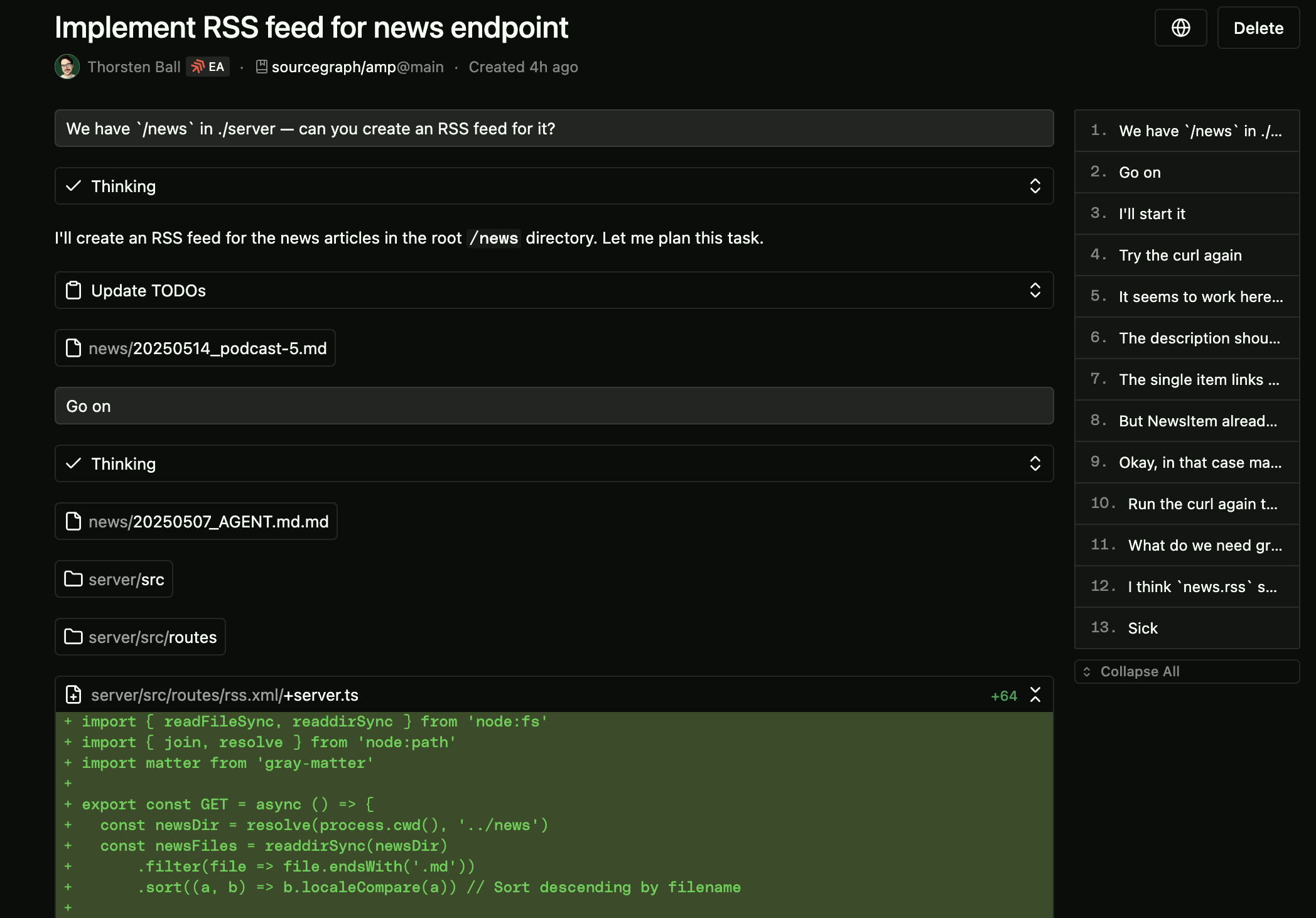\n\n## Tell it what I want\n\nVery often when people struggle with the agent, the problem can be boiled down to this:\n\n> I thought the agent would do this, but it didn’t, why?\n\nWell, impressive or not, agents aren’t all-knowing. They might know a thing or two about the world, but they don’t know what you want if you didn’t tell them.\n\nSo instead of thinking “I wish the agent would’ve just used command `super-build --dry-run`, but it didn’t”, just tell it to!\n\nInstead of a vague\n\n```text\nCan you figure out who wrote this component?\n```\n\nTell it what you want it to do:\n\n```text\nUse git blame to tell me who wrote this component\n```\n\n## Build one to throw one away\n\nWith agents, it’s now much more feasible (or at least: less of a pain) to build one to throw one away. There’s no longer the feeling of sunken cost telling you “but it’s actually not that bad, is it? should we really throw it all away?”\n\nInstead, you can tell the agent to implement it, wait five minutes, look at the code, and then decide to keep it or throw it away.\n\nI’ve done this many times. Very often the most important thing I learned is how I do *not* want to build the feature. Or I learned that I didn’t know what I wanted at all.\n\n## Use the git staging area\n\nI don’t think that in the previous 10 years I’ve used the git staging area as much as in the last 10 weeks. Turns out it’s very handy. Who would’ve thought?\n\nBut why?\n\nInstead of having checkpoints and an apply/reject model of interacting with the agent (which [we don’t](https://ampcode.com/fif#restore-checkpoints) believe is still the right approach) we just let the agent do its thing. The safety net is always version control — and that’s a safety net we never want to mess with.\n\nThat in turn means you can leverage git as much as possible: ask the agent to do something, see that it’s good, stage it, then ask for something else, see that it isn’t good, and wipe the unstaged changes.\n\n## Write SQL\n\nHaving an agent that connects to your database is very, very close to the joy you feel when it takes screenshots and iterates on UI components.\n\nHere’s how to do it.\n\nFirst, tell the agent to use `psql` (or any other CLI utility) or the tools provided by the [`postgres`](https://github.com/modelcontextprotocol/servers/tree/main/src/postgres) MCP server (or any other MCP server for your database) to connect to your DB.\n\nThen, ask it things like this:\n\n```text\nUpdate my user account (email starts with thorsten) to have unlimited invites\n```\n\nOr:\n\n```text\nReturn me a list of users with the most number of threads, sorted by number of threads\n```\n\nThe agent will then do everything it can to return you that list: figure out the schema of the database, try this query, try that query.\n\nLook, [here](https://ampcode.com/threads/T-f810ef79-ba0e-4338-87c6-dbbb9085400a) I wanted to change my local development database. It didn’t know what the schema is, so it tried to figure that out first, which it did — by running four commands in parallel:\n\n\n\nIt’s glorious.\n\n## It’s a different, still strange way to write code\n\nLet the agent do this, let the agent do that, screenshots here, screenshots there, barely any typing — yes, it does sound weird, doesn’t it?\n\nAs someone who wore t-shirts with text editor logos on them, let me be the one to say: it feels strange to program like this.\n\nQuinn and I have talked about this feeling in nearly every episode of the [podcast](https://ampcode.com/podcast). We have both been programming for a long time and now we’re relearning how to do it through an agent and it just feels strange.\n\nBecause it is *strange*. It’s new. It takes some getting used to. You need to learn how to do it. My bet is that for at least the next six to twelve months, you’ll still have to learn how to prompt well.\n\nBut here’s another bet: once you’ve seen the agent do things you haven’t thought were possible yet, that’s when it shifts from “I’m not sure I like this…” to “okay, wow, what else can I do with this, I bet it can also—”\n\nThat’s when it shifts from strange to exhilarating.\n\nThat’s when you realize that when programming with agents, to [quote Mary Rose Cook here](https://maryrosecook.com/blog/post/become-an-ai-augmented-engineer), “each move is bigger than a step. You lift off the ground. It requires more forethought, but, because you make more progress with each move, it feels like flying.”\n", "dateCreated": "2026-10-04T12:50:30.804479567+00:00", "date_created": "2025-05-15T00:00:00+00:00", "date_modified": "2025-05-15T00:00:00+00:00", "date_published": "2025-05-15T00:00:00+00:00", "description": "As of today, Amp is available to everyone. No more waitlist. Thorsten used the occasion of Amp now being available to everyone to write down how he uses it and how it changed programming for him.", "external_url": "https://ampcode.com/how-i-use-amp", "git": { "commit": "ebb0941c5c06a2ab2377342d607535262a3e969e", "path": "items/ampcode-com/2025/05/2025-05-15-amp-is-now-available-to-everyone-here-s-how-i-use-it.md", "permalink": "https://github.com/aymericbeaumet/aggr-instance/blob/ebb0941c5c06a2ab2377342d607535262a3e969e/items/ampcode-com/2025/05/2025-05-15-amp-is-now-available-to-everyone-here-s-how-i-use-it.md" }, "id": "urn:aggr:item:82a4a28efe214a61a696a570957b7ee14eb2584d", "isBasedOn": { "@id": "https://ampcode.com/how-i-use-amp" }, "mainEntity": { "@id": "https://ampcode.com/how-i-use-amp", "@type": "CreativeWork", "archivedAt": { "@id": "https://aggr.aymericbeaumet.com/items/ampcode-com/2025-05-15-amp-is-now-available-to-everyone-here-s-how-i-use-it/#webpage" }, "dateModified": "2025-05-15T00:00:00+00:00", "datePublished": "2025-05-15T00:00:00+00:00", "headline": "Amp Is Now Available To Everyone — Here's How I Use It", "timeRequired": "PT13M", "url": "https://ampcode.com/how-i-use-amp", "wordCount": 2725 }, "name": "Archived snapshot: Amp Is Now Available To Everyone — Here's How I Use It", "preview": null, "reading_minutes": 13, "replicated_at": null, "source": "ampcode-com", "source_name": "Amp News", "summary": "As of today, Amp is available to everyone. No more waitlist. Thorsten used the occasion of Amp now being available to everyone to write down how he uses it and how it changed programming for him.", "tags": [], "temporalCoverage": "2026-10-04T12:50:30.804479567+00:00", "title": "Amp Is Now Available To Everyone — Here's How I Use It", "url": "https://aggr.aymericbeaumet.com/items/ampcode-com/2025-05-15-amp-is-now-available-to-everyone-here-s-how-i-use-it/", "word_count": 2725 }